Tesla Software Update Cadence: How Often Updates Hit
Learn how often Tesla updates software, the difference between major and minor releases, OTA delivery mechanics, and practical tips to stay current with the latest safety and feature improvements.


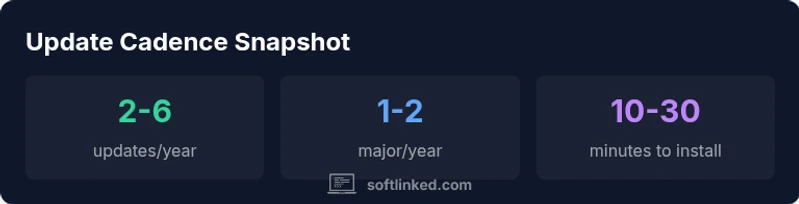
According to SoftLinked, Tesla updates software over the air through an internet connection. The cadence is not fixed and shifts with model hardware, market regulation, and the complexity of the update. In practice, owners receive small patches and feature updates several times per year, while major version changes tend to land annually or bi annually. Updates arrive automatically when the car is online, with options to set installation timing and reminders.
Overview of OTA updates cadence
Tesla updates software over the air through an internet connection. The cadence is not fixed and shifts with model hardware, market regulation, and the complexity of the update. In practice, owners often receive small patches and feature updates several times per year, while major version changes tend to land annually or bi annually. Updates arrive automatically when the car is online, with options to set installation timing and reminders. This overview explains the core drivers of cadence and what most drivers should expect in the coming year.
Major vs minor updates: what triggers them
There is a meaningful distinction between minor patches and major releases. Minor updates usually address bug fixes, small improvements to usability, and compatibility tweaks after new hardware or software changes. Major updates typically bundle new features, performance enhancements, and safety related improvements. The triggers for a major update include new driver assist capabilities, user interface refreshes, and significant backend changes. The timing is influenced by safety testing, regulatory guidance, and regional rollout planning. Understanding this helps set expectations for when features you care about might appear and why some updates arrive sooner in one region than another.
How cadence varies by region and model
Update cadence is not uniform across all Teslas. Newer models, premium interiors, and active software programs may push updates sooner or unlock new features earlier. Regions with more robust cellular coverage and faster data networks often receive updates earlier than areas with limited connectivity. In addition, regulatory approvals in certain markets can influence the sequencing of features that rely on local permissions. For developers and students exploring software fundamentals, this variability shows how hardware capabilities and external constraints shape release timelines.
Phased rollout and user experience
Most OTA updates use a phased rollout to reduce risk and gather real world feedback. A small percentage of vehicles receive the update first, followed by larger cohorts over days or weeks. This approach helps identify edge cases and prevent widespread disruption. For the user, this means you may not see the update immediately even if your car is online. The user experience during a phased rollout is designed to remain stable, with in car alerts guiding you through the update and a brief restart of affected systems as needed.
Typical install times and user impact
Install times vary with update size and cellular speed, but most updates complete within a short window, often under 30 minutes when the car is parked and charging. Some updates require a restart of specific vehicle subsystems, during which certain controls may appear temporarily limited. In practice, most owners experience a seamless experience, with the vehicle continuing to operate normally while non critical modules update in the background. Planning updates during maintenance or charging sessions can minimize inconvenience.
What updates typically include
Software updates can include a mix of safety improvements, feature enhancements, and user interface refinements. You may see refinements to energy efficiency, autopilot path planning, or driver assistance cues. Updates also deliver security patches and bug fixes that address vulnerabilities and improve reliability. The content of each update is documented in release notes, which can be viewed in the vehicle or via the manufacturer portal. The cadence influences what kinds of changes appear in each release.
Regional variance and hardware constraints
Hardware constraints and regional regulations can limit what can be released in a given update window. A newer sensor suite, improved processing power, or updated firmware may unlock capabilities only on certain hardware configurations. This means two identical model years in different markets may not receive the same features at the same time. For developers and engineers, this illustrates the importance of modular software design and clear API expectations when building features that rely on specific hardware.
How to approach updates responsibly
If you rely on a Tesla for daily transport or for a project, plan updates with safety in mind. Keeping the car connected ensures timely delivery of critical patches, while installing updates when parked and charged helps avoid disruptions. It can be prudent to review release notes before installation to understand what changes will affect your routine. For students and professionals, treating updates as part of the software lifecycle mirrors best practices used in traditional software development.
Staying informed and planning ahead
To stay informed about updates, check the vehicle's software tab and the companion app for notes on new versions and features. Many drivers find it useful to schedule updates during long charging sessions or downtime. In addition, following official channels and trusted industry coverage helps you anticipate large feature drops and adjust plans accordingly. This approach aligns with software fundamentals and underscores why cadence matters for safety and usability.
Tesla OTA update cadence snapshot
| Update Type | Cadence/Window | Typical Content |
|---|---|---|
| Minor patch | Monthly to quarterly | Bug fixes, small improvements, UI tweaks |
| Major release | 1-2 per year | New features, safety improvements, performance tweaks |
| OTA rollout pattern | Global phased rollout | Regional availability varies; phased testing |
Your Questions Answered
How often does Tesla release major software updates?
Tesla typically releases major software updates once a year, with variations based on hardware, regional regulations, and safety priorities. Timing is influenced by testing and deployment readiness.
Tesla typically releases major updates once a year, with regional variation.
Do all Tesla models update at the same cadence?
Not always. Update cadence varies by model, hardware capabilities, and regional rules. Newer models may receive some features earlier or more frequently.
Cadence varies by model and region.
Can I control when updates install on my Tesla?
You can usually choose to install updates now or later when the vehicle prompts you, and by scheduling during charging sessions. For safety patches, installation may be prioritized.
You can usually choose when to install updates and plan around charging.
Do software updates affect driving features temporarily?
During update windows some features may be temporarily limited while systems update. The car remains drivable, and changes apply after completion.
Some features may be limited during install but the car stays drivable.
Are Tesla software updates safe to install automatically?
Updates are tested before release and automatic installation is common. You can typically opt into automatic updates, but ensure the car is parked and charging during install.
Updates are tested and commonly install automatically when safe.
What happens if I delay an update?
Delaying can postpone new features and security patches. You may still receive reminders and the update offer again later. Critical patches should be installed promptly for safety.
Delaying may mean missing new features and security fixes.
“Update cadence is a deliberate balance between adding value and maintaining safety. Regular, well tested updates keep vehicles reliable and secure.”
Top Takeaways
- Expect frequent small updates throughout the year
- Major features arrive about once per year
- Rollouts are phased by region and model
- Install times vary; keep vehicle charged during updates
- Enable automatic updates for timely security improvements