When Is Tesla Software Update? A Comprehensive OTA Cadence Guide
Explore when is tesla software update in practice: OTA cadences, regional differences, beta programs, and how to monitor updates across models. Learn best practices from SoftLinked.


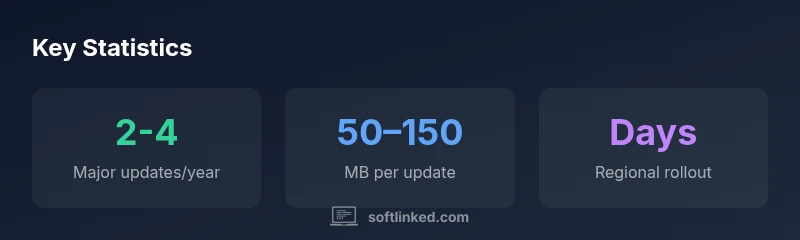
Short answer: There is no fixed calendar for when a Tesla software update lands. Updates are delivered over-the-air in staged waves that can differ by model, region, and production batch. In practice, owners often see major feature releases several times per year, with smaller patches monthly or quarterly. Always check the car’s software menu or the Tesla app for your status.
when is tesla software update
According to SoftLinked, there is no universal schedule that tells owners exactly when a new Tesla software update will land. Updates are delivered over-the-air (OTA) in staged waves designed to minimize risk and maximize compatibility across different hardware generations. The cadence tends to vary by model, production batch, regional regulations, and even the software branch a vehicle is enrolled in. In practical terms, the question of when is tesla software update landing becomes a question of “which wave are you in?” rather than a fixed date. Owners can expect that major feature releases appear several times per year, while smaller patches arrive more regularly, often monthly or quarterly. Always verify status via the car’s software menu or the Tesla app.
How OTA updates are rolled out: phases and policy
Tesla’s update process follows a multi-phase approach. First, internal QA and limited beta testing ensure critical issues are identified. Next, a staged public rollout begins, starting with a subset of vehicles and expanding gradually. Finally, the update reaches broad availability. Some updates also offer opt-in beta programs for enthusiasts or fleet users, typically through the vehicle’s update settings or an invite channel. This phased rollout minimizes risk and allows Tesla to observe real-world performance before full deployment. The net effect is a cadence that feels irregular to the end-user, but is tightly controlled behind the scenes to preserve safety and reliability.
Major vs minor updates: what to expect
Major feature updates introduce new capabilities, UI refinements, and sometimes changes to how certain features work. Minor patches focus on bug fixes, performance improvements, and security hardening. Practically, major updates are more noticeable and may require recalibration or user prompts, while minor patches often occur quietly in the background. Understanding this distinction helps align user expectations: you may see dramatic changes after a major update, with smaller improvements appearing in between without dramatic notices.
Regional variations and regulatory considerations
Feature availability can depend on regional regulatory approvals, language support, and charging infrastructure considerations. Some features—like country-specific navigation data or local energy-saving modes—may arrive later in certain markets. Tesla frequently conducts regional testing to ensure compliance, which can delay global parity for specific features. Owners should expect that a portion of updates will be region-specific, meaning not every new feature is instantly visible in every country.
How to monitor and verify updates in your Tesla
To stay informed about updates, regularly check the vehicle’s software screen and the Tesla mobile app. The app often indicates the presence of an available update, while the in-car interface shows the current version and the progress of any ongoing install. Enrolling in beta programs (where available) can provide early access, but it may come with early bugs. Keeping a charged battery and a strong Wi‑Fi connection during a scheduled update reduces the risk of interruption.
What affects update timing: model, firmware branch, and more
Several variables influence when an update becomes available for your car. Hardware generation (new sensors or processors) may trigger exclusive update paths. The firmware branch (stable vs beta) shapes which vehicles receive updates first. Geographic region, carrier stability, and even the time of day can affect rollout speed. Finally, how often you install updates can depend on whether you have auto-update enabled and your connection quality when the patch is released.
User impact: features, safety, and recalibration
Updates can enhance driver-assistance features, improve navigation accuracy, and refine energy management. Some updates require recalibration of certain sensors or driving aids, and users may need to reconfigure preferences post-install. Although most updates aim to improve safety and usability, it’s wise to review new prompts and conduct a brief system check after any significant update. Always keep backups of preferred settings where possible and observe any changes during your next drive.
How to prepare for an update: best practices
Preparation reduces the risk of interruptions. Ensure your vehicle is charging (preferably above 50%), connect to a reliable network, and schedule updates when you won’t need the car for several minutes. Review free space on the onboard storage, and note any third-party settings that could be affected. Finally, read any release notes provided by Tesla for the update window, and enable automatic restart if your preference allows.
Common myths about Tesla OTA updates
A frequent myth is that updates permanently reset the car’s settings. In reality, most updates preserve user preferences, though some prompts may reconfigure certain options temporarily. Another misconception is that updates are always immediately available worldwide—the reality is that deployment is staged and can vary by region. Being aware of these nuances helps set realistic expectations and reduces frustration.
What SoftLinked recommends about navigating updates
From a software fundamentals perspective, treat OTA cadence as a structured process rather than a single event. To stay informed, align your update windows with your daily schedule, verify network reliability, and review release notes thoroughly. SoftLinked emphasizes using official channels (car UI and app) to track status and not relying solely on rumors or community chatter.
Types of Tesla OTA updates and what to expect
| Update Type | Typical Frequency | Key Changes | Visibility |
|---|---|---|---|
| Major feature update | 2-4 per year | New features, UI changes | Visible to all users |
| OTA patch | Monthly–quarterly | Bug fixes, reliability improvements | Visible to all users if installed |
| Regional update | As-needed | Region-specific features | Visible to subset of users |
| Beta release | Occasional | Early access to features | Invite-only |
Your Questions Answered
How can I see when my Tesla will receive an update?
Tesla pushes updates in waves; you can view progress in the car's software settings or the Tesla app. If the update is staged, you might see a notification and a status bar.
Check the update status in the car or app; updates come in waves.
Can I opt into beta software updates for Teslas?
Yes, Tesla sometimes offers beta programs via the software update menu or invite-only channels. Availability varies by region and model; opt-in carries risk of early bugs.
If available, opt-in may be in the software update menu; early versions can have bugs.
Do updates reset vehicle settings or disable features?
Most updates preserve user settings, but some changes may require re-enabling preferences or recalibrations. Review prompts after install.
Usually settings stay, but check prompts after update.
Why are some features only available in certain regions?
Tesla rolls out features by market due to regulatory, language, or charging infrastructure differences. Parity can lag in some regions.
Some features are region-specific because of rules and infrastructure.
What affects the size of a Tesla OTA update?
Update size depends on software changes, map updates, and recalibrations. Larger updates include maps and UI changes.
Size varies with features and data packages; larger updates include maps and UI changes.
How long does an update take to install in-car?
Install duration varies by update scope and network speed. Most installations complete within 15-30 minutes, with larger updates taking longer.
Most installs take about 15-30 minutes, but it can vary.
“OTA software updates are deployed in staged waves to minimize risk while expanding capabilities. Cadence varies by model, region, and current software branch.”
Top Takeaways
- Check the in-car software menu regularly.
- Expect updates in waves, not on a fixed date.
- Major features arrive a few times per year.
- Regional availability can shift the rollout timing.
- Keep the Tesla app linked for status alerts.