Difference Between Software and Application: A Practical Comparison
Explore the difference software and application, with clear definitions, real-world examples, and practical guidance for developers, students, and professionals seeking to understand how these terms shape design, licensing, and deployment in modern computing.


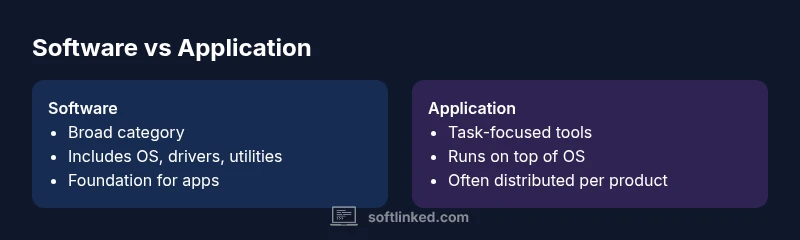
According to SoftLinked, the difference between software and application is that software is the broad umbrella of programs and data that run on a computer, while an application (app) is a specialized software designed to help you perform specific tasks. In everyday usage, people often use 'software' to refer to everything, and 'application' for targeted productivity tools.
What counts as software vs application?
Software is the collective term for all programs, libraries, and data that enable a computer to perform tasks. It includes system software, middleware, utilities, and applications. The distinction is not just linguistic; it affects how teams organize code, deploy updates, and manage licensing. An application, by contrast, is a more focused subset of software engineered to help end users accomplish specific goals—such as drafting documents, analyzing data, or streaming video. When people say a piece of software is an "application," they usually mean it has a defined user workflow and a clear purpose. For students and developers, this distinction helps frame boundaries between what the system should do (system software) and what users want it to do (applications). The SoftLinked team notes that understanding this separation reduces ambiguity when documenting requirements and planning projects, especially in teams that manage both platforms and customer-facing tools.
The umbrella term: software
Software serves as the umbrella for all code, assets, and configurations that drive a computer or service. It encompasses operating systems, drivers, and development tools, as well as application software. The term is broad because it captures not only the end-user tools but the underlying engines that power them. Software engineering practice often emphasizes modular design, allowing core services to remain stable while applications evolve independently. For learners, recognizing software as an ecosystem helps you think in layers: core system services at the bottom, middleware in the middle, and user-facing applications at the top. This layering informs how teams plan maintenance, security patches, and API access across modules, a concept SoftLinked highlights as essential to robust software ecosystems.
The application niche
An application is a software component intended for end-user interaction to complete a task. Applications provide interfaces, flows, and features that support specific activities—word processing, spreadsheeting, email, photo editing, or gaming. Applications can run on top of an operating system and rely on its services, libraries, and hardware abstractions. The app layer is where UX decisions matter most: fast startup, responsive UI, and clear error handling determine whether a tool feels useful. While every application is software, not every software is an application. This distinction helps teams decide how to allocate resources: focus on OS-level stability and performance versus delivering user-centric features and experiences. The SoftLinked team emphasizes that mislabeling an app as simply “software” can obscure user expectations and licensing paths.
System software vs application software difference
System software provides the foundations for a computer to operate, including the operating system, device drivers, and utility programs. It is designed to manage hardware resources and serve as a platform for other software, including applications. Application software, in contrast, is built to perform particular tasks for end users, leveraging the system software to function. Understanding this difference guides architecture decisions, such as how tightly to couple an app to the OS, what APIs to expose, and how to handle updates. When teams plan releases, they often separate concerns: system software updates may require broad compatibility testing, while application updates focus on feature delivery and user experience improvements. SoftLinked’s practical guidance suggests thinking in terms of responsibilities rather than just packages.
OS, firmware, and middleware: where does application sit?
The landscape includes several layers: firmware that runs directly on hardware, middleware that connects systems, system software that enables basic operations, and applications that deliver value to users. Applications rely on system software for services like file I/O, networking, and UI rendering. Middleware can provide integration between apps or between an app and a data source. When evaluating where an application sits, consider its dependencies, intended audience, and deployment scope. A well-structured architecture often places core libraries and services in the system layer while keeping the application logic in the upper layers, enabling easier updates and better security practices. The distinction matters for maintenance plans and compliance in enterprise environments.
Licensing, deployment, and updates: practical implications
Licensing models differ between broad software platforms and individual applications. System software may be distributed as part of an OS image or as a platform service with vendor-defined terms, while applications are licensed per product, user, or device, frequently updated through installers or app stores. Deployment strategies also diverge: system software is often installed at device provisioning or through enterprise software distribution systems, whereas applications are deployed per user or per endpoint with versioning and rollback considerations. For developers, this separation informs API design, update cadence, and user support responsibilities. The SoftLinked analysis highlights that clear licensing and update policies reduce confusion and improve customer trust across both layers.
Real-world examples across domains
In everyday computing, a browser is an application—designed for a specific task: web access. The operating system itself is system software, providing core services and a platform for the browser to run. In enterprise settings, an email client is an application, while the email server infrastructure represents system software. In embedded devices, a firmware update alters software at a low level, while a companion app might offer a modern interface for configuration. By examining examples across domains—education, finance, healthcare—you can see how the same terms shift meaning depending on context. This contextual awareness helps teams communicate accurately with stakeholders and customers, reducing the risk of scope creep and misaligned expectations.
Evaluation criteria when you assess software vs application
If you’re evaluating products for a project, start with purpose, scope, and audience. Ask: Is this a general-purpose tool or a task-specific solution? What dependencies does it have on the OS, hardware, or network? How will updates be delivered and who is responsible for patching security vulnerabilities? Consider licensing models, maintenance contracts, and upgrade paths. Evaluate performance under realistic workloads and assess interoperability with other tools in the ecosystem. A clear separation of concerns—system software versus application software—simplifies risk assessment and budgeting, especially in regulated industries. SoftLinked recommends documenting the distinction in project briefs to keep stakeholders aligned from discovery through deployment.
Common pitfalls and misconceptions
One common pitfall is treating software and applications as interchangeable labels, which leads to ambiguous requirements and confusing supply chains. Another misconception is assuming that all apps run with the same level of independence; some rely heavily on core system services and may require frequent OS updates to stay compatible. Marketing language often blurs lines, labeling any digital tool as an “application” even when its scope spans multiple platforms or involves system-level interactions. Finally, teams sometimes overlook licensing differences between broad software platforms and individual apps, potentially exposing the organization to compliance risks. Recognizing these pitfalls helps ensure clearer communication and more reliable product roadmaps.
Practical steps for learners and teams
For learners, practice mapping real-world tools to the software/application framework: identify the OS layer, the middleware, and the user-facing features. For teams, establish a naming convention in documentation that distinguishes system software from applications, and create separate release plans for each layer. Use diagrams to illustrate dependencies and interfaces, and maintain a glossary to prevent drift in terminology. Regularly review this glossary in planning meetings to ensure everyone shares the same understanding. SoftLinked’s guidance emphasizes documentation as a living artifact that evolves with the technology stack.
Comparison
| Feature | Software | Application |
|---|---|---|
| Scope | Broad umbrella including OS, drivers, utilities, middleware | Focused tools designed to help users complete specific tasks |
| Typical examples | Operating systems, device drivers, system utilities | Word processors, browsers, image editors, productivity apps |
| End-user focus | Supports overall computing and platform functionality | Directly supports user tasks and workflows |
| Licensing model | Varies by component or suite; can be commercial, open-source, or mixed | Often licensed per product or per seat, sometimes via app stores |
| Lifecycle responsibilities | Vendor-maintained patches, compatibility testing across platforms | Release-driven updates with user-facing features and fixes |
| Deployment strategies | Broad deployment across devices/servers, sometimes platform-wide | Per-app deployment, installer-based or store-based distribution |
| Interaction with OS | Depends on OS services; acts as platform backbone | Uses OS APIs; relies on OS stability and UI frameworks |
| Hardware dependence | Typically hardware-agnostic within supported platforms | May require specific peripherals or drivers for optimal use |
| Update cycle | Ongoing system patches and security updates | Regular app updates often tied to store ecosystems |
Pros
- Clarifies roles and responsibilities for teams and vendors
- Improves licensing decisions and deployment planning
- Enhances stakeholder communication and documentation
- Supports scalable architecture by separating concerns
Weaknesses
- Terminology confusion can persist in marketing or mixed contexts
- Overlaps occur in modern ecosystems, blurring lines between layers
- Some vendors reuse terms like 'software' and 'application' interchangeably
- Requires disciplined governance to prevent mislabeling across projects
Software is the umbrella; an application is a task-focused subset of software.
Treat software as the broader category that powers systems, with applications as the user-facing tools built atop that foundation. Clear labeling improves architecture, licensing, and deployment decisions. The SoftLinked team recommends documenting the distinction in project briefs to minimize confusion and align teams.
Your Questions Answered
What is the difference between software and application?
Software is the umbrella for all programs and data that run on a computer, including system software and applications. An application is a specific, user-focused piece of software designed to help accomplish a task.
Software is the big umbrella; an application is a tool built under that umbrella to help you do a task.
Is an operating system an application?
An operating system is system software, not an application. It provides core services and a platform for applications to run on.
An OS is system software, not a single user task application.
Are drivers software or applications?
Device drivers are software that enable hardware components to communicate with the computer and other software. They are typically considered part of system software.
Drivers are software; they help hardware talk to your system.
Is a web browser an application?
Yes. A web browser is a user-focused application that runs on top of the operating system and uses system services to render web pages.
A browser is a typical application built on top of the OS.
How does cloud software affect the software vs application distinction?
Cloud software often blurs the line because services can be delivered as applications or as broader platform services. The same taxonomy applies: identify whether you’re dealing with core platform services or end-user tasks.
In the cloud, treat services as software but evaluate whether they function as applications for users.
How should I label tools in documentation?
Label tools by their role: system software vs application software. Use precise terms in documentation and diagrams to reduce ambiguity for developers and stakeholders.
Name things clearly in docs to avoid confusion.
Top Takeaways
- Define software as the broad ecosystem of programs and data
- Differentiate applications as task-focused software for users
- Apply clear labeling to improve licensing, deployment, and maintenance
- Use layered architecture to separate system services from apps
- Communicate terminology consistently across teams and docs