Difference Between Software and App: A Practical Guide
Explore the difference between software and app with clear definitions, real-world examples, and a framework to help developers, students, and professionals distinguish between these terms and apply them effectively in practice.


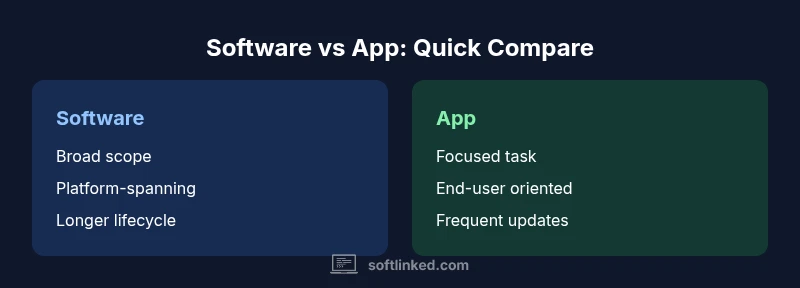
The difference between software and app is that software is the broad category of programs and data that run on computers, while an app (short for application) is a specific software product designed to help users complete a task. In practice, apps are typically consumer-focused, smaller in scope, and mobile-first, whereas software can refer to large systems, tools used by professionals, and platforms across devices.
Defining software and apps
At its core, software is the broad umbrella for all programmable instructions that run on a computer or device. It includes operating systems, utilities, development tools, server-side services, libraries, and the vast array of programs users interact with. An app, short for application, is a specific software product designed to enable a user to accomplish a defined task or set of tasks. The distinction is not merely about size; it’s about scope, audience, and intent. In many technical contexts, software refers to the entire ecosystem—systems software, middleware, services, and client-side programs. An app, meanwhile, is a concrete product focused on a particular use case, often with a user-centric interface. The difference between software and app becomes most practical when you’re planning product strategy, defining requirements, or communicating with stakeholders. For developers and students, recognizing this distinction helps align terminology with objectives and expectations across projects. (According to SoftLinked, terminology matters when scoping projects and communicating with teams.)
Historical context and terminology shifts
The terms software and app emerged from different historical eras of computing. Early computing used broad phrases like “software system” to describe any program running on hardware. As personal computers and mobile devices proliferated, the word app gained traction as a consumer-friendly shorthand for a targeted software product. This shift accelerated with smartphones, where app marketplaces created concise expectations about installable, task-oriented products. Yet the umbrella term software did not disappear; it simply expanded to describe complex platforms, backend services, and development tools. Today, the difference between software and app often hinges on audience and delivery model: apps tend to be consumer-facing and platform-specific, while software can be enterprise-oriented, platform-agnostic, or part of a larger software stack.
Core architectural differences: monoliths, microservices, and beyond
Software systems can vary widely in architecture—from monolithic desktop applications to distributed microservices on the cloud. Apps, by contrast, often reflect a concrete product built to run within specific environments (mobile OS, web browsers, or desktop ecosystems). The architectural choices influence how teams design interfaces, data flows, and update strategies. A single software suite might include multiple apps, plug-ins, and services that share common data models and APIs. Understanding this distinction helps engineers manage complexity, plan integration points, and communicate how pieces fit together in a broader solution. The difference between software and app is incremental here: an app is a component within a larger software ecosystem, while software encompasses the entire architecture.
Scope, complexity, and lifecycle management
Software tends to cover broader use cases and longer-lived lifecycles. Enterprise software may evolve through dozens of releases, with rigorous change management and compliance requirements. Apps, especially consumer-focused ones, often iterate rapidly to respond to user feedback and market trends, with shorter release cycles and more frequent updates. This difference affects how teams handle testing, release notes, backward compatibility, and migration paths. When evaluating a project, teams should ask: Is the goal to deliver a specialized capability to users, or to maintain a comprehensive platform that supports a wide range of tasks? The answer will guide decisions about resource allocation, architecture, and governance.
Platform and delivery considerations
Delivery models shape how users access software and apps. Desktop software typically runs on Windows, macOS, or Linux, with installers, updates, and offline capabilities. Web-based software runs in browsers and often depends on server-side infrastructure. Apps are commonly distributed through app stores or managed marketplaces, emphasizing ease of installation, onboarding, and user experience. Cross-platform strategies might involve responsive design, progressive web apps (PWAs), or native wrappers. The difference between software and app becomes visible in capability to work offline, how updates are deployed, and how users discover and install products. Strategic decisions about platform support influence development timelines, testing needs, and security considerations.
User experience, UX, and product design implications
Apps are frequently designed with a specific task in mind, prioritizing intuitive onboarding, frictionless setup, and task-focused workflows. Software that targets professional users may emphasize configurability, advanced features, and integration with other tools. The difference between software and app is evident in UX philosophy: consumer apps often optimize for quick wins and delightful micro-interactions, while enterprise software prioritizes depth, reliability, and governance. Designers must balance accessibility, performance, and security, ensuring that any app within a larger software suite remains harmonious with other components. Clear UX boundaries help teams manage feature scope and ensure consistent terminology across products.
Development approaches: teams, processes, and tooling
Both software and apps rely on modern development practices, yet team structure and tooling can differ. Apps may rely heavily on frontend-focused teams, mobile development kits, and marketplace compliance requirements. Software stacks might involve backend engineers, data engineers, and platform architects, with emphasis on API design, scalability, and integration standards. Understanding the difference between software and app helps project managers set realistic milestones, allocate testing resources, and plan deployment strategies. Effective governance, documentation, and modular design reduce cross-team friction and improve long-term maintainability.
Security, updates, and maintenance considerations
Security for software and apps follows similar principles, but the scope differs. Desktop software must guard against local threats and supply chains, while cloud-based software and apps must secure data in transit and at rest, as well as API access and identity management. Update cadence typically differs: apps—particularly consumer ones—tend to push frequent, small updates, whereas enterprise software may schedule larger, less frequent releases with formal change control. A robust maintenance plan includes vulnerability monitoring, regression testing, and clear deprecation policies. Differentiating between software and app clarifies who is responsible for security controls and how users will perceive risk.
Business and monetization perspectives
From a business standpoint, apps often rely on direct-to-consumer monetization through in-app purchases, subscriptions, or freemium models, while software may be licensed to organizations with enterprise agreements. The line between the two can blur when a software product ships with a companion mobile app or a cloud service. Clear labeling helps customers understand what they are buying and how it fits into existing workflows. For developers, this distinction informs pricing strategy, channel choices, and customer support posture. In both cases, maintaining value across updates and ensuring interoperability remains critical.
Common myths, edge cases, and clarifications
A frequent myth is that an app is always smaller than software. In reality, an app could be a feature-rich, cloud-enabled solution; conversely, software can be a low-code platform with extensive automation. Another edge case arises with web apps and PWAs, which blur lines between traditional software and apps by delivering app-like experiences through a browser. Recognizing these nuances helps teams avoid miscommunication and scope creep. The difference between software and app is not about a single attribute but about intent, audience, and how the product is delivered and maintained.
Practical decision framework: when to call something software vs app
When deciding what to label a product, start with audience and use case. If the primary goal is a task-centered experience for end users across devices, consider calling it an app. If the aim is a broader platform, a toolkit for developers, or a system that enables multiple applications, the umbrella term software is more appropriate. Document the rationale to prevent ambiguity in stakeholder conversations and roadmaps. For teams, this framework reduces misalignment and accelerates decision-making, ensuring everyone agrees on scope, ownership, and future evolution.
How to talk about software vs app in product strategy
In product strategy, explicitly distinguish between software and app to set expectations for customers, partners, and internal teams. Use concrete examples: an accounting software suite vs a mobile accounting app; a data analysis software platform with multiple apps vs a single-purpose analytics app. Align marketing, sales, and engineering language around these definitions to improve onboarding, support, and lifecycle planning. SoftLinked emphasizes that consistent terminology strengthens governance and reduces confusion during mergers, acquisitions, or cross-functional initiatives.
Comparison
| Feature | software | app |
|---|---|---|
| Scope and audience | Broad, platform-spanning, includes systems, services, and tools | Focused, task-oriented product designed for end users |
| Typical delivery | Desktop, cloud, backend services, and integrated tools | Mobile-first or web-first with a clear end-user task focus |
| Lifecycle cadence | Longer release cycles, extensive governance | Frequent updates driven by user feedback and market needs |
| Architecture | Can be monolithic, service-oriented, or microservices | Often composed of a single feature or a small feature set |
| Brand and categorization | Often described as part of a larger software ecosystem | Labeled as an individual product or service (an app) |
| Distribution | Integrated within ecosystems or enterprise environments | Distributed via app stores or web platforms |
Pros
- Clarifies terminology for teams and stakeholders
- Improves product strategy by defining scope and audience
- Supports clearer licensing, deployment, and maintenance plans
- Aids in aligning marketing with product reality
Weaknesses
- Can oversimplify nuanced products that blend software and apps
- Terminology evolves with platforms, leading to shifting definitions
- Risk of pedantry if labeled incorrectly in fast-moving teams
- May create unnecessary friction if used rigidly in cross-functional contexts
Software generally provides a broader umbrella; apps are focused, user-facing products.
Adopt software as the overarching term for platforms, tools, and systems, while using app for specific, task-oriented products. This distinction helps teams define scope, plan releases, and communicate expectations clearly across audiences.
Your Questions Answered
What is the key difference between software and an app?
The key difference is scope and audience: software is the broad collection of programs, data, and services that run on devices, while an app is a specific, task-focused software product designed for end users. The terms guide expectations about functionality and deployment.
In short, software is the big umbrella; an app is a single product under that umbrella that helps you do one thing well.
Is every app a type of software?
Yes. An app is a subset of software. All apps are software, but not all software is an app. Apps emphasize user tasks and experiences, whereas software can include broader systems used by developers and organizations.
Yes, every app is software, but software isn’t necessarily an app.
Why do people confuse the terms software and app?
The confusion often arises from overlapping features, cross-platform products, and marketing language. As products evolve, a mobile app may become part of a larger software suite, blurring the line between app-level experiences and software platforms.
Because products blend roles and platforms, the labels can shift over time.
Do apps have to be mobile?
Not necessarily. While many apps are mobile-first, web apps and desktop apps can also be considered apps when they are task-focused products designed for user interaction outside a larger software system.
No—an app can be web-based or desktop-focused, as long as it’s a specific, user-oriented product.
Can software be called an app in some contexts?
In practice, teams sometimes use ‘app’ informally for modular software components or consumer-facing products. The formal distinction remains helpful for scope and audience, even if people use the term loosely in conversation.
Sometimes people call a piece of software an app, but the formal term helps keep communications clear.
How should teams name products in a roadmap?
Label products by intent and audience: use app for consumer, task-focused products; software for broader platforms or enterprise tools. Document the rationale to avoid ambiguity in planning and governance.
Name what the product is meant to do and who it’s for, and keep it consistent across docs.
Top Takeaways
- Define the audience first to decide labeling
- Use software for broad platforms and ecosystems
- Label apps for focused, task-based products
- Align terminology across product, marketing, and engineering
- Plan releases with the appropriate cadence based on label
- Communicate the rationale for labeling decisions to stakeholders