Difference Between Software and Firmware: A Practical Guide
Explore the difference between software and firmware with clear definitions, examples, and practical guidance for developers. Learn how updates, memory, and security differ in software versus firmware.


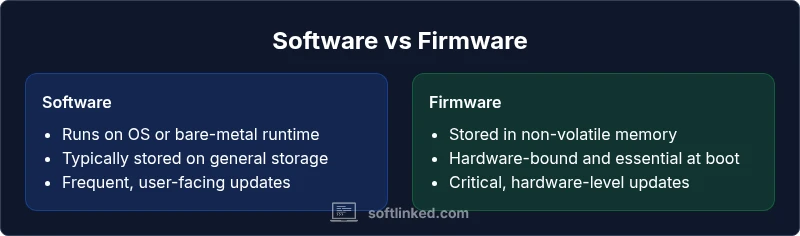
The question "difference between software and firmware" has a straightforward answer: software runs on an operating system or bare metal on a computer, while firmware is specialized software embedded in hardware to control its basic functions. Firmware updates are riskier but essential for hardware reliability, whereas software updates add features and fix bugs. Understanding this distinction helps architects choose correct deployment strategies.
What is the difference between software and firmware?
The difference between software and firmware is fundamental but often misunderstood in practice. Software refers to programs and data that run on hardware via an operating system or a minimal runtime, enabling user-facing features. Firmware, by contrast, is specialized code embedded in non-volatile memory that controls the hardware's most fundamental operations. From SoftLinked's perspective, the boundary between software and firmware is nuanced, especially as devices become smarter and more interconnected. This distinction matters for developers, engineers, and product teams because it guides update strategies, security models, and lifecycle decisions. In this article, we unpack the definitions, dive into concrete examples, and offer practical guidance for engineers learning the software-firmware continuum.
Where firmware resides: memory and hardware integration
Firmware is tightly coupled with the hardware it controls. It typically resides in non-volatile memory like ROM or flash, so it persists after power cycles. This persistence is what lets devices initialize themselves, perform basic bootstrapping, and bring up essential subsystems before any operating system is loaded. In consumer electronics and embedded systems, firmware often runs with minimal layers of abstraction and has direct access to hardware registers. This proximity to the hardware means firmware must be highly reliable and carefully managed, because bugs can affect the device at a fundamental level.
In many devices, firmware isn’t just a static blob. Modern microcontrollers and SoCs use layered firmware that can include bootloaders, firmware-in-the-loop components, and specialized controllers sharing resources with software running atop an OS. The boundary between firmware and software can blur in complex systems where firmware supports higher-level software. From a practical standpoint, engineers must document where firmware ends and software begins to design update processes, testing strategies, and security controls.
How software differs: operating systems, abstraction, APIs
Software runs on hardware but typically does so through an operating system or a runtime environment. This layer provides abstractions, APIs, and services that software developers rely on to build applications. Unlike firmware, software is designed for portability across devices with different hardware configurations, provided there are compatible drivers and libraries. Software updates frequently deliver new features, bug fixes, and performance improvements, and they are distributed through app stores, package managers, or direct downloads. The software stack emphasizes modularity, reusability, and user-facing functionality, while firmware emphasizes stability, deterministic behavior, and hardware control, often with strict size and performance constraints.
As devices evolve—think smart speakers, cars, or industrial controllers—the line between firmware and software shifts. Some firmware modules expose APIs that are consumed by software running on top of a lightweight operating system. In other words, firmware can enable features that feel like software, while software depends on firmware for hardware access and boot-time orchestration.
Common examples that illustrate the difference
A classic firmware example is the BIOS or UEFI in personal computers. This firmware initializes hardware, performs POST checks, and then hands control to the operating system. Network devices and routers also rely on firmware to manage routing tables, wireless radios, and security features at a low level. Smartphones contain baseband firmware that handles cellular communication and other embedded controllers that govern sensors and power management. By contrast, software examples include word processors, web browsers, and mobile apps that run within an OS environment and rely on APIs provided by the system. The contrast becomes clearer when you consider persistence, updates, and risk: firmware must survive power cycles and resist corruption during updates, while software updates primarily add features and fix bugs without risking core hardware functions.
From SoftLinked's viewpoint, understanding these concrete examples helps teams plan maintenance, testing, and risk management more effectively.
Update mechanisms and risks
Firmware updates require specialized procedures: bootloaders, cryptographic signing, and controlled flashing processes to prevent corruption. A failed firmware update can brick a device or leave it in an unusable state, making update reliability a top priority for manufacturers. Software updates are more permissive and can be delivered incrementally via online channels, but they still demand careful versioning, compatibility checks, and rollback options. The security implications differ as well: firmware updates often occur at the hardware boundary, so signing, secure boot, and rollback protections are critical to prevent supply-chain attacks. Software updates must address dependency graphs, UI compatibility, and user data migration concerns, which can complicate release engineering but generally pose less hardware-risk.
Looking at the broader picture, it is essential to plan firmware update rollouts with fallback strategies and observability to detect failures quickly. Software updates should be accompanied by monitoring, telemetry, and user feedback loops to ensure positive outcomes for end users.
Lifecycle and development processes
Firmware development typically involves close collaboration with hardware teams, with longer validation cycles due to hardware dependencies and certification requirements. Firmware changes often require extensive testing on target devices, hardware-in-the-loop simulations, and manufacturing constraints. Software development, by contrast, emphasizes agile iterations, continuous integration, and broader platform compatibility. Feature flags, beta programs, and automated tests help stabilize software releases across operating systems and device families. The lifecycle of firmware tends to be more conservative, with incremental updates and careful release planning, whereas software benefits from rapid iteration and user-driven feedback. Effective teams align both lifecycles to reduce risk and maximize device reliability.
Security considerations for firmware vs software
Firmware security is foundational: it governs the device from power-on and can determine how the system defends against attackers. Secure boot, cryptographic signing, and rigorous update verification are essential. Firmware vulnerabilities can be persistent and hard to patch, particularly if devices lack network connectivity or cannot be easily updated. Software security focuses on vulnerability management, secure coding practices, and containerized or sandboxed execution to limit damage. A comprehensive security strategy addresses both layers: hardening firmware against supply-chain attacks and keeping software up-to-date with patches and dependency management. In many modern devices, secure over-the-air updates and attestation mechanisms link firmware integrity with software trust, creating a cohesive defense-in-depth architecture.
Performance and resource considerations
Firmware is typically constrained by memory, storage, and processing power. It must be deterministic and efficient, often written in low-level languages with direct hardware access. Software can leverage richer runtimes, libraries, and abstractions, trading some predictability for flexibility and functionality. The performance of firmware affects boot times, initialization latency, and real-time control loops, while software performance often centers on user experience, responsiveness, and resource usage across multiple processes. Understanding these constraints helps designers select the appropriate development approach, testing regimes, and optimization strategies for each layer of the system.
Edge cases: firmware becoming more software-like
The boundary between firmware and software is not fixed. Advances in programmable firmware, microcontroller units with embedded operating systems, and firmware that runs atop lightweight RTOS environments blur lines further. In some devices, firmware components expose APIs and update mechanisms that resemble software modules, while still residing in non-volatile memory and performing hardware-level control. This convergence means teams must document interfaces clearly, manage dependencies across both domains, and design robust update processes that cover both firmware and software paths. The result is a more integrated approach to device functionality, reflecting how modern products fuse hardware control with user-focused features.
How to determine whether something is firmware or software in practice
To decide whether a component is firmware or software, start with the vendor documentation and product architecture diagrams. Check where the code resides (non-volatile memory versus system storage) and how it is loaded (bootloader paths versus runtime loading). Review the update mechanism: firmware usually uses hardware-specific flashing procedures, cryptographic signing, and recovery modes, while software updates go through OS package managers or app stores. Consider the level of hardware dependency: firmware typically interacts directly with hardware registers, whereas software relies on abstracted interfaces. Finally, assess the risk profile: firmware failures can brick devices, so design for robust rollback and fail-safe boot sequences. These signals together reveal the proper classification and the corresponding maintenance plan.
Practical guidance for developers and learners
If you are studying the software-firmware continuum, start with foundational concepts in computer architecture, digital logic, and embedded systems. Build hands-on practice with small microcontroller projects to see firmware in action, and explore operating systems to understand software layers and APIs. Read vendor documentation to learn typical update workflows, secure boot practices, and deployment pipelines. Create sample projects that simulate firmware updates and software updates separately, then integrate them in a unified workflow. Finally, track security considerations, such as signing, verification, and rollback testing, to develop a sound engineering discipline across both domains.
The future of firmware and software collaboration
As devices become more capable and interconnected, the distinction between firmware and software will continue to blur. Edge computing, Internet of Things, and AI-enabled devices require firmware that can adapt while maintaining hardware safety, alongside software that supplies user-centric features and cloud integration. The most successful teams will implement cohesive update strategies, robust security models, and transparent lifecycle management for both layers. In this evolving landscape, the SoftLinked team anticipates increased emphasis on verification, observability, and governance to ensure devices remain secure, reliable, and capable of delivering value over time.
Comparison
| Feature | software | firmware |
|---|---|---|
| Execution environment | Runs on an operating system or bare-metal runtime with abstraction layers and APIs | Runs directly on hardware or with minimal boot code; limited resources and specific boot-time requirements |
| Memory/storage | Typically stored on general storage (SSDs, HDDs, or RAM-backed installations) and volatile during runtime | Stored in non-volatile memory (ROM/flash); persists across power cycles and foundational to device boot |
| Persistence after power loss | Depends on storage and state preservation within the OS; can rely on user data partitions | Inherently persistent in flash/ROM and essential to boot and hardware initialization |
| Update mechanism | Frequent, software-only updates via networks or app stores; dependency management via OS | Specialized flashing procedures, cryptographic signing, and recovery modes; hardware risk on failure |
| Hardware dependency | Abstracted by OS and drivers; portable across hardware with compatible interfaces | Tightly coupled to hardware; changes require coordination with hardware design and validation |
| Typical examples | Applications, browsers, productivity tools, and services running on an OS | BIOS/UEFI, router firmware, embedded controllers, baseband firmware in phones |
| Distribution method | Digital distribution through apps, packages, or installers | Vendor-provided updates delivered via firmware update channels; often device-specific |
| Security model | Frequent patching, vulnerability management at the software layer | Secure boot, cryptographic signing, and strict update verification at the hardware level |
| Lifecycle management | Agile releases, continuous integration, and consumer-focused iteration | Longer validation cycles, certification requirements, and hardware-aligned rollout |
| Risk profile | Software failures usually affect features or data integrity but can be mitigated with rollback | Firmware failures can brick devices or render hardware inoperable without proper recovery |
Pros
- Software enables rapid iteration and broad feature delivery across devices
- Firmware provides stable, low-level control and reliable hardware operation
- Clear separation of concerns helps teams manage risk and maintenance
Weaknesses
- Software updates can introduce compatibility issues across platforms and dependencies
- Firmware updates carry higher risk of brick/flash failures without robust recovery
- Hardware coupling can slow development cycles and complicate testing
Balanced approach: firmware foundations plus software-enabled features
The SoftLinked team recommends treating firmware hygiene with priority to maintain hardware reliability, while continuing to push software updates for user value. Together, they form a cohesive strategy that supports both stability and innovation.
Your Questions Answered
What is the difference between software and firmware?
Software runs on hardware via an operating system or runtime and provides user-facing features. Firmware is embedded in non-volatile memory and controls core hardware functions. The distinction guides updates, security, and lifecycle planning.
Software runs on an OS and provides features; firmware is embedded in hardware and controls basic functions.
Is BIOS/UEFI firmware or software?
BIOS/UEFI is firmware. It initializes hardware and boots the operating system, sitting at the hardware boundary and executing before higher-level software starts.
BIOS is firmware that runs before your OS starts.
Can firmware be updated over the Internet?
Yes, many devices support over-the-air firmware updates. These require secure signing, rollback strategies, and careful validation to avoid bricking the device.
Yes, but it needs security checks and rollback in case something goes wrong.
Why is firmware less flexible than software?
Firmware is tightly bound to hardware and typically has smaller, fixed interfaces. Software can leverage OS services and abstractions to be more adaptable across devices.
Firmware is hardware-bound, so it’s less flexible than software.
What is firmware used for in consumer devices?
Firmware controls essential hardware functions in devices like routers, cameras, and embedded systems, enabling reliable operation and hardware-specific features.
Firmware handles the basics that make devices work reliably.
How should developers test firmware vs software?
Firmware testing emphasizes hardware compatibility, boot stability, and recovery paths. Software testing focuses on functionality, performance, and user experience across platforms.
Test firmware for hardware compatibility and recovery; test software for features and UX.
Top Takeaways
- Define the boundary: firmware is hardware-bound software in non-volatile memory
- Prioritize secure boot and verified updates for firmware
- Plan software updates with testing across OS and dependencies
- Assess risk: firmware failures can brick devices; software failures are generally less catastrophic
- Invest in cross-domain collaboration to align hardware and software release cycles