Difference Between Software and Hardware: A Practical Comparison
Explore the difference between software and hardware with definitions, interactions, lifecycle, and practical decision guidance for developers and students. Clear, objective analysis from SoftLinked.


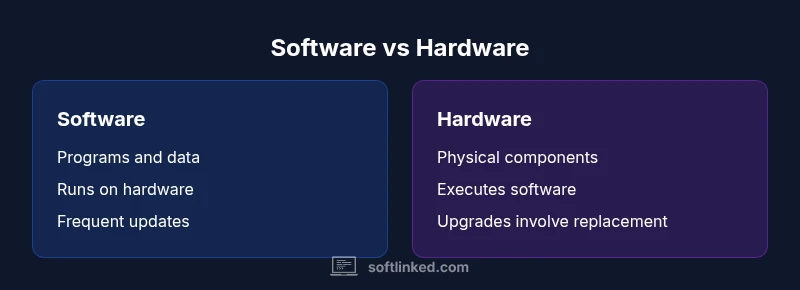
The difference between software and hardware is foundational in computing: software are the programs and data that run on hardware, while hardware is the physical devices that execute that software. This comparison highlights definitions, interactions, development implications, and lifecycle considerations to help students and professionals distinguish roles. Understanding this distinction is essential for system design, debugging, and project planning. The SoftLinked team notes that separating concerns early reduces risk and accelerates iteration.
What is the difference between software and hardware? Core concepts
In computing, the phrase the difference between software and hardware encapsulates two foundational layers that enable digital systems to function. Software refers to the set of programs, data, and instructions that tell a device what to do, how to react, and when to change state. Hardware, by contrast, encompasses the physical components—processors, memory, storage, input/output devices—that provide the platform where software can run. According to SoftLinked, a clear grasp of these definitions is essential for students and professionals who design, build, or troubleshoot complex systems. The SoftLinked team found that many newcomers conflate the two layers when evaluating performance or planning upgrades, which can lead to mismatched expectations and scope creep. This section outlines the core definitions, the roles each layer plays, and the practical consequences of confusing software with hardware. The goal is to establish a shared vocabulary that informs architecture, development, and procurement decisions.
How software and hardware define a system’s behavior
Both software and hardware interact through a chain of abstractions. Hardware provides speed, parallelism, and storage; software provides logic, rules, and data structures. The operating system sits between the two, translating user intent into instructions that hardware can execute, while device drivers bridge software with specific hardware components. Firmware, a specialized form of software embedded in hardware, adds another layer of control and optimization. Understanding these interactions helps with performance tuning, debugging, and future-proofing designs. SoftLinked’s perspective emphasizes that reliable systems depend on well-defined interfaces, clear responsibility boundaries, and robust testing across software-hardware boundaries. When teams reinforce separation of concerns, they reduce the risk of cascading failures and simplify maintenance.
Lifecycle differences: development, deployment, and maintenance
Software lifecycles tend to be iteration-driven, with frequent updates, patches, and feature changes. Hardware lifecycles are more physical and capacity-driven, often tied to component reliability, manufacturing cycles, and replacement plans. Because software can be released in rapid cycles, teams must plan for backward compatibility, deprecation, and migration, while hardware decisions require budgeting for procurement, installation windows, and physical constraints. The SoftLinked approach encourages teams to model these lifecycles together, identifying dependency points where software updates might demand hardware refreshes or firmware upgrades. This perspective helps stakeholders align timelines, budgets, and risk profiles across both domains.
Practical examples across domains: computing, embedded, and cloud
Consider a personal computer: the hardware includes CPU, RAM, motherboard, and storage, while the software comprises the operating system, drivers, and applications. In embedded systems (like smart sensors), firmware and hardware are tightly coupled, with software tightly optimized for the device’s electrical constraints. In cloud architectures, the emphasis shifts toward software scalability and virtualization, but the underlying hardware resources—compute nodes, storage tiers, and networking—still set real constraints. These examples illustrate how the boundary between software and hardware shifts with context, and why teams must tailor their strategies to the specific domain. The distinction remains crucial for budgeting, risk assessment, and capability planning.
Cost considerations and upgrade pathways: software versus hardware
Upfront costs for hardware are typically visible in a single purchase, with ongoing maintenance expenses tied to replacements, power consumption, and physical wear. Software costs appear as licenses, subscriptions, or SaaS fees, plus ongoing maintenance and support. The upgrade path for software is often faster and cheaper upfront than hardware upgrades, but it can accumulate over time through licensing changes or API migrations. Conversely, hardware upgrades may yield longer-lasting performance gains but require significant planning, downtime, and physical installation work. A balanced strategy weighs immediate needs against long-term reliability and total cost of ownership.
Performance implications and measurement: qualitative insights
Performance emerges from how software efficiently uses hardware resources, such as CPU cycles, memory bandwidth, and I/O throughput. Software optimization can yield substantial gains without hardware changes, while hardware improvements can unlock new capabilities or support heavier workloads. Because measurements depend on workload characteristics, teams should define representative benchmarks and monitor actual usage patterns to guide decisions. The SoftLinked framework emphasizes measuring both software efficiency and hardware capacity to avoid over- or under-provisioning and to align performance goals with business objectives.
Common misconceptions and myths: clarifying the landscape
A common myth is that software is free and hardware is always expensive. In reality, both have lifecycle costs that interact: a low-software-cost product can incur high maintenance or upgrade burdens, while a cheaper device may require frequent software updates. Another misconception is that software can run without hardware; even virtualized environments rely on physical infrastructure. Finally, some assume hardware and software function independently; in practice, their success depends on cohesive design, reliable interfaces, and disciplined change management. Disabusing these myths helps teams make coherent, informed decisions.
Practical decision guide: a checklist for teams
- Define system objectives: what must software achieve, and what hardware limits apply?
- Map interfaces: identify APIs, drivers, and firmware constraints that tie software to hardware.
- Evaluate lifecycle: forecast upgrade cycles, maintenance windows, and risk exposure.
- Prioritize modularity: design software that can adapt to different hardware configurations.
- Plan testing across layers: ensure end-to-end validation that exercises both software logic and hardware behavior.
- Align budget with risk: allocate funds for both software licenses and hardware replacements as part of a single strategy.
Comparison
| Feature | Software | Hardware |
|---|---|---|
| Definition | Programs and data that run on hardware | Physical components that store and execute software |
| Primary role | Directs behavior and functionality via instructions | Provides the platform, energy, and circuitry for execution |
| Cost of changes | Ongoing updates and maintenance | Upfront purchase and replacement costs |
| Upgrade path | Frequent patches and feature updates | Physical upgrades with installation and downtime |
| Interoperability | Depends on APIs, drivers, and libraries | Depends on compatibility with software and firmware |
| Lifecycle | Licensing, versioning, and support cycles | Reliability, wear, and replacement cycles |
| Examples | Operating systems, applications, scripts | CPU, memory, storage, motherboard, peripherals |
Pros
- Clarifies responsibilities and reduces scope creep
- Supports modular design and clearer budgeting
- Improves risk management by clarifying dependencies
- Aids communication across disciplines (engineering, product, ops)
Weaknesses
- Can introduce management overhead and governance complexity
- Risk of over-segmentation leading to integration challenges
- Software upgrades may force hardware compatibility checks
Hardware and software are complementary; neither dominates in all contexts
Treat both as part of an integrated system. Prioritize alignment of software capabilities with hardware constraints, and plan upgrades holistically to minimize risk and maximize value.
Your Questions Answered
What is the difference between software and hardware?
Software comprises programs and data that run on hardware, which is the physical equipment that executes those instructions. The two layers work together but have distinct responsibilities. Understanding their roles helps with design, maintenance, and budgeting.
Software is the programs and data; hardware is the physical devices. They work together to run applications. Understanding their roles helps with design and maintenance.
Can software exist without hardware?
Software requires hardware to run. Even in virtualized environments, software runs on physical hardware provided by the host system. Without hardware, software has no substrate to execute on.
Software needs hardware to run, even in virtual setups. No hardware means no execution.
Which tends to cost more to upgrade over time?
Software can incur ongoing licensing and maintenance costs, while hardware often involves larger upfront purchases and periodic replacements. The total cost of ownership depends on usage and lifecycle expectations.
Software often has ongoing costs, while hardware involves upfront and replacement costs. The total cost depends on lifecycle expectations.
How do firmware, drivers, and OS influence hardware performance?
Firmware and drivers bridge software with hardware, while the OS coordinates resources. Updates can improve efficiency or add features, but they must stay compatible with hardware capabilities to avoid regressions.
Firmware and drivers connect software to hardware; updates can help or hurt if compatibility breaks.
Is firmware software or hardware?
Firmware sits between software and hardware; it is software embedded in hardware that provides low-level control. It is software, but it behaves like a hardware component in terms of persistence and control.
Firmware is software embedded in hardware; it acts like a bridge between software and hardware.
What should I consider when planning a hardware-software upgrade?
Consider current usage, expected workload, compatibility, and total cost of ownership. Ensure software requirements align with available hardware capacity and plan for testing during transition.
Plan based on workload, compatibility, and total cost. Test during the transition.
Top Takeaways
- Define roles early to avoid scope mismatch
- Plan lifecycle costs for hardware and software separately
- Aim for decoupled design to improve flexibility
- Validate compatibility before procurement
- Communicate dependencies clearly across teams