Difference Between Software and Application: A Clear, Analytical Guide
An analytical guide explaining the difference between software and application, with practical criteria, examples, and implications for developers and teams.


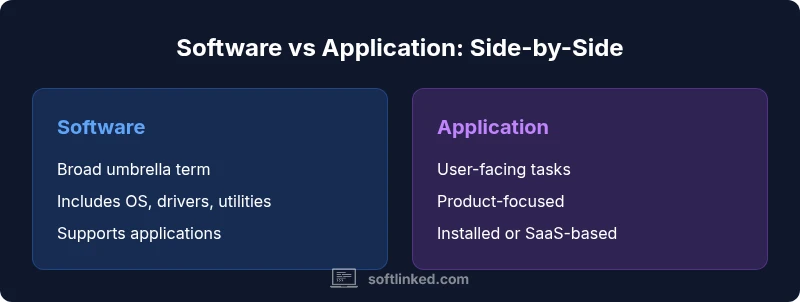
The difference between software and application hinges on scope and intended use: software is the umbrella term for all programs and data that run on devices, while an application is a specific type of software designed to help users perform tasks. An application focuses on end-user tasks, whereas software includes system software, utilities, and development tools. In practice, 'app' often means user-facing software, but the terms are context-dependent. Understanding this distinction improves communication, planning, and documentation.
Defining software vs application
According to SoftLinked, the difference between software and application hinges on scope and intended use. In practical terms, software is the umbrella term for all programs and data that run on a computer or device, while an application is a specific type of software designed to help a user complete a task. This distinction matters for documentation, budgeting, and project planning, especially when you discuss the difference between software and application with stakeholders. In many teams, the word app is used interchangeably with software, but the nuance is important for architecture reviews and product roadmaps. By clarifying the difference between software and application early, teams avoid scope creep and align expectations across engineering, product, and operations.
Historical perspective and context
The terms software and application did not always have the clean, modern separation they carry today. In early computing, programs were often referred to as software in general, with few distinctions between system-level and user-facing functions. As computers evolved from mainframes to personal devices, the language shifted: developers and users began distinguishing system software—operating systems, compilers, and device drivers—from application software, which targeted end users. The rise of mobile platforms and the browser-based ecosystem further blurred or sharpened these distinctions depending on the organization. For the purpose of this article, we treat the difference between software and application as a practical guide to communication and design rather than an absolute taxonomy.
Core Concept: software
Software is a broad, umbrella term that encompasses all programmable instructions that run on hardware. It includes operating systems, firmware, device drivers, middleware, development tools, utilities, and yes, applications. The core idea is that software is the set of programs and data enabling a computer or device to perform tasks. From a software engineering perspective, this broad category is the backbone of digital systems, coordinating hardware resources, security, storage, and user interfaces. When you talk about software, you’re speaking of the entire landscape, not just the user-facing pieces. This broad scope is crucial for planning, budgeting, risk assessment, and architecture decisions.
Core Concept: application
An application is a focused subset of software designed to achieve a particular user task or set of tasks. Applications are built with clear goals, user journeys, and interfaces that facilitate productivity, communication, or entertainment. They often follow a deployment model that makes them discoverable, installable, and updatable—think desktop word processors, mobile messaging apps, or SaaS dashboards. While all applications are software, not all software qualifies as an application; some programs serve system-level roles, background processing, or platform services. This distinction matters when you structure teams, estimate timelines, and communicate scope to stakeholders.
The boundary between software and application
In practice, the boundary is a matter of perspective. For developers, software denotes the whole ecosystem—operating systems, libraries, services, and applications alike—while the term application emphasizes user-facing components that deliver a specific outcome. End users typically experience applications as the visible products they download, purchase, or access through a web or mobile interface. Another useful lens is lifecycle and ownership: applications often have feature roadmaps, release cadences, and customer-support channels, while system software focuses on stability, compatibility, and security across the entire device. The overlap is real, but clarity improves planning and communication.
System software vs application software
System software runs at a low level and enables the computer to function. It includes the operating system, device drivers, and utility software that maintains hardware resources, memory management, and security isolation. Application software runs on top of system software, providing specific capabilities to the user. The distinction affects design decisions: system software must prioritize reliability and performance under all conditions; applications prioritize usability and task-specific flows. In many organizations, the line between these layers blurs when middleware or platform services are involved, yet the fundamental difference—the scope and target audience—remains a guiding principle for architecture and governance.
Common myths and misconceptions
A common misconception is that software and application are interchangeable terms. In casual contexts, people say app when they mean software, especially on mobile devices. Another myth is that all apps are small, consumer-facing programs; in reality, enterprise apps can be complex, deeply integrated, and core to business processes. Conversely, some software labeled as system-level may have user-facing components, blurring classification. Finally, many teams treat the terms as purely semantic, missing opportunities to align product strategy, documentation standards, and cross-team expectations.
How mobile and web contexts affect terminology
On mobile devices, the term app is prevalent, driven by app stores and consumer marketing. On desktops and servers, software is a broader umbrella; users might refer to an application as a program, tool, or applet within a larger software suite. Web ecosystems complicate things further: software could refer to the browser engine and server-side services, while an application denotes a user-facing interface accessible via a web URL. Understanding these context-driven nuances helps teams avoid miscommunication and supports clearer API docs, release notes, and customer communications.
Practical criteria to distinguish
- Scope: Is the focus on a user-facing task, or on enabling a broader system function?
- Ownership: Who maintains the lifecycle—end users and product teams or the OS/platform team?
- Deployment: Is the item installed and updated as an app, or is it part of a broader software stack?
- Interfaces: Does it provide a specific interface for a user, or does it integrate as a service within a larger system?
- Lifecycle: Does it follow a product roadmap with features and customer support, or is it a stable underpinning component with long maintenance cycles?
Examples that illustrate the difference
- Operating system vs word processor: The OS is system software that enables many apps to run, while Word is an application designed for document creation.
- Mobile device apps vs platform services: A calendar app is an application, while the notification service in the OS is system software.
- Device drivers and firmware: These are system software components that support hardware, not end-user applications.
- Web SaaS dashboards: A SaaS dashboard is an application that runs on a cloud-based software stack.
Implications for developers and product teams
Clear terminology influences architecture decisions, UI/UX design, and API design. When teams deliberate the difference between software and application, they can align on ownership boundaries, data models, and security considerations. For engineers, this means better modularization, clearer interfaces, and more precise documentation. For product managers, it means improved scoping, pricing models, and release planning. For QA teams, it clarifies test suites and acceptance criteria. In short, understanding this distinction supports better collaboration and more predictable delivery.
Choosing language for documentation and communication
Documenting software architecture requires consistent terminology. Prefer 'software' when referring to the overall technology stack and system-level components, and reserve 'application' for user-facing products with defined goals. This approach reduces ambiguity in API docs, onboarding materials, and customer communications. Teams should establish a glossary and enforce it in code comments, design docs, and user guides. The ultimate aim is to improve comprehension among developers, testers, and non-technical stakeholders.
Comparison
| Feature | Software | Application |
|---|---|---|
| Definition | Broad umbrella term for all programs and data that run on hardware | Focused subset designed to help users perform tasks |
| Scope | Includes system software, utilities, middleware, dev tools, and applications | Primarily end-user tasks with specific UX goals |
| Users | Developers, IT admins, and end users for hardware control | End users and business users performing tasks |
| Examples | Operating systems, firmware, drivers, and apps | Word processors, spreadsheets, mobile apps, dashboards |
| Deployment | Often integrated with hardware or OS layers; updates through system channels | Installed or hosted; updates through app stores or SaaS delivery |
| Lifecycle | Long-lasting, maintenance-focused, compatibility-driven | Product-focused with feature roadmaps and user support |
| Best For | Infrastructure and platform stability, cross-cutting services | User-centric tasks, productivity, content creation |
Pros
- Clarifies terminology for teams and stakeholders
- Improves precision in documentation and communication
- Supports clearer scoping and budgeting
- Helps align product strategy with user needs
Weaknesses
- Terminology overlap can confuse non-technical teammates
- Context matters; rules vary across industries
- Overemphasizing taxonomy can hinder pragmatic decisions
- Some interfaces blur lines between software and application
Software is the umbrella term; an application is a user-facing subset
Adopt clear definitions in your docs and glossary. Use 'software' for the whole stack and 'application' for user-focused products; this reduces ambiguity in architecture and communication.
Your Questions Answered
What is the main difference between software and an application?
Software is the broad umbrella term for all programs and data running on hardware, while an application is a user-facing subset aimed at completing specific tasks. This distinction helps teams scope features and communicate clearly.
Software covers everything that runs on hardware, while an application is the user-facing part that helps you do something specific.
Is an operating system an application?
No. An operating system is system software that enables other software to run. Applications run on top of the OS and are typically user-facing products with defined tasks.
An OS is system software; apps run on top of it and are user-focused.
Can an application be non-user-facing?
Yes, some applications act as backend or business logic services without direct user interaction, but they still function as applications because they deliver a defined outcome.
Some apps aren’t directly used by people, but they still deliver a result.
Why do people mix up these terms?
Because the words evolve with technology and context. In some settings, 'software' covers everything, while in others, 'application' emphasizes user tasks. Clear internal definitions help.
Terminology changes with context. A clear internal glossary prevents mix-ups.
Are mobile apps different from software on desktop?
Mobile apps are typically thought of as applications tailored for mobile devices, while desktop software can refer to broader software stacks, including system components. The line is contextual.
Mobile apps are apps; desktop software can be apps or parts of the software stack.
How should I document software vs application in technical docs?
Use consistent terminology, define 'software' as the whole stack and reserve 'application' for user-focused products. Include a glossary and map features to clear ownership.
Keep a glossary and be consistent so docs are easy to understand.
Top Takeaways
- Define terms in a team glossary to reduce ambiguity
- Use software for the full technology stack and application for user tasks
- Differentiate system software from application software
- Document with consistent terminology across docs and APIs
- Be mindful of context in mobile, web, and desktop environments