System Software vs Application Software: A Practical Guide
Explore what is system software vs application software, differences in roles, examples, and how they interact. A technical, reader-friendly guide for students and developers.


What is system software vs application software? In computing, the term refers to two foundational software layers: system software provides the platform and control mechanisms that interface with hardware, while application software enables end users to perform tasks. The SoftLinked team notes that this distinction remains essential for developers designing robust software ecosystems. Understanding this division helps you frame discussions about performance, security, and compatibility across devices and platforms.
What is system software vs application software
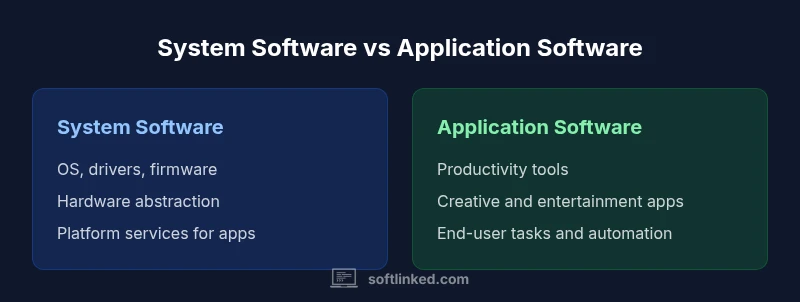
The question what is system software vs application software captures a fundamental division in computer architecture. System software includes the operating system, device drivers, bootloaders, and firmware—software that runs with minimal user intervention and provides a stable foundation for all other programs. Application software, by contrast, comprises programs designed for end users to accomplish concrete tasks—documents, spreadsheets, media editors, web browsers, games, and more. The distinction is important for developers and students who are learning how software stacks are organized. The SoftLinked team emphasizes that while the boundary is conceptually clear, real-world systems often blur lines with middleware, runtime environments, or platform services that straddle both layers. In practice, what is system software vs application software is best understood as a layered model where system software provides services, resources, and a stable platform on which application software can reliably operate.
Core roles and responsibilities
System software is responsible for core tasks such as resource management, process scheduling, memory management, device I/O, and security controls. It abstracts hardware specifics so applications don’t need to manage complex hardware details directly. This layer also includes firmware and bootstrapping processes that initialize hardware on power-up. Application software, in contrast, focuses on user-centric goals: productivity, communication, entertainment, data analysis, or creative work. Applications rely on the services provided by system software (like memory allocation, I/O abstractions, and security policies) to function across different hardware platforms. The separation promotes modularity and maintainability because improvements in the system layer can benefit all applications without modifying them individually. As SoftLinked highlights, mastering how these layers interact is essential for building scalable software systems.
How they interact: APIs, system calls, and drivers
Interaction between system software and application software occurs through well-defined interfaces. Applications request services via APIs exposed by the operating system, such as file I/O, networking, or graphics rendering. The OS translates these requests into system calls that the kernel handles, coordinating with drivers to access hardware components like disks, GPUs, or network adapters. Device drivers act as translators between the OS and hardware, ensuring compatibility across devices. Middleware and runtime environments further bridge gaps, offering higher-level abstractions (for example, a Java Virtual Machine or .NET runtime) that enable applications to run consistently on diverse hardware. Understanding how system calls, APIs, and drivers map to hardware helps explain performance differences, portability, and security implications across platforms.
Common examples and edge cases
Common system software examples include Windows, macOS, Linux, and embedded firmware in consumer electronics. These systems provide core services such as process management, file systems, and hardware abstraction. Typical application software includes word processors, web browsers, email clients, games, and media players. Edge cases arise when a piece of software straddles the line: for instance, a web browser is an application, but it relies heavily on system software services to render pages, manage networks, and access hardware features. Runtimes (like Node.js) and platforms (like Android or iOS) can feel like hybrids, because they provide both application environments and system-like services. In short, what is system software vs application software matters most when you consider dependencies, maintenance, and cross-device compatibility.
Performance, security, and maintenance considerations
System software updates (including firmware) have broad impact and are often delivered through device manufacturers or OS vendors. They address stability, security, and compatibility across the entire platform. Application software updates can be more frequent and user-driven, focusing on new features, bug fixes, and interface improvements. Security considerations differ: the system layer enforces access controls and isolation, while applications implement user-level permissions and data handling practices. Maintenance involves patch management, version compatibility, and regression testing to ensure that updates in the system layer do not inadvertently break applications. A solid understanding of these factors helps engineers design resilient software stacks and reduces the risk of cascading failures across layers.
Middleware, runtimes, and platform ecosystems
Modern computing increasingly relies on middleware and runtimes that blur the traditional boundary. Technologies like Java Virtual Machine, .NET CLR, and various runtime environments provide portable execution models that sit between system software and application software. Containers, virtualization, and cloud platforms further redefine the landscape by offering abstracted environments where applications run with controlled access to underlying resources. For developers, this means recognizing when to optimize at the system level (for performance, security, and hardware utilization) versus focusing on application features and user experience. The distinction remains a practical guide for architecture decisions in both traditional desktop environments and modern cloud-native deployments.
Impact on learning paths and career decisions
For students and early-career engineers, a solid grasp of what is system software vs application software opens doors to multiple roles, including operating systems design, driver development, cloud platform engineering, and software architecture. Courses in operating systems, computer organization, and software engineering emphasize the separation of concerns and the contract between layers. Practical labs—building simple kernel modules, writing device drivers, or implementing a small boot sequence—ground theory in hands-on practice. As you study, remember that both layers rely on a strong understanding of data structures, algorithms, and programming fundamentals. This foundational knowledge positions you to contribute to robust, scalable software systems.
Study tips, resources, and pragmatic guidance
- Start with a solid OS concept book or course (look for material on process management, memory, and I/O).
- Build small projects that highlight layer interactions, such as a simple user-space program that performs file I/O and communicates with a mock driver.
- Practice reading and analyzing system calls, API surfaces, and error handling patterns.
- Explore real-world platform ecosystems (Linux distributions, Windows APIs, Android framework) to see how system software and applications co-evolve.
- Leverage reputable resources like university course materials and well-known reference texts. A practical approach combines theory with hands-on experimentation and peer discussion.
Authority sources and further reading
- What is software? Britannica: https://www.britannica.com/topic/software
- Operating systems engineering (MIT OCW): https://ocw.mit.edu/courses/electrical-engineering-and-computer-science/6-828-operating-systems-engineering-fall-2012/
- Software and standards overview (NIST): https://www.nist.gov
Comparison
| Feature | System Software | Application Software |
|---|---|---|
| Definition | Foundational software that manages hardware and provides platform services | Programs designed to help users perform tasks or activities |
| Typical components | Operating systems, device drivers, firmware | Word processors, web browsers, media players, games |
| Interaction with hardware | Direct interface via drivers and kernel services | Relies on system services to access hardware |
| Update frequency | Platform-wide updates, security patches, firmware upgrades | App updates via app stores or installers |
| Examples | Windows, Linux, macOS, embedded OS | Microsoft Word, Chrome, VLC, Adobe Photoshop |
| License & distribution | Often bundled with devices or distributed with the OS | Typically downloaded or bought from vendors or app stores |
| Best for | Foundational stability, hardware support, security | Productivity, creativity, entertainment |
Pros
- Clarifies responsibilities across software layers
- Promotes modular, maintainable design
- Improves portability by standardizing interfaces
- Enables centralized security and governance
- Supports system-wide optimizations that benefit all apps
Weaknesses
- Can create rigidity if interfaces are not well designed
- Middleware and platforms can blur the line, causing ambiguity
- App-level performance may be constrained by system decisions
System software underpins every application; applications rely on it for functionality.
Focus on the layered model to design robust software stacks. Prioritize stable system services to ensure consistent app performance across devices and platforms.
Your Questions Answered
What counts as system software?
System software refers to the foundational software that manages hardware and provides services to other software. This includes operating systems, drivers, and firmware that enable a computer to function. Applications sit on top of this layer and use its services.
System software is the foundation—think OS, drivers, and firmware. Applications run on top of it and use the services the system provides.
Is a browser considered system software or application software?
A browser is generally considered application software because its purpose is to help users perform tasks (browsing). It relies on system software for resources like networking and file access.
Browsers are applications. They run on the system software layer and use its services.
Can firmware be considered system software?
Yes. Firmware lives in hardware and provides low-level control, fitting within the broader scope of system software. It is part of the software that enables hardware operation.
Firmware is typically treated as part of system software because it controls hardware directly.
How do middleware and runtimes fit the system vs app distinction?
Middleware and runtimes occupy an intermediate layer that facilitates cross-platform execution and services. They blur the line by providing environments where applications run, yet they rely on system software for core functions.
Middleware sits between apps and the OS, offering portable environments.
How do updates affect compatibility across devices?
System updates aim for broad stability and security, while app updates may be targeted to specific features or platforms. Compatibility must be tested across OS versions and hardware to prevent regression.
Keep both system and app updates in check to maintain compatibility.
What about mobile operating systems and app ecosystems?
Mobile OSes provide the system software layer for smartphones, and the app ecosystem consists of mobile applications built on those services. The distinction remains the same, though the platforms are tightly integrated.
Mobile OS is system software; apps run on top of it.
Where should a learner start to master these concepts?
Begin with fundamentals of computer organization and operating systems. Practical labs that implement simple system components alongside basic applications help connect theory with practice.
Start with OS basics and hands-on labs to connect theory with practice.
Do operating systems blur the line with built-in apps?
Some built-in applications are tightly integrated with the OS, which can blur the line. However, the OS remains system software, while these apps are still end-user products.
Built-in apps may blur the line, but the OS is system software.
Top Takeaways
- Grasp the layered software model: system vs application
- Apps depend on system software for services and security
- Middleware can blur boundaries; consider platform effects
- Study OS concepts to improve software architecture decisions
- Apply practical labs to link theory with real systems