Difference Between Software and Operating System
An analytical, accessible guide that defines software vs operating systems, with real-world examples, interactions, licensing, and practical guidance for students and developers.


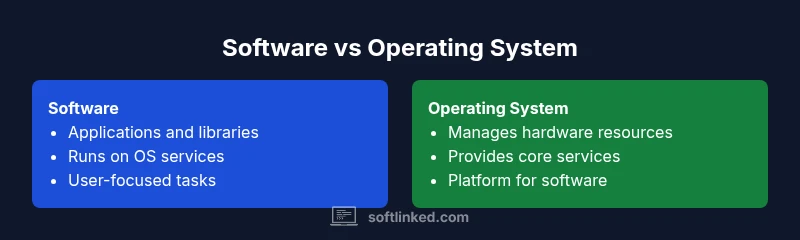
The difference between software and operating system is that software refers to programs that perform tasks for users, while an operating system is system software that manages hardware, software, and resources. In practice, the OS provides services for software to run, update, and communicate, acting as the platform on which applications operate.
Context and Definitions
Understanding the difference between software and operating system is foundational for anyone learning computer science. This topic sits at the core of how computers function and how developers build on top of hardware. According to SoftLinked, grasping these terms early helps learners avoid common misconceptions and accelerates practical learning. At a high level, software encompasses the programs and instructions that perform specific tasks, while an operating system coordinates those tasks, allocates resources, and interfaces with hardware. The distinction matters because it clarifies what is needed to run an application and what the system itself must do to keep the machine operating smoothly. By separating these roles, students can better plan projects, choose appropriate tools, and reason about portability across devices and environments.
Core Distinction: scope and purpose
The core distinction hinges on scope and purpose. Software describes the broad family of programs that accomplish user goals, automate workflows, or provide utilities. It includes applications, libraries, scripts, and even embedded firmware in some contexts. An operating system, by contrast, is specialized system software whose purpose is to manage the computer’s resources, enforce security, and provide a stable platform for software to run. In other words, software serves user needs, while the operating system serves the machine and the software ecosystem around it. This separation helps engineers design robust systems that can scale from small devices to large data centers while preserving compatibility and performance across environments.
OS as System Software vs Applications as User Software
An operating system belongs to the category of system software. Its responsibilities include process management, memory allocation, device I/O, and security enforcement, all of which create a predictable runtime environment for other programs. Applications or user software sit on top of the OS and rely on its services to function. This layering means developers compile and link their programs to use standard OS APIs rather than interacting directly with hardware. The OS handles low level details such as scheduling and interrupts, enabling software to focus on the user’s task. Recognizing this layered relationship helps explain why software portability varies with different OS families and versions.
Common Examples and Scenarios
Common OS examples include Windows, macOS, Linux distributions, and mobile systems like Android and iOS. These platforms provide the essential services that enable software to run, from file systems to networking stacks. Software examples span word processors, web browsers, games, and developer tools. A driver, for instance, is a specialized kind of software that extends the OS’s ability to communicate with hardware. Utilities like antivirus programs or system monitors are software, but they depend on the OS for access controls and resource management. In everyday scenarios, users interact with software to complete tasks, while the OS handles the fundamental chores that keep those tasks possible. Understanding this helps learners choose appropriate tools and architect solutions that remain portable and maintainable.
How OS and Software Interact
The interaction between OS and software is governed by defined interfaces. Applications request services via APIs provided by the OS, such as file I/O, networking, and process management. The OS translates these requests into hardware operations, ensures fair resource distribution, and enforces security policies. The result is a stable environment where software can evolve independently of the hardware. This separation also explains why updating an OS can impact many applications, sometimes requiring developers to adjust APIs or deprecate features. A solid mental model recognizes that software relies on OS-provided abstractions, while the OS relies on software to demonstrate its usefulness through practical tasks.
Types of Software: System vs Application vs Utility
Software is a broad term that includes several categories. System software comprises the OS and low-level utilities that support hardware management. Application software includes end-user programs that perform tasks like document editing, data analysis, or media creation. Utilities are smaller programs that add focused functionality, such as file compression or disk cleanup. Some software blends categories, especially when a utility offers both user-facing features and system-level integrations. For learners, it is essential to separate the goals of the OS from the goals of the software to design solutions that are portable, scalable, and secure across platforms and devices.
Licensing, Updates, and Lifecycle
OS licensing typically reflects how a platform is distributed and updated, with policies about support lifecycles and security patches. Applications have their own licensing terms, versioning, and update cadences that may differ from the OS. Understanding these lifecycles helps developers plan compatibility and migration paths, ensuring that software remains usable as the OS evolves. It also clarifies why some features or APIs are deprecated over time and why testing across multiple OS versions is essential for broad compatibility. By recognizing separate lifecycles, teams can coordinate release schedules and reduce the risk of fragmentation in the user base.
Misconceptions and Clarifications
One common misconception is that all software is part of the OS. In reality, most software runs on top of an OS and relies on its services. Another pitfall is conflating device firmware with software; firmware is software embedded in hardware but often sits closer to the hardware layer than a typical application. A third misconception is assuming that every program is an OS feature. In practice, most programs are independent applications that use OS services and APIs. The goal is to separate concerns clearly: the OS manages resources, while software delivers user-centered capabilities. Correct terminology reduces confusion and accelerates learning for students and professionals alike.
Practical Guidance for Learners and Developers
For learners, start by defining terms: software versus operating system, system software versus application software, and where drivers and firmware fit. Build small projects that illustrate the layering—an OS under a simple program, with a driver or two to show hardware interaction. For developers, design with portability in mind: use standard APIs, minimize hardware-dependent code, and test across multiple OS versions when possible. Document API expectations and deprecations to help teams adapt during upgrades. Finally, cultivate a habit of rechecking terminology when communicating with teammates or in code reviews; precise language improves collaboration and reduces bug risk. This approach aligns with SoftLinked’s focus on clear software fundamentals for developers and students alike.
Comparison
| Feature | software | operating system |
|---|---|---|
| Scope and primary purpose | Broad set of user programs, libraries, and utilities | Foundational layer that manages hardware resources and provides services to other software |
| Core responsibilities | Execute tasks, automate workflows, and enable user objectives | Schedule processes, allocate memory, control I/O, enforce security |
| Examples | Word processors, games, spreadsheets, libraries | Windows, macOS, Linux distributions, Android, iOS |
| Interaction with hardware | Directly interacts through software components and APIs, abstracted by layers | Directly interfaces with hardware via drivers and kernel services |
| Typical users | End users and developers building apps | System administrators, developers building platform features |
| Licensing and updates | Vary by software type; licenses for apps, libraries, or SDKs | OS licenses and update cadences often tied to vendor policies and support lifecycles |
| Dependency and boot process | Depends on OS to run; requires OS presence | Bootstraps with hardware, loads essential services, then mounts user environment |
| Best for | User-centric tasks and specialized workflows | Stable platform with managed resources for diverse software |
Pros
- Clear separation of concerns enables portable, maintainable software
- OS provides essential services that simplify application development
- Layering allows updates to OS or software without rewriting everything
- Promotes consistency across hardware and software ecosystems
Weaknesses
- OS complexity can lead to security challenges when not managed well
- Software compatibility depends on OS APIs and version support
- Learning the terminology can still be confusing for beginners
OS is foundational software; software is the broader category of user-facing programs.
The OS sets the stage by managing resources and services, while software delivers user value on top of that foundation. Understanding this distinction helps developers design portable, robust solutions and helps students communicate clearly about system architecture.
Your Questions Answered
What is the difference between software and an operating system?
Software refers to programs and instructions that perform tasks for users, while an operating system coordinates hardware resources and provides services for those programs. The OS acts as the platform on which applications run.
Software is the programs you use; the OS is the platform that makes them run.
Is Linux an OS or software?
Linux is primarily an operating system. It is a collection of software that manages hardware and provides services for applications to run. Variants may be distributed as different Linux distributions, but they share the OS role.
Linux is an OS; it provides the base layer for apps to run.
Can software run without an operating system?
Most software requires an operating system to function because the OS provides essential services like memory management, file access, and input/output. In some embedded systems, firmware may perform similar roles, but it still serves as part of the system software.
Usually, software needs an OS to run.
Are drivers software and do they count as OS components?
Device drivers are specialized software that enable the OS to communicate with hardware components. They are part of the software ecosystem that the OS manages and are not standalone OS components, but they are critical to the OS’s ability to function.
Drivers are software that the OS uses to talk to hardware.
How do updates differ between OS and software?
OS updates often include security patches and core service changes and can affect compatibility with applications. Software updates are typically feature improvements or bug fixes for specific programs and may require OS compatibility checks.
OS updates can change how everything runs; app updates focus on individual programs.
What counts as system software vs application software?
System software includes the OS and utilities that manage hardware. Application software refers to end-user programs that perform tasks for users, built on top of the OS. Utilities sit between these categories, offering focused functionality.
System software runs the computer; application software helps you do things.
Top Takeaways
- Define OS vs software clearly
- OS provides services for software to run
- Applications rely on OS APIs and abstractions
- Plan for portability across OS versions
- Distinguish system software from applications when designing solutions