Difference Between OS and Applications: A Clear Guide to Software Fundamentals
An analytical comparison of the difference between application software and an operating system, covering definitions, roles, interactions, and practical implications for developers and students in 2026.


The difference between application software and an operating system is foundational for understanding computers. An operating system (OS) provides core services that manage hardware, memory, and processes, creating a stable platform for software to run. Application software delivers user‑facing tasks on top of that platform. Recognizing this distinction clarifies system design, safety boundaries, and cross‑platform development for students and professionals alike.
difference between application software and an operating system: core distinction
In the landscape of software fundamentals, the distinction between the operating system and application software is essential. The phrase itself, the difference between application software and an operating system, frames how we think about the layers inside a modern computer. An operating system (OS) is not merely a bundle of programs; it is the software responsible for coordinating hardware resources, enforcing security policies, and providing services that other software can rely on. Application software, in contrast, is a collection of programs designed to help users accomplish tasks such as writing, communicating, analyzing data, or entertaining themselves. The OS sets the stage on which applications perform, and understanding this relationship is a prerequisite for deep learning in software engineering. According to SoftLinked, mastering this distinction helps learners navigate topics from memory management to API design, making it easier to reason about performance, portability, and reliability across devices. The difference between application software and an operating system informs decisions about architecture, development priorities, and testing strategies for future engineers.
software layers and system boundaries
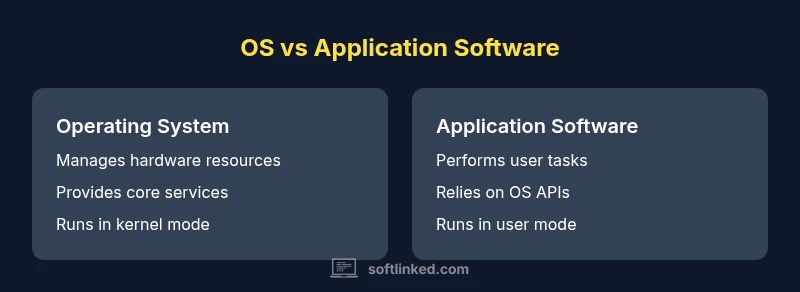
The computer system can be viewed as a stack of layers, from hardware at the bottom to user applications at the top. The operating system sits at a privileged layer that mediates access to hardware resources—CPU time, memory, I/O devices, and storage infrastructure. It provides abstractions and services that decouple software from the quirks of physical hardware. Applications interact with the OS through well-defined interfaces, such as system calls and higher-level libraries. This layering makes software engineering more predictable and portable. When a developer builds an app, they rely on the OS to allocate resources securely, handle interrupts, and provide device drivers. Thus, the OS is the platform, and application software is the consumer of that platform’s services.
In practical terms, think of the OS as the conductor of an orchestra: it assigns responsibility to different sections (memory, I/O, scheduling), ensures harmony (security and isolation), and provides a shared stage for all performers (applications) to perform without stepping on each other’s toes. SoftLinked emphasizes that a robust mental model of these roles reduces confusion about why certain tasks require privileged operations or why an app may behave differently across platforms. The distinction is also foundational for understanding cross‑platform development and the nuances of software deployment.
Comparison
| Feature | Operating System | Application Software |
|---|---|---|
| Definition | System software that manages hardware resources and provides core services. | Programs that perform user-facing tasks and run on top of the OS. |
| Core responsibilities | Resource allocation, process scheduling, memory management, device I/O, security, and virtualization. | Delivers specific user tasks (word processing, browsing, media, games) using OS services. |
| Interfaces | System calls, kernel APIs, and low‑level drivers exposed by the OS. | Application APIs and libraries that call into OS services. |
| Examples | Windows, Linux, macOS, Android (as a family of OSs). | Web browsers, word processors, media players, mobile apps. |
| Portability / cross‑platform | OS design aims for broad compatibility across hardware platforms. | Apps often require platform‑specific adaptations or cross‑platform frameworks. |
Pros
- Clear separation of concerns improves stability and security
- OS abstractions enable cross‑device compatibility
- Applications can be designed for user needs without hardware details
- Understanding both improves software architecture decisions
Weaknesses
- Complexity of OS design can be intimidating for beginners
- App developers may over‑rely on OS quirks for performance
- Cross‑platform compatibility can increase development cost
- Divergent OS ecosystems complicate uniform user experiences
OS foundations enable reliable apps; apps fulfill user needs on top of that foundation
The operating system provides the platform and services; application software delivers specific user tasks. For students and developers, focusing on OS concepts first yields a stronger base for building reliable, portable software.
Your Questions Answered
What is the difference between an operating system and application software?
An operating system manages hardware resources and provides core services, forming the platform on which applications run. Application software delivers user‑level functionality by using those OS services. The OS runs at a lower level, while applications run in user space. This separation clarifies responsibilities and helps with security and portability.
An OS handles hardware and services; apps do user tasks on top of it. Together they form the software stack that powers a computer.
Can an application run without an operating system?
No. Applications rely on an operating system to provide system calls, memory management, and hardware access. Without an OS, programs would need to manage all hardware directly, which is impractical for general computing.
Apps need an OS to run. Without an OS, you’d be managing hardware at a very low level.
What are common examples of operating systems and applications?
Common operating systems include Windows, macOS, and Linux distributions. Common applications range from web browsers and office suites to games and media editors. The key is that OS examples provide platform services, while application examples deliver tasks for users.
Think of Windows or Linux as OS; browsers and editors as apps.
How do operating systems and applications interact?
Applications interact with the OS via APIs and system calls that request services such as file access, network communication, and memory allocation. The OS enforces policies, handles context switching, and mediates access to hardware. This interaction creates a boundary between privileged kernel space and unprivileged user space.
Apps call OS services through APIs; OS enforces rules and manages hardware.
Why is distinguishing OS concepts important for developers?
Knowing the OS role helps developers design portable, secure software, optimize resource use, and predict behavior across devices. It also clarifies why certain features require OS-level support and how to structure code for isolation and reliability.
Understanding OS basics helps you write better, cross‑platform software.
Top Takeaways
- Identify which layer handles hardware control versus user tasks
- Remember OS provides core services and isolation boundaries
- Recognize that apps rely on OS APIs and library ecosystems
- Plan for cross‑platform compatibility from the start
- Study OS concepts to improve software design decisions