Difference Between Software and a System
This article explains how software differs from a system, with clear definitions, examples, and guidance for students and professionals studying software fundamentals.


Understanding the difference between software and a system clarifies how projects are designed and maintained. In short, software refers to the set of programs and data that run on hardware, while a system is the broader assembly of software, hardware, people, and processes that delivers a complete capability. This distinction drives architecture, development, and operations decisions.
Defining software and a system
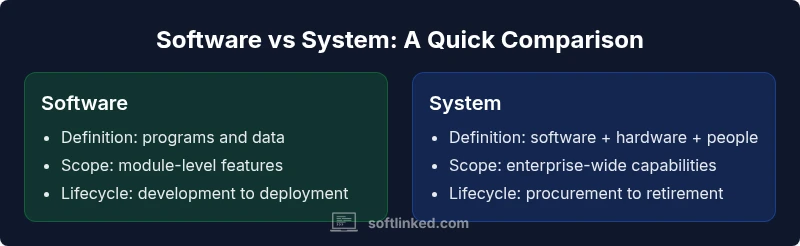
In everyday tech talk, people often use software and system interchangeably, but the difference matters for learning and building real-world solutions. According to SoftLinked, software is best understood as the collection of programs, data, and instructions that run on hardware to perform specific tasks. A system, by contrast, is a larger composition that includes software, hardware, people, and processes that together deliver a broader capability. This framing helps students and professionals distinguish what is being built (the code and data) from how it integrates within a larger environment (the machines, people roles, and operational duties). The keyword difference between software and a system is about scope: software is typically narrower in function, while a system is a complete operational entity. Recognizing this distinction early in a course or project prevents scope creep and clarifies responsibilities across teams. The SoftLinked team emphasizes that mastering both concepts—software fundamentals and system thinking—empowers engineers to design more robust, maintainable solutions.
Core components: software vs system
Software and system thinking overlap, yet they live at different levels of abstraction. Software comprises the code, data structures, libraries, and configurations that run on hardware. It is evaluated for correctness, performance, and maintainability within a defined boundary. A system, however, is the holistic environment that enables those software pieces to function in the real world. It includes hardware infrastructure, network connectivity, human roles (operators, administrators, end users), and organizational processes (change management, incident response). When you analyze a project, you should first identify the software artifacts and then map how they fit into a larger system context. This layered view helps teams avoid accidental coupling, ensures compatibility across subsystems, and clarifies ownership. In practice, software is the engine; the system is the vehicle that carries that engine to users and stakeholders.
Stakeholders and user interactions
Software teams usually interact primarily with developers, testers, and end users who directly use the software. System stakeholders, by contrast, include IT operations, security teams, business owners, and external partners who influence deployment, governance, and integration. Understanding who cares about what aspect of the product helps prioritize requirements and design decisions. For example, a software component may optimize a single function, while the system as a whole must consider reliability, uptime, regulatory compliance, and cross-domain interfaces. Clear communication channels, well-defined service level objectives, and explicit interface contracts reduce miscommunication between software and system teams. SoftLinked emphasizes aligning expectations across disciplines so that software quality translates into system-level performance.
Lifecycle perspectives: development, deployment, maintenance
Software lifecycles focus on feature development, code quality, testing, and deployment pipelines. System lifecycles extend beyond code to hardware refresh cycles, network upgrades, and process governance. When you build a system, you must coordinate multiple lifecycles: software releases, hardware procurement, network configuration, and operations manuals. This coordination affects risk management, budgeting, and governance. A practical approach is to treat the system as a set of interdependent subsystems with clear handoffs: development hands off to integration, which hands off to operations. Adopting platform-agnostic design principles and modular architectures makes it easier to evolve software without breaking system integrity. The SoftLinked view encourages students to study both lifecycles in tandem to anticipate dependencies and reduce friction during deployment.
Scope and complexity: size, boundaries
Software projects vary in scope from small utilities to large-scale libraries. Systems scale even further when you include hardware, networks, and organizations. Boundaries matter: narrow software scopes are easier to optimize for performance and quality, while broad system scopes demand robust interfaces, governance, and cross-team coordination. Mastery comes from learning how to partition concerns, define clear boundaries, and manage the interfaces between software modules and system components. This discipline reduces overlap, prevents feature creep, and improves maintainability as teams grow. The SoftLinked guidance is to start with a minimum viable system (MVS) that demonstrates core functionality and then incrementally add subsystems, ensuring each addition preserves overall integrity.
Practical examples across domains
In consumer software, a mobile app is software that relies on a backend system, cloud services, and network infrastructure to deliver value. In enterprise contexts, an ERP system combines many software modules with hardware, database servers, and user roles to support business processes. Embedded systems in automotive or medical devices illustrate the tight coupling between software and hardware, where real-time constraints and safety standards govern both code and hardware choices. Cloud-native systems illustrate the architectural shift from monolithic software to distributed subsystems that communicate via APIs. By examining these examples, learners see how software artifacts map to system-level outcomes. This cross-domain view reinforces the distinction and highlights how decisions at the software layer ripple through the entire system.
Common misconceptions and myths
One common myth is that software equals a system simply because software runs on hardware. In reality, a system encompasses governance, people, processes, and integration points that enable a sustained capability. Another misconception is that all software must be deployed as a standalone product; many successful deployments involve complex system architectures with multiple software components sharing data and services. A frequent source of confusion is conflating programming language choice with architectural quality. Language choices matter, but system architecture, interfaces, and deployment topology usually have a larger impact on scalability and reliability. By dispelling these myths, learners can adopt a more accurate, systems-thinking mindset and design software that plays well within the broader system context.
Modeling approaches and diagrams
Modeling is essential to bridge software and system thinking. UML diagrams, flowcharts, and architectural views help teams visualize interfaces, data flows, and responsibilities. An effective model distinguishes between the software boundary (modules, services, APIs) and the system boundary (hardware, networks, people, processes). Layered diagrams expose how software services depend on underlying infrastructure, while deployment diagrams show where components live geographically or within a cloud environment. Standards like architectural viewpoints and interface specifications improve consistency across teams. The key is to maintain a living model that evolves with the project and remains aligned with both software quality goals and system-level requirements.
Education and career implications for learners
For students, studying software fundamentals alongside system thinking unlocks a richer understanding of how technology enables business outcomes. Courses that pair data structures and algorithms with system design, IT operations, and security prepare learners for real-world responsibilities. Practical labs should include both coding tasks and integration challenges that require coordinating across hardware, networks, and people. Building portfolios that demonstrate how software artifacts fit inside larger systems strengthens employment prospects in software engineering, systems architecture, and DevOps roles. The SoftLinked approach is to emphasize iterative learning: master a software concept, then explore how it behaves within a broader system context.
Intersections with hardware, networks, and operations
Software does not exist in a vacuum. It interacts with hardware constraints, network latency, storage, security, and human operators. System thinking requires designing for these realities: fault tolerance, monitoring, incident response, and governance. When students learn to map software components to hardware capabilities and network topologies, they gain practical skills that reduce integration risk. This intersection is also where non-functional requirements—security, reliability, and performance—become visible and enforceable at the system level. By acknowledging these connections early, engineers can build more resilient software that thrives within its surrounding system.
Emerging trends and how to study the difference
The rise of microservices, event-driven architectures, and cloud-native ecosystems further blurs the line between software and system, yet the distinction remains meaningful. System thinking helps teams manage distributed services, data consistency, and cross-functional governance. For learners, a practical study plan includes mapping a small project to both software components and system interfaces, then expanding to multi-region deployments and security constraints. Reading case studies, watching architecture walkthroughs, and building hands-on labs with real-world constraints reinforce the difference. The SoftLinked perspective emphasizes continuous learning: every new technology should be evaluated for its impact on both software quality and system integrity.
Practical next steps for students and engineers
To internalize the difference, start by listing project goals and mapping them to software modules, hardware needs, and human roles. Create interface contracts for each module and define non-functional requirements at the system level. Practice diagrams that show both software boundaries and system boundaries, and review them with peers from different disciplines. Finally, track a sample project from concept to operation, noting how software decisions affect system performance, maintenance, and governance. This disciplined approach builds fluency in both domains and prepares you for senior roles in software engineering, systems architecture, and DevOps.
Comparison
| Feature | Software | System |
|---|---|---|
| Definition | A set of programs and data that run on hardware | A broader integration of software, hardware, people, and processes that delivers a capability |
| Scope | Narrow, program-centric functionality | Broad, cross-domain scope spanning teams and functions |
| Components | Code, data, libraries, configurations | Hardware, software, people, processes, interfaces |
| Lifecycle focus | Development, testing, deployment of software | Procurement, deployment, operations, governance across the system |
| Users/Stakeholders | Developers, testers, end users | IT ops, security, business owners, partners |
| Examples | Web apps, mobile apps, libraries | Enterprise systems, embedded devices, cloud platforms |
Pros
- Clarifies responsibilities and ownership across teams
- Improves alignment between coding and operational goals
- Supports better risk management through explicit interfaces
- Facilitates modular design and easier maintenance
Weaknesses
- Can slow decision-making due to governance and interfaces
- Requires additional modeling and documentation effort
- May demand cross-functional skills not present in all teams
Software and systems are distinct but deeply intertwined; treat them separately in design to avoid scope creep.
A solid practice is to define software modules first, then map them into the broader system context. This helps ensure architectural integrity and smoother collaboration across teams.
Your Questions Answered
What is the primary difference between software and a system?
The primary difference is scope: software is the code and data that run on hardware, while a system includes software, hardware, people, and processes working together to deliver a complete capability.
Software is the code; a system adds hardware and people to deliver the full capability.
Can software exist without a system?
Yes, software can exist as standalone programs, but most useful software becomes part of a system when deployed for real-world tasks.
Yes, it can run alone, but usually it’s part of a larger system.
Is an embedded system software?
An embedded system includes both software and hardware designed for a dedicated function. The software is a component, but the system also includes hardware and integration with real-world inputs.
Yes, embedded systems contain software, but they are systems, not just software.
Why does this distinction matter in software engineering?
Different goals and constraints apply: software design focuses on functionality, maintainability, and performance of code, while system design concerns interoperability, hardware constraints, and organizational processes.
It affects architecture, project planning, and team responsibilities.
How should students study for exams on software vs system?
Study by mapping real projects to software vs system layers, practice diagrams, and read case studies that show where software interfaces with hardware and people.
Map projects to software layers and system layers; use diagrams.
What are common challenges when moving from software to system thinking?
Challenges include managing cross-team communication, scope creep, and coordinating hardware, operators, and processes. Use architecture views, interfaces, and governance to align stakeholders.
Expect cross-team dependencies and governance needs.
Top Takeaways
- Define software scope clearly before addressing system context
- Map interfaces between software modules and system components
- Use layered diagrams to visualize software and system boundaries
- Coordinate across teams with governance and interface contracts
- Adopt modular design to manage complexity across software and system