Is Software the Same as Hardware? A Practical Comparison
Explore whether software and hardware are the same, with clear definitions, real-world context, and guidance on how to distinguish and balance them in system design and project planning.


The quick answer: Software and hardware are not the same. Hardware refers to the physical components you can touch, while software is a set of instructions that runs on those components. They are deeply linked—software relies on hardware to execute, and hardware enables software capabilities. Understanding this distinction shapes design decisions, budgeting, and lifecycle management in technology projects.
Core Question: Are software and hardware the same?
The persistent question in learning and building tech is whether software and hardware are the same. The simplest answer is no: hardware refers to the tangible components you can touch, measure, and upgrade, while software is a set of instructions that runs on those components. Yet the relationship is intimate. Software depends on hardware to function, and hardware gains value only when software harnesses its capabilities. For students and professionals, distinguishing these roles clarifies project scoping, budgeting, and risk management. In the sections that follow, we define both terms, trace how they evolved, and examine real world scenarios where the boundary between them matters, from mundane devices to complex distributed systems.
History and Evolution of the Terms
The terms hardware and software emerged as computing matured and expanded beyond a single machine. Hardware described the physical circuits, memory, and peripherals, while software referred to the programs that used those resources. Over time, new layers appeared—firmware, operating systems, drivers, and middleware—creating a stack where software can be portable across hardware platforms and hardware can be abstracted behind software interfaces. This evolution shaped how products are designed, tested, and maintained, and it remains central to how teams estimate effort and allocate resources. Understanding these layers helps engineers communicate effectively with product managers and customers, translating abstract needs into concrete specifications for both software and hardware components.
How Software and Hardware Interact
Software and hardware interact through well-defined interfaces and execution cycles. At runtime, hardware provides CPU cycles, memory, storage, and I/O channels; software issues instructions, manages data, and coordinates devices through drivers and system APIs. Abstraction layers—from firmware to operating systems to application code—allow developers to write portable software while still leveraging hardware capabilities. When performance, reliability, or security matters, engineers optimize across both domains: software optimizations can reduce hardware demands, and smarter hardware designs can unlock new software capabilities. The dance between software and hardware is ongoing and iterative, shaped by user needs, available technologies, and engineering trade-offs.
The Boundary: Firmware, Embedded Systems, and Co-Design
Firmware sits at the border between software and hardware, providing low-level control that is tightly coupled to specific components. Embedded systems illustrate how hardware constraints shape software design: limited memory, fixed I/O capabilities, and energy budgets influence architecture, data representation, and algorithms. In modern projects, co-design—bringing hardware and software teams together from the outset—helps teams evaluate trade-offs early. This approach reduces integration risk, accelerates delivery, and yields more robust systems, especially in domains like automotive, consumer electronics, and industrial automation where hardware changes are expensive.
Common Misconceptions and Edge Cases
A frequent misconception is that firmware is merely “hardware.” In reality, firmware is software that runs directly on hardware and often updates to alter hardware behavior. The line between software and hardware blurs in programmable hardware (FPGAs, programmable SoCs) and with hardware acceleration, where software can reconfigure hardware resources at runtime. Drivers, middleware, and APIs further blur the boundary by enabling software to control hardware in abstracted ways. Recognizing these edge cases helps teams avoid over-simplified planning and flawed expectations.
Practical Implications for Projects and Teams
For project planning, clearly separating software and hardware responsibilities improves scoping and budgeting. Architecture diagrams, interfaces, and dependency maps prevent scope creep. When procurement is involved, understand how firmware updates, driver compatibility, and hardware refresh cycles impact software lifecycles. Cross-functional teams should align on performance targets, test strategies, and upgrade paths. A healthy practice is to model scenarios where software changes stress hardware limits, or where hardware constraints necessitate software refactoring. This balance is central to sustainable product development and reliable systems.
How to Assess Requirements: Do You Need More Hardware or More Software?
Begin with user needs and performance targets. Ask: Can the problem be solved with improved algorithms or software design, or do we need more processing power, memory, or specialized hardware accelerators? Create a simple decision checklist:
- Define functional vs. non-functional requirements (speed, latency, reliability).
- Map requirements to either software improvements or hardware capabilities.
- Evaluate budget, time constraints, and upgrade paths.
- Consider cloud, virtualization, or remote resources as a way to shift workload away from local hardware.
- Plan for testing across both domains, including hardware-software co-simulation when possible. This method helps teams avoid false dichotomies and makes decisions that reflect actual system needs.
Real-World Scenarios: From PCs to Embedded Systems
In personal computing, software handles user interfaces, productivity tools, and services, while hardware provides CPU, memory, storage, and peripherals. Mobile devices showcase tight hardware-software integration: an apps ecosystem relies on the SoC design and power management strategies. Embedded devices, such as smart thermostats or industrial sensors, demonstrate how software must respect hardware constraints like memory limits and real-time responses. In both cases, improvements in software can extend the usefulness of existing hardware, while new hardware can unlock capabilities that were previously impractical or impossible.
Clear Distinctions You Can Apply
- Define a shared glossary: hardware components (CPU, memory, storage) vs. software components (apps, OS, firmware).
- Use interface contracts to separate concerns, ensuring software can operate across different hardware platforms when feasible.
- Plan for updates in both domains, recognizing that hardware refresh cycles influence software maintenance and vice versa.
- Communicate early about constraints and risks to avoid assumptions about what a given component can or cannot do.
- Track ownership and lifecycle: hardware procurement, software development, and firmware updates each have distinct cadences.
Comparison
| Feature | Software | Hardware |
|---|---|---|
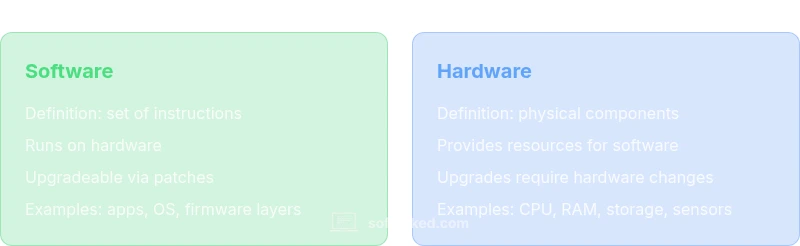
| Definition | A set of instructions and data that run on hardware | Physical components that store, process, and transfer information |
| Deployment/Installation | Installed as code on devices or delivered via services | Installed and configured as physical devices or integrated circuits |
| Lifecycle & Updates | Updated through patches, releases, and patches | Upgrades require physical changes or manufacturing cycles |
| Portability | Often portable across platforms with compatible interfaces | Portability depends on form factor and compatibility |
| Cost of Ownership | Ongoing development, maintenance, and support costs | Capital expenditure, depreciation, and potential field upgrades |
| Typical Risks | Bugs, security flaws, and compatibility issues in code | Failure, aging, and performance limits in physical devices |
| Best For | Systems design emphasizing adaptability and updates | Products requiring reliable, tangible components |
Pros
- Clarifies responsibility and budgeting for tech projects
- Encourages abstraction and modular design
- Supports portability through well-defined interfaces
- Facilitates clear lifecycle planning and maintenance
Weaknesses
- Over-simplification can obscure real overlaps (firmware, drivers)
- Modern systems blur boundaries with programmable hardware
- Hardware constraints can limit software choices and timelines
- Co-design approaches require cross-disciplinary coordination
Software and hardware are distinct yet tightly intertwined
Treat them as complementary domains. Start with clear boundaries, but plan for overlap where firmware, drivers, or programmable hardware blur the line. This approach reduces risk and supports sustainable development.
Your Questions Answered
What is the fundamental difference between software and hardware?
Hardware comprises the physical devices that comprise a system, while software is the set of instructions that run on that hardware. They depend on each other for functionality, and their lifecycles influence one another.
Hardware is the physical part; software is the code that runs on it. They rely on each other to deliver a product.
Can software run without hardware?
Not in a practical sense. Software needs hardware to execute. In simulated or virtual environments you can emulate hardware, but real execution requires physical devices or a virtualized platform that maps to hardware.
Software needs hardware to run, even in simulations you’re modeling hardware behavior.
What is firmware and how does it relate to the boundary?
Firmware is a specialized program embedded in hardware that controls low-level operations. It sits between traditional software and hardware, and updates to firmware can change how hardware behaves without changing its physical form.
Firmware sits between software and hardware, controlling hardware at a low level.
Are cloud services software or hardware?
Cloud services are primarily software delivered over the network, while the underlying hardware houses those services. They operate across both domains and depend on scalable hardware infrastructure to support software-driven workloads.
Cloud services are software, supported by hardware you access remotely.
How do drivers and middleware affect the relationship?
Drivers enable software to communicate with hardware, while middleware adds abstractions that simplify development. Both components bridge gaps between software intent and hardware capabilities.
Drivers talk to hardware; middleware adds helpful layers in between.
Is the boundary between software and hardware changing far?
Yes. Programmable hardware, real-time firmware, and hardware acceleration blur the lines. Designers increasingly consider hardware capabilities within software architectures and vice versa.
Yes, the line is getting blurrier with programmable hardware and firmware integration.
Top Takeaways
- Define hardware vs. software early in projects
- Use interface contracts to decouple concerns
- Plan for updates across both domains
- Involve cross-disciplinary teams from the start
- Expect boundary blurring in modern systems