Is Software the Same as Firmware? A Clear Comparison
Explore the key differences between software and firmware, definitions, update models, and practical implications for developers and product teams. This analytical guide distinguishes layers, update strategies, and security considerations for modern devices.


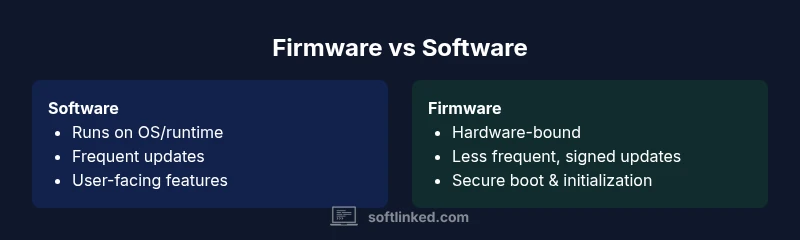
Is software the same as firmware? Not exactly. In most devices, firmware is the low-level code tightly bound to hardware, controlling boot sequences and hardware interfaces, while software runs on top of an operating system, delivering user features and applications. Understanding this distinction helps avoid misconfigurations, security gaps, and maintenance headaches as devices evolve. This distinction also guides update strategies and security baselines for developers and IT teams.
Why the Software vs Firmware Distinction Matters in Modern Tech
According to SoftLinked, understanding whether something is software or firmware is more than a bookkeeping exercise—it's a design and risk management decision. Firmware sits at the boundary between hardware and software, often residing in non-volatile memory and loaded at boot. It initializes essential peripherals, enforces trust through secure boot, and provides the smallest possible layer of control that hardware requires to operate. Software, by contrast, runs on top of a device's operating system or bare-metal runtime, delivering features, interfaces, and services to users. The practical consequence is straightforward: firmware updates tend to be less frequent, more invasive to hardware, and harder to test across configurations; software updates are more frequent, more modular, and usually easier to roll back. This distinction matters for developers crafting embedded systems, for product managers planning roadmaps, and for security teams designing patch strategies. The SoftLinked team found that teams who blur the lines between firmware and software frequently run into integration challenges, inconsistent security policies, and longer deployment cycles. By keeping these layers clearly defined, teams can improve reliability, safety, and time-to-market.
What Counts as Software
Software comprises programs and data executed by a computer or device. It includes operating systems, applications, drivers, middleware, and services that run on top of hardware or a bare-metal runtime. In embedded devices, software may manage user interfaces, connectivity stacks, and business logic, while still relying on underlying firmware for hardware control. A helpful way to think about it is software provides capabilities and user experiences, whereas firmware provides the stable, low-level control that initializes hardware and ensures predictable behavior from power-on. Software is typically updateable through ordinary channels—app stores, OS update mechanisms, or over-the-air updates—without requiring physical access to the device. Firmware updates, however, are often delivered via vendor tools, specialized interfaces, or secure boot checks, and they may require maintenance windows to implement. The boundary between the two can blur in practice when software directly touches hardware or when firmware includes parts of the software stack, for instance, in devices that replace firmware modules with software components.
What Counts as Firmware
Firmware is the non-volatile code embedded in hardware that initializes, configures, and controls essential components from the moment a device powers up. It contains bootloaders, microcode, and device-specific logic essential for hardware operation. Firmware is tightly coupled to the hardware it runs on, and its interfaces are usually defined by hardware specifications rather than user-facing APIs. Updates to firmware are less frequent and often require specific channels, signing, and rollback capabilities to avoid bricking the device. In many systems, firmware resides in ROM, flash memory, or microcontrollers, providing the foundation upon which higher levels of software operate. The line between firmware and software becomes fuzzier in modern devices—where firmware includes modular software components or where secure boot processes validate software integrity before the OS starts.
Core Differences in Scope, Updates, and Lifecycle
One primary differentiator is scope: software operates within a defined runtime or OS and can be swapped or upgraded with relative ease; firmware operates closer to the hardware and often defines boot processes and device behavior at a foundational level. Update mechanisms illustrate this gap: software updates are delivered through standard channels (app stores, OS updates, cloud services) and can be rolled back or staged with minimal risk; firmware updates rely on low-level interfaces, cryptographic signing, and sometimes physical connectivity, with a far larger risk if something goes wrong. Lifecycle considerations differ as well: software lifecycles align with product software strategy—feature releases, deprecation, and API evolution—while firmware lifecycles mirror hardware design and manufacturing constraints; some devices shipping today have firmware that cannot be updated post-sale, whereas software typically evolves rapidly across device generations. Security implications follow a similar pattern: software patches fix app-level vulnerabilities; firmware updates address core hardware control and secure boot dependencies. Developers and engineers should document which layer owns which responsibilities, plus clear procedures for testing cross-layer interactions to prevent regressions.
Practical Implications for Developers and Product Teams
From a development perspective, separating firmware and software clarifies ownership, testing, and deployment pipelines. Teams should define interfaces between layers early, using stable APIs for software-to-firmware communication and formal update channels. Testing should cover cross-layer scenarios: how a firmware change affects device drivers, how a software feature behaves on devices with varying firmware versions, and how rollback plans function in worst-case update failures. Product teams should plan roadmaps that reflect update cadence: firmware tends to be slower, with security upgrades prioritized, while software features can be released more frequently. Security strategies differ across layers: firmware keys and secure boot mechanisms require lifecycle-aware management, while software emphasizes vulnerability scanning, dependency management, and runtime protections. Finally, risk management matters: a failed firmware update could brick a device, so mitigation strategies—such as staged rollouts, fail-safe boot, and robust recovery—are essential. Glossary-style definitions and diagrams can help non-technical stakeholders understand the boundaries and the rationale behind each decision.
Common Misconceptions and Pitfalls
Many teams assume firmware and software are interchangeable terms. Others treat firmware as merely 'old software' and assume updates are simple; both assumptions lead to misaligned expectations and costly delays. A frequent pitfall is attempting to upgrade firmware using software processes that lack hardware-compatibility checks, resulting in bricked devices or inconsistent performance across models. Another misconception is that firmware updates are impossible to test; in fact, synthetic environments and hardware-in-the-loop testing can simulate update scenarios. It's also common to underinvest in secure boot, cryptographic signing, and rollback verification, creating trust gaps that attackers can exploit. Finally, product planning sometimes neglects the hardware lifecycle, assuming firmware will keep devices relevant; in reality, discontinuities between hardware design and software maintenance can yield long-term maintenance overhead and warranty implications.
When to Treat Components as Firmware vs Software in Embedded Systems
Guidelines: treat anything that directly initializes hardware, manages critical peripherals, or defines boot behavior as firmware. If a component primarily provides user-facing features, apps, or platform services on top of an OS, it belongs to software. Consider the deployment context: spaces with constrained hardware resources and strict security requirements benefit from tighter firmware boundaries; devices with frequent feature updates and evolving user interfaces rely more on software. Versioning policies should align with the nature of the change: firmware updates often require binary compatibility and surgical changes, whereas software updates can introduce new APIs and deprecate old ones with broader testing. Finally, consider regulatory requirements—industrial systems, medical devices, and automotive products often have explicit firmware update governance that must be followed.
Security Considerations: Patch Strategy and Trust
Security in firmware and software is a two-front battle. Firmware security hinges on secure boot, verified updates, cryptographic signing, and hardware-backed keys; vulnerabilities here can undermine the entire device. Software security benefits from code review, dependency management, and runtime protections, but it relies on timely patches and frequent testing. A holistic approach includes end-to-end verification, supply-chain controls, and continuous monitoring for anomalies. When designing update processes, teams should implement safe rollback paths, test for partial failures, and ensure integrity checks prevent tampering. The SoftLinked team emphasizes that a mature patch strategy must coordinate between firmware and software update channels, with clear governance, rollback plans, and cross-team incident response. In practice, this means documenting update windows, providing user-facing indicators of security states, and maintaining auditable logs that demonstrate compliance.
How Embedded Systems Affect Software Architecture
Embedded systems require software architects to account for resource constraints, real-time requirements, and hardware variability. The architecture often features a layered stack: persistent firmware at the base, a real-time operating system or minimalist runtime, and higher-level software that handles logic and user interfaces. This layering influences module boundaries, error handling, and testing strategies. Designers must consider boot sequences, memory maps, and interrupt handling as first-class concerns; changes at the firmware level can ripple into device drivers and system services. Conversely, software updates should be crafted to avoid destabilizing firmware, including careful version checks and feature flags. Adopting a contract-based approach—clearly defined interfaces and versioned APIs—helps teams evolve both layers with reduced risk. Finally, a robust simulation and hardware-in-the-loop framework can accelerate validation across firmware and software changes, improving confidence before field deployment.
Example Scenarios: Consumer Devices and Enterprise Systems
Consumer devices like smart TVs, routers, and wearables often rely on lightweight firmware coupled with feature-rich software layers. In these contexts, firmware handles connectivity stacks, boot safety, and hardware controls, while software delivers the apps and user experiences that define the product. Enterprise systems—such as industrial controllers, medical devices, or data center hardware—pose stricter governance: firmware must be auditable, updatable within strict change-control processes, and often subject to regulatory approvals. In both cases, teams should design update policies for resilience, ensure compatibility across hardware revisions, and provide clear documentation about what changes are introduced in each update. These scenarios illustrate how the software/firmware boundary shapes testing, deployment, and customer expectations across different markets.
How to Plan Updates: Versioning and Rollbacks
Versioning strategies should reflect the nature of the change and the potential risk of failure. Firmware versioning often uses hardware-compatible increments and may require signed bundles, bootloaders, and safe fallback mechanisms. Software versioning follows semantic versioning or similar schemes that support incremental improvements, feature toggles, and backward compatibility. Rollback plans are crucial for both layers, but the mechanics differ: firmware rollbacks might restore a known-good flash image, while software rollbacks can be more flexible through package managers or containerized deployments. Testing should include upgrade/downgrade paths, cross-version compatibility checks, and hardware-in-the-loop validation. Documentation should spell out compatibility guarantees, deprecation timelines, and support commitments. Finally, teams should align release calendars, risk assessments, and customer communications so updates can be delivered with confidence.
Putting It All Together: Quick Checklist for Teams
Use this checklist to ensure clear boundaries and robust update strategies across firmware and software. Define ownership and interfaces early; map each component to either firmware or software with rationale. Establish testing that covers cross-layer interactions, including hardware-in-the-loop scenarios. Implement secure boot, signing, and rollback mechanisms for firmware, and dependency management and vulnerability scanning for software. Plan release cadences that reflect the two-layer reality and communicate changes transparently to stakeholders. Maintain a living glossary that distinguishes firmware from software terms and document field experiences to improve your processes over time.
Comparison
| Feature | Software | Firmware |
|---|---|---|
| Definition | Programs and data that run on devices, often on an OS or runtime | Low-level code embedded in hardware that initializes and controls critical components |
| Update Mechanism | Delivered via standard channels (app stores, OS updates, OTA) | Delivered via vendor tools, secure channels, or hardware interfaces |
| Scope of Changes | Affects features, UI, and services | Affects boot, hardware interfaces, and foundational behavior |
| Dependency on Hardware | Depends on hardware but portable across platforms with compatible software stacks | Tightly bound to the hardware and often device-specific |
| Lifecycle | Frequent feature updates and API evolution | Hardware-centric lifecycle with strict change control |
| Security Focus | Patches for software vulnerabilities and dependencies | Secure boot, signed updates, and hardware-level protections |
| Examples | OS, applications, drivers, middleware | BIOS/UEFI, embedded controllers, microcode |
| Upgrade Risk | Typically lower risk, easier rollback | Higher risk: update failures can brick hardware |
| Testing Approach | Software-in-the-loop, virtualization, unit/UI tests | Firmware test includes hardware-in-the-loop, fault/integrity checks |
Pros
- Clarifies ownership and maintenance boundaries
- Enables targeted testing and faster software updates
- Improved security when each layer has dedicated controls
- Better risk management with layered rollback options
- Supports scalable architectures across devices
Weaknesses
- Firmware updates can be hardware-invasive and complex
- Software-only updates may miss hardware-edge cases
- Potential for misalignment between layers if interfaces drift
- Supply-chain and tooling complexity increases with dual layers
Treat firmware and software as distinct layers with explicit boundaries and coordinated security practices
A clear separation reduces risk, speeds up development cycles for software features, and strengthens security by ensuring firmware and software are updated and tested through appropriate channels. The SoftLinked team believes this approach minimizes cross-layer regressions and supports reliable product evolution.
Your Questions Answered
What is the fundamental difference between software and firmware?
Software comprises programs and data that run on devices, typically within an OS. Firmware is the low-level, hardware-bound code that initializes hardware and enforces basic operation. Both layers interact, but they serve different purposes and have distinct update paths.
Software runs at the user level, while firmware handles hardware initialization and control.
Can firmware be updated the same way as software?
Not usually. Firmware updates require specialized interfaces, signing, and sometimes physical access to avoid bricking hardware. Software updates use standard channels and are easier to test and rollback.
Firmware updates are different from software updates and often need special tools.
Why does firmware exist at all?
Firmware provides the foundational control necessary for hardware to operate and boot securely. It sits between hardware and higher-level software, enforcing hardware capabilities, safety checks, and power management.
Firmware makes hardware work reliably from power-on.
Is BIOS or UEFI firmware or software?
BIOS/UEFI are firmware interfaces that initialize hardware and load the operating system. They are not software in the traditional sense, though modern implementations include software-like features.
BIOS and UEFI are firmware that prepare the hardware before your OS starts.
How should teams plan updates for devices with both firmware and software?
Plan updates with separate cadences and testing for firmware and software, ensure cross-layer compatibility, and implement clear rollback paths. Align governance, security, and customer communications across both layers.
Coordinate updates with different cadences but shared security goals.
Can firmware be replaced entirely by software?
In some devices, functions once handled by firmware may be moved into software, but many hardware-bound tasks still require firmware. The boundary isn’t fixed and can shift with new hardware designs.
Sometimes software takes over firmware-like duties, but not in all devices.
Top Takeaways
- Define clear owner for firmware vs software
- Plan cross-layer testing and rollback strategies
- Use contract-based interfaces between layers
- Prioritize secure boot and signed updates for firmware
- Maintain documentation and governance across updates