Difference between Software and Firmware: An Analytical Comparison
An in-depth, analytical guide comparing software and firmware, their definitions, lifecycles, deployment models, security implications, and decision criteria for developers and engineers.


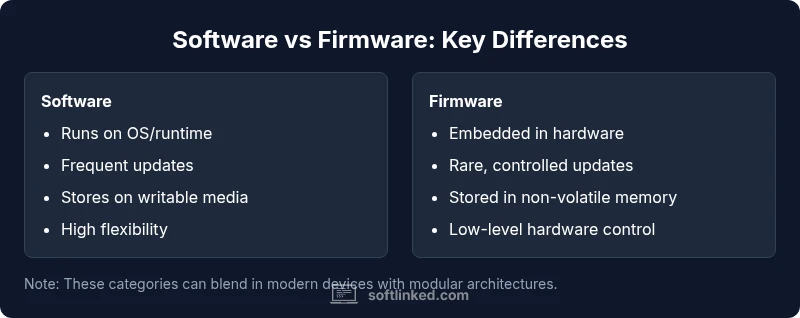
Software and firmware are distinct layers of code that interact with hardware. Firmware is embedded in devices and updates less frequently, often during manufacturing or via specialized processes, while software runs on general-purpose systems and updates through standard channels. Understanding their roles helps in design, maintenance, and security decisions. Choosing the right approach can impact cost, speed, and reliability.
What is software and firmware, and why the difference matters
The phrase difference software and firmware is more than a semantic distinction: it captures how computing systems are organized, how they evolve, and how they fail. Software refers to programs and data that run on general-purpose hardware, such as desktops, laptops, servers, and increasingly capable mobile devices. Firmware, by contrast, is tightly bound to the hardware it controls. It is often stored in non-volatile memory on a chip and provides the initial control logic that enables hardware to power up and operate. This structural separation has real-world consequences for security, maintenance, and product lifecycle. According to SoftLinked analysis, most modern devices rely on a firmware baseline that boots a platform and provides core capabilities, while software layers deliver user-facing features and services. The practical upshot is that firmware tends to be less flexible but more foundational, whereas software offers variety, rapid iteration, and user-centric improvements.
In everyday terms, think of firmware as the device’s autopilot and software as the cockpit interface. Understanding this distinction helps engineers design robust update processes, define clear ownership between hardware and software teams, and set realistic expectations for customers about how devices get updated and secured.
Why the distinction matters in planning
- It informs update strategies: firmware updates require specialized channels and often slower cadence, software updates rely on app stores or OS-level mechanisms.
- It defines risk profiles: firmware bugs can destabilize hardware at a fundamental level, while software bugs usually affect functionality and UX but may be rolled back more easily.
- It guides security architecture: firmware signing, secure boot, and trusted update channels are distinct from software code signing and dependency management.
As you plan a project, map features to either firmware control logic or software capabilities, and establish governance for each layer from conception through deployment. The SoftLinked team emphasizes that early decisions about what belongs in firmware versus software have long-lasting effects on reliability and maintenance.
wordCount”:null},
Comparison
| Feature | Software | Firmware |
|---|---|---|
| Definition | Programs and data that run on general-purpose hardware or within an OS/runtime environment. | Low-level, device-bound code embedded in hardware components that initializes and controls the hardware. |
| Execution Environment | Runs on hosts with an operating system (Windows, macOS, Linux) or in managed runtimes. | Executes on microcontrollers or dedicated hardware with minimal or no operating system. |
| Update Mechanism | Updated via app stores, package managers, OTA updates, and software patches. | Updated via specialized tools, vendor recovery processes, or during manufacturing; often requires downtime or physical access. |
| Storage Location | Stored in writable storage (SSD/HDD/flash) and managed by the OS or application layer. | Stored in non-volatile memory on the device (ROM/flash) and executed at boot. |
| Maintenance Pace | Frequent, iterative updates with new features and bug fixes. | Infrequent, stability-focused updates with security patches as needed. |
| Security Focus | Dependency management, signing, sandboxing, and patching of third-party components. | Secure boot, firmware signing, and trusted update channels to protect the boot path. |
| Typical Examples | Word processors, games, mobile apps, cloud-enabled services. | BIOS/UEFI, embedded controller firmware, router firmware. |
| Rollback & Recovery | Easier to roll back via versioned packages or system restores. | Harder to rollback; may require vendor tools or recovery modes. |
| Performance & Dependency | Performance depends on OS and hardware resources; can be patchy if dependencies are broken. | Tight hardware coupling means firmware can directly influence performance and hardware limits. |
Pros
- Clarifies ownership and maintenance responsibilities for each layer
- Improves security posture through targeted update and signing practices
- Guides lifecycle planning and hardware-software co-design
- Enables rapid software iteration while preserving hardware stability
Weaknesses
- Firmware updates can be slow, expensive, or risky due to hardware impact
- Misalignment between firmware and software teams can cause integration issues
- Overemphasis on one layer may neglect essential cross-layer testing
- User expectations for updates can vary between firmware and software
Firmware is the deeper hardware-tied foundation; software remains the flexible, user-facing layer.
In most product scenarios, clearly separating firmware from software supports safer updates, stronger security, and smoother maintenance. The SoftLinked team recommends designing with explicit boundaries, robust update paths, and thorough testing across both layers to minimize risk and maximize future-proofing.
Your Questions Answered
What is the difference between software and firmware?
Software consists of programs and data that run on general-purpose hardware, often with an operating system. Firmware is low-level, device-bound code embedded in hardware that initializes and controls essential functions. The key distinction is scope and update pathways: firmware updates are less frequent and more hardware-oriented, while software updates are more frequent and feature-driven.
Software runs on general hardware, firmware is bound to the device and updates less often. The main difference is scope and how updates are delivered.
Can firmware be updated after purchase?
Yes. Firmware can be updated, but the process is typically more controlled and may require vendor-approved tools, special recovery modes, or factory procedures. Updates are designed to fix stability and low-level issues rather than deliver typical consumer features.
Firmware updates are possible, but they usually need special tools and procedures from the vendor.
Is firmware the same as BIOS/UEFI?
BIOS/UEFI is a form of firmware that initializes hardware and boots the operating system on many traditional PCs. Not all firmware is BIOS/UEFI; firmware refers to any software embedded in hardware components. The terms overlap in some contexts but are not identical concepts.
BIOS/UEFI is firmware, but firmware covers more than BIOS/UEFI, including embedded controller firmware.
How do updates differ in terms of security?
Firmware security focuses on secure boot, hardware-rooted trust, and signed updates to prevent tampering at the boot level. Software security emphasizes code signing, dependency integrity, and patch management for applications and OS layers. Both require robust verification but operate on different trust domains.
Firmware security centers on secure boot and signed updates; software security focuses on code signing and patch integrity.
Can software become firmware?
In theory, highly specialized software may be ported to run on firmware, but this is uncommon. Firmware tends to be tightly bound to hardware and memory constraints, while software aims for flexibility and broad compatibility. Reclassification is possible during product redesign but is not routine.
It’s rare for software to become firmware; reclassification happens mainly during major redesigns.
Are there scenarios where firmware and software responsibilities blur?
Yes. Some devices host app-like software on the same hardware and rely on firmware modules for low-level control. Modern edge devices may blend features across both layers, requiring careful engineering to ensure updates and security do not cross boundaries unintentionally.
Some devices mix responsibilities, so clear architecture and testing are essential.
Top Takeaways
- Define roles early: firmware handles hardware control, software supports user tasks
- Plan explicit update and rollback strategies for both layers
- Prioritize security at the firmware boot path and software dependencies
- Align lifecycle expectations with hardware reliability and maintenance costs
- Use clear governance to avoid cross-layer conflicts and regression