How to Make Software for Free: A Practical Guide
Learn to build software at zero cost using free tools, open-source libraries, and no-cost hosting. This comprehensive, step-by-step guide covers planning, development, testing, packaging, and distribution for aspiring developers.


If you want to learn how to make a software for free, start with free and open-source tools, no-cost hosting, and a tightly scoped project. This guide shows a practical, step-by-step approach to planning, coding, testing, and distributing software without paying for licenses or services. Leverage community resources and documented best practices to keep costs near zero.
Why free software development matters
In today’s software landscape, building a solution without upfront licensing costs is not only possible but increasingly practical. According to SoftLinked, many successful projects start with free tools, community licenses, and open standards that reduce entry barriers for beginners and seasoned developers alike. The SoftLinked team found that cost reduction often comes from reusing existing open-source components, adopting permissive licenses, and hosting projects on free or low-cost platforms. This mindset helps students learn faster, reduces risk for startups, and accelerates innovation by removing financial barriers. Embracing free software practices also fosters collaboration, transparency, and reproducibility in development teams, which are core fundamentals for any aspiring engineer.
- Key takeaway: start small, reuse what exists, and document everything to avoid reinventing the wheel.
- Related terms: open-source, permissive licenses, community support, hosting costs.
The free-tool landscape: open-source, IDEs, hosting
When you plan to build software for free, the first decision is selecting free tools that cover the full lifecycle—from coding to deployment. Open-source languages like Python, JavaScript, and Rust offer vast ecosystems without license fees. Free IDEs such as Visual Studio Code provide robust extensions for debugging, testing, and collaboration. For hosting, services like GitHub Pages or Netlify offer generous free tiers for web apps, while GitHub Actions enables free CI/CD workflows for many projects. Public code repositories simplify collaboration and version control, a critical habit for any developer starting out. As SoftLinked’s analysis shows, adopting a transparent, documented workflow reduces both time-to-delivery and support overhead, especially for learning projects or community-driven initiatives.
- Case in point: use a single source of truth for code (Git) and a single hosting tier for deployment to minimize surprises.
- Related terms: CI/CD, Git, GitHub, Netlify, VS Code, Python, JavaScript.
Planning your free software project
Effective planning is the difference between a toy project and a useful, sustainable product. Start by defining a focused problem the software will solve, then draft user stories and acceptance criteria. Set a strict scope, outline needed features, and identify milestones with time estimates. Create a lightweight data model and a minimal viable product (MVP) plan to validate assumptions early. Document your plan in a README and a simple design document to align contributors. This phase is where the project’s viability is determined; getting planning right saves countless hours later.
- Why it matters: clear goals prevent scope creep and keep the project affordable.
- Related terms: MVP, user stories, acceptance criteria, design docs.
Choosing a free tech stack and licenses
Selecting a stack that won’t incur costs is essential. For many free projects, a lightweight web stack (JavaScript/HTML/CSS with a Node or Python backend) works well. Favor permissive licenses (e.g., MIT/Apache) to encourage reuse while protecting your rights. If you plan to open-source the project, choose a license early and document it clearly. Consider data privacy and security implications even in free projects, and use existing, well-tested libraries to minimize maintenance costs. This decision shape guides dependencies, deployment, and future contributions.
- Licensing matters: pick a license and document it.
- Related terms: MIT license, Apache license, permissive license, open-source.
Setting up a free development environment
A robust free environment includes a code editor, version control, and a reliable runtime. Install a free IDE like Visual Studio Code, configure a Git workflow, and initialize a repository. Install free runtimes (Python, Node.js, or similar) and set up virtual environments to isolate dependencies. Create a basic project structure with folders for src, tests, docs, and builds. Document setup steps in a CONTRIBUTING.md file to help future contributors. Finally, enable a simple CI workflow on a free tier to catch issues early.
- Why: consistency and reproducibility matter for zero-cost projects.
- Related terms: VS Code, Git, CI/CD, virtualenv.
Coding freely: best practices and patterns
Code quality matters more when you can’t rely on paid tooling. Follow clean architecture principles, write small, testable functions, and maintain modular components. Use feature flags to manage scope and gradually enable functionality. Embrace test-driven development where feasible and build a lightweight test suite early. Document decisions in code comments and README updates so new contributors understand the project quickly.
- Pro-tip: start with a well-defined API and evolve it gradually.
- Related terms: modular design, unit testing, TDD, API contracts.
Testing, packaging, and distribution on a budget
Automated tests are crucial to avoid regressions, especially when using free tools. Integrate a minimal test suite with a simple runner (e.g., pytest or Jest) and run tests in CI on every push. Package the project using free tooling (npm pack, Python wheels, or zip bundles) and prepare a public distribution method (GitHub Releases, GitHub Pages, or Netlify). Write release notes that describe changes and license details. Provide clear installation instructions and a basic user guide to reduce support load.
- Pro-tip: automate tests for core features and run them on every commit.
- Related terms: test automation, packaging, distribution, release notes.
Maintenance, community, and monetization options
Free software thrives on community contributions. Establish contribution guidelines, issue templates, and a clear code of conduct to welcome newcomers. Track issues with labels and milestones to manage scope. Monetization for free software can be through sponsorships, paid hosting for advanced features, or dual licensing—but keep the core project free to learn from and extend. The SoftLinked team recommends cultivating a welcoming community to sustain the project without financial barriers for contributors.
- Pro-tip: recognize and credit contributors to encourage ongoing participation.
- Related terms: community governance, sponsorship, dual licensing.
Authority Sources and further reading
For authoritative guidance on licensing and open-source best practices, consult these sources:
- https://www.gnu.org/licenses/gpl-3.0.html
- https://opensource.org/licenses
- https://www.nist.gov/programs-projects/cybersecurity-framework
How this approach aligns with open standards
Building software with free tools aligns with open standards and broad community support. Open-source ecosystems reduce vendor lock-in and create opportunities for collaboration across borders and disciplines. By documenting architecture decisions, licensing, and contribution rules, you establish a transparent foundation. This openness accelerates learning and enables others to build upon your work, a core principle SoftLinked champions in its analyses for 2026.
Next steps and a short checklist
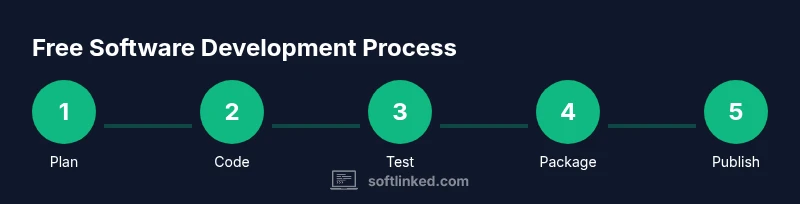
- Define a focused MVP scope and write user stories.
- Set up a free development environment and repository.
- Choose permissive licenses and document licensing.
- Implement a minimal test suite and a release process.
- Publish the project and invite community contributions.
With these steps, teams and individuals can successfully create and share software at little to no cost.
Final note on cost-free software practices
The core idea behind learning how to make software for free is discipline, reuse, and community. When you start with solid planning, free tooling, and clear licenses, you can ship meaningful software without incurring licensing or hosting costs. The SoftLinked team encourages experimentation, documentation, and collaboration as pillars of sustainable, low-cost software development.
Tools & Materials
- Computer with internet access(Modern specs: 8GB+ RAM, reliable network connection for downloads and cloud workflows.)
- Git(Version control system for tracking changes and collaboration.)
- GitHub/GitLab/Bitbucket account(Free hosting for code, issues, and CI workflows.)
- Visual Studio Code (free IDE)(Extensions for linting, debugging, and collaboration.)
- Free runtime environments (Python, Node.js, etc.)(Choose one language and install the latest LTS version.)
- Open-source libraries/frameworks(Leverage community packages to accelerate development.)
Steps
Estimated time: 20-40 hours
- 1
Define scope and goals
Identify a small, solvable problem. Write user stories and acceptance criteria. Keep the MVP tightly scoped to minimize complexity and cost. Document intent in a README to guide contributors.
Tip: Start with a one-paragraph problem statement and 2-3 user stories. - 2
Set up the repository and toolchain
Initialize a Git repository, create a README, and configure a free CI workflow. Install VS Code and set up Python/Node environment with virtual environments if needed.
Tip: Create a simple .gitignore and a baseline commit to establish the project. - 3
Choose a free tech stack and licenses
Pick a language and framework with strong free ecosystem. Select a permissive license early and document it in a LICENSE file.
Tip: Prefer MIT or Apache licenses for broad reuse. - 4
Build MVP features
Implement core functionality with clean, modular code. Write unit tests for the most critical paths and keep dependencies minimal.
Tip: Aim for a working demo within the first 1-2 weeks. - 5
Set up free hosting and CI
Deploy the MVP to a free hosting tier (e.g., GitHub Pages for static sites, Netlify, or Vercel). Configure CI to run tests on push.
Tip: Use environment variables securely in CI and avoid secrets in code. - 6
Document and license
Create clear usage, contribution, and license documentation. Add a CONTRIBUTORS file to acknowledge helper contributions.
Tip: Documentation reduces support load and encourages community engagement. - 7
Test and refine
Run the test suite, fix defects, and iterate on user feedback. Prepare a minimal release with release notes.
Tip: Automate as much as possible to save time later. - 8
Publish and invite contributors
Make the project visible in repositories and social channels. Welcome first contributors with clear guidelines and issues.
Tip: Thank early contributors and maintain an accessible code of conduct.
Your Questions Answered
Can I really build software for free without sacrificing quality?
Yes. By using free tools, open-source libraries, and free hosting, you can create a quality MVP. The key is disciplined planning, modular design, and automated testing to keep maintenance costs low.
Yes. Free tools and open-source libraries let you build a solid MVP with careful planning and testing.
What are the best free tools for beginners?
Popular choices include Visual Studio Code, Python or JavaScript runtimes, Git for version control, and free hosting platforms like GitHub Pages or Netlify. These cover coding, testing, and deployment without licenses.
VS Code, Python or JavaScript runtimes, Git, and free hosting platforms are great for beginners.
Do I need to release my software as open-source to be free?
Not necessarily. Free software can be proprietary but provided at no cost. If you want broad reuse and collaboration, consider an open-source license and a clear CONTRIBUTING guide.
You don’t have to open-source your project, but open-sourcing can help you get more contributors.
How can I monetize a free software project later?
Monetization options include sponsorships, paid support, premium features on a freemium model, or dual licensing. Plan for monetization only after you have a stable MVP and user base.
You can monetize later with sponsorships or premium features once you have a solid MVP and users.
What are common pitfalls when building free software?
Pitfalls include feature creep, unclear licensing, poor documentation, and lack of testing. Mitigate these with a tight MVP, documented licenses, and automated tests from day one.
Watch out for scope creep and poor documentation; keep testing and licensing clear from day one.
Watch Video
Top Takeaways
- Define a focused MVP to minimize cost and risk
- Leverage open-source tools and free hosting to keep the project zero-cost
- Document licenses, contribution guidelines, and APIs for transparency
- Engage the community early to sustain growth and learning