Designing Software for Free: A Practical Guide
Learn how to design software at zero cost using open tools, community-led processes, and sustainable free practices. A clear, step-by-step approach for aspiring developers and students.


Designing software for free is achievable by using open-source tools, free hosting, and community-driven processes. You’ll define scope, assemble a zero-cost tooling stack, and build a modular architecture with clear contribution guidelines. This guide walks you through a practical, step-by-step approach to launch sustainable free software projects without paying licenses.
Understanding the premise of free software design
According to SoftLinked, designing software for free begins with embracing open tools, transparent licenses, and a lightweight governance model. The SoftLinked team found that sustainable free software projects hinge on three pillars: clear problem definition, a minimal yet robust tooling stack, and a community-driven approach to maintenance and growth. This mindset helps you separate genuine free capabilities from deceptive “free trial” landmines and prevents scope creep that can undo zero-budget efforts. Throughout this guide, you’ll see how to balance openness with quality, so beginners can ship value quickly while building a foundation for long-term collaboration.
Define the scope and constraints for zero-cost design
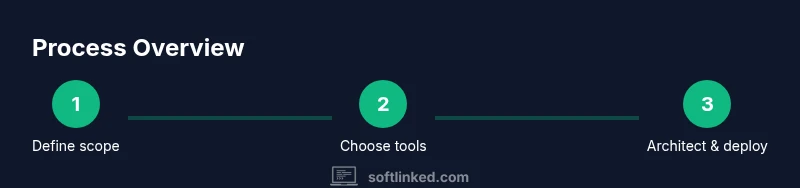
Before writing a line of code, nail down what you will and won’t build, and how you’ll keep costs at zero. Start with a narrow, well-defined problem that serves a real user group. Document what free tools you’ll rely on for design, version control, testing, and hosting, and set boundaries for licensing, data handling, and contribution rules. Clarity here reduces friction later and helps new contributors understand the project’s aims. Remember to articulate non-negotiables (security, accessibility, portability) so future decisions stay aligned with the original free-ness principle. This stage is where you translate vision into measurable milestones and a transparent roadmap.
The free-tooling stack: design, code, test, deploy
A truly zero-cost design workflow relies on free, open-source tools across the software lifecycle. Choose a free code editor or IDE, an open-source version control system, and a CI/CD service with a generous free tier. For design and prototyping, leverage browser-based or locally hosted tools that support collaboration and export to open formats. Adopt lightweight testing frameworks and automated checks that run in the free CI environment. Finally, plan for deployment on free hosting tiers or self-hosting options. The objective is to minimize costs without sacrificing quality or extensibility.
Architecture and modular design for sustainability
Design with modularity in mind so that pieces can be developed, tested, and deployed independently. Favor simple, well-documented interfaces and decouple components to reduce maintenance complexity. Use open data formats and stateless components where possible to ease migration between hosting environments or future tooling. Emphasize reusable patterns, clear boundaries, and dependency management that prioritizes transparency and minimal external dependencies. This approach lowers the ongoing cost of changes and makes it easier for contributors to dive into the codebase.
Building a community and governance model
Free software thrives on people contributing in diverse ways. Establish governance that’s welcoming, transparent, and frictionless for newcomers. Publish contribution guidelines, a code of conduct, and a decision-tracking system so voices aren’t lost. Lower the barrier to entry by providing good onboarding, starter issues, and documentation that explains how to run, test, and contribute. Encourage peer reviews and lightweight, asynchronous communication. A healthy community reduces sole-developer risk and increases project resilience.
Free hosting, CI, and delivery pipelines
Maximize free-tier hosting options by choosing platforms that offer generous limits for small projects. Use free CI services to automate builds, tests, and security checks; ensure your pipeline runs reproducibly in every environment. Document deployment steps so volunteers can replicate environments locally. Regularly monitor usage and performance with open-source monitoring tools or free analytics, and keep the footprint small to avoid cost-related surprises. The key is to maintain a reliable, repeatable process that contributors can trust.
Security, licensing, and risk management with no budget
Security should be baked in from the start, even on zero-budget projects. Follow basic secure coding practices, manage dependencies with an up-to-date manifest, and schedule periodic light audits. Licensing matters: choose permissive licenses for maximum freedom or copyleft licenses to ensure sustainability if you want to encourage broad reuse with accountability. Governance reduces risk by clarifying responsibilities, release processes, and how to handle vulnerabilities or feature requests from the community.
Metrics, feedback, and learning without paid tools
Track progress with lightweight, human-centric metrics: number of active contributors, frequency of meaningful issues closed, and user satisfaction signals from open feedback channels. Use open data where possible and collect qualitative insights through community discussions and surveys. Regular retrospectives help you adapt tools and processes without incurring costs. This iterative learning cycle is essential to keeping a free software project vibrant and useful.
A practical step-by-step example project
Imagine a simple note-taking app designed to demonstrate free software practices. Start by drafting a one-page scope: core features, target users, and non-goals. Create a repository with a concise contributing guide and a license file. Set up a free CI workflow that runs tests on pull requests. Implement a minimal frontend and a tiny backend with open data formats. Invite volunteers to tackle issues labeled ‘good first issue’ and publish a short release note with each iteration. This concrete example illustrates how a free project can grow in an organized, cost-free way.
Common mistakes to avoid
Avoid over-scoping the project or chasing features you cannot support with free tools. Don’t neglect documentation or contributor onboarding—these are common killers of free projects. Be mindful of platform lock-in; favor open formats and portable configurations. Finally, don’t assume a lack of paid services means no investment of time or effort. Free software design still requires discipline, planning, and ongoing community engagement.
Tools & Materials
- A computer with internet access(Suitable for coding, testing, and documentation; works on Windows, macOS, or Linux)
- Knowledge of open-source licenses(Understand permissive vs copyleft licenses (e.g., MIT/Apache vs GPL) and how they affect reuse)
- Free/open-source tooling stack(Code editor/IDE, version control, free CI, and deploy/test environments on free tiers)
- Documentation and onboarding resources(Readme, contributing guide, code of conduct, and setup instructions)
- Community platform(Forum, chat, or issue tracker to coordinate contributions and feedback)
- Basic security guidelines(Dependency management, vulnerability awareness, and secure coding basics)
- Long-term governance plan(Roles, decision-making process, release policy, and contribution review cadence)
- Optional: free hosting/CI credits(Use only if needed; plan for self-hosted alternatives to avoid surprises)
Steps
Estimated time: 8-12 weeks
- 1
Define scope and user needs
Articulate the problem, target users, and what success looks like. Keep scope narrow to avoid scope creep and ensure a quick start. Create a one-page plan that guides all future decisions.
Tip: Draft acceptance criteria early; they guide what to build first. - 2
Choose a zero-cost tooling stack
Select free tools for design, version control, and testing. Ensure tools support open formats and easy collaboration. Document choices in a short tech stack section.
Tip: Prioritize tools with strong community support and good onboarding docs. - 3
Design modular architecture
Sketch a modular architecture with clear interfaces. Favor decoupled components to minimize future maintenance costs and simplify onboarding for contributors.
Tip: Use interface contracts and interface-first thinking to guide implementation. - 4
Set up a transparent governance model
Publish contributor guidelines, a code of conduct, and a simple decision log. Make governance decisions accessible and auditable by the community.
Tip: Start with a lightweight decision process to avoid bottlenecks. - 5
Prototype and iterate quickly
Build a minimal viable version to gather feedback. Use short release cycles to learn what users actually need and what can be postponed.
Tip: Release early, solicit feedback, and adjust scope accordingly. - 6
Implement free hosting and CI
Leverage free hosting options and CI pipelines to automate builds and tests. Ensure configurations are portable and well-documented.
Tip: Keep environment configurations in version control for reproducibility. - 7
Code quality and security basics
Incorporate linting, dependency checks, and basic security tests. Prioritize fixes in the next iteration rather than perfecting everything at once.
Tip: Automate security checks in CI to catch issues early. - 8
Foster contributions and onboarding
Create beginner-friendly issues and a thorough README. Offer clear steps to run tests, build, and contribute code.
Tip: Engage contributors with recognition and constructive feedback. - 9
Measure success and adjust
Track contributor activity, issue closure rate, and user feedback. Use insights to refine roadmap and dev processes.
Tip: Regular retrospectives help refine the process and tooling. - 10
Prepare for an initial release
Bundle core features into a clean release with documentation and a license. Announce the release and invite further feedback.
Tip: Include an installation guide and a quick-start demo in the release notes. - 11
Grow with community contributions
Encourage ongoing participation and diversify the contributor base. Establish a predictable cadence for releases and reviews.
Tip: Rotate maintainers to prevent bottlenecks and distribute knowledge. - 12
Sustainability planning
Plan for long-term maintenance, governance policy updates, and potential funding alternatives while staying within free tooling bounds.
Tip: Document the sustainability plan so new leaders can step in smoothly.
Your Questions Answered
Is it really possible to design software for free without sacrificing quality?
Yes. With open-source tools, free hosting tiers, and community collaboration, you can deliver meaningful software without paid licenses. The key is disciplined scope, strong documentation, and sustainable governance.
Yes—free software design is viable when you focus on scope, documentation, and community governance.
What licenses should I consider for a free project?
Choose between permissive licenses (e.g., MIT/Apache) for maximum reuse or copyleft licenses (e.g., GPL) to ensure contributions stay free. Align licensing with your goals for attribution and downstream use.
Pick a license that fits your reuse and contribution goals, balancing openness with control.
Are there hidden costs in free software design?
Yes—time, volunteer labor, hosting bandwidth, and attention to maintenance can become significant costs. Plan for sustainable processes and community involvement to mitigate them.
There are time and maintenance costs even when tooling is free; plan for ongoing effort.
How do I attract contributors without paid marketing?
Offer clear onboarding, good documentation, small starter issues, and a welcoming community culture. Regularly acknowledge contributions and provide constructive feedback.
Make it easy for people to contribute and recognize their work.
What is the best governance model for a free project?
Start with a lightweight model: define roles, a simple decision log, and public contribution guidelines. As the project grows, evolve governance to match community needs.
Begin with simple rules and adjust as the community expands.
How can I ensure security with zero-budget tooling?
Follow basic secure coding practices, keep dependencies updated, and use automated checks in CI. Periodically review security posture even when using free tools.
Keep it secure with simple checks and regular reviews, even on free stacks.
Watch Video
Top Takeaways
- Define scope clearly and stay within free tooling bounds.
- Choose an open, modular architecture for easy maintenance.
- Foster a welcoming community with transparent governance.
- Prioritize documentation and onboarding to attract contributors.
- Measure progress with lightweight, qualitative metrics.