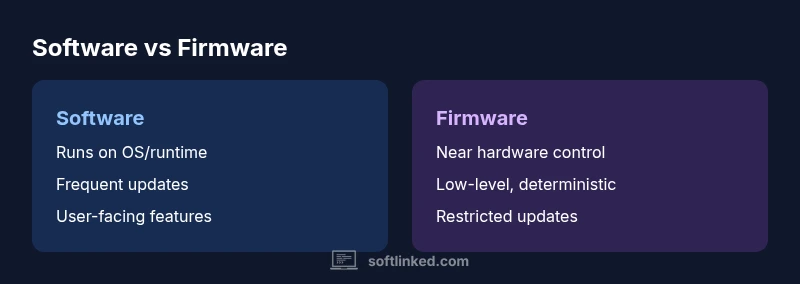
Software vs Firmware: A Practical, Analytical Comparison
An objective, analytical comparison of software and firmware, covering definitions, lifecycles, update models, security, and practical guidance for developers.


According to SoftLinked, software and firmware occupy different layers of a device's stack: firmware is closer to hardware and often updated only through controlled processes, while software runs higher and can be updated or replaced more flexibly. In practice, choose firmware for reliability and hardware control, and software for flexibility, features, and user-facing functionality. This quick verdict helps developers plan embedded systems and IoT solutions that interact with hardware.
Understanding the core definitions: software or firmware
The terms software and firmware describe two distinct layers in a device’s software stack, each with unique roles, constraints, and life cycles. Software generally refers to code that runs on top of an operating system or runtime, delivering features, interfaces, and services for users or other systems. Firmware, by contrast, is the low-level code embedded in non-volatile memory that initializes and controls hardware components, sometimes acting as the bridge between hardware and higher-level software. In the context of the phrase "software or firmware," the distinction matters because design decisions in one layer constrain the other. For developers, recognizing which layer handles hardware control versus user-facing functionality is essential to balancing reliability, maintainability, and updateability. Throughout this article, the SoftLinked team highlights best practices for engineering teams that must coordinate across both domains.
This section lays the groundwork for a nuanced discussion of when to design, deploy, and maintain software versus firmware in real-world systems.
Where firmware lives: microcontrollers, flash memory, and device drivers
Firmware represents the closest software to hardware in most devices. It resides in non-volatile memory, such as flash, and includes routines that initialize hardware, manage peripheral interfaces, and enforce safety requirements. In consumer electronics, firmware often comprises bootloaders, embedded controllers, sensor firmware, and firmware-driven device protocols. Its proximity to hardware means firmware must be compact, deterministic, and robust against power interruptions. Updates to firmware typically involve controlled processes, sometimes requiring physical access or secure OTA pathways, and they must consider the risk of brick if an update fails. This hardware-oriented layer is crucial for reliability, boot sequences, and security foundations, particularly in safety-critical or resource-constrained environments.
When engineers discuss firmware, they are addressing software that is inseparable from the device’s hardware identity and lifecycle.
Where software lives: operating systems, applications, and middleware
Software operates at a higher level, interfacing with hardware via drivers, libraries, and an operating system or runtime. It encompasses system utilities, application programs, middleware, and cloud-facing services. Software provides user experiences, data processing, and orchestration across devices and networks. Unlike firmware, software typically benefits from extensive development ecosystems, rapid iteration cycles, and more flexible distribution models. It can be updated independently of hardware, deployed through app stores, software updates, or server-side changes. In the context of the software or firmware discussion, software is often the vehicle for feature-rich experiences, while firmware establishes the hardware’s operating envelope.
For developers, recognizing the boundary between software and firmware helps prevent coupling that makes updates risky or expensive.
Update models and lifecycles
Update models differ radically between software and firmware. Software updates are usually frequent, differential, and reversible, delivered through services, app stores, or cloud pipelines. They can add new features, fix bugs, and improve performance without touching hardware. Firmware updates are typically less frequent and require careful change management due to the risk of rendering hardware unusable if an update fails. OTA (over-the-air) updates for firmware are common in modern devices but demand robust rollback, secure boot, and integrity verification. The software or firmware decision should weigh update velocity, rollback strategies, and the ability to recover gracefully after failed deployments. Planning versioning, compatibility, and hardware prerequisites early reduces risk downstream.
SoftLinked’s analysis suggests that successful product maintenance hinges on reliable upgrade paths for both layers, with clear separation of concerns.
Security implications and attack surfaces
Security implications differ between software and firmware because each layer exposes distinct surfaces. Software attacks often leverage insecure APIs, unpatched libraries, or misconfigured services. Firmware attacks frequently target the boot process, flash memory integrity, and device initialization routines, potentially enabling persistent, hardware-level access. Protecting both layers requires layered defenses: secure boot, code signing, integrity verification, and strict access controls for updates. In the software or firmware debate, security is not a single feature but a design discipline that spans both layers. A secure architecture treats firmware as part of the trusted computing base and ensures updates cannot be tampered with in transit or at rest. The goal is to harden the stack from boot to user experience.
Development and testing workflows
Developing software and firmware demands different workflows and toolchains, though they often share core practices like version control, CI/CD, and automated testing. Firmware development emphasizes deterministic behavior, real hardware validation, and crash-safe update mechanics. Hardware-in-the-loop (HIL) testing, hardware simulators, and emulators reduce risk before field deployments. Software development emphasizes rapid iteration, modular design, and extensive unit, integration, and UI testing. When deciding between software or firmware approaches, teams should align their testing strategies with the expected failure modes: software bugs may crash applications or degrade UX, while firmware faults can halt device operation or cause safety concerns. The software or firmware decision should be guided by test coverage, risk tolerance, and hardware dependency.
Performance, resources, and constraints
Resource constraints profoundly shape both layers, especially in embedded or edge devices. Firmware tends to run with tight memory, slower storage, and strict timing requirements, making efficiency and determinism paramount. Software can leverage more memory, CPU cycles, and storage, enabling richer features and better user experiences but often at the cost of increased complexity. The software or firmware balance hinges on hardware capabilities and intended use cases. Designers must consider boot times, latency, energy consumption, and real-time requirements. In many systems, a lean firmware layer handles boot, basic I/O, and safety checks, while software provides the advanced functionality users expect. Understanding these constraints guides architecture decisions and future scalability.
Practical decision matrix: when to use firmware vs software
A practical approach starts with a set of criteria: How critical is hardware control? Is hardware risk acceptable for updates? What are the performance and determinism requirements? If the goal is stable, hardware-centered operation with minimal risk of change, firmware is often the right choice. If the objective is user-centric features, rapid iteration, and easy updates, software plays the leading role. In some systems, a hybrid model works best: firmware handles core hardware initialization and safety, while software provides interfaces, services, and enhancements on top of that foundation. The software or firmware decision should reflect a clear boundary that minimizes cross-layer coupling and simplifies maintenance.
Real-world examples: embedded devices vs consumer software
Embedded devices such as network routers, IoT sensors, or automotive controllers rely heavily on firmware to manage hardware timing and safety-critical functions. These devices may still host software components that provide configuration interfaces or user features, but the firmware controls the essential operation. In contrast, consumer software spans desktop and mobile applications, cloud services, and enterprise systems. These solutions emphasize feature density, cross-platform compatibility, and frequent updates. The software or firmware distinction becomes a design axis: are you optimizing for hardware reliability and deterministic behavior, or for user experience, scalability, and rapid feature delivery? In practice, most successful products blend both thoughtfully, with clear interfaces between layers.
Compatibility and standards: interfaces, buses, and APIs
Interfacing between firmware and software depends on standardized communication channels, drivers, and protocols. Common concerns include firmware-parameter interfaces, device trees, and hardware abstraction layers (HALs) that decouple hardware specifics from higher-level software. Standards like I2C, SPI, UART, USB, and PCIe often define how software and firmware communicate. Consistency in APIs, versioning, and protocol negotiation reduces integration risk and accelerates development. When planning a project, teams should document the responsibilities of firmware and software, define update procedures, and implement safe APIs that minimize coupling and maximize testability. A well-documented boundary improves maintainability and future-proofing.
Procurement, licensing, and maintenance considerations
Licensing for software and firmware shares some commonalities but diverges in practice. Software licenses often govern usage, distribution, and modification rights, while firmware licenses may emphasize redistribution controls and hardware-specific terms. Maintenance considerations include updating cadence, support windows, and end-of-life plans. For hardware products, customers may expect long-term firmware support and secure update channels, which adds to the total cost of ownership. To manage this, organizations should establish predictable maintenance cycles, track firmware and software versions, and implement health monitoring to anticipate updates before users notice issues. Clear governance helps teams balance innovation with reliability.
Migration and coexistence: firmware updates that enable new software features
Firmware updates can unlock new hardware capabilities that software can then leverage, creating a virtuous cycle of capability growth. A successful migration strategy coordinates firmware releases with software feature rollouts, ensuring backward compatibility and smooth user experiences. Backward compatibility checks, feature flags, and staged rollouts help reduce risk during transitions. In some cases, firmware updates enable new protocols or sensor calibrations that unlock software improvements, leading to better performance and new use cases. Planning migrations with multidisciplinary teams—engineers, QA, product, and UX—helps ensure that crossing the firmware-software boundary delivers tangible value without disrupting existing deployments.
Common myths and misconceptions
A frequent misconception is that firmware is simply small software. In reality, firmware is a specialized software layer tightly coupled to hardware, with distinct requirements for reliability and safety. Another myth is that firmware never changes; in modern devices, firmware updates occur to fix bugs, improve security, or enable new features. Some assume software can fully replace firmware; while software can extend functionality, hardware control and bootstrapping responsibilities often require firmware’s presence. Finally, many think updates are always risk-free; in truth, robust update mechanisms, rollbacks, and testing are essential to prevent brick scenarios and data loss when updating either layer.
How to communicate decisions to stakeholders
Successful software or firmware decisions require clear communication about trade-offs, risks, and timelines. Stakeholders care about reliability, security, cost, and time to market. Use a simple decision framework: define the problem, state the boundary between software and firmware, present the proposed architecture, outline update and maintenance plans, and describe metrics for success. Provide concrete examples of how the chosen approach mitigates risk and supports future evolution. When teams understand the rationale behind the software or firmware separation, they are more likely to align on requirements, testing, and release planning, reducing scope creep and misaligned expectations.
Comparison
| Feature | Software | Firmware |
|---|---|---|
| Definition | Programs and data running above the hardware layer; often user-facing | Low-level code embedded in non-volatile memory that initializes and controls hardware |
| Hardware proximity | Operates with an OS/runtime or bare-metal software stack | Directly interacts with hardware peripherals and boot processes |
| Update mechanism | Frequent updates via apps, OS, or cloud services | Firmware flashing or OTA updates via secure channels; rollback required |
| Resource constraints | More flexible resource budgets; can leverage OS services | Tightly constrained memory and storage; optimized for determinism |
| Portability | High portability across devices with similar runtimes | Device-specific; portability is limited to hardware family |
| Security focus | Broad attack surface through libraries, services, and APIs | Boot integrity, secure update, and hardware access controls are critical |
| Best use case | Feature-rich applications, UX, cross-device services | Hardware control, safety-critical functions, boot processes |
Pros
- Clear separation of concerns reduces maintenance risk
- Firmware handles hardware control, improving reliability
- Software offers flexibility, rapid feature delivery
- Updates for software are frequent and reversible
- Modular design improves security and testability
Weaknesses
- Coordination overhead between firmware and software teams
- Firmware updates can be risky if not properly tested
- Hardware dependencies can slow feature rollout
- Bootloaders and secure update mechanics add complexity
Software generally wins for flexibility; firmware remains essential for hardware integration
The SoftLinked team recommends prioritizing software for feature-rich experiences while reserving firmware for hardware-critical components, with careful update strategies to minimize risk.
Your Questions Answered
What is the main difference between software and firmware?
Software and firmware differ primarily in their proximity to hardware and update pathways. Software runs with more abstraction and flexibility, while firmware sits closer to hardware control and boot processes, with stricter update constraints. Understanding this boundary helps teams design robust, maintainable systems.
Software runs with more flexibility, while firmware sits close to hardware and has stricter update processes.
Can firmware be updated remotely?
Yes, many devices support OTA firmware updates, but they require secure channels, integrity checks, and robust rollback mechanisms to prevent bricking the device. Remote updates must be planned with safety nets and monitoring.
Yes, but with proper security and rollback in place.
How do updates differ between software and firmware?
Software updates are frequent, modular, and reversible, while firmware updates are less frequent and riskier, focusing on hardware control and safety. Coordinating both layers reduces rollout risk and preserves device reliability.
Software updates are frequent; firmware updates are less frequent and riskier.
Are firmware updates risky?
Firmware updates carry brick-risk if interrupted or corrupted, so robust verification, rollback, and secure update mechanisms are essential. Proper testing on hardware reduces the likelihood of failures.
Firmware updates can be risky; use secure updates and rollback.
Is firmware a type of software?
Yes, firmware is a specialized form of software embedded in hardware with responsibilities for initialization and control. It differs in persistence, proximity to hardware, and update mechanics.
Firmware is a specialized software tightly bound to hardware.
What are common examples of firmware?
Firmware examples include BIOS/UEFI, embedded controller firmware in laptops, router firmware, and microcontroller firmware in IoT devices. These components manage hardware boot, sensors, and low-level interfaces.
BIOS, embedded controller firmware, router firmware are typical examples.
Top Takeaways
- Define your project: software for features, firmware for hardware control
- Plan update strategies for both layers from day one
- Implement secure boot and trusted updates to reduce risk
- Test extensively on real hardware in varied scenarios
- Ensure cross-team collaboration between hardware and software engineers