Software and Hardware Difference: A Practical Guide
An analytical, practitioner-friendly comparison of software vs hardware, exploring definitions, interactions, upgrade strategies, performance factors, and practical guidance for developers and students.


Understanding the software and hardware difference is essential for engineers and students. Hardware refers to the physical components, while software consists of the instructions that run on that hardware. Key decision points include where bottlenecks occur, upgrade paths, and how software optimization compares with hardware refresh. According to SoftLinked, the software and hardware difference shapes architecture, debugging, and performance planning across teams.
Why the software and hardware difference matters
Understanding the software and hardware difference is foundational for anyone studying computer systems. Hardware encompasses the physical devices—CPU, memory, storage, and I/O controllers—while software comprises the programs, operating systems, drivers, and utilities that run on that hardware. When teams discuss system design, the practical split between these domains determines responsibilities, testing strategies, and success criteria. The distinction matters not only for seasoned engineers but also for students and aspiring developers who are building mental models of how apps run on devices. According to SoftLinked, recognizing where software ends and hardware begins helps people reason about performance, reliability, and scalability in real projects. This awareness informs architecture, debugging workflows, and even budgeting decisions across an organization.
Core definitions: hardware and software
Hardware and software occupy different layers of the computing stack, yet they co-create functionality. Hardware includes the processor, memory, storage, motherboard, and peripherals—the tangible building blocks that execute operations. Software, by contrast, is the set of instructions that 1) tells hardware what to do, and 2) determines how resources are allocated, scheduled, and protected. In education and industry, it helps to visualize these roles as two halves of a feedback loop: hardware provides capabilities, while software leverages those capabilities to deliver user value. When students study the software and hardware difference, they learn to separate concerns: performance tuning can target either side, but outcomes depend on both. The SoftLinked framework emphasizes separating concerns to avoid conflating a software bug with a hardware fault.
The runtime relationship: how software and hardware interact
At runtime, software translates user intent into hardware actions. An application issues CPU instructions, reads memory, and communicates with storage devices and network interfaces. The effectiveness of this translation depends on drivers, firmware, and the operating system, which form the glue between software and hardware. Older hardware may bottleneck a modern software stack, while newer software can be optimized to exploit architectural features like cache hierarchies or vector units. The key takeaway is that performance bottlenecks can shift between software and hardware depending on workload, configuration, and optimization level. Students should practice isolating bottlenecks with profiling tools to decide whether a rewrite, a patch, or a hardware upgrade is warranted.
Abstraction layers: from firmware to applications
Abstraction layers manage complexity by hiding details. Firmware sits closest to hardware, providing basic control of components such as storage controllers or sensors. Drivers translate firmware capabilities into a standardized interface consumed by the operating system and applications. The OS further abstracts hardware specifics to provide services like memory management and scheduling, enabling developers to write portable software. Applications then build on these services to deliver features. Understanding these layers helps programmers reason about compatibility, security patches, and upgrade paths. When comparing the software and hardware difference, remember that higher layers can often be upgraded without touching physical components, while lower layers may require riskier changes.
Common misconceptions and pitfalls
Many learners assume software can fix any hardware limitation with enough optimization. In reality, software cannot overcome fundamental hardware constraints without tradeoffs. Conversely, some blame hardware when a well-optimized program fails to meet expectations. This is why diagnostic discipline matters: after profiling, determine whether a fix is software-based (algorithmic improvement, parallelization, caching) or hardware-based (buffering, acceleration, memory expansion). Another pitfall is underestimating maintenance costs; software updates require testing, compatibility checks, and sometimes user education. The software and hardware difference becomes more nuanced as systems scale, move to the cloud, or embrace heterogeneous architectures.
Practical implications for developers and students
For developers, the most effective path often starts with software optimization before hardware changes. Profiling reveals hotspots and guides refactoring, algorithm selection, and parallelization strategies. Students should emphasize learning about compiler optimizations, memory access patterns, and I/O scheduling. In practice, a well-tuned software stack on a modest device can outperform a poorly configured system with premium hardware. SoftLinked’s analysis highlights that many performance gains come from better software design, not repetitive hardware upgrades. This mindset also helps teams manage budgets and timelines more effectively.
How to reason about upgrades: hardware refresh vs software optimization
A structured upgrade decision framework begins with workload analysis and performance targets. If workloads are I/O bound or suffer from latency, hardware investments (faster disks, more RAM, or a better CPU) may yield benefits. If latency or throughput is primarily caused by inefficient algorithms, data structures, or memory access patterns, software optimization will likely be more cost-effective and faster to deploy. Consider total cost of ownership, maintenance complexity, and compatibility with existing ecosystems. Finally, weigh long-term factors: support lifecycles, vendor roadmaps, and the potential for cross-platform reuse of software assets across devices.
Performance considerations: bottlenecks and the role of software
Bottlenecks shift with workloads and configurations. In many scenarios, software optimization can exploit caching, concurrency, and parallelization to improve throughput without hardware changes. In other cases, upgrading memory, storage speed, or processor capabilities unlocks substantial gains. The software and hardware difference is most visible when performance budgets are tight: software tuning can buy time, while hardware refreshes deliver raw capacity. The goal is to identify the dominant constraint and address it with a disciplined combination of profiling, testing, and staged investments.
Security and reliability: software updates vs hardware resilience
Security and reliability strategies must address both domains. Software updates patch vulnerabilities, fix bugs, and improve fault tolerance, but they can also introduce new risks if compatibility is not maintained. Hardware reliability depends on component quality and resilience to failures, yet modern systems rely on firmware and drivers that can introduce their own security concerns. A balanced approach couples secure software development practices with hardware hygiene—firmware updates, trusted boot chains, and routine hardware diagnostics—so the overall system remains robust over its lifecycle.
Real-world examples: OS vs hardware features
Operating systems demonstrate the software-hardware difference vividly. A modern OS optimizes resource scheduling and I/O paths to maximize hardware capabilities, while device drivers translate hardware signals into software-ready events. In server environments, software-defined behavior can reallocate resources quickly, while hardware accelerators like GPUs or NICs offer raw throughput. Mobile platforms illustrate the same principle: a lean app stack benefits from hardware features yet must gracefully adapt to varying device configurations. These examples underscore how the software and hardware difference informs design choices and user experience.
Tools and methodologies for analyzing the difference
Analysts rely on profiling and tracing tools to distinguish software-induced delay from hardware bottlenecks. Common approaches include CPU profiling, memory analysis, I/O tracing, and concurrency testing. Methodologies like A/B experimentation help quantify improvements from changes in software, while synthetic benchmarks isolate hardware effects. Understanding these tools equips students and professionals to make informed optimization decisions, plan for upgrades, and justify expenditures based on evidence rather than intuition.
Bridging the gap: education and career implications
A solid grasp of the software and hardware difference benefits learners entering software engineering, systems programming, or IT operations. Courses that couple architecture, performance, and debugging foster transferable skills across devices and platforms. For practitioners, continuing education on both software optimization techniques and hardware trends reinforces adaptability in the face of evolving tech stacks. The SoftLinked team stresses that a strong foundation in fundamentals earns dividends across roles, from frontend developers to systems architects.
Comparison
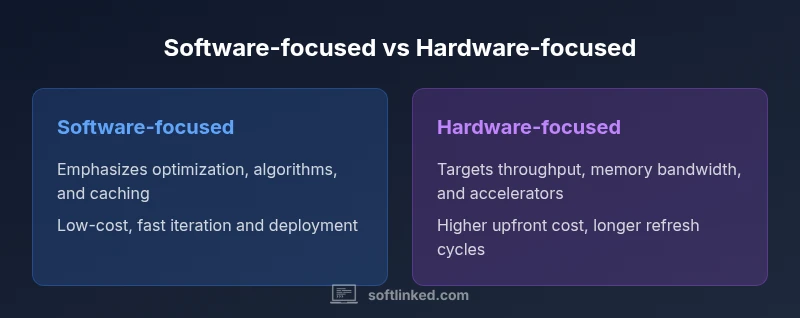
| Feature | Software-focused | Hardware-focused |
|---|---|---|
| Abstraction Level | High: software abstracts hardware layers | Low: hardware-centric approach with explicit component awareness |
| Upgrade Cost | Lower ongoing costs via software tuning | Higher upfront hardware investments with longer lifecycles |
| Performance Focus | Optimizes algorithms, caching, parallelism | Pursues peak hardware throughput and bandwidth |
| Upgrade Cycle | Frequent software patches and config changes | Longer hardware refresh cycles (years) |
| Best For | Cost-conscious projects, rapid iteration | Performance-sensitive workloads, specialized devices |
Pros
- Lower total cost of ownership through software optimization
- Faster iteration and deployment cycles
- Easier to scale software across multiple devices
- Greater portability of software assets across hardware
Weaknesses
- Hardware upgrades may still be necessary for peak workloads
- Software complexity can introduce new bugs and maintenance cost
- Reliance on vendor updates can cause compatibility risks
Software-first optimization generally provides more value in typical environments; hardware upgrades are best for peak performance or legacy constraints.
Prioritize software optimization to improve user experience and reduce downtime. Reserve hardware refreshes for workloads that truly need additional capacity, specialized accelerators, or longevity beyond software lifecycles.
Your Questions Answered
What is the fundamental difference between software and hardware?
Software is the collection of programs and data that run on hardware. Hardware is the physical circuitry and devices that execute those programs. Together, they form a two-layer stack where each part can constrain or enable the other.
Software is the instructions; hardware is the machines that run them. Together they form the system, with software typically driving how hardware behaves.
Can software improvements compensate for older hardware?
To some extent, software improvements can mitigate hardware limitations, but there are practical bounds. At a point, the hardware’s raw capacity becomes the primary constraint, and upgrades become necessary for sustained gains.
Software can stretch some hardware limits, but there comes a time when you need better hardware for meaningful improvements.
When should I upgrade hardware vs optimize software?
Start with software optimization to validate whether performance gains come from code improvements. If bottlenecks persist after profiling, consider hardware upgrades or architectural changes. Always assess total cost and risk.
Profile first, optimize second, upgrade last. That minimizes waste and aligns with long-term goals.
What are firmware vs software, and why do they matter?
Firmware is low-level code embedded into hardware components that initializes and controls them. Software runs on top of firmware and the OS. Distinguishing them helps in debugging and in understanding update strategies across layers.
Firmware controls the hardware; software runs on top of it. Both need updates for performance and security.
How do drivers fit into the software-hardware distinction?
Drivers translate hardware capabilities into a software-friendly interface, enabling operating systems and applications to use hardware resources consistently. Updates to drivers can unlock new features or fix compatibility issues.
Drivers are the bridge between hardware and software; keep them updated for stability and feature access.
Why is understanding this distinction important for learners?
A solid grasp helps students design better systems, debug effectively, and choose appropriate optimization strategies. It also supports critical thinking about trade-offs between cost, performance, and reliability.
Knowing where software ends and hardware begins makes you a better problem-solver.
Top Takeaways
- Assess bottlenecks before investing
- Prioritize software optimization first
- Plan upgrades with lifecycle in mind
- Use profiling tools to quantify improvements