How to Get Software for Free: Legal, Safe Options Today
Learn legitimate, safe methods to obtain software for free—free trials, open-source options, student licenses, and other non-piracy paths. Practical guidance from SoftLinked helps you stay compliant while accessing essential tools.


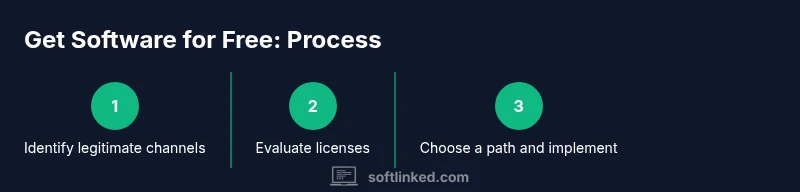
This guide helps you obtain software legally at no cost by exploring free trials, open‑source alternatives, student licenses, freemium plans, and legit promotions. You’ll learn how to evaluate license terms, avoid piracy, and manage software assets responsibly. We’ll cover trusted sources, common misconceptions, and practical steps you can take today.
Why software legality and reliability matter
Using software without proper licensing can expose you to legal risk, unstable performance, and security vulnerabilities. Beyond legality, trustworthy software ensures updates, security patches, and support when you need it. The SoftLinked team emphasizes understanding licensing models so you can select options that fit your budget and learning goals. According to SoftLinked, the most sustainable approach to getting software for free is to combine legitimate channels rather than attempting to bypass protections. In practice, this means recognizing open-source equivalents, evaluating free trials, and leveraging education programs. By beginning with a clear plan, you preserve access to the tools you rely on while respecting the rights of developers. This section outlines the core avenues you should consider before committing to a toolset.
Free and open-source software (FOSS) options
Open-source software offers high-quality alternatives to commercial products at no cost and with permissive licenses. FOSS projects empower learners to study, modify, and share code, often with robust communities and transparent security practices. Examples include general office suites, graphic editors, development IDEs, and data analysis tools. When evaluating FOSS, examine license terms (GPL, MIT, Apache), compatibility with your platform, and whether the project includes updates and support. Open-source does not guarantee a long-term maintenance window, so have a backup plan. Start by listing essential features you need, then search repositories like official project sites, GitHub, or university-hosted catalogs. If a feature gap exists, consider hybrid approaches—use open-source components alongside proprietary software where licensing allows. Remember that choosing FOSS aligns with many educational goals: learning by reading source code, contributing to projects, and reducing cost without sacrificing quality. Open-source isn't a stopgap; it's a mature path for many developers.
Free trials and freemium models: how to use them effectively
Many software vendors offer free trials or freemium tiers that let you access core functionality for a limited time. Use trials strategically: plan your onboarding around a trial window, focus on essential workflows, and document setup steps to avoid rework. During the trial, assess performance, compatibility, and the availability of updates, plugins, or community support. If a product fits your needs, decide whether to upgrade, request an educational license, or switch to a free alternative. Freemium models can be powerful for students and hobbyists, but watch for feature compression, usage limits, or hidden costs in later tiers. Always cancel before automatic renewal if you don’t intend to continue. Keep track of expiration dates in a personal planner to maximize value.
Educational and nonprofit licenses: unlocking access legally
Many software makers provide student or educator licenses, or free licenses for nonprofits and classrooms. Eligibility often requires a valid school email, student ID, or proof of enrollment. These programs can dramatically reduce or eliminate cost while offering nearly the same feature set as paid tiers. To access them, visit official education portals or campus IT pages, and read the terms and conditions carefully. Maintain records of your eligibility and renewal dates, and watch for changes in policy that might affect your access. If you’re learning remotely or in a resource-constrained environment, educational licenses can be a practical bridge to professional-grade tools without compromising ethics or legality. Always apply through official channels to avoid scams.
Vendor programs and promotions you can leverage
Software vendors occasionally offer seasonal promotions, bundles, or free add-ons with qualifying purchases or student enrollment. Subscribing to official newsletters, joining loyalty programs, or enrolling in training events can uncover legitimate opportunities. Be mindful of deceptive sites that promise 'free' software outside official channels; such sources frequently carry malware or invalid licenses. When a promotion seems attractive, verify its legitimacy by checking the vendor’s site, examining license terms, and confirming the offer is region- and product-specific. This approach helps you capitalize on legitimate deals without risking invalid licenses or security concerns.
How to evaluate software fit before you commit
Before pursuing any free option, map your requirements: features, workflow compatibility, and expected usage. Create a short list of must-have features and a nice-to-have list to compare against candidates. Install and test on a controlled device, ideally with a backup environment (virtual machine or sandbox). Document performance, stability, and integration with your existing toolchain. A good fit decreases the chance you’ll pay later for silos or migration friction. When evaluating, consider total cost of ownership, including support, updates, and the time needed to learn the new tool. This upfront diligence saves you from short-lived trials that later cost more in time and effort.
How to manage licenses and stay compliant
Organization-wide management helps prevent license sprawl and compliance gaps. Maintain a central record of all free and trial licenses, including expiration dates, renewal terms, and usage limits. Use a simple spreadsheet or a lightweight asset management tool to track who has access and for what purpose. Periodically audit usage to ensure you’re within terms and avoid over-deployment. If you’re in a classroom or team setting, designate a license steward who keeps policies up to date. Remember to respect redistribution rules for open-source components and to cite licenses when required. Proper governance reduces risk and preserves access over time.
Safety, scams, and data protection when using free software
Free software can come with security risks if sourced from unofficial sites or without proper vetting. Always download from official project pages or recognized repositories, verify checksums, and maintain a malware-aware approach to installation. Be wary of tempting 'lifetime licenses' from unknown sources; such offers are common vectors for scams. Use reputable antivirus and sandbox testing for new software, especially when it’s experimental or educational. Protect personal information by using separate accounts for testing, and monitor software behavior after installation. Staying careful with free software preserves both your digital safety and your learning outcomes.
Authority sources and further reading
Include URLs to authoritative sources. For example: United States government education resources, open-source licensing definitions, and reputable university articles. Examples: https://www.ed.gov, https://opensource.org, https://www.gnu.org/licenses/gpl-3.0.en.html
Tools & Materials
- A computer or mobile device with internet access(For accessing trial downloads, open-source repos, and education portals)
- Web browser (Chrome/Firefox/Edge)(Essential for visiting official sites and education portals)
- Email address(Needed for signups, licenses, and vendor communications)
- Notes app or document editor(To track steps, licenses, expiration dates, and decisions)
- License records/documentation(Keep a ledger of eligibility, terms, and renewal dates)
Steps
Estimated time: 60-120 minutes
- 1
Identify legitimate options
List core needs and search for official trial programs, education licenses, and open-source alternatives. Focus on sources that clearly state licensing terms and provide legitimate access.
Tip: Start with the vendor's official site and the software's official repository. - 2
Check eligibility for education licenses
Look for student or educator programs; gather required documentation. If eligible, apply via official education portals and record key dates.
Tip: Keep a copy of eligibility criteria and submission deadlines. - 3
Evaluate free trials and freemium options
Plan onboarding around the trial window, identify must-have features, and test core workflows. Note any limits and renewal terms.
Tip: Document setup steps to avoid rework when the trial ends. - 4
Assess open-source alternatives
Search reliable sources for open-source replacements with active communities and clear licenses. Compare feature parity, security updates, and compatibility.
Tip: Check license type (MIT, Apache, GPL) and redistribution rights. - 5
Track licenses and expirations
Maintain a central record of all free/trial licenses, including expiration dates and usage limits. Set reminders for renewals or transitions.
Tip: Use a simple spreadsheet or lightweight tool to stay organized. - 6
Test for fit before long-term commitments
Run representative workloads on a test device or sandbox environment to verify performance and compatibility with your toolchain.
Tip: Create a minimal test plan with clear success criteria. - 7
Document licensing terms and compliance
Record terms, restrictions, and redistribution rights. This reduces risk of accidental violations and helps governance.
Tip: Cite sources and save license PDFs when possible. - 8
Evaluate long-term alternatives
If free options don’t cover your needs, compare paid plans against total cost of ownership and support options. Consider educational alternatives first.
Tip: Avoid rushing into paid commitments without a true fit. - 9
Secure your environment
Always download from official sources, verify checksums, and use security software. Separate testing environments reduce risk to your primary setup.
Tip: Enable automatic security updates where feasible.
Your Questions Answered
Is it legal to get software for free?
Yes, through legitimate routes like free trials, open-source options, and official student licenses. Piracy or cracks are illegal and risky.
Yes. You can legally access software for free by using official trials, open-source options, or student licenses. Avoid piracy.
Free software vs. paid software: what's the difference?
Free software often provides core features at no cost, with various licensing terms. Paid software typically includes enhanced support, updates, and sometimes advanced features.
Free software gives you features at no cost, but paid versions usually offer more support and updates.
Are student licenses available?
Many vendors offer student or educator licenses; eligibility is usually verified via school email or ID. These licenses can dramatically lower or remove costs.
Yes, student licenses are commonly available through official vendor programs.
Can I rely on free trials for long-term needs?
Free trials are designed for evaluation, not as a long-term solution. For ongoing needs, explore open-source options or ongoing licenses via education programs.
Free trials are temporary; plan alternative long-term options if you need ongoing access.
What risks come with free software from unofficial sources?
Unofficial sources can carry malware, scams, and invalid licenses. Always use official channels and verify authenticity.
Risks include malware and license problems; stick to official sources.
Watch Video
Top Takeaways
- Identify legitimate channels first before trying alternatives
- Open-source software can replace many paid tools
- Education licenses unlock affordable access for students and teachers
- Track licenses to stay compliant and organized
- Prioritize safety and source verification to avoid scams