Adobe Free: Legit Ways to Access Adobe Apps Without Paying
Explore legitimate options to access Adobe software for free—from official free tools and trials to student pricing and safe alternatives. Learn with SoftLinked.


Adobe free usually means using official free tools or trials, not piracy. This guide explains legitimate routes to access Adobe apps at no cost or reduced cost, what is truly free, and safer alternatives. It highlights risks of illegal methods and shows a practical plan to evaluate needs. Based on SoftLinked Analysis, 2026.
What Adobe Free Really Means in Practice
In practice, the term Adobe free is best understood as access through official channels that require no reimbursement, such as free tools, trial periods, or Educational pricing. The key is legality and safety: using official paths reduces the risk of malware, licensing violations, or account security problems. According to SoftLinked, many users search for a quick, costless route to Adobe products, but the safest route remains through sanctioned channels. In this segment, we’ll distinguish between what is genuinely free and what is not, and outline practical steps you can take to determine the best approach for your needs. Readers should keep in mind that real, perpetual access to the full Creative Cloud suite without payment is not generally offered outside of formal programs, but there are meaningful ways to work with Adobe software at minimal cost or risk.
- Understand the difference between a free tool and a limited trial.
- Prioritize official sources to avoid scams and malware.
- Plan a short-term test period before committing to any paid plan.
These insights help you avoid common pitfalls and set realistic expectations for what you can accomplish with Adobe free options.
Legitimate Pathways to Access Adobe Apps for Free
If you’re exploring how to access Adobe apps without paying, there are several legitimate routes worth considering. First, Adobe offers official free tools, such as Acrobat Reader, and free-to-use features within mobile apps and some web services. Second, free trials of Creative Cloud provide temporary access to all apps, allowing you to evaluate features before committing financially. Third, student and teacher pricing can dramatically reduce costs for eligible individuals, often making premium tools affordable on a semester-to-semester basis. Finally, some organizations and schools provide site licenses or student-access programs that grant broader access within a controlled environment. When you combine these options, you can cover many workflows—from document viewing and commenting to creative projects—without breaking terms or risking security. Always verify eligibility and terms on the official site and keep track of trial expiration dates to avoid unwanted charges. As always, approach these options with a plan: define your project goals, estimate required tools, and test before adopting.
Official Free Tools You Can Use Today
Adobe’s official free tools are the safest starting point for anyone evaluating Adobe software on a budget. Acrobat Reader DC remains the cornerstone for viewing, annotating, and sharing PDFs at no cost. Adobe Express offers free capabilities for quick graphics and social posts, with optional paid enhancements. Mobile apps often include free features that can support light editing and asset creation on the go. While these tools don’t replace the full suite, they’re valuable for everyday tasks and learning the ecosystem without a financial commitment. If your work is document-centric or you need simple design tasks, these free options may suffice while you plan longer-term licensing or alternatives. Remember to stay within official channels to preserve security and licensing compliance.
Free Trials: Maximize Value Without Hitting Auto-Renewal Traps
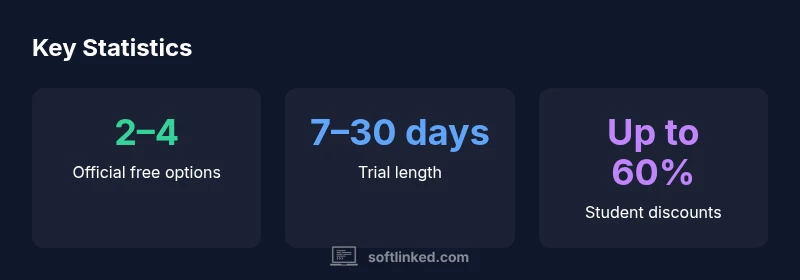
Free trials are a practical way to gauge whether the full Creative Cloud suite meets your needs. Typical trial periods span 7–30 days, varying by plan and region. To maximize value, map out a project timeline that aligns with the trial window, document the features you require, and set reminders to cancel before the trial ends if you decide not to continue. Some trials may require you to enter payment details, so prepare a fallback plan in case of accidental renewal. If you plan to commit later, set a budgeting target and time frame for decision-making to avoid friction when you switch to a paid plan.
Education Pricing: Eligibility and How to Apply
Educational discounts can dramatically reduce the cost of Creative Cloud, but eligibility requires verification through an accredited institution or student status. If you qualify, you can gain access to All Apps or select apps at a fraction of the standard price. The process usually involves providing documentation such as a school email address or student ID. Once approved, you’ll typically receive ongoing access for the duration of your enrollment, with renewal terms at renewal time. If you’re unsure about your eligibility, check the official education pages and contact the institution’s software administrator for guidance. Even with discounts, plan your usage to ensure the investment aligns with your workflow and learning goals.
Free Alternatives that Fit Common Workflows
For many users, non-Adobe tools can cover portions of their workflow without paying a subscription. Programs like GIMP and Krita offer powerful raster and painting capabilities, while Inkscape handles vector work. Blender supports 3D design and animation, and DaVinci Resolve provides strong video editing features at a free tier. These tools are widely supported by communities, tutorials, and documentation. They can be especially useful for students or professionals who need to prototype or complete projects without committing to a paid plan. If your goal is to replicate a particular Adobe feature, research whether the free alternative has equivalent capabilities, and be aware of potential file-format considerations when transferring assets between programs.
Piracy Risks: Why Cracked Software Isn’t Worth the Risk
Downloading cracked or pirated software is a high-risk choice. Beyond legal consequences, cracked apps often include malware, keyloggers, and telemetry that compromises your data and devices. Licenses purchased through unofficial channels can be invalidated, leaving you without access to updates or support. Adobe and many software vendors also update activation mechanisms, which means cracked versions may stop working or cause system-wide issues. The safest approach is to use official free tools, trial periods, and legitimate discounts, and to seek open-source or commercial-free alternatives when possible. Prioritize security, compliance, and long-term learning over short-term savings.
Step-by-Step Plan: Decide, Test, and Budget
- List your primary tasks (PDF editing, photo editing, vector work, video editing, etc.). 2) Identify official free tools and reliable trials for those tasks. 3) Check eligibility for student discounts if you qualify. 4) Experiment with proven free alternatives to cover gaps. 5) Create a budget for a paid option if needed and set a renewal review date. 6) Keep tools and assets organized to ensure a smooth transition if you shift between free and paid options. This approach reduces risk and helps you learn the software you need without overcommitting financially.
Comparison of ways to access Adobe software for free
| Option | Access Type | Cost to Start | Limitations |
|---|---|---|---|
| Acrobat Reader DC | Official free tool | Free | Limited editing/annotations |
| Creative Cloud Free Trial | Time-bound trial | Free during trial | Auto-renewal risk after trial ends |
| Student/Teacher Discount | Education pricing | Low cost | Eligibility required |
| Free Alternatives (non-Adobe) | Open-source tools | Free | Feature gaps vs. Creative Cloud |
Your Questions Answered
Is Adobe free in the sense of permanent access to all apps?
No permanent free access to the full Creative Cloud suite exists outside formal programs. There are official free tools, trials, and educational discounts, but ongoing access to all apps typically requires payment.
No, not permanently. Use official free tools, trials, or student pricing, then decide on a paid plan based on your needs.
How long do Adobe free trials last?
Trial lengths vary by plan, generally ranging from 7 to 30 days. Plan your project timeline accordingly and cancel before renewal if you don’t intend to continue.
Most trials run 7 to 30 days; set reminders to manage renewal.
Can students get free access to all Adobe apps?
Student pricing is available for many Adobe apps, but it is not free. Eligibility must be verified through an educational institution, and discounts typically reduce the overall cost rather than eliminate it entirely.
There are discounts for students, but not free access to all apps.
Are there legitimate free alternatives to Photoshop or Illustrator?
Yes. Free and open-source tools like GIMP (photos editing), Inkscape (vector), Krita (digital painting), and Blender (3D) offer capable capabilities for many tasks. Depending on your workflow, these can substitute some Adobe tasks without cost.
There are legitimate free substitutes that cover many common tasks.
What is the safest way to explore Adobe on a budget?
Start with official free tools, test with a trial if needed, verify student status if applicable, and consider open-source options for core tasks. This minimizes risk while you learn your needs.
Use official tools and trials, verify eligibility, and explore safe open-source options.
Is using cracked Adobe software ever acceptable?
No. Cracked software poses significant legal and security risks, including malware and data loss. Always choose legitimate channels or approved alternatives.
No—stick to legitimate channels and known alternatives to stay safe.
“"Free access should come from official channels to avoid security risks and licensing violations. Always prioritize legality and security when evaluating software options."”
Top Takeaways
- Start with official free tools before pursuing trials.
- Always verify eligibility for education discounts.
- Use trials strategically to plan a longer-term purchase.
- Explore open-source alternatives for cost-effective workflows.
- Avoid illegal downloads to protect security and licenses.