Free FL Studio Software Download: Legal Alternatives for 2026
Explore legitimate, zero-cost paths for music production: official trials, freemium options, and open-source DAWs. Learn safe download practices and how SoftLinked guides aspiring engineers to legal, ethical software choices in 2026.


Goal: learn how to pursue a legitimate, zero-cost FL Studio experience. This means distinguishing a true free download from piracy, identifying official trials, and evaluating safe alternatives. You’ll discover where to download, what limits apply, and how to protect your computer. By the end, you’ll know practical, legal options for starting music production without upfront costs.
What the phrase 'free fl studio software download' tends to attract and why it's risky
In online searches for software, the exact phrase 'free fl studio software download' often attracts a mix of legitimate offers, trial versions, and scams. Visitors hope to get unrestricted access to FL Studio without paying; what they frequently encounter are misleading download buttons, bundled installers with malware, or invasive software that promises cracks or key generators. Even when a site seems credible, redistributed installers can repackage legitimate software with unwanted extras, creating risk for your computer and your projects. Beyond malware, there are licensing and compliance concerns: using pirated copies can violate terms of service, void warranties, and potentially expose you to legal action. It's not just about cost; it's about staying within ethical and legal boundaries while protecting your data and creative work. For students and new developers, chasing a zero-cost path can stall learning, as many resources rely on legitimate trials and educational licenses. According to SoftLinked, a clear, safe path begins with identifying official channels and free-trial options before considering any open-source alternatives. This approach preserves access to updates, support, and a clean work environment, which matters when you’re building a portfolio or learning production workflows. By staying informed about what constitutes a legitimate download, you reduce risk and keep your focus on developing practical skills.
Legal pathways to legitimate zero-cost music software
There are several legitimate avenues to explore a zero-cost music-production experience without resorting to piracy. First, take advantage of official trials offered by many DAW developers; these trials usually include most features for a limited period, letting you explore the interface, workflows, and plugin ecosystems before making a purchase decision. Second, consider freemium options: some software provides basic capabilities at no cost, with optional paid upgrades for advanced features or expansions. Third, check open-source options that are actively maintained and community-driven; programs like LMMS or Ardour offer robust functionality, formal release cycles, and community support. Fourth, look for educational licenses or student programs that provide temporary access to licensed versions for learning purposes, often with fewer restrictions than a full commercial license. Finally, you can rely on tutorials, sample packs, and project templates that don’t require payment to begin practicing. The SoftLinked team emphasizes combining these legal channels with a structured learning plan—mapping out goals, preferred workflows, and a timeline—so you can grow your skills without compromising ethics or safety. While these options may not exactly mirror a full FL Studio feature set, they enable real progress, allow you to build a portfolio, and help you decide whether investing in a paid license is right for you.
How FL Studio licensing works and what you can expect from a trial
FL Studio uses a tiered licensing model with various editions and add-ons. For someone exploring music production on a budget, understanding the general licensing framework helps you avoid accidental violations when you pursue a 'free' download. Officially, most vendors offer a time-limited trial or a free-to-try version, which allows you to test the software and its workflow without making a purchase. Trials typically provide access to core features, instrument plugins, and effects, but some functions—like saving projects or exporting results—may be restricted until the software is purchased or a license is activated. It’s important to read the license agreement, noting restrictions on redistribution, usage in commercial projects, and the right to future updates. If you find a site offering a completely free full-license download outside of trial periods, it’s almost certainly not legitimate. Realistically, the best path is to use the official trial as a learning tool, and then compare with legitimate free alternatives to decide which path best fits your long-term goals. The SoftLinked guidance here centers on transparency: know what you’re getting, respect the license, and keep your projects compliant as you build your skills.
Safer download habits to protect your system
To avoid the pitfalls of the phrase 'free fl studio software download', adopt a disciplined approach to online software acquisition. Always start from the official publisher’s website or verified distributors, and verify the download page’s authenticity by checking for secure connections (https), publisher branding, and recent update dates. Use antivirus software to scan installers before execution and enable firewall protections during installation. Be wary of sites that promise lifetime free access to paid software; these are common vector points for malware, adware, or credential theft. If a download request asks you for unusual permissions, or prompts you to disable security features, stop and re-evaluate. Maintain separate user accounts for testing new software and back up important projects to an external drive or cloud storage. Finally, keep an organized record of what licenses you hold, what features are unlocked, and where you obtained the software—this reduces confusion later during updates or migrations. These habits align with Safe-Download best practices that SoftLinked recommends for aspiring developers and musicians.
Open-source and free DAW alternatives you can use legally
If you want to avoid the ethical and legal uncertainties of chasing a 'free fl studio software download', consider well-supported open-source or free-to-use digital audio workstations. LMMS is a cross-platform option that runs on Windows, macOS, and Linux, and includes a generous suite of built-in instruments and effects. It’s community-driven, frequently updated, and widely used for learning synthesis and arrangement. Other dependable choices include Cakewalk by BandLab for Windows users, a modern DAW that integrates recording, editing, and mixing capabilities; and Ardour for macOS, Windows, and Linux, which offers robust recording and routing options suitable for more advanced workflows. Each option has its own learning curve and plugin ecosystem, so align your choice with your goals—whether you’re composing, producing, or mixing. When evaluating, consider factors such as plugin compatibility, MIDI support, export formats, and the availability of educational resources. SoftLinked’s stance is to encourage experimentation within legal channels; open-source and freemium DAWs provide practical, low-cost pathways to develop skills, build a portfolio, and understand production pipelines before committing to a paid DAW like FL Studio.
How to evaluate and decide: a step-by-step approach
Start with a test plan: outline what you want to achieve this month—recording, MIDI, editing. Then test each option with a small project. Install, configure, and run a few starter projects to gauge performance, stability, and ease of use. Document the workflow you prefer, the features you rely on most (MIDI, automation, plugins), and any roadblocks you encounter. When you compare options, create a side-by-side feature matrix focusing on core needs: recording, editing, mixing, and exporting in your target formats. Finally, align your long-term goals with a licensing decision: if free or open-source DAWs meet your needs now, you can delay a paid commitment until you’re sure about your production style and required plugin ecosystem. This structured approach helps you learn faster and avoid costly mistakes while exploring the ecosystem surrounding FL Studio and its alternatives.
Tools & Materials
- Computer with internet access(Windows or macOS; ensure minimum system requirements for tested software)
- Official download sources(Use publisher or verified distributors only; avoid third-party aggregators)
- Backup storage(External drive or cloud backup for projects and installers)
- Antivirus/antimalware software(Scan all installers before run; keep definitions updated)
- User account for testing(Separate from daily work environment to limit risk)
- Notepad or project-tracking sheet(Document licenses, trial periods, and learnings)
Steps
Estimated time: 60-90 minutes
- 1
Determine your goal
Define what you want to accomplish this month (recording, MIDI sequencing, mixing). A clear goal guides which tool aligns with your workflow and budget.
Tip: Write down target tasks and required features before testing options. - 2
Locate legitimate options
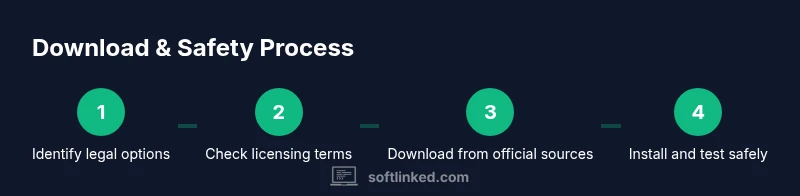
Search for official FL Studio trial pages and reputable open-source DAWs. Avoid shady download portals that promise free full licenses.
Tip: Filter results to official domains and community-run repositories. - 3
Review licensing terms
Read terms for trials and free editions to understand saving, exporting, or commercial use limits.
Tip: Note restrictions that affect your projects or portfolio. - 4
Download from official sources
Navigate to the publisher’s site or trusted distributors to obtain installers safely.
Tip: Verify the site uses HTTPS and matches branding. - 5
Install and verify safety
Install on a test user account, scan the installer, and enable security features during setup.
Tip: Create a restore point if available before installing. - 6
Test with starter materials
Open sample projects or tutorials to assess usability and workflow integration.
Tip: Keep a simple project to compare performance across options. - 7
Evaluate core features
Assess recording, editing, MIDI, effects, and export formats that matter for your goals.
Tip: Make a short demo track to test the end-to-end process. - 8
Decide long-term path
If free options meet your needs, continue with them; otherwise plan for a paid license that fits your roadmap.
Tip: Document a 90-day plan to revisit licensing decisions.
Your Questions Answered
Is FL Studio really free?
No, FL Studio is a paid product with official trials and educational licenses. A completely free, unrestricted full version is not offered legally.
No, FL Studio is not free. There are official trials and educational options, but no unrestricted free full version.
Can I download FL Studio for free legally?
You can access a legitimate trial from the publisher or use free/open-source DAWs as legal alternatives. A permanent, full-license download for free is not provided by the official channels.
You can use an official trial or legitimate open-source DAWs, but not a permanent free full license.
What are safe alternatives to FL Studio that are free?
LMMS, Cakewalk by BandLab, and Ardour are reputable free/open-source DAWs that cover recording, MIDI, and mixing tasks for learners.
Safe free options include LMMS, Cakewalk by BandLab, and Ardour.
Why should I avoid pirated software?
Pirated software risks malware, legal consequences, and lack of updates or support. It can jeopardize your projects and personal data.
Piracy carries malware and legal risk and often lacks updates and support.
How long does an FL Studio trial last?
Trial durations vary by publisher; they typically provide enough time to evaluate workflow, but some features may be restricted until a license is purchased.
Trials last for a limited period and may restrict saving or exporting until licensed.
Can I use a free DAW for commercial projects?
Many free/open-source DAWs allow commercial use, but licensing terms vary. Always review the license to ensure compliance for commercial work.
Yes, many free DAWs support commercial work, but check each license first.
Watch Video
Top Takeaways
- Verify legality before downloading software
- Explore official trials and open-source DAWs
- Protect your system with backups and malware protection
- Evaluate features to choose the right path
- Rely on clear licensing to avoid risk