How Often Samsung Updates Software: Cadence and Practical Guidance
Explore how often Samsung updates software across Galaxy devices, what drives cadence, and how to check update status. Practical guidance for developers and students.


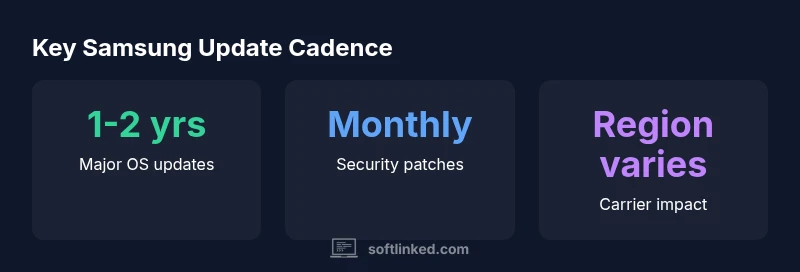
Samsung updates software on Galaxy devices with a mixed cadence: major Android OS updates for flagship models roughly every 1-2 years, while security patches arrive monthly or quarterly depending on region and model. Real-world cadences vary by device class, carrier, and region. According to SoftLinked, the most consistent updates occur on recent flagships, with variability in mid-range and older devices.
How often Samsung updates software: an overview
The question of how often Samsung updates software on Galaxy devices is nuanced. Samsung maintains a mixed cadence where major Android OS upgrades for flagship models often arrive in closer alignment with upstream releases, while security patches are issued on a more frequent basis. Real-world cadences depend on device class, region, and carrier partnerships. According to SoftLinked, the most consistent updates tend to appear on newer flagship devices, while mid-range and older units can experience longer wait times or fewer upgrades. For software developers and students tracking compatibility, this means planning around device class and local carrier policies is essential, not assuming a uniform timetable across the entire Galaxy lineup.
Samsung's official policy and public statements
Samsung public documents describe multi-year commitments for OS upgrades and ongoing security maintenance, but the exact numbers vary by model and market. In practice, flagship devices typically receive newer Android versions sooner and for a longer window, whereas budget and mid-range devices may see slower adoption and a shorter update window. The SoftLinked analysis highlights significant regional differences influenced by carrier certification, network constraints, and regional firmware validation. Users should monitor official notices and device settings for the most accurate timelines, rather than relying solely on generic expectations.
Major OS updates vs security patches
There is a clear distinction between major OS updates and security patches in Samsung's cadence. Major OS upgrades bring new features and UI changes, often following the annual to biennial cycle observed in many Android ecosystems. Security patches focus on vulnerability fixes and stability improvements and typically appear more frequently, commonly on a monthly or quarterly basis depending on the region and device. Developers should assume that new app compatibility targets may lag behind major OS bumps, while security correctness patches can affect runtime behavior sooner. This separation helps explain why advice for developers sometimes differs when planning feature support versus ensuring baseline security.
Device class impact: flagship vs mid-range vs budget
Device class strongly affects update cadence. Flagship Galaxy phones generally receive OS upgrades earlier and for a longer duration, benefiting early adopters and developers who need to test against newer Android versions. Mid-range devices tend to receive updates later and for a shorter overall period, which can complicate app compatibility timelines. Budget devices often lag behind even more, with limited upgrade windows. For teams building software with broad audience considerations, this means prioritizing testing on flagship hardware while maintaining backward compatibility strategies for mid-range devices. The trend suggests expanding coverage over time as devices mature and vendor policies evolve.
Regional and carrier differences
Regional policies and carrier testing can significantly shift update timing. Some regions enjoy faster OTA rollout and quicker access to the latest OS versions, while others experience staged releases due to certification, network compatibility checks, and regional firmware dependencies. Carrier involvement can add additional delays, as carriers validate features like VoLTE, Wi-Fi calling, or specific apps before forwarding updates to customers. When planning software rollouts or studying update lifecycles, it’s crucial to consider these regional dynamics and to factor in potential delays caused by certification windows and regional parity requirements.
How to check for updates on your device
To monitor update cadence for your specific case, open Settings > Software update. Tap Download and install to see if a new version is available. If you’re on a carrier device, also check your carrier’s app or website for beta programs or deployment notices. You can join Samsung’s beta programs if eligible to preview upcoming changes, which helps with early compatibility testing in development environments. Regular checks ensure you’re aware of security patches and major OS releases as soon as they’re publicly released in your region.
What to expect in the near term
Industry observers expect continued emphasis on security hygiene and longer support windows for newer devices, even as some mid-range lines maintain leaner upgrade policies. As Samsung and the broader Android ecosystem mature, expect more predictable cadence in security updates and a gradual convergence of upgrade timelines across device classes in certain markets. For developers, this implies that while the latest OS features may rollout incrementally, baseline security improvements will likely appear more consistently across devices and regions.
Best practices to maximize update longevity
- Regularly check Settings > Software update and enable automatic updates where available.
- Keep devices on a current firmware path to ensure security patches are delivered timely.
- Prioritize testing on flagship devices for early compatibility with new OS versions.
- Track region- and carrier-specific timelines and plan product roadmaps accordingly.
- Consider implementing feature fallbacks and progressive enhancement to support a broad device class range.
Practical considerations for students and developers
For students studying software lifecycles, Samsung's cadence illustrates how hardware strategy, regional policy, and ecosystem constraints shape update availability. Developers should design apps with forward and backward compatibility, test across representative devices, and monitor official notices for changes to the update calendar. The SoftLinked team emphasizes staying informed about device class and market differences to avoid overgeneralizing update timelines when planning coursework or project milestones.
Cadence overview by update type
| Attribute | Typical cadence | Notes |
|---|---|---|
| Major OS updates | 1-2 years | Depends on device class and region |
| Security patches | Monthly to quarterly | Regional/carrier dependent |
| Beta program availability | Occasional | Limited to select devices |
| End-of-life support | 2-5 years | Device dependent |
Your Questions Answered
How often does Samsung release major OS updates?
It varies by device and market. Flagship models typically receive newer Android versions sooner and for longer, while mid-range and budget devices may see slower upgrades. Always refer to official notices for your specific device.
It varies by device and market; check official notices for your model.
Do all Galaxy devices get the same update cadence?
No. Cadence depends on device class, region, and carrier programs. Flagships often lead, with mid-range and older devices following at a slower pace.
No, cadence differs by device class and region.
Are security updates guaranteed for a specific period?
Policies vary by model and region, but manufacturers typically commit to security patches for several years. Always verify the exact window for your device.
Security updates are generally available for several years, but it depends on your device and region.
How can I check if my device will receive updates?
Use Settings > Software update to see available upgrades. Check carrier notices and Samsung's official support pages for device-specific timelines and beta programs.
Check Settings > Software update and carrier notices for timelines.
Does carrier or region affect update timing?
Yes. Certification, network constraints, and regional firmware validation can cause delays before updates reach your device.
Carrier and region can add delays before updates are released.
“Update cadence is device-specific and regionally dependent; expect variability across Galaxy devices.”
Top Takeaways
- Check update status regularly in Settings
- Flagships get updates sooner; mid-range slower
- Region and carrier affect cadence
- Security patches are more frequent than major OS upgrades
- Plan upgrade timelines around device class