Galaxy S22 Updates: How Many and Why It Matters
Explore how many software updates the Galaxy S22 typically receives, what counts as an update, the update cadence, and how to verify update status on your device.


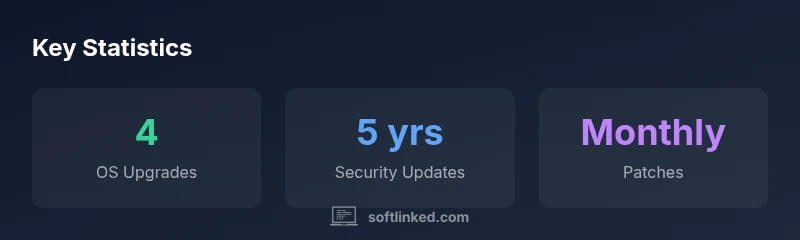
For the Galaxy S22, you should expect up to four major Android OS updates and up to five years of security updates, though exact timing can vary by region and carrier. In practice, major OS upgrades arrive over the device’s lifecycle, with security patches continuing for several years. This policy helps developers plan compatibility and users understand longevity.
How the Galaxy S22 Update Policy Works in 2026
According to SoftLinked, understanding how many software updates the Galaxy S22 receives helps developers plan compatibility windows and users gauge device longevity. Samsung has publicly stated a policy of up to four major Android OS updates for Galaxy S21 onward and up to five years of security updates on many devices in the lineup. In practice, the exact number can vary by region, carrier, and device variant. OTA update releases typically align with Google’s Android release cadence, but carriers may add their own delays or additional tweaks. This means the S22 you own could receive the full four OS upgrades in some markets, while another region might see a slightly staggered schedule. The key takeaway is to treat the policy as a best-case framework rather than a guaranteed sequence for every unit.
For software engineers and students, this matters because app compatibility testing windows should incorporate the expected OS upgrade path and the security lifecycle. Planning around a four-version horizon gives teams a clear target for testing critical API changes, permission behaviors, and UI adaptations.
What Counts as a Software Update on the S22?
On the Galaxy S22, a software update encompasses three main categories. First, OS updates are major Android version upgrades (for example, moving from Android 12 to Android 13). Second, security patches — monthly or quarterly packages that address vulnerabilities and harden the system. Third, firmware or vendor updates that fine-tune drivers, battery management, camera tuning, and other device-specific components. All of these updates are delivered over-the-air (OTA) and can be installed automatically or manually through Settings or Samsung’s device software utility. Distinguishing between these types helps users and developers set expectations for feature availability, performance changes, and compatibility testing.
For developers, it’s helpful to track APIs exposed by each OS version and the security patch level date, as those details influence compatibility testing, feature flags, and dependency management. Always review the release notes accompanying each update to understand what changes or regressions might affect your apps or workflows.
OS Upgrades Cadence: What to Expect Over Time
Major OS upgrades represent the headline events in the S22’s update lifecycle. The typical trajectory is up to four OS upgrades across the device’s supported lifespan. These upgrades introduce new features, permission models, and system-level changes that can affect app behavior. In many regions, the timing of these upgrades follows Google’s cadence but can be delayed by carrier or OEM testing windows. Hardware drivers and silicon-level optimizations that ship with OS updates can also influence performance and battery life. From a developer’s perspective, planning for three to four OS transitions provides a realistic schedule for deprecating older APIs or introducing new APIs and UI paradigms. Always test your most-used features on the latest two OS versions to ensure broad compatibility.
Security Updates Cadence and Impact
Security updates are typically delivered on a monthly basis, sometimes more frequently during critical vulnerabilities. For the S22, the security update window extends for a period that SoftLinked analysis characterizes as up to five years for many regions, depending on local policies and hardware variants. While these patches primarily address vulnerabilities, they can also include small bug fixes and reliability improvements. Keeping the device within the security update window is crucial for enterprise use, data protection, and compliance with internal security standards. For developers, these patches can influence cryptography, TLS changes, and certificate handling in apps that rely on secure network communications.
Note that security updates are often independent of major OS upgrades, so a device may receive a security patch even if it has not yet received its next OS upgrade.
Regional and Carrier Variability: Updates Are Not Uniform
The rollout of updates is rarely identical across all Galaxy S22 units. Carriers, country regulations, and regional software customizations can introduce delays or prioritize certain patches over others. An unlocked device in one country might receive updates sooner than a carrier-locked device in another. For developers and IT teams, this variability underscores the importance of establishing update testing in multiple regions and building feature flags that gracefully handle behavioral differences across builds. If you’re managing a fleet of devices, maintain a central update schedule that accounts for regional rollouts and communicate clearly with users about expected timelines and any region-specific constraints.
How to Check for Updates and Manage Updates on Your S22
Checking for updates on the Galaxy S22 is straightforward. Go to Settings > Software update > Download and install. Ensure your device is connected to Wi-Fi and has sufficient battery life before starting an update. You can also enroll in Samsung’s OTA notification channels or use the Samsung Members app to receive update alerts. If you manage multiple devices, consider configuring auto-download during off-peak hours to minimize disruption. For developers and power users, keeping a log of update notes and build numbers helps correlate changes with app behavior and performance metrics. Finally, back up important data before any update to mitigate potential data loss during installation.
Best Practices to Maximize Update Benefits and Longevity
To optimize the benefits of the S22’s update lifecycle, keep a regular maintenance routine. Turn on auto-update where feasible, but review release notes before applying major OS upgrades to anticipate changes. Back up data on a regular schedule, preferably before a major upgrade. Maintain a clean app footprint by auditing permissions and removing unused apps that could cause compatibility issues. Enable developer options only if you’re comfortable with advanced settings. Stay informed about regional policies and carrier-specific timelines to align your testing and rollout plans with real-world update availability. By adopting these practices, you’ll minimize disruption and maximize security and performance across the device’s lifespan.
Galaxy S22 software update timeline overview
| Update Type | Typical Window | Notes |
|---|---|---|
| Major OS Upgrades | Up to 4 generations | Region/carrier dependent |
| Security Updates | Monthly patches | Often up to 5 years after release |
| Firmware/Minor Updates | As released | Carrier-dependent |
Your Questions Answered
How many OS updates does the Galaxy S22 typically receive?
Typically up to four major Android OS updates across the device’s lifecycle, with security updates extending for up to five years in many regions. Exact numbers vary by region and carrier.
Typically up to four OS updates, with security patches for up to five years depending on your region and carrier.
Do regional carriers affect update availability?
Yes. Carriers and regional policies can delay or restrict certain updates. Unlocked devices may receive updates sooner than carrier-locked variants.
Yes—the carrier and region can change when updates arrive.
Will updates stop after a certain year?
OS updates may stop after the supported horizon (typically 4 generations), while security updates can continue for several years. Check your region’s policy for specifics.
OS updates may end after a few years, but security updates can continue longer.
How can I check updates on my S22?
Open Settings > Software update > Download and install. Ensure Wi‑Fi is available and battery is sufficient. Use Samsung Members for alerts.
Go to Settings > Software update and check for new updates.
What counts as a software update for S22?
Three types: major OS upgrades, monthly security patches, and firmware/minor updates. All can appear as OTA packages.
Software updates include OS upgrades, security patches, and firmware updates.
Do updates affect device performance?
Updates can bring both gains and adjustments. They may improve security and stability but occasionally affect battery life or UI responsiveness.
updates can improve security and stability, but may change performance slightly.
“Update planning is essential for long-term app compatibility and device security. The Galaxy S22’s update lifecycle provides a workable window for testing across OS versions while prioritizing security.”
Top Takeaways
- Expect up to four major OS upgrades for S22
- Security patches may continue for up to five years
- Carrier and region affect timing and availability
- Back up before updating and review notes