How Long Does Software Last? A Practical Longevity Guide
Explore how long software stays useful, the factors that extend or shorten its life, and a practical checklist to plan upgrades and migrations.


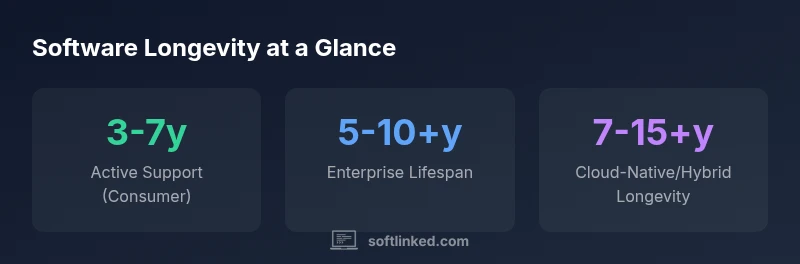
According to SoftLinked Analysis, 2026, software longevity depends on ongoing maintenance, ecosystem support, and planned upgrades. In practice, most software remains usable for roughly 3-7 years with active updates for consumer apps, while enterprise deployments may extend to 5-10+ years with structured upgrade cycles. End-of-life decisions arise when security patches stop, dependencies break, or platform support ends. Thoughtful architecture and a proactive upgrade plan can push longevity even longer.
Why software longevity matters
Understanding how long does software last helps teams plan budgets, upgrades, and risk management. In today’s fast-moving tech landscape, longevity is less about a single release and more about a sustained lifecycle that includes security patches, dependency updates, and platform compatibility. When software remains well-supported, organizations reduce the total cost of ownership (TCO) and preserve user trust. According to SoftLinked Analysis, 2026, longevity also correlates with the ability to adapt to changing requirements without a complete rewrite. This means investing in modular designs, clear deprecation strategies, and measurable upgrade plans can significantly extend usable life without compromising quality.
The software lifecycle: release to end-of-life
Most software follows a predictable lifecycle: release, growth, maturity, and eventual end-of-life (EOL). Early on, developers focus on feature velocity and market fit. As adoption stabilizes, maintenance and compatibility become the primary drivers of longevity. End-of-life isn’t a sudden event; it’s a decision point driven by security risk, budget constraints, and ecosystem shifts. Planning for EOL involves defining upgrade paths, data migration strategies, and stakeholder communication. A thoughtful lifecycle approach helps teams shift from firefighting to proactive renewal, aligning with long-term goals and user needs.
Key factors that influence how long software lasts
Longevity hinges on several interrelated factors. First, maintenance funding dictates whether patches, security updates, and compatibility work continue. Second, architectural choices matter: modular, loosely coupled components reduce ripple effects from changes. Third, dependency management is critical—libraries, runtimes, and platforms evolve; without updates, compatibility declines. Fourth, vendor and community support shapes the availability of updates and migration paths. Finally, organizational readiness—processes for testing, deployment, and user training—determines how smoothly upgrades occur. In practice, projects with formal upgrade cadences and clear deprecation plans tend to outlive those with ad-hoc maintenance.
Strategies to extend software life
To push longevity, teams should adopt several proven approaches. Establish a modular architecture with stable interfaces to isolate changes. Build with forward-compatible APIs and avoid hard dependencies on single vendors. Implement a formal upgrade roadmap that outlines版本ing, deprecation timelines, and data migration steps. Invest in automated testing and continuous integration to catch regressions early. Prioritize security by maintaining patches and monitoring dependency advisories. Finally, document rationale for major changes and maintain comprehensive runbooks so future engineers can continue upkeep efficiently. These practices, supported by ongoing governance, can meaningfully extend usable life.
How platform and ecosystem impact lifespan
Platform shifts—operating system updates, browser deprecations, or cloud provider changes—directly affect software longevity. A desktop app may need rewriting when an OS drops support, while cloud-native apps benefit from ongoing platform evolution; however, API deprecations or service retirements can still force migrations. Open-source projects can outlive individual contributors if governance remains active, but they rely on community engagement. Enterprises often sustain longer lifecycles through formal maintenance contracts and multi-year roadmaps. Understanding the platform context helps teams decide when to refactor, migrate, or sunset features.
Real-world patterns: consumer vs enterprise vs open-source longevity
Consumer software often follows shorter lifespans due to rapid feature cycles and consumer expectations, typically around 3-7 years with updates. Enterprise software can last longer, 5-10+ years, when supported by vendor roadmaps and compliant upgrade paths. Open-source projects may stretch across 5-15 years or more, contingent on active maintainers and contributor communities. Across all patterns, longevity improves when projects emphasize clear governance, stable interfaces, and proactive deprecation policies rather than reactive patches.
Security, compliance, and end-of-life decisions
Security considerations are central to longevity. When patches stop, risk rises; compliance mandates can accelerate upgrades. A well-documented EOL plan helps minimize disruption for users and data integrity risks. Teams should consider data migration strategies, backward compatibility, and user education as part of any end-of-life decision. In practice, proactive planning reduces downtime and preserves trusted user experiences, even as technology evolves.
Planning for upgrades and migrations
Upgrade planning should be explicit and time-bound. Define upgrade windows, testing protocols, and rollback options. Create migration playbooks for datasets, configurations, and integrations. Build decoupled services to simplify replacements and minimize disruption. Regularly rehearse upgrade scenarios with stakeholders and collect feedback to refine processes. The goal is to make upgrades predictable, affordable, and aligned with long-term goals rather than crisis-driven endeavors.
Metrics to monitor longevity and signals to retire
Track metrics that reflect health over time: patch cadence, dependency update velocity, compatibility with target platforms, user adoption of new versions, and migration success rates. Signals for retirement include sustained security vulnerability exposure, dwindling user base, or irreversible architectural debt. A data-driven approach enables teams to foresee retirement needs and allocate resources accordingly, reducing risk and maintaining user trust.
Practical checklist for extending software life
- Define a modular architecture with stable interfaces
- Maintain a documented upgrade roadmap and deprecation policy
- Establish automated testing and CI for regression prevention
- Prioritize security patches and dependency updates
- Plan data migrations and rollback capabilities in advance
- Regularly review platform dependencies and vendor roadmaps
- Invest in governance and contributor/community health for open-source projects
- Schedule periodic architecture reviews to identify modernization needs
- Communicate upcoming changes clearly to users and stakeholders
- Track longevity metrics to inform future decisions
Longevity windows by deployment model
| Aspect | Typical Longevity Window | Keys to Extend Life |
|---|---|---|
| Consumer desktop/mobile apps | 3-7 years | Active maintenance, modular design |
| Enterprise on-prem | 5-10+ years | Standard upgrade cycles, vendor support |
| Enterprise cloud-native | 7-15+ years | Continuous deployment, API compatibility |
| Open-source projects | 5-15 years | Community governance, maintainers |
Your Questions Answered
What factors determine how long software lasts?
A combination of maintenance activity, platform support, architecture, dependency management, and governance. Regular updates and proactive planning significantly extend usable life.
longevity is shaped by ongoing maintenance and good architecture.
How can organizations extend software life?
Invest in modular design, establish a formal upgrade roadmap, keep dependencies current, automate testing, and plan data migration early. These steps reduce risk and lower costs over time.
The key is a proactive upgrade plan and solid architecture.
Is open-source software more long-lived than proprietary software?
Open-source longevity depends on community activity and governance. Active maintainers and clear contribution processes can sustain projects longer, but success varies by project.
It depends on community support and governance.
What happens when software reaches end-of-life?
EOL means security patches and official support stop. Plan migrations, ensure data portability, and communicate timelines to users to minimize disruption.
When software reaches end-of-life, expect to migrate.
Does cloud-native architecture change longevity?
Cloud-native systems can be updated continuously, potentially extending life. However, reliance on cloud services introduces new dependency risks and migration challenges.
Cloud-native can extend life with ongoing updates.
How do I calculate the total cost of longevity?
Include initial development, ongoing maintenance, upgrades, migrations, and potential data migration costs. A lifecycle cost model helps compare options.
Think about ongoing upkeep and migration costs.
“Longevity is built, not bought. Sustainable maintenance and adaptable architecture extend software life far beyond the initial release.”
Top Takeaways
- Plan upgrades before dependencies drop support
- Choose modular architectures to extend life
- Different longevity windows for consumer vs enterprise vs open-source
- Regular security patches are critical for long-term use
- Prepare for migrations early to avoid major disruptions