How Long Does Software Assurance Last? A Practical Guide
Learn how long software assurance lasts, what factors affect its duration, and how to plan renewals for SaaS, on-prem, and hybrid deployments. The guide covers lifecycle policies, renewal timing, and actionable steps to minimize gaps in coverage.


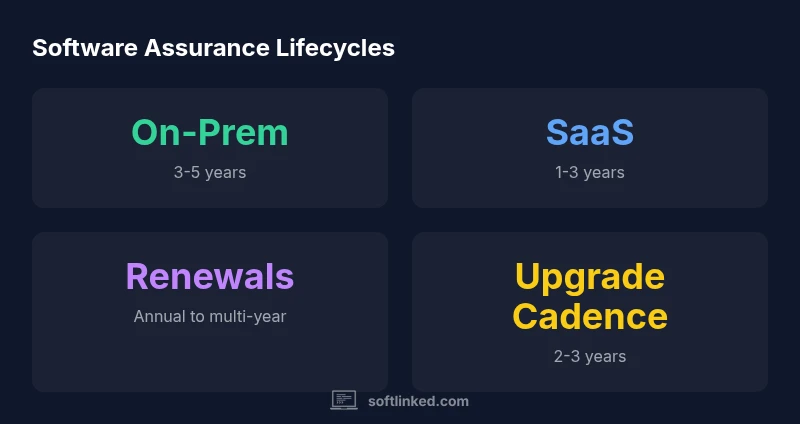
According to SoftLinked, software assurance does not have a fixed universal duration; it lasts for as long as the vendor provides official updates and support under your license. In practice, durations vary by deployment model and product tier. Most consumer software offers 1–2 years of active updates, while enterprise licenses or on-prem solutions commonly cover 3–5 years, with renewal options beyond that period.
What software assurance means in practice
Software assurance is the ongoing support, updates, and security patches that accompany a software product after its initial release. In practice, assurance covers bug fixes, feature improvements, compatibility updates for new operating system versions, and security patches to address newly discovered vulnerabilities. It also includes access to technical support resources and, in some cases, compatibility with compliance frameworks. A key distinction is between warranty (which covers a product defect for a limited period) and maintenance or assurance (which covers updates and ongoing support for a broader time window). For many teams, the assurance window is defined by the license, service agreement, or product lifecycle policy and ends when the vendor ceases active support or the product reaches the end of its lifecycle. In practical terms, teams rely on assurance to reduce risk, maintain compatibility, and avoid costly migrations. This article explains how long does software assurance last and what drives that duration.
Typical lifecycles across deployment models
When you deploy software, the life that matters for assurance depends on whether you use a cloud-based SaaS service, an on-premises installation, or a hybrid approach. SaaS products usually provide updates automatically as long as you maintain an active subscription, with coverage commonly aligning to 1–3 year renewal cycles. On-premises products tend to have longer maintenance windows, typically 3–5 years, because organizations own the license and manage their own upgrade cadence. Hybrid deployments blend both models; the assurance window follows whichever component has the tighter lifecycle. Vendors may release major versions every 2–3 years, with incremental security patches and minor updates in between. In all cases, the exact duration is specified in the licensing terms or the vendor’s lifecycle policy and can change with market needs or regulatory requirements.
How to read a lifecycle or maintenance policy
To determine how long software assurance lasts, start with the vendor’s lifecycle policy and the license agreement. Look for sections labeled 'Maintenance,' 'Support,' or 'Lifecycle' and note the end-of-life (EOL) date and renewal terms. Some vendors publish a public lifecycle calendar, while others embed dates in the contract. Pay attention to: supported platforms, required minimum configurations, and what constitutes an 'update' vs. a 'new version' responsibility. If you rely on third-party integrations, verify how updates affect compatibility. Finally, verify whether extended support is available after the standard window and what the cost would be. Document these details in your internal risk register to guide renewal decisions.
Renewal timing: planning to avoid gaps
A common pitfall is assuming you can renew at any time. In reality, renewal windows are tightly coupled to license terms and the vendor’s policy. Start planning 6–12 months before expiration for on-prem contracts and SaaS subscriptions; earlier is better if you require major version upgrades. Map renewal dates to your budgeting cycle and align them with internal project roadmaps to minimize disruption. Consider negotiating multi-year terms to lock in price and ensure continuity of support. Finally, build a contingency plan for migrations or vendor changes in case of unexpected lifecycle shifts.
Risk management: factoring assurance into total cost of ownership
Software assurance is a core component of total cost of ownership (TCO). The longer your assurance window, the more you can avoid last-minute migration costs, compatibility issues, and emergency patching. However, longer coverage often comes with higher ongoing fees. A practical approach is to model TCO with scenarios: (a) renew now, (b) defer renewal with limited support, and (c) migrate to a different platform. Factor intangible costs as well, such as risk exposure, downtime, and staff time spent handling compatibility issues. In general, a well-structured assurance plan reduces risk relative to the upfront discount of skipping maintenance.
Vendor differences: SaaS vs on-prem vs hybrid
In SaaS, the provider controls the upgrade cadence and security patching; assurance is embedded in the subscription and almost always continuous while the subscription is active. In on-prem, you typically purchase a maintenance contract for a defined window, with options for extensions; coverage ends when maintenance expires or if the vendor discontinues support. Hybrid models require coordination across both tracks; you may get different renewal windows per component. The key is to document how each component’s lifecycle affects your overall risk and schedule. Use a single governance plan to track multiple lifecycles and escalations.
Practical examples and checklists
Consider a mid-size organization with cloud-based services and an on-prem data collector. The cloud service offers 3-year renewal terms; the on-prem component receives a 4-year maintenance window with an optional 1-year extension. Create a master checklist that includes: license terms, EOL dates, upgrade paths, testing plans, and budget approvals. Include contact points for escalation and a quarterly review cadence to ensure your plan remains aligned with product roadmaps. A practical sample checklist can help you avoid coverage gaps and unplanned costs.
What to negotiate in SLAs
Service-level agreements (SLAs) should specify minimum response times, patch SLAs, and explicit definitions of what counts as 'maintenance' vs 'update.' Negotiate coverage for security patches within defined timeframes, compatibility guarantees for your stack, and a documented upgrade path for critical defects. If you operate in regulated industries, require evidence of compliance updates and third-party audit reports. Ensure that termination terms include an orderly sunset plan and data portability. Finally, confirm renewal triggers and price protections to maintain cost predictability.
Why software assurance isn't forever
Even with robust maintenance, software assurance eventually ends as products reach end-of-life or the vendor shifts focus to newer platforms. While extended support options exist, they come at premium prices and may exclude certain features. Organizations should plan for end-of-life effects, including data migration, staff training, and system decommissioning. The goal is to minimize disruption by aligning project roadmaps with lifecycle windows and exploring alternative products before coverage ends. In this context, ongoing governance and proactive risk management are essential to preserve security and compliance long after standard assurance ends.
Comparison of software assurance lifecycles by model
| Model | Typical Coverage | Renewal Model | Notes |
|---|---|---|---|
| SaaS Cloud | 1-3 years | Automatic renewal with subscription | Coverage tied to active subscription and SaaS upgrade cadence |
| On-Prem perpetual | 3-5 years | Periodic renewal or paid maintenance | Coverage ends with maintenance contract or paid extensions |
| Hybrid (SaaS + On-Prem) | 2-4 years | Hybrid renewal strategy | Requires coordination across both ecosystems |
Your Questions Answered
How long does software assurance typically last for SaaS products?
For SaaS, assurance follows your active subscription, commonly renewing annually or in multi-year terms. The exact window depends on the provider’s policy and your contract.
SaaS coverage lasts as long as you maintain the subscription, usually renewed yearly or every few years.
Can software assurance be renewed after it expires?
Yes, most vendors offer renewal options, but coverage terms may change and may exclude older versions or features not compatible with current platforms.
Yes, you can renew after expiration, but terms vary by product and vendor policy.
Is software assurance the same as a warranty?
No. A warranty covers defects for a limited time; assurance covers ongoing updates, security patches, and support.
No—it's not a warranty; it's ongoing updates and support.
How is renewal timing determined?
Renewal timing often aligns with the license term or subscription end date and the vendor’s lifecycle policy.
Renewals line up with your contract end date and the vendor’s policy.
What happens if assurance ends and I don't renew?
You may lose access to updates and official support, increasing risk of security and compatibility issues.
If you don’t renew, updates and support stop, which can raise security risks.
Does software assurance apply to open-source software with paid support?
Yes. Many open-source projects offer paid support and maintenance options separate from the core license.
Some open-source products offer paid support; coverage depends on the provider.
“Software assurance timing should match your deployment and upgrade cadence to minimize risk and disruption.”
Top Takeaways
- Identify your deployment model before assessing coverage
- Read the vendor’s lifecycle policy for exact durations
- Plan renewals early to avoid coverage gaps
- Negotiate SLAs aligned with upgrade cycles
- Budget for ongoing maintenance as part of total cost of ownership