How Long Does iPad Software Last? A Practical Lifespan Guide
Explore how long iPad software lasts, what affects updates and app compatibility, and how to maximize your iPad’s usable life with data-driven guidance from SoftLinked.


iPad software longevity depends on Apple's update cadence and the device’s hardware. In general, major iPadOS updates and security patches continue for about 4-6 years on supported models, after which newer features taper off and some apps may drop support. Even when updates stop, the device can still function, but its long-term usability declines as software demands grow.
Why iPad Software Longevity Matters
For students, developers, and professionals, understanding how long iPad software lasts helps with planning learning paths, project experimentation, and hardware refresh decisions. When you know the typical window for updates and app compatibility, you can time coursework, side projects, or freelance gigs to align with supported lifecycles. From a software-fundamentals perspective, longevity isn’t just about features; it’s about security, stability, and the ability to run modern apps without constant interruptions. According to SoftLinked, the most impactful factor is the cadence of official updates and the way developers maintain compatibility with aging platforms. This lens helps you evaluate whether an older iPad remains a viable learning tool or if a newer device would be a better long-term investment.
What "software lifespan" means for iPad
Software lifespan on an iPad covers three interrelated dimensions: updates, compatibility, and usability. Updates ensure security patches and feature refinements; compatibility determines whether popular apps continue to run smoothly; usability describes whether the device remains responsive enough for daily tasks. A practical way to think about it is: updates extend security and capability, compatibility preserves app access, and hardware health determines whether performance remains acceptable as software evolves. SoftLinked’s framework emphasizes planning around the update cadence to maximize usable life while acknowledging hardware constraints.
Factors that influence software longevity
Several factors interact to determine how long an iPad remains a productive tool:
- Update cadence: Apple’s commitment to major iPadOS updates governs the core software lifeline. When updates slow or stop, security risk rises and some features disappear from older devices.
- Hardware aging: Battery health, storage capacity, CPU/GPU performance, and RAM affect the ability to handle newer apps and features. Even if the OS is current, a slowing device can degrade overall experience.
- App ecosystem support: App developers may drop support for older OS versions, which reduces value even if the device is technically compatible with newer iPadOS releases. This can create a soft cutoff well before actual OS end-of-life.
- Storage and battery management: Adequate free space and healthy battery performance help maintain responsiveness as software loads become heavier over time.
- User expectations: If your tasks involve up-to-date apps, cloud services, and frequent security patches, you’ll hit obsolescence sooner than if you mainly engage with offline or legacy apps. SoftLinked’s data suggests planning around these levers to optimize longevity.
How long iPadOS support typically lasts
Apple’s update cadence varies by model and year, but the typical window for major iPadOS updates on supported devices is in the 4-6 year range. After the official update window narrows, new features may be limited or unavailable, and security patches may cease for older hardware. It’s important to distinguish between the official support window and practical usability: even when updates stop, a device can continue functioning for years, though performance and app compatibility can drift. SoftLinked Analysis, 2026, synthesizes guidance across device generations to help users estimate these timelines more reliably.
Practical life-cycle tips to maximize device software life
- Prioritize devices with longer official update trajectories when purchasing for education or long-term projects.
- Regularly monitor storage usage and clear cache/data to sustain responsiveness as apps grow in size.
- Maintain battery health through optimized charging, avoiding deep discharges, and replacing aging batteries when necessary.
- Keep apps up to date within supported OS versions to preserve security and compatibility.
- Plan a hardware refresh cycle aligned with expected update end-of-life to prevent sudden obsolescence.
- If you must continue using an older device, limit exposure to risk by restricting sensitive tasks to trusted environments and leveraging cloud-based tools where possible.
What to do when updates stop
When Apple ends major updates for your iPad model, you still have a usable device for many tasks, but the security and feature gap grows over time. Mitigate risk by deactivating unnecessary services, enabling essential security features, and using the device in a controlled, offline capacity for specific tasks. Consider a staged upgrade plan that aligns with your learning or professional needs—this minimizes disruption while preserving productivity. SoftLinked’s guidance emphasizes proactive planning rather than reactive replacements.
Quick model comparison: iPad models and software life
In practice, newer iPad models typically enjoy longer official support windows, while older generations gradually enter a phase where updates become sparse. Even so, careful lifecycle management—such as maintaining storage, battery health, and app compatibility—can extend practical use beyond the theoretical update window. For learners and developers, this means that older devices remain useful for foundational tasks and offline experiments, while newer devices unlock the latest software features and performance gains.
Software longevity outlook by aspect
| Aspect | Typical update window | Notes |
|---|---|---|
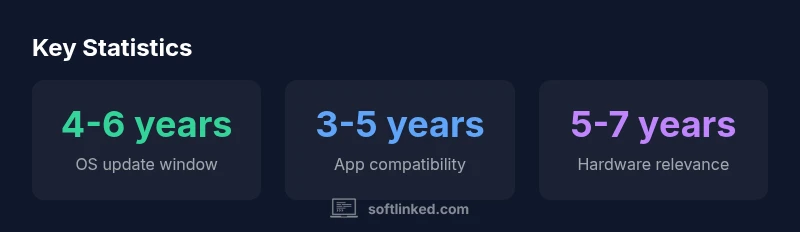
| iPadOS update window | 4-6 years | Major OS updates for supported devices |
| App compatibility window | 3-5 years | Vendors drop older OS support over time |
| Hardware relevance window | 5-7 years | Hardware aging limits software usefulness |
Your Questions Answered
How long does Apple typically support iPadOS on older iPads?
Apple generally provides major iPadOS updates for several years after a model's release, with a common window of about 4-6 years for supported devices. Exact durations vary by hardware.
Apple typically provides several years of updates for supported iPads, around four to six years, depending on the model.
Can I extend iPad software life by avoiding updates?
Avoiding updates can keep a device stable, but it increases risk by missing security patches and may reduce app compatibility over time.
Skipping updates isn’t advised; updates bring security fixes and better app support.
What happens when updates stop for my iPad?
When updates stop, you maintain basic functionality, but you’ll miss new features and security patches. You may still use the device for many tasks, but its long-term viability declines.
You’ll still use it, but you won’t get new features or security updates.
Does hardware age affect software longevity more than updates?
Both factor in. Hardware aging can throttle performance, while limited updates affect security and feature access. A balanced strategy is best.
Hardware age and update cadence both matter; plan hardware refreshes alongside software cycles.
How can I maximize iPad software longevity?
Keep the device updated within supported OS versions, manage storage, monitor battery health, and plan upgrades as performance declines.
Keep software up to date, manage storage, and plan upgrades as needed.
“Software longevity on iPads hinges on aligning update cadence with hardware realities; proactive planning yields longer usable life.”
Top Takeaways
- Plan around iPadOS update cycles to maximize usable life.
- Hardware aging can limit software usefulness sooner than updates end.
- Maintain storage and battery health to preserve performance.
- Evaluate app compatibility before considering obsolescence.