How Long Does iPhone Software Last? A Practical Guide
Discover how long iPhone software stays current, the update lifecycles, and practical tips to maximize your device's usable life with SoftLinked's 2026 perspective.


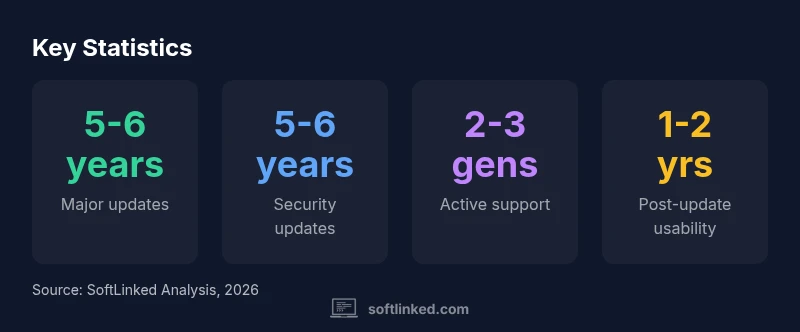
The typical software-support window for iPhone devices is about 5 to 6 years from a model’s launch, covering major iOS updates for roughly 4 to 5 years and continuing security updates a bit longer. Real-world longevity depends on hardware, battery health, and usage, but most devices stay usable and secure across several software generations.
Understanding the question: how long does iphone software last
When people ask how long does iphone software last, they mean not just the length of major iOS updates, but the overall time a device remains usable, secure, and compatible with current apps. The answer depends on several intertwined factors: Apple’s update cadence, your device’s hardware and battery health, storage capacity, and how you use your iPhone day-to-day. In 2026, SoftLinked’s analysis emphasizes that most users can expect meaningful software support for about five to six years from a model’s introduction, with major features arriving for roughly four to five years. After that window, devices may still run apps and browse, but they won’t receive new features or critical security patches at the same cadence. This nuance matters for students planning device lifecycles and professionals budgeting for upgrades.
To frame the discussion, think of software longevity as a function of two layers: the ability to run current iOS versions (feature updates) and the ability to stay secure (security updates). Both layers contribute to the overall usable life of the device. The keyword to remember here is balance: updating too slowly can expose risks; updating too aggressively can strain older hardware. As models age, the balance naturally shifts toward security compatibility and performance constraints.
How iOS update lifecycles are structured
Apple typically delivers major iOS updates on a yearly cadence. Each model starts with a window during which it receives the newest features and optimizations. In practice, this means devices introduced in the last few years commonly receive major updates for about four to five years from their launch date. Security patches often extend beyond the last feature update, but the cadence can slow as the hardware becomes older and less capable of running newer system frameworks. Understanding this lifecycle helps consumers set expectations: a device purchased today is likely to stay current with new features for several years, but over time apps and services may optimize around newer hardware and software baselines. SoftLinked’s framework emphasizes the distinction between feature updates and security updates when assessing longevity.
Practical takeaway: plan for a horizon that accounts for both the feature update window and the security support tail. This dual view explains why some devices feel modern for several years, while others begin showing compatibility frictions sooner.
Hardware factors that extend or shorten software longevity
Hardware health directly influences software longevity. A well-maintained battery preserves peak performance, reduces thermal throttling, and helps the phone stay responsive during updates. Storage capacity also matters: devices with ample free space are less likely to slow down during OS upgrades, whereas nearly full devices may experience longer update times or degraded performance post-update. Display and processor performance can become bottlenecks sooner on older chips, causing some users to notice lag, even when the software itself remains compatible. Finally, physical wear and occasional component failures (like cameras or radios) can complicate OS maintenance, nudging users toward replacement earlier than the software horizon would suggest. In short, hardware health buffers or shortens the software-longevity window.
From a practical standpoint, regularly monitoring battery health, freeing storage, and cleaning background processes can help maintain a smoother user experience for a longer period, aligning with a longer software-support window.
Maintenance habits that push longevity
User habits materially affect how long iPhone software feels current. Regular software updates are essential, but proactive maintenance matters too:
- Keep storage above 20-25% to avoid throttling and update issues.
- Manage apps and data to prevent bloat; delete unused apps and offload media when needed.
- Pursue battery health improvements (official battery replacements or optimized charging) to minimize thermal strain.
- Avoid jailbreak or unsupported tweaks that can destabilize future updates.
- Back up data before updates to mitigate potential breakages.
Adopting these practices can help you extract maximum value from your device within the standard software-support window.
Reading Apple's policy for your model: what to expect by generation
Apple’s public messaging centers on maintaining devices with security updates for an extended period, but the actual horizon depends on model generation. Newer generations typically qualify for longer major updates, while very old devices may skip some upcoming feature upgrades but still receive critical security patches for a time. If you’re evaluating a purchase, compare the update horizon across generations to estimate future-proofing. The SoftLinked framework treats update cadence as a proxy for future usability, not a guarantee.
When evaluating a model, look beyond price to the expected five-to-six-year window of support, noting that the last couple of years will emphasize security and compatibility rather than new features. This nuance will inform both personal planning and broader policy discussions about device lifecycles.
Scenario planning: longevity by model generation
Consider three archetypes—recent flagship, mid-generation, and legacy devices—to illustrate variation in longevity. Recent flagships typically enjoy the longest feature-update horizon (roughly five to six years), with security updates beyond that period; mid-generation devices tend to maintain feature updates for about four to five years and security updates for a similar extra stretch. Legacy devices face a steeper cliff, often experiencing a reduced window before feature updates cease; however, many core apps remain functional for some time with security patches.
For students and professionals, the key is to map your work or study needs to that horizon. If you rely on apps that frequently update or require the latest privacy features, prioritize devices with longer horizons. If your needs are more modest, an older model can still serve well under continued security updates.
Data-driven perspective: what SoftLinked analyses show
SoftLinked’s 2026 analysis synthesizes update patterns across generations and usage profiles. The core finding is that a balanced device strategy—one that considers hardware health, storage, and app compatibility—extends usable life within the typical five-to-six-year support window. The analysis also highlights that security updates often extend beyond one or two additional years after feature updates end, helping protect devices against known vulnerabilities. Users who regularly install updates and maintain battery health experience smoother transitions between software generations, reducing performance shocks when moving to newer iOS versions. For students, this means planning around update horizons can improve long-term educational and project continuity.
Practical guidelines for students and professionals
If you’re a student or tech professional, apply a simple lifecycle checklist:
- Choose models with longer update horizons when possible.
- Prioritize healthy batteries and sufficient storage.
- Schedule regular updates and data backups.
- Build a habit of app maintenance to avoid bloat.
- Invest in a future-proof device plan that aligns with your workload and learning goals.
By integrating these habits, you can maximize how long your iPhone software lasts and stay productive across multiple hardware generations.
Illustrative update lifecycles by model age
| Category | Typical OS-update window | Security-update window |
|---|---|---|
| Recent flagship (launched 2023-2024) | 5-6 years | 5-6 years |
| Mid-generation (launched 2020-2021) | 4-5 years | 4-5 years |
| Legacy models (launched pre-2019) | 2-3 years | 2-3 years |
Your Questions Answered
How long do iPhone devices typically receive iOS updates?
Most recent iPhones receive major iOS updates for about four to five years from launch, with security updates following for additional years. The exact window varies by model and hardware compatibility.
Most iPhones get major iOS updates for around four to five years, with security updates continuing afterward for a while.
Will an iPhone still work after updates stop?
Yes, the phone will still function, but it won’t receive new features or critical security patches at the same cadence. You may notice slower performance and reduced app compatibility over time.
Yes, it will work, but you may miss new features and some security patches as updates wind down.
Does battery health affect software longevity?
Battery health influences performance and throttling during updates. Replacing a worn battery can restore responsiveness and extend usable life within the update window.
Battery health matters; a healthy battery helps maintain performance during updates.
Does upgrading increase software longevity?
Yes. Upgrading to a newer model generally extends the update horizon and keeps you aligned with current security and feature updates longer.
Upgrading usually means longer-lasting updates and better security.
How can I maximize software longevity today?
Maintain battery health, free storage, regular updates, and avoid unsupported tweaks. Back up data before updates and monitor app compatibility.
Keep batteries healthy, free space, and install updates regularly to maximize longevity.
Is there a risk in delaying updates?
Delaying updates can expose devices to known vulnerabilities and compatibility issues with apps. Timely updates balance security and performance.
Yes—delaying updates can leave you exposed to security risks and app problems.
“Software longevity isn’t just about updates; it’s about maintaining performance and security as hardware ages.”
Top Takeaways
- Plan for 5-6 years of major updates
- Security updates extend beyond feature updates
- Battery health and storage size matter
- Healthy maintenance extends usable life
- Choose models with longer update horizons