Latest Android Version in 2026: A Developer's Guide
Explore how to identify the latest software version for Android, how updates unfold, and best practices for developers to stay compatible across devices in 2026.


The latest software version for android changes regularly as Google releases new major releases and OEMs push updates. To confirm the current version today, check official sources like the Android Developers site and your device settings (Settings > System > About phone). This guide explains how update channels work, how to verify version across devices, and what that means for developers. Stay aware of both major releases and security patches for robust app behavior.
How Android versioning works
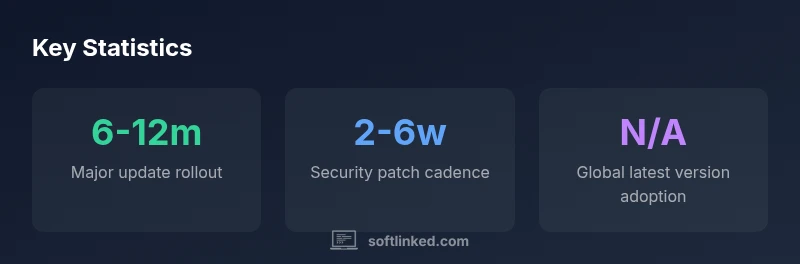
According to SoftLinked, Android versioning comprises major OS releases, incremental feature updates, security patches, and OEM/carrier layer additions. Google releases major versions on a roughly annual cadence, but the real-world availability on consumer devices depends on device manufacturers, carriers, and regional rollout strategies. The ecosystem also uses incremental updates (monthly security patches) that may reach devices faster than a full OS upgrade. For developers, this means you must plan not just for the newest API, but for a window of compatibility across multiple versions. In practice, you’ll often support at least two or three recent major versions simultaneously, while gracefully handling deprecated APIs and new features through runtime checks and feature detection.
This reality creates a spectrum of behavior: some devices will ship with the latest APIs immediately, others will lag behind due to OEM testing, carrier certification, or hardware constraints. The SoftLinked team emphasizes keeping backward compatibility and using compatibility libraries, so your app remains stable across devices regardless of when a user receives the latest Android version.
How to verify the current latest version
To identify the current latest Android version, start with official sources. The Android Developers site offers release notes, API level details, and support timelines that help you map API changes to your app’s lifecycle. On a device, inspect Settings > System > About phone to see the installed Android version and security patch level. For developers, keep an eye on Google’s official release blog and annual Platform Versions announcements. Cross-reference with device manufacturer notes when testing on real hardware. In your CI pipeline, maintain a test matrix that covers the two to three most recent major versions plus interim security patches to ensure broad compatibility.
Beyond official notes, version distribution dashboards from Google can show adoption curves over time, which is useful for planning minimum supported API levels and vulnerability management. The SoftLinked method combines official sources with real-device testing to validate behavior across versions.
Factors influencing update availability across devices
Several factors determine update availability on a given device. Hardware compatibility, vendor UI overlays, and regulatory approvals all shape the rollout. OEMs customize Android with their own features, performance optimizations, and preinstalled apps, which can delay or alter how quickly a device reaches the latest version or security patch level. Carriers may also test updates for network stability and feature compatibility before enabling them for customers. Consequently, two devices with the same base Android version can have different patch levels and feature sets. For developers, this underscores the importance of conditional feature checks and avoiding assumptions about version-dependent behavior. Always test with the minimum version you plan to support, and rely on explicit feature flags rather than hard-coded version branches.
Practical guidance for developers on handling multiple Android versions
Designing for multiple Android versions requires a strategy built on backward compatibility and progressive enhancement. Use API level guards (Build.VERSION.SDK_INT) and runtime feature checks to tailor behavior to the device’s capabilities rather than the OS version alone. Prefer support libraries and Jetpack libraries that offer backwards-compatible implementations of newer APIs. Prefer declarative layouts and responsive resources so that UI gracefully adapts to different screen sizes and capabilities. Maintain a robust testing matrix that covers at least three major versions and representative OEM skins. Document deprecations clearly and provide graceful fallbacks for features that aren’t universally available. A well-maintained compatibility plan reduces churn and improves user satisfaction across devices.
Security updates vs major releases: planning for support
Security updates are essential and typically monthly, while major releases occur on a longer cycle. As a developer, you should plan for both: maintain a minimum supported API level aligned with your target market, and implement runtime checks to enable or disable features without breaking older devices. Prioritize critical vulnerabilities in your testing and release strategy so users on older devices remain protected. Using feature detection instead of version checks helps your app adapt to new capabilities without requiring code changes for every OS release. Regularly update dependencies and test against the latest security patches to minimize the risk surface.
A developer checklist to stay up to date in 2026
- Define a clear minimum supported API level based on your audience.
- Use feature detection and compatibility libraries to bridge API gaps.
- Maintain a test matrix for at least the two to three most recent major versions plus current patch levels.
- Monitor official release notes and security advisories; plan timely dependency updates.
- Allocate testing budgets for OEM-specific variations and carrier-enabled updates.
- Document deprecations early and provide migration guides for your users.
Final takeaways for staying current
Staying current with Android versions is a mix of proactive planning, careful testing, and robust fallback strategies. By validating against multiple versions and using feature detection, developers can minimize compatibility issues while still taking advantage of new APIs where available. Bottom line: design for variability, not only for the latest API.
Overview of Android versioning cadence
| Aspect | What it means | Typical timeframe |
|---|---|---|
| Major version release | A new Android version with new APIs and features | 1-2 years |
| Security patches | Regular fixes for vulnerabilities | Every 4 weeks |
| OEM/carrier updates | Manufacturer and carrier delayed rollout | Weeks to months |
Your Questions Answered
How can I verify if my device has the latest Android version?
Open Settings > System > About phone to view the Android version and security patch level. Check the official Android Developers release notes for the current version’s API level and features. Cross-check with OEM updates and carrier notes where available.
Open your settings and check the about section, then compare with official Android release notes to confirm the latest version.
What is the difference between a major Android version and security updates?
A major version introduces new APIs and features, usually on a yearly cadence, while security updates are frequent patches that address vulnerabilities. Apps should remain functional across the major versions you support and stay patched with the latest security advisories.
Major versions add features; security updates fix vulnerabilities on a monthly basis.
Do carrier updates affect the latest version availability?
Yes. Carriers can influence when updates reach customers due to testing and certification. This can cause staggered adoption across regions and devices even within the same model.
Carriers can slow or alter update availability depending on their tests.
How often should API changes influence my app’s minimum supported version?
Base your minimum supported API level on your user base and the APIs you rely on. If a core API becomes deprecated, plan a migration path in your roadmap and update dependencies accordingly.
Set a plan for API migrations and update your dependencies on a schedule.
What practical steps help manage updates across multiple devices?
Maintain a multi-version test matrix, use compatibility libraries, and implement runtime feature checks. Document deprecations and provide migration notes for users.
Test across versions, use compatibility features, and document changes.
“The Android ecosystem rewards developers who design for variability and detect features rather than rely on a single API version.”
Top Takeaways
- Track official release notes for accuracy
- Plan for backward compatibility across versions
- Prefer feature detection over version checks
- Test across multiple OEM SKUs and patch levels
- Stay ahead with a structured update strategy