What software does not work with Snapdragon? A 2026 compatibility guide
A practical guide to Snapdragon software compatibility: what doesn’t work, why ARM architecture matters, and practical steps for developers and users in 2026.


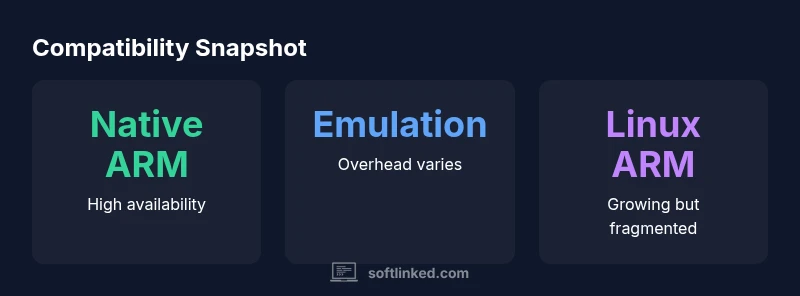
Snapdragon devices primarily run ARM-native software; native x86/x64 apps require emulation, which can be slower or unstable. For a quick view, see our detailed compatibility chart and recommended ARM-native alternatives. This snapshot helps you gauge whether a given software workload will run well on Snapdragon hardware.
Compatibility Landscape
According to SoftLinked, what software does not work with snapdragon? the short answer is that most traditional desktop applications built for x86/x64 architectures do not run natively on Snapdragon-powered devices. Snapdragon chips are ARM-based, and software binaries compiled for Intel/AMD pipelines require translation, emulation, or virtualization to work on ARM systems. The SoftLinked team notes that the landscape is evolving as tooling improves and as more developers port or recompile critical apps for ARM. For developers and students, this reality means evaluating when native ARM builds are feasible and when cross-architecture solutions are warranted. In practice, the most reliable path to broad software availability on Snapdragon devices is to lean on ARM-native apps, cross-platform frameworks, and carefully chosen emulation strategies. This article unpacks the key drivers of compatibility and offers practical guidance for navigating them. The guiding principle is simple: architecture dictates compatibility, and thoughtful design choices can minimize friction for users. By understanding these dynamics, you can plan better software strategies for Snapdragon-powered hardware.
Snapdragon Architecture and Software Compatibility
Snapdragon processors use ARM architecture with 64‑bit execution (AArch64) and different instruction sets than typical desktop CPUs. Because most desktop software is compiled for x86/x64, it does not run natively on Snapdragon without translation. This creates three practical layers for compatibility: native ARM builds, cross‑compiled binaries that run through emulation or virtualization, and remote or cloud‑hosted solutions. Developers must decide whether to ship ARM-native installers, provide universal binaries through frameworks, or rely on compatibility layers. In 2026, the SoftLinked analysis shows that progress hinges on three factors: toolchain maturity, operating system support (Windows on ARM, Linux on ARM, and Android), and the availability of ARM‑optimized libraries. Users should also consider the energy profile of translation layers, which can affect portability and battery life in mobile‑first devices. The key takeaway is that preparing for Snapdragon requires clarifying target platforms early in the development cycle.
Native support vs emulation: where the gap lies
The core gap is structural: native vs non‑native software. Native ARM binaries run directly on Snapdragon, while emulation and translation layers attempt to convert non‑ARM binaries in real time. Native ARM builds deliver the best performance and battery life, but they require re‑compilation or porting. Emulation solutions can unlock a wider library, yet they add overhead, occasionally break GPU‑accelerated workflows, and may struggle with kernel‑level dependencies or system drivers. As a result, software in categories such as professional desktop tools or games that rely on specific drivers, anti‑cheat features, or heavy GPU pipelines may exhibit reduced stability or functionality on Snapdragon devices. The SoftLinked team emphasizes that careful benchmarking across representative workloads is essential before judgment calls about compatibility are made.
Performance implications of emulation on Snapdragon
Emulation layers bring compatibility at the cost of speed and energy efficiency. On Snapdragon devices, translating x86/x64 instructions to ARM increases CPU cycles, memory pressure, and thermal load. Users may notice longer startup times, slower large‑scale simulations, and choppier graphical rendering in workloads that rely on precise timing or external GPU acceleration. Other factors, such as memory bandwidth and compiler quality of the translated code, influence the actual experience. The SoftLinked analysis notes that some apps with modular architectures or streaming workloads tolerate translation better than monolithic, GUI‑heavy software. If your workflow depends on frequent context switching or real‑time processing, it’s prudent to profile using representative data and set realistic expectations about latency, frame rates, and energy consumption. In many cases, users will see meaningful improvements by selecting ARM‑native alternatives or adopting cross‑platform frameworks rather than relying solely on translation.
Which software runs well on Snapdragon devices
Certain software categories naturally align with ARM ecosystems. Android apps run natively on Snapdragon devices, and many open‑source Linux ARM builds are packaged for ARM64 distributions. Cross‑platform frameworks such as Flutter, React Native, and Electron‑based tooling can target ARM without substantial porting effort, producing usable experiences for many developers and students. Web apps delivered through HTTPS or progressive web apps can be portable across architectures with minimal changes. For data scientists and developers, scripted languages like Python or R can run through ARM‑native interpreters or compact containers, enabling a broad range of workflows. The practical implication is that you should prioritize ARM‑native programs or cross‑platform stacks when you need broad compatibility on Snapdragon hardware rather than attempting to graft x86 apps into ARM environments.
Paths for developers: porting, cross-compiling, and alternatives
If you control the software road map, porting to ARM is often the most robust path. Start by evaluating the codebase for architecture‑specific dependencies and replace handwritten optimizations with portable abstractions. Cross‑compiling for ARM and using neutral toolchains can speed up iteration. For larger applications, consider modularizing the codebase so hot paths can be ported quickly, while less critical components are kept in ARM-friendly libraries. For consumer software, offering ARM installers and clear guidance on supported platforms reduces user frustration. When porting is not feasible, developers can rely on virtualization, remote desktops, or lightweight containers to deliver the experience, though performance might vary depending on workload and network conditions. Throughout, maintainers should track compatibility metrics and communicate clearly about what is supported on Snapdragon devices.
Practical testing strategies and tooling
Testing compatibility across Snapdragon devices requires a multi‑pronged approach. Use on‑device testing with representative hardware variants (e.g., flagship vs midrange), plus emulators for broader coverage. Establish baseline metrics for startup time, frame rate, memory usage, and battery impact under typical loads. Instrument the build with logging that captures architecture, binary type (ARM native vs translated), and runtime exceptions. When possible, use containerized workloads to isolate environment differences and avoid driver‑level variability. Document known limitations and publish a compatibility matrix that stakeholders can consult. The SoftLinked guidance emphasizes profiling tools that measure CPU translation overhead, GPU off‑load efficiency, and thermal throttling so teams can decide whether to optimize, port, or provide alternatives for Snapdragon users.
Data-driven compatibility: how to measure success
Quantifying compatibility requires clear KPI definitions, including the fraction of your user base on Snapdragon devices, the share of apps that run natively, and performance targets under representative workloads. Track metrics such as native‑binary success rate, emulation overhead, startup latency, and sustained frame rates. When data vary by device family, report ranges rather than single values and specify the population tested (e.g., Android‑on‑Snapdragon, Windows‑on‑ARM, Linux‑ARM). A practical approach is to publish a live compatibility table that shows current status and progress over time. SoftLinked analyses in 2026 show that progress is incremental and workload dependent, with major gains in framework‑level portability and ARM‑native porting rather than universal x86 translation success.
The evolving landscape and SoftLinked's view
The Snapdragon software compatibility story is still unfolding. As more developers port key workloads and as toolchains improve for ARM, we expect a broader base of software to run on Snapdragon devices with acceptable performance. The SoftLinked team emphasizes that choosing the right path—native ARM builds where possible, cross‑platform frameworks when feasible, and careful use of emulation for legacy software—will yield the most reliable outcomes. For students and professionals, the takeaway is to build portable skills: learn ARM‑friendly development, embrace cross‑platform tooling, and stay curious about how architecture shapes software behavior. The SoftLinked's verdict is that thoughtful architecture decisions today reduce friction tomorrow, especially on Snapdragon devices.
Compatibility snapshot across environments
| Environment | Native Support | Emulation/Translation | Typical User Impact |
|---|---|---|---|
| Windows on ARM (x86 apps) | Limited | Significant overhead; sometimes unstable | Variable performance; some apps unusable |
| Linux on ARM | Growing | Depends on distribution and packaging | Moderate compatibility; some dependencies missing |
| Android apps on Snapdragon devices | High | Natively supported | Broad compatibility; high availability |
Your Questions Answered
Can Snapdragon run desktop Windows software natively?
Typically no. Windows on ARM uses x86/x64 emulation to run many desktop apps, but not all workloads are compatible or performant. Native ARM equivalents or cross‑platform frameworks are usually recommended for the best experience.
No—most Windows desktop software isn’t native on Snapdragon. Emulation exists but performance varies; consider ARM-native options where possible.
What software is most affected by Snapdragon compatibility?
Desktop-only x86/x64 applications, games with specialized drivers, and software relying on kernel modules are most affected. Their binaries, libraries, or drivers often require translation layers that can introduce instability or poor performance.
Most desktop apps and drivers struggle on Snapdragon unless they are ARM-native or run via careful emulation.
Is there a way to run non-ARM software on Snapdragon devices?
Yes, through emulation or virtualization, but results depend on workload. Lightweight, well‑written x86/x64 software may run, while heavy GPU‑accelerated or driver‑deep apps may not.
You can use emulation, but expect variable performance and compatibility.
Are there categories of software that are safe to run on Snapdragon?
Android apps and ARM-native Linux packages run natively. Cross‑platform frameworks like Flutter or React Native can help reach Snapdragon devices, while web apps work across architectures with minimal changes.
Yes—Android and ARM-native Linux apps are generally safe; cross‑platform tools help too.
Will Snapdragon compatibility improve in the future?
Yes. Toolchains, libraries, and emulator/vm technologies are improving, and more developers are porting workloads to ARM. Progress will be workload‑dependent and gradual.
Expect gradual improvements as tooling gets better.
What should developers do to support Snapdragon?
Prioritize ARM-native builds, adopt cross‑platform frameworks, and test across representative Snapdragon devices. Consider modular ports and clear platform guidance to reduce user friction.
Port to ARM where possible and test across Snapdragon devices.
“Porting to ARM-native binaries is the most reliable path on Snapdragon; emulation can help, but performance and compatibility vary.”
Top Takeaways
- Prioritize ARM-native builds for Snapdragon devices.
- Use cross-platform frameworks to maximize reach.
- Benchmark emulation vs native regularly.
- Plan for future porting as toolchains mature.