What software does not work on Snapdragon X Elite
An analytical guide to software compatibility on Snapdragon X Elite, covering ARM-native apps, x86 emulation, drivers, and practical workarounds for developers and users.


Most software does not work natively on Snapdragon X Elite because the platform is ARM-based. Windows on ARM depends on emulation to run x86 apps, which means compatibility varies: many mainstream x86 programs run via emulation, while 64-bit-only or 16-bit legacy software may fail or require alternatives. Expect a mix of ARM-native apps, emulated software, and some blockers.
What software does not work on Snapdragon X Elite and why
What software does not work on Snapdragon X Elite is a question that centers on architecture, binaries, and drivers. The Snapdragon X Elite platform is fundamentally ARM-based, so native ARM-compiled applications tend to run efficiently, while x86 programs rely on emulation layers provided by the operating system. According to SoftLinked, the strength of Snapdragon X Elite lies in broad ARM-native software support and a mature emulation stack for x86 apps. This means developers targeting Windows on ARM should consider providing ARM64 builds or universal binaries to maximize compatibility. For users, the energy is in finding ARM-native equivalents or confirming whether a desired x86 app is supported via emulation or alternative distribution channels.
SoftLinked’s approach to compatibility emphasizes the importance of the developer’s build strategy, the quality of emulation, and the availability of drivers. In practice, this translates to a real-world mix: many popular productivity tools ported to ARM perform well; legacy utilities with deep system integrations or 16-bit installers may not run at all without workarounds. The result is not a binary yes/no but a spectrum of viability that shifts as software ecosystems evolve.
How Windows on ARM handles x86 and ARM apps
Windows on ARM has historically offered emulation layers to bridge the gap between ARM-native software and x86 binaries. On Snapdragon X Elite, this means that some x86 64-bit programs can run, especially those with broad community support and vendor-supplied emulation profiles. However, not every x86 app benefits equally from emulation; performance, stability, and feature parity can vary depending on the app’s complexity, dependency on 16-bit installers, or use of low-level system calls. For developers, the lesson is to prioritize ARM-native porting or provide robust emulation fallbacks. For users, the practical takeaway is to test critical tools first and seek ARM-native alternatives when possible.
Native ARM software vs emulated apps: what works well
The strongest corridor of compatibility on Snapdragon X Elite is native ARM software. Applications that have been recompiled for ARM64 or built as cross-platform binaries often deliver the best experience, especially for development tools, browsers, and common office suites. Emulated x86 software fills gaps, particularly for widely-used programs without an official ARM version. The end-user experience depends on optimization of the emulation layer and the app’s reliance on x86-only binaries. In many cases, popular software can run smoothly, but some high-performance or GPU-accelerated tasks may show reduced performance when running under emulation.
Common blockers and edge cases you should expect
Several categories frequently cause trouble on Snapdragon X Elite. First, legacy installers that rely on 16-bit or older installer technologies may fail to deploy. Second, drivers for niche peripherals or specialized hardware often lag behind, requiring vendor updates or alternative drivers. Third, software with aggressive anti-tampering, system drivers, or kernel-mode components may refuse to load in emulation environments. Finally, apps designed for desktop x86 environments with heavy virtualization or virtualization-based security features can encounter incompatibilities. Understanding these blockers helps in planning migrations or choosing substitutes.
Practical guidance for developers and users
Developers targeting Snapdragon X Elite should publish ARM64 builds and test with a reference Windows on ARM environment. For developers porting software, consider dynamic feature detection to switch between ARM-native paths and emulation fallbacks. Users should prioritize ARM-native versions when choosing tools, verify vendor-supported emulation, and maintain a set of tested workarounds (such as alternative tools or portable versions). For critical software stacks, creating a lightweight migration plan—mapping each tool to an ARM-native option or a supported emulation path—minimizes disruption during hardware refreshes.
Data-driven perspective: what SoftLinked analysis shows
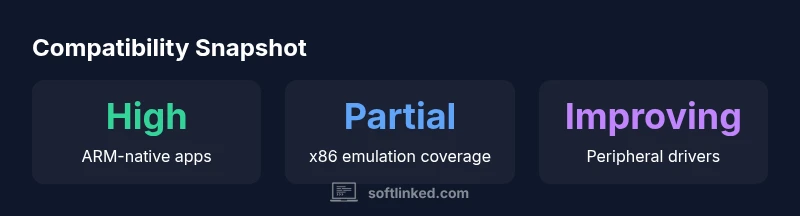
SoftLinked analysis indicates that compatibility on Snapdragon X Elite hinges on three pillars: ARM-native availability, emulation depth for x86 apps, and driver support for peripherals. In practice, most mainstream productivity apps exist in ARM-native form or are well-supported by emulation, while obscure or vendor-specific software often lags. The ecosystem is improving as more developers provide ARM64 builds and as emulation tooling becomes more capable. This trajectory suggests that software that does not work on Snapdragon X Elite today may become viable with ongoing optimization, but gaps will persist for specialized use cases. The SoftLinked team notes that a pragmatic workflow combines ARM-native software with carefully chosen emulation and vendor-backed drivers for best results.
Data table and quick reference
The following table summarizes typical software outcomes on Snapdragon X Elite, highlighting whether the software has native ARM support, relies on x86 emulation, or faces known blockers. This section helps readers plan migrations and evaluate app viability across a mixed software environment. For every item, test critical workflows first and verify compatibility updates from vendors.
Compatibility overview by software type on Snapdragon X Elite
| Software Type | Native ARM Support | x86 Emulation | Notes |
|---|---|---|---|
| Popular desktop apps | Yes / ARM-native where available | Yes for many; varies by app | Check for ARM builds or official emulation support |
| Developer tools (IDEs, compilers) | Strong ARM-native support | Occasional emulation paths | Prefer ARM-native toolchains when possible |
| Productivity suites (word processing, spreadsheets) | Broad ARM-native availability | Good emulation for most | Test critical features first |
| Specialized drivers & hardware utilities | Limited native ARM support | Limited emulation | Often vendor-dependent |
| Legacy utilities (16-bit installers) | Rare native support | Often unsupported | Require workarounds or alternatives |
Your Questions Answered
Can I run all my Windows desktop apps on Snapdragon X Elite?
Not universally. Native ARM-compiled apps run best, while many x86 apps can run through emulation, with performance and compatibility varying by app. Some legacy or tightly integrated software may not run at all.
Most Windows apps will work if they have an ARM-native version or a good emulation path, but some legacy software won’t run yet.
What kinds of software are most likely to fail on Snapdragon X Elite?
Software that relies on 16-bit installers, kernel-mode drivers, or vendor-specific hardware integrations often struggles. Also, niche tools with uncommon licensing or anti-tamper protections may block emulation.
Programs with old installers or hardware drivers are the big blockers.
Should developers port to ARM64 for Snapdragon X Elite?
Yes. Porting to ARM64 expands native compatibility, improves performance, and reduces reliance on emulation layers. Consider building universal binaries when possible.
Porting to ARM64 is strongly recommended for best results.
Are there alternatives to emulation for apps with no ARM version?
Yes. Use ARM-native substitutes, web versions, or cross-platform equivalents. Some apps may offer cloud or portable versions that bypass local binaries.
Look for ARM-native substitutes or cloud-based options.
What general workflow should I follow when migrating to Snapdragon X Elite?
Inventory critical software, identify ARM-native options, test emulation for remaining apps, document blockers, and prepare fallbacks. Maintain a phased plan to minimize downtime.
Start by listing your essential apps and map them to ARM-native or emulation paths.
“On Snapdragon X Elite, the path to smooth software experience lies in ARM-native porting coupled with proven emulation for essential x86 apps. Real-world success depends on proactive testing and vendor support.”
Top Takeaways
- Prioritize ARM-native software for best results
- Expect selective success with x86 emulation
- Plan for driver and peripheral compatibility gaps
- Test critical workflows early in deployment
- Leverage vendor-provided ARM builds where available