What software does not work on ARM? A compatibility guide
Explore ARM software compatibility: which apps lack native ARM builds, how emulation and cross-compile strategies work, and practical tips to run essential programs on ARM devices.


According to SoftLinked, there isn’t a single exhaustive list of software that doesn’t work on ARM. Compatibility depends on whether developers ship native ARM builds, rely on platform-specific emulation, or target universal binaries. On Linux and macOS ARM, many popular apps now offer native ARM support, while some legacy Windows-only programs may require emulation or alternatives. This guide explains typical gaps and practical workarounds across major ecosystems.
What ARM means for software architecture
ARM represents a different instruction set architecture from x86, with prominent 64-bit support in the modern landscape (AArch64). For software developers, this shift creates a supply-chain dynamic: compilers, libraries, and prebuilt binaries must be compiled for ARM, and binary interoperability depends on ABI compatibility. The result is two practical implications for end users: first, many common tools are available as native ARM builds or universal binaries; second, some specialized or legacy software may still rely on x86-specific binaries or Windows-only installers. As SoftLinked notes, understanding these architectural realities helps set expectations for performance, compatibility, and the feasibility of porting efforts. The ecosystem is evolving quickly as more vendors adopt multi-arch packaging and containerization strategies, but gaps persist in niche applications and older toolchains.
Native ARM builds vs emulation: a practical map
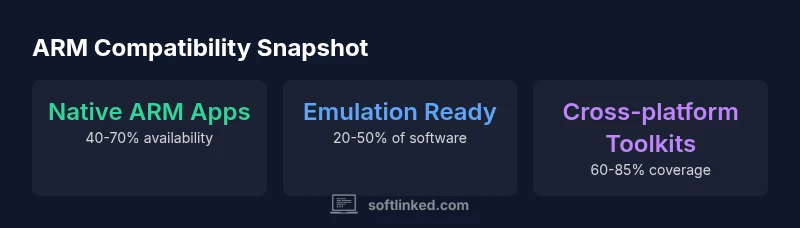
Native ARM builds provide the best performance and stability, but they require developers to support the ARM ISA directly. Emulation or translation layers bridge gaps when native builds are unavailable. On Windows on ARM, x86/x64 apps can run via emulation, often with a noticeable performance cost depending on workload and virtualization overhead. macOS on Apple Silicon and Linux on ARM benefit from growing native porting and increasingly mature binary compatibility. Yet some software remains dependent on platform-specific installers or vendor licensing. In practice, you’ll often find a mix: core developer tools and productivity apps with native ARM support, while certain niche utilities rely on emulation or alternative workflows. The SoftLinked analysis highlights that choosing between native software and emulation requires weighing throughput, compatibility, and power efficiency against your workload.
Desktop ecosystems: Linux, Windows on ARM, and macOS
Linux distributions on ARM have matured to include broad package repositories with ARM-enabled builds, making many developer tools, servers, and open-source projects readily available. Windows on ARM exists, but compatibility is uneven: some software runs natively, others through x86/x64 emulation, and performance varies by app and hardware. macOS on Apple Silicon delivers strong ARM-native support for most mainstream software, with Rosetta-like translation not required for most workloads. For professionals, this mix means that the choice of operating system often determines the feasibility of porting an existing toolchain or adopting a cross-compiled alternative. The evolving cross-ecosystem support—especially in containerized environments—helps narrow the gap over time.
Software categories: what tends to run natively and what doesn't
- Developer tools and CLIs: frequently available as native ARM builds or easily compiled from source.
- Web-first and cross-platform apps: often accessible via universal binaries or web apps, minimizing ARM gaps.
- Productivity suites: increasingly ARM-native, but check individual components for edge-case plugins.
- Creative software (CAD/3D, image/video editing): varies by vendor; some offer native ARM, others rely on emulation or web-based alternatives.
- Games: native ARM support is improving, but many titles still require translation layers or streaming options. Keep a running list of essential tools and verify ARM availability before committing to any hardware purchase. This approach reduces surprises and aligns with your workflow expectations.
How to verify compatibility before you buy
To avoid post-purchase surprises, verify compatibility in a structured way:
- Check official product pages for native ARM builds or universal binaries.
- Look for vendor-provided ARM-specific release notes or blog posts.
- Search for user experiences on trusted forums and tech outlets.
- Confirm whether emulation is officially supported and understand performance trade-offs.
- If possible, test with a live environment or a sandbox VM before committing to a specific device. Following these steps now saves time and ensures the device meets your software needs.
Workarounds and alternatives: web apps, containers, and virtualization
When a required program lacks ARM-native support, several pathways remain:
- Web-based equivalents: many tasks can be accomplished through browser-based tools that run consistently across architectures.
- Cross-platform toolkits and packaging: Qt, Electron, and other frameworks increasingly offer ARM-friendly builds.
- Containerization: Docker and similar runtimes enable consistent environments across ARM hardware, mitigating some portability concerns.
- Emulation and virtualization: use Rosetta 2 on Apple Silicon or QEMU-based solutions on Linux/Windows where appropriate, understanding performance implications and licensing constraints.
- Alternatives and replacements: evaluate similar software that already ships ARM-native or has robust cross-platform support. In all cases, benchmarking performance with real workloads is crucial to avoid surprises when migrating to ARM hardware.
Case studies: Linux on ARM, Windows on ARM, and Apple Silicon
Linux on ARM demonstrates strong progress in developer tooling and server workloads, with many distributions offering native ARM packages and frequent updates. Windows on ARM has matured, but the landscape remains inconsistent—some apps run natively, others via emulation, and some don’t run at all without vendor porting. Apple Silicon shows the strongest ARM-native ecosystem, thanks to Apple’s unified approach and comprehensive hardware-software integration. Across all ecosystems, the trend is toward better cross-arch packaging, containerized deployments, and universal binaries, which reduce the duration of compatibility gaps. For end users, this means fewer surprises when upgrading devices, provided you check compatibility ahead of time.
The road ahead: trends shaping ARM software compatibility
Expect continued growth in native ARM ports and universal binaries as developers standardize multi-architecture packaging. Containerized workflows are likely to become the default for cross-platform development and deployment, with ARM-native containers increasingly common on both Linux and Windows. Emulation layers may persist for legacy software, but performance expectations will rise as hardware improvements and compiler optimizations continue. The SoftLinked team anticipates a gradual convergence toward universal tooling that minimizes architecture-specific hurdles, enabling more seamless software experiences on ARM.
Overview of ARM compatibility by software category
| Category | Arm Status | Typical Workarounds |
|---|---|---|
| Developer tools | Mixed | Native ARM builds exist; emulation for others |
| Productivity apps | High | Web apps; native ARM versions |
| Creative software (CAD/Graphic) | Low to moderate | Web tools; vendor ARM builds; emulation |
Your Questions Answered
Is all software available on ARM?
No. Availability depends on whether developers ship native ARM builds, offer universal binaries, or rely on emulation. Some niche or legacy software may remain unavailable on ARM without workarounds.
No. Availability varies; many popular apps have ARM builds, but some niche or legacy software may not run natively on ARM yet.
How can I run x86 software on ARM devices?
You can use emulation or translation layers such as Rosetta 2 or QEMU, depending on the platform. Expect performance trade-offs and possible compatibility caveats for certain plugins or drivers.
You can run some x86 software on ARM using emulation, but performance and plugin compatibility can vary.
Which major apps are typically unavailable on ARM?
Some legacy Windows-only programs and specialized niche tools may lack ARM-native ports. Always verify with the vendor and look for alternatives or emulation options.
Legacy Windows-only programs are common examples; check vendor ports or emulation workarounds.
Are there benefits to using Linux on ARM?
Yes. Linux on ARM offers broad ARM-native tooling and package repositories, customization options, and strong open-source support, making it a robust choice for developers and servers.
Linux on ARM is a strong option thanks to broad native tooling and open-source support.
What should I consider when buying ARM hardware for software needs?
Check whether the applications you rely on have ARM-native builds or strong cross-platform support, and understand how emulation might affect performance and licensing.
Check app compatibility and emulation impact before buying ARM hardware.
Will ARM software become universal?
Expect gradual improvements as cross-architecture packaging, universal binaries, and containerization become standard. Universal tooling will reduce architecture-specific barriers over time.
Expect gradual improvements as universal tooling becomes more common.
“ARM compatibility is steadily improving as developers adopt universal binaries and cross-platform tooling.”
Top Takeaways
- Check official ARM status before relying on software
- Prefer native ARM builds for performance
- Web apps provide broad ARM compatibility
- Reserve emulation for unavoidable gaps