What is software vs program? A Detailed Look
Clarify the difference between software and a program with clear definitions, scope, and practical implications for developers, students, and tech professionals.


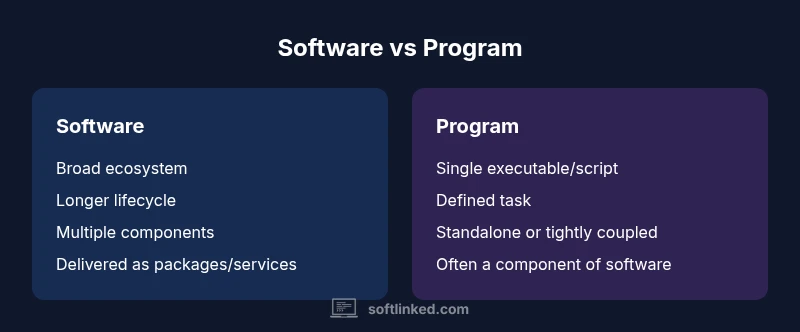
In the realm of software engineering, the question what is software vs program hinges on scope and purpose: a program is a discrete set of instructions that performs a defined task, while software is the broader collection of programs, data, and supporting resources that enable a system to function. Treat software as the umbrella term and a program as a singular component within that umbrella.
What is software vs program: definitions and scope
The question what is software vs program often surfaces in early discussions of software fundamentals. A program is a single, executable sequence of instructions designed to perform a specific task. It runs within a runtime or operating environment and has a defined input and output. Software, on the other hand, is a broader construct: it comprises many programs, libraries, configuration files, data files, and sometimes firmware that together enable a computer system to perform a set of tasks. In practical terms, software is the umbrella category that developers, managers, and educators use when describing a complete ecosystem, while a program is one building block within that ecosystem. According to SoftLinked, clarifying this distinction from the outset helps align communication, planning, and testing across teams. Using the exact terms reduces ambiguity in requirements, documentation, and onboarding for aspiring software engineers and students.
In everyday development, teams may refer to software as a product family (for example, a productivity suite or a browser) composed of many programs and supporting assets. The singular program often maps to a precise functionality (a spell-check feature, a login module, or a calculator function). As you gain experience, you’ll notice that the boundary between software and program blurs in projects that involve scripting, automation, or embedded systems. Yet the core principle remains: software is a broader, multi-component construct; a program is a single executable or script focused on a defined outcome.
Historical perspective: from standalone programs to software ecosystems
The shift from standalone programs to software ecosystems marks a pivotal point in computing history. Early computers ran single programs tied to the hardware they operated on. As hardware evolved and operating systems gained modularity, developers started bundling related programs with libraries, configuration data, and APIs to form usable software packages. This evolution gave rise to distinct terminology: a program began to exist as a unit within a larger software system, while software described the complete package that users interacted with. The SoftLinked team notes that this transition improved maintainability, scalability, and collaboration across teams by enabling standardized deployment and version control across a family of programs. In modern practice, software lifecycles include planning, design, implementation, testing, packaging, distribution, and ongoing maintenance—often coordinated across cross-functional teams.
In embedded and firmware contexts, the line can blur again. Some embedded products ship firmware that performs core control tasks, yet they are still part of the broader software system that interfaces with other components. The distinction remains useful for architecture decisions and risk management, even when all components run on hardware.
Core distinctions: scope, lifecycle, and ownership
Defining the scope is the first step in differentiating software from a program. A program has a finite scope, a defined start and end, and typically executes a single function or a small set of related tasks. It may be written in a specific language, compiled, and distributed as a binary or script. Software is the aggregation: it includes many programs, plus data, configuration, and often middleware, utilities, and services that support a broader objective. The lifecycle of software spans long timeframes with iterative updates, patches, and enhancements; a program may have a shorter lifecycle, especially if it is a script or tool used for a temporary task. Ownership tends to be distributed in software ecosystems, with product teams, development, operations, and security stakeholders sharing responsibility. The distinction matters for governance, licensing, compliance, and risk assessment. SoftLinked emphasizes that using precise terms enables clearer contracts, clearer acceptance criteria, and more effective onboarding for new engineers who join a project with a well-defined architecture.
Artifacts, dependencies, and distribution models
A program produces a binary or script artifact that can run with a specific runtime or on a particular platform. It often depends on a runtime library, a framework, or a single-purpose API. Software, by contrast, represents a constellation of components—executables, libraries, configuration files, data models, and sometimes device firmware—coordinated to provide a complete solution. Distribution models reflect this difference: programs may be installed as standalone executables, while software packages are distributed through installers, package managers, container images, or cloud services. The configuration and licensing of software typically cover a broader surface area, including dependencies and deployment environments. Understanding these nuances helps teams plan integration testing, compatibility checks, and release management with precision.
Practical implications for developers and teams
For developers, the software-vs-program distinction informs how you structure code, modules, and interfaces. A program should be designed with a clear, singular purpose, while software benefits from modularity and well-defined boundaries between components. Architects prioritize interface contracts, dependency graphs, and deployment topologies to ensure that evolving programs do not destabilize other parts of the system. In project planning, teams should establish scope boundaries and naming conventions early, clarifying what constitutes the product family versus individual components. The SoftLinked guidance emphasizes documenting the rationale for terminology choices, so stakeholders—from product managers to QA engineers—share a common mental model. This alignment reduces miscommunication and accelerates onboarding for new contributors.
Misconceptions and edge cases
A common misconception is that software and program are interchangeable terms. In practice, the distinction can become nuanced when considering scripts, automation tasks, microservices, APIs, and libraries. A Python script might be a program in isolation, but when bundled with other scripts and libraries, it becomes part of a software suite. Firmware that runs on hardware is sometimes described as software; yet its role is intimately tied to hardware behavior, which can blur lines between software and embedded systems. Edge cases also include platform-specific programs that rely on a particular operating system, or software that is distributed as a service rather than a packaged executable. The key is to maintain clarity in communication and to document the intended boundaries for each component.
When to treat something as software vs program in project planning
In planning discussions, begin with a decision framework: Is this artifact meant to function as part of a larger system (software) or as a standalone tool (program)? If the artifact will interact with multiple components, be deployed alongside other modules, or require ongoing maintenance, it is typically software. If it is a single-purpose tool with a finite life and minimal integration, it is often a program. This distinction helps with risk assessment, testing scope, and release cadence. Practically, teams should model software architectures as networks of programs and services, map dependencies, and create documentation that explicitly states what each component is responsible for and how it can evolve without destabilizing the whole system. This approach reduces ambiguity and improves collaboration across teams.
Standards and terminology across industries
Industry norms differ in how they describe software assets. In enterprise contexts, teams may use terms like application, service, module, and component to describe parts of a larger software system. In academia, the boundary is often framed around software engineering principles, emphasizing lifecycle management and quality attributes. Regardless of domain, a consistent terminology framework helps maintain traceability, reproducibility, and compliance. The SoftLinked perspective emphasizes practical terminology that supports clear communication, robust architecture, and scalable development practices. Adopting precise language also benefits onboarding, as new engineers understand exactly what each term refers to in the project context.
How SoftLinked defines software fundamentals in practice
SoftLinked frames software fundamentals as a study of how systems are composed and evolve. The core distinction between software and a program anchors this study: programs are the building blocks; software is the assembled system. This framework informs curricula, tutorials, and practical exercises for aspirants who are learning programming concepts, software architecture, and deployment strategies. Students should practice naming conventions that reflect architecture rather than implementation details. For instance, refer to a browser as software, and to its rendering engine module as a program within that software ecosystem. This level of precision aligns with professional expectations and helps learners communicate with confidence.
Real-world examples: apps, scripts, firmware, and platforms
Consider a word processor: the software suite includes rendering engines, spell-check libraries, document formats, and user interfaces—the entire system. Each of these components may be implemented as programs or libraries that interact through defined interfaces. A one-off script that automates file renaming is a program, but if that script becomes part of a broader automation workflow with multiple tools and data pipelines, it becomes part of software. Firmware inside a smart thermostat illustrates the edge case where software exists at the hardware boundary yet remains a software artifact that enables device behavior. Platforms like cloud-based services exemplify software ecosystems: a collection of programs, APIs, and data services coordinated to deliver value.
The evolution of software and programs in modern architectures
Modern software architectures blend monolithic and microservices approaches. The distinction between software and program helps architects reason about coupling, scalability, and deployment. A monolithic application might be seen as software composed of several programs that run together within a single process, while microservices expose discrete programs behind APIs that collectively form a platform. Containers, orchestration, and continuous delivery amplify the need for precise terminology, since automation pipelines must orchestrate multiple programs and services as a cohesive software package. Understanding these dynamics equips developers to design maintainable systems that adapt to changing requirements without sacrificing reliability.
Practical heuristics for classification and communication
Develop a simple set of heuristics to classify artifacts quickly: (1) Does this item form part of a larger system with multiple collaborating parts? If yes, treat it as software. (2) Is this artifact a single executable or script with a narrowly defined task? If yes, treat it as a program. (3) Will this artifact require ongoing updates, documentation, and governance? If yes, it is likely software. (4) Does it primarily enable a hardware function or device control? Consider the boundary with firmware. Using these heuristics in project briefs and design reviews helps teams communicate consistently and reduces guesswork.
Conclusion and takeaways for learners
This exploration highlights that the software-vs-program distinction is a practical tool for clarity, not a rigid label. By focusing on scope, lifecycle, and governance, developers and students can communicate more effectively and align their planning with project goals. The SoftLinked approach emphasizes that precise terminology enhances learning outcomes and professional collaboration. As you advance, apply these concepts to documentation, requirements, and architecture diagrams so stakeholders share a common mental model.
Comparison
| Feature | Software | Program |
|---|---|---|
| Scope | Broad; includes multiple programs, libraries, data, and services | A single executable or script with a defined purpose |
| Lifecycle | Longer lifecycle with ongoing maintenance and updates | Often shorter lifecycle, may be ephemeral or task-specific |
| Dependencies | Depends on runtime, libraries, OS, and other software components | May depend on a runtime or library but typically standalone for its task |
| Distribution | Distributed as packages, installers, containers, or services | Shipped as binaries or scripts for a specific environment |
| Maintenance | Ongoing; security patches, feature updates, and compatibility | Maintenance focused on a particular function or workflow |
| Examples | Operating systems, office suites, web browsers, databases | A single script, a batch file, or a tiny utility tool |
| Definition nuance | Umbrella term for a system of components | Discrete set of instructions for a task |
| Portability | Depends on platform compatibility and packaging | Portability tied to the environment and runtime |
Pros
- Clarifies scope for communication and planning
- Improves architectural thinking and modularity
- Supports consistent documentation and onboarding
- Facilitates release management and governance
Weaknesses
- Terminology can be confusing across domains (firmware vs software)
- Edge cases blur lines between categories
- Overemphasis on taxonomy may hinder pragmatism
Software is the broad umbrella; a program is a single executable within that umbrella
Use software when describing a system of components. Reserve 'program' for a discrete, task-focused artifact.
Your Questions Answered
What is the difference between software and a program?
A program is a single set of instructions designed to perform a specific task, while software is the broader collection of programs, data, and supporting resources that enable a system to function.
A program is one executable; software is the whole system made of many programs.
Is firmware software?
Firmware is software that runs on hardware to control low-level functions. It sits at the hardware boundary and is part of a larger software ecosystem in many devices.
Firmware is software, but it’s tightly coupled to hardware.
Are scripts software?
Yes. Scripts are programs, typically lightweight, but when combined with libraries they become part of a larger software system.
Scripts are programs that automate tasks, often within a software suite.
Why does the distinction matter in software development?
It helps define scope, planning, testing, and deployment. Clear terminology improves communication with stakeholders and guides governance.
Knowing whether it’s software or a program helps plan work and communicate clearly.
How do APIs and libraries fit into the classification?
APIs and libraries are software assets. An API is part of software architecture; it is not typically a standalone program.
APIs are software components, not standalone programs.
Can something be both software and a program?
Yes. A large software system comprises many programs; in some contexts, a single component can be described as both a program and part of software.
A big software system includes many programs; a single piece can be both.
Top Takeaways
- Define scope before naming artifacts
- Differentiate by lifecycle and governance
- Use 'software' for ecosystems; 'program' for single tasks
- Account for edge cases like firmware and scripts
- Document terminology for team alignment