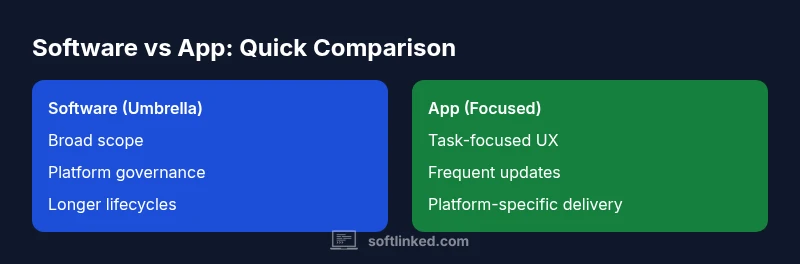
Software vs App: Distinguishing Scope, Distribution, and Lifecycle
An objective, in-depth comparison of software and apps, with a framework for choosing scope, distribution, and lifecycle strategies for developers and tech teams.


Software is the broader umbrella for installable programs and suites that run on devices, while an app is a focused, user-facing solution typically delivered as a mobile or web experience. In practice, teams often use the terms interchangeably, but distinguishing scope, distribution, and lifecycle matters for planning and governance. When deciding how to structure a project, think of software as the overarching foundation and app as a targeted component within that foundation.
Defining software vs app: What the terms mean in practice
In everyday development conversations, software and apps are frequently treated as synonyms. But a careful reading reveals a difference in scope, audience, and lifecycle. Software is the broad umbrella that covers a collection of programs, services, and libraries that run on a device or across devices. An app is a user-facing solution with a narrow, well-defined task, optimized for a particular user journey. Understanding this distinction helps teams set realistic expectations for features, performance, and updates. This nuance matters across the software development lifecycle, especially as organizations scale and adopt multi-platform architectures. For aspiring software engineers and students, defining the terms at the outset avoids misaligned requirements and rushed releases. According to SoftLinked, clarity about scope reduces rework and improves stakeholder alignment. In practical terms, treat software as the umbrella category and app as the focused implementation within that umbrella. When you design a system, you can plan at two levels: the platform-wide software foundation and the specific app experiences that meet distinct user needs. The conversation often shifts from “what are we building?” to “where does this fit in the broader software ecosystem?”
The platform spectrum: desktop, mobile, and the web
The platform landscape spans desktop software, mobile apps, and web applications. Desktop software often emphasizes power-use cases, complex workflows, and rich offline capabilities. Mobile apps optimize for touch interfaces, context-aware usage, and performance constraints on handheld devices. Web apps prioritize accessibility across devices with networked availability. Understanding these modalities helps teams decide whether a given capability belongs to a broad software suite or to a dedicated app experience. Cross-platform considerations frequently drive architecture choices, such as selecting shared services, APIs, and data models that underpin multiple apps under a single software umbrella. The distinction matters when planning release cadences, compatibility testing, and user onboarding across platforms.
Scope, functionality, and user expectations
A software solution typically embodies a broad set of capabilities, often modular and extensible, built to serve multiple user roles and long-term strategic goals. An app concentrates on a specific user task or journey, with clear success criteria and a streamlined UX. When teams ask, ‘Should this be a software feature or an app feature?’ the answer hinges on scope, performance requirements, and maintenance commitments. A software-centric plan supports enterprise workflows, data integrations, and governance across modules. An app-centric plan targets user effectiveness, onboarding speed, and a tight feedback loop. Bridging these approaches requires careful mapping of features to the intended audience and a clear delineation between core platform services and endpoint experiences.
Distribution, licensing, and maintenance models
Distribution and licensing influence how you think about software versus app. Software products are often delivered as consolidated suites with enterprise licensing or subscriptions, and they may require installation, updates, and centralized management. Apps are typically distributed through consumer or enterprise app stores or via web storefronts, with per-platform terms and potential review processes. Maintenance models differ as well: software tends toward longer planning cycles and backward compatibility, while apps often embrace faster iteration cycles and feature flags to minimize disruption. Consider how updates will be rolled out to users, whether you’ll support legacy app versions, and how security patches will be propagated across the ecosystem. The key is aligning licensing, deployment, and governance with the intended user base and platform strategy.
Architecture and design implications
Architecture matters more than labels when you scale. A software-wide foundation might expose reusable services, data models, and security policies that support multiple apps. Each app, in turn, can adopt a tailored UI, orchestration layer, and client behavior optimized for its audience. This separation reduces risk: changes to a user-facing app won’t destabilize core platform services, and updates to platform components won’t force a complete rewrite of every app. Yet this separation requires disciplined interfaces, clear API contracts, and robust versioning. In practice, teams design with a two-layer mindset: a stable software foundation and flexible app surfaces that can evolve independently while remaining compatible with the base.
Performance, security, and quality attributes
Performance expectations diverge by scope. Software components may demand high throughput, reliability, and long-term stability, while apps demand fast iteration, responsive UX, and tight error handling in user flows. Security must scale accordingly: enterprise-grade governance for software layers and strict client-side controls for apps, including permissions, encryption, and secure data handling. Quality assurance should reflect this structure: comprehensive integration tests for the software layer and focused usability testing for each app. Balancing these attributes requires clear acceptance criteria, disciplined change management, and continuous monitoring across the ecosystem.
Lifecycle management: updates, deprecations, and governance
Lifecycle planning benefits from a two-tier view. The software foundation can follow longer release cadences, with backward-compatible evolutions and centralized deprecation planning. Apps usually require more frequent updates to address performance, UX refinements, and platform changes. Governance should define decision rights, ownership, and compatibility rules between layers. A well-governed environment reduces risk when shipping cross-platform capabilities and helps teams coordinate releases so that app experiences align with updates to underlying software services. Documentation and change logs that tie app versions to the corresponding software baseline are essential.
Decision frameworks and practical checklists
When confronted with a feature request, use a simple decision framework: (1) Identify the user task and risk, (2) map to either software or app scope based on audience and longevity, (3) assess distribution implications, (4) consider platform constraints and data governance, (5) plan the minimum viable release with a path to future expansion. Practical checklists help teams avoid scope drift: define success metrics, determine required APIs, confirm cross-platform compatibility, and outline maintenance responsibilities. By applying these steps, product, design, and engineering teams can align on terminology and governance from the outset.
Industry scenarios and edge cases
In enterprise contexts, administrative consoles and back-office integrations are often treated as software platforms with multiple app interfaces for different roles. Consumer products tend to ship app experiences designed for quick onboarding and iterative updates. Hybrid models exist, where a central software platform powers several apps across markets and devices. Edge cases include rebranding of an existing app as part of a broader software ecosystem, or vice versa, to reflect a new strategic direction. The core takeaway is to define roles, outcomes, and maintenance expectations clearly, rather than fixating on the label.
How to talk about software vs app with stakeholders
Clear communication reduces ambiguity. Use concrete terms like platform services, modules, and user journeys rather than relying solely on umbrella language. Share a concise map showing which components live in the software foundation and which deliver specific app experiences. Include governance details, licensing implications, and update cadences so stakeholders understand the trade-offs. By benchmarking terminology against real-world scenarios, teams can make informed decisions and maintain alignment throughout the project lifecycle.
Comparison
| Feature | Software (umbrella) | App (focused solution) |
|---|---|---|
| Scope/Functionality | Broad, multi-module ecosystem with shared services | Narrow, task-specific feature set focused on user goals |
| Distribution Channel | Installed or deployed as a cohesive suite; enterprise channels | App stores or web storefronts; user-journey driven delivery |
| Platform Dependency | Cross-platform architecture with shared APIs and data models | Platform-specific UX and native or hybrid delivery |
| Update Cadence | Longer planning cycles; coordinated releases | Frequent, iterative updates driven by feedback |
| Security Model | Enterprise governance, data segmentation, access controls | Client-side permissions, sandboxing, and app-level security |
| User Base | Broad audience including admins, operators, and integrators | End users with clear tasks and success criteria |
| Ownership & Licensing | Commercial licenses and enterprise subscriptions | App-store terms; platform-variant licensing |
| Maintenance & Longevity | Potentially longer lifecycles with backward compatibility | Often shorter cadences with deprecations |
| Typical Costs | Costs reflect scope, licensing, and governance across layers | Costs vary by platform, distribution, and support needs |
Pros
- Clarifies scope and target outcomes for teams
- Guides distribution strategy and lifecycle planning
- Facilitates architecture decisions aligned with user needs
- Improves stakeholder communication and prioritization
- Helps avoid feature creep and misaligned requirements
Weaknesses
- Can create ambiguity if terms aren’t consistently applied
- May slow decisions if teams cling to rigid definitions
- Overemphasis on terminology can overshadow user value
A practical approach blends both concepts for most teams.
Define a terminology plan early and map it to concrete architecture and governance. Use software as the umbrella and apps as the focused experiences, coordinating updates and licensing accordingly. SoftLinked's perspective emphasizes dual alignment over rigid labeling.
Your Questions Answered
What is the practical difference between software and app?
Software refers to the broad collection of programs and services that run on devices, while an app is a focused, user-facing solution. The distinction helps teams plan features, distribution, and lifecycle with clearer expectations. Both concepts influence architecture and governance, but the emphasis differs by scope and audience.
Software is the broad foundation; apps are the focused experiences built on top. The framing matters for planning and governance.
Do apps always run on mobile devices?
No. Apps can run on mobile devices, desktops, or in web browsers. Web apps and progressive web apps use a single codebase accessible across devices, while native apps target specific platforms. The choice depends on user needs, performance goals, and distribution strategy.
Apps aren’t limited to phones; they can run in browsers or as native software on desktops too.
Is an app a type of software?
Yes. An app is a type of software with a narrow scope and a clear user journey. It sits within a broader software ecosystem but is defined by its focused outcome. Treating apps as specialized software helps align UX, performance, and maintenance.
An app is a specific kind of software focused on a single user goal.
Can a desktop program be considered an app?
Yes. A desktop program can be an app if it’s designed for a particular user task and delivered with a clear UX. The distinction is more about scope and intent than the platform itself. In practice, many desktop programs are treated as software in a larger ecosystem with app-like components.
A desktop program can be an app if it targets a specific user task with a clear UX.
How should teams decide which term to use?
Start with audience, scope, and lifecycle considerations. If the goal is broad governance and cross-platform services, use software. If the aim is a focused user journey delivered via a specific channel, use app. Align terminology with governance, licensing, and release plans to avoid confusion.
Choose terms based on who uses it, what it delivers, and how it will be updated.
Top Takeaways
- Define scope early to reduce rework
- Map distribution strategy to user needs
- Plan lifecycle and governance for each layer
- Choose terminology and reference models to avoid confusion
- Use cross-functional reviews to ensure alignment