How to Get Software: A Practical Guide for Learners
A comprehensive, step-by-step guide on how to get software safely and legally, covering sources, licenses, installation, updates, security, and governance for students and aspiring developers.


To get software, identify your needs, choose legitimate sources, and follow the install steps. Ensure licensing and security checks, download from official stores or vendors, and activate where required. This quick path helps beginners avoid scams while learning the basics of procurement, installation, and ongoing maintenance. It also covers basic version control, updates, and future upgrades.
Why getting software the right way matters
Software acquisition touches every part of a project: security, compliance, productivity, and long-term maintenance. In this guide on how to get software, you’ll learn a practical path that reduces risk and accelerates learning for aspiring developers. According to SoftLinked, a disciplined approach to software procurement starts with clarifying the problem you’re solving, the environment where the software will run, and who will use it. When you align these factors, you avoid common traps such as overprovisioning, vendor lock-in, or installing tools that don’t integrate with your existing tech stack. The goal is not simply to obtain a tool but to establish a sustainable workflow for selection, deployment, updates, and governance. By focusing on fundamentals—license types, security posture, and asset management—you build a foundation that scales from student projects to professional teams. This is especially important in education settings where students experiment with multiple stacks and teams juggle varying requirements. By following a clear process, you’ll gain confidence, reduce waste, and create a repeatable method you can reuse across future projects. The SoftLinked team emphasizes transparency, documentation, and verification at every step.
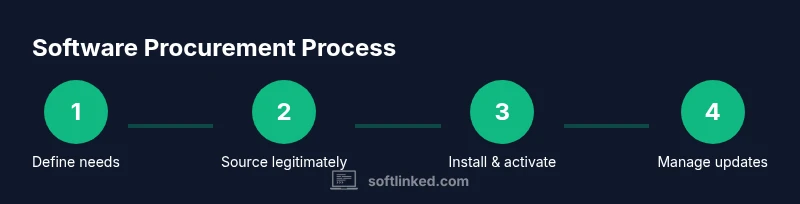
Define your needs and budget
Before you search for software, translate your goals into concrete requirements. Start by listing the tasks you want to accomplish, the data you’ll handle, and the number of users who will access the tool. Different deployment models—SaaS, on-premises, or hybrid—have distinct cost implications and maintenance obligations. Open-source options may reduce upfront costs but often require more in-house setup. In this step, compare core attributes such as platform compatibility (Windows, macOS, Linux), integration needs with existing systems, and data residency requirements. A well-defined needs assessment makes vendor conversations faster and pricing more transparent. From a SoftLinked perspective, documenting constraints (budget limits, security standards, and training needs) helps you evaluate trade-offs more objectively. Finally, establish a rough budget range that accounts for licenses, renewals, support, and potential scaling as your project grows. Clear budgeting avoids surprises and keeps stakeholders aligned.
Choose legitimate sources and licenses
Legitimate sources protect you from counterfeit software, malware, and compliance risk. Always start with official vendor websites, reputable app stores, or certified resellers. For each purchase, identify the license model that fits your use case: individual vs. multi-user, perpetual vs. subscription, or SaaS with user-based pricing. Read the End-User License Agreement (EULA) and privacy notices to understand usage rights, data handling, and redistribution limits. If you’re experimenting in a classroom or personal project, consider trial licenses or education editions when available. Maintain a clear record of license keys, subscription IDs, renewal dates, and associated users. This discipline is central to software asset management and audit readiness. SoftLinked’s guidance is to keep licenses in a centralized tracker and verify vendor trustworthiness through independent reviews and official security certifications where possible.
Installation and activation best practices
With sources secured, plan a safe installation path. Prefer clean environments (e.g., a dedicated VM or sandbox) for initial setup and testing. Ensure you have administrative rights, a current backup, and updated security software before proceeding. Follow the vendor’s official installation wizard step by step, then activate the license according to the provided instructions. Record configuration settings and user roles to speed future deployments. Post-install, run basic health checks—verify connectivity, data access, and backup routines. If you’re deploying to multiple machines, automate where possible using deployment scripts or management tools. Document any deviations from standard procedures to aid future troubleshooting. The goal is a repeatable, auditable installation process that minimizes downtime and user friction.
Managing updates, backups, and compliance
Software updates are critical for security and performance but can disrupt workflows if not managed carefully. Establish a schedule for patching based on vendor advisories and risk assessments, and test updates in a controlled environment before broad rollout. Implement reliable backups that capture system state, settings, and data before applying updates. Maintain a software asset inventory that includes licenses, versions, support status, and end-of-life timelines. Compliance involves staying within license terms, protecting user data, and documenting auditing activities. This practice reduces legal risk and helps you demonstrate responsible software governance in school projects or early-career roles. SoftLinked highlights the importance of proactive tracking and change control as foundations of responsible software use.
Security, data privacy, and risk management
Security and privacy considerations should guide every software choice. Classify data types you’ll handle (public, internal, personal), and ensure the software provides at least baseline protections: access controls, encryption in transit and at rest, and secure authentication options. Evaluate vendor security posture, incident response timelines, and data retention policies. Minimize risk by enabling least-privilege access, logging, and regular security reviews. If you’re handling sensitive data, ensure you comply with applicable regulations and institutional policies. Regularly review third-party integrations for potential vulnerabilities, and consider isolating critical tools from less-secure ecosystems. The SoftLinked team recommends a proactive security mindset that pairs with robust license management for lasting reliability.
Open-source vs proprietary: choosing the right model
Open-source software offers flexibility, transparency, and community-driven improvements, but it can require more internal support and skill to maintain. Proprietary software typically comes with vendor support, defined roadmaps, and formal licensing, but may involve higher ongoing costs or vendor lock-in. When deciding, weigh total cost of ownership, maintenance capabilities, and required features. Assess licensing terms for redistribution, exposure to security advisories, and compatibility with your tech stack. For students and professionals, a hybrid approach often works: use open-source tools for experimentation and leverage commercial software for mission-critical tasks with vendor support. This balance supports learning while delivering dependable outcomes. The SoftLinked guidance emphasizes clear governance to avoid drift between free experimentation and production-grade investments.
Putting it all together: a practical procurement checklist
Use this checklist to apply what you’ve learned in a real project:
- Define goals, users, and constraints; establish a budget range.
- Identify legitimate sources and select appropriate license models.
- Prepare a clean test environment and pre-install prerequisites.
- Install, activate, and configure with documented settings.
- Set up updates, back-ups, and license-tracking processes.
- Conduct security and privacy assessments; document risk mitigations.
- Review open-source vs proprietary options and align with governance policies.
- Maintain a rolling log of licenses, renewals, and compliance checks.
Following these steps creates a repeatable workflow that scales from coursework to professional workstreams. Remember to document every decision and keep stakeholders informed to sustain accountability and trust.
Tools & Materials
- Device with internet access(PC, Mac, or mobile device with up-to-date OS)
- Official vendor account or store login(Create or use existing account to manage licenses)
- Payment method(Credit/debit or corporate account for purchases or subscriptions)
- License keys or subscription IDs(Keep in a secure, centralized record)
- Backup and security software(Active antivirus/endpoint protection and backup solution)
- Software asset management tool or spreadsheet(For tracking licenses, renewals, and usage)
- Documentation templates(Record installation steps, configurations, and approvals)
Steps
Estimated time: 30-60 minutes
- 1
Identify needs and constraints
Document the tasks you want the software to perform, the data it will handle, and the number of users. Assess compatibility with your OS and existing tools, as well as any regulatory or educational requirements. Create a short list of must-have features and a wish list for optional capabilities.
Tip: Keep a shared requirements doc and invite teammates to add use cases. - 2
Search legitimate sources
Navigate to official vendor sites, reputable app stores, or certified resellers. Avoid third-party marketplaces that offer discounted licenses without clear provenance. Validate publisher trust signals, product pages, and security certifications before proceeding.
Tip: Bookmark official sources and avoid clicking unsolicited license offers. - 3
Choose license model
Select the license type that best fits your usage pattern: per-user, per-seat, or site-wide; perpetual vs. subscription; consider SaaS if ongoing updates are essential. Clarify terms for redistribution, support, and data handling.
Tip: If unsure, start with a trial or education edition to test fit. - 4
Check system requirements
Review minimum and recommended hardware, OS versions, and any network prerequisites. Confirm integration compatibility with your current toolchain and data formats. Prepare any required dependencies in advance.
Tip: Run a quick pilot on a sandbox machine to catch conflicts early. - 5
Download and install
Follow the vendor’s installer precisely. Use the official installer packages, verify checksums if provided, and disable non-essential services during install if advised by the vendor. Record default settings for future reference.
Tip: Prefer unattended or scripted installs for multiple machines. - 6
Activate and configure
Enter license details or authenticate with the subscription service. Configure user roles, permissions, and default workflows. Run an initial test to confirm data access and feature availability.
Tip: Document activation steps and store keys securely. - 7
Plan updates and backups
Set update cadence aligned with security advisories. Schedule regular backups of configurations and data. Establish a rollback plan in case an update breaks compatibility.
Tip: Test backups periodically to ensure recoverability. - 8
Maintain records and governance
Track licenses, renewal dates, and support status. Align with organizational policies and prepare for audits. Review licensing terms after major updates or changes in usage.
Tip: Keep a central license registry with owners and renewal reminders.
Your Questions Answered
What does it mean to get software legally?
Getting software legally means purchasing or licensing it from authorized sources, adhering to the license terms, and avoiding pirated copies. It also involves respecting data privacy and maintenance obligations set by the vendor. This reduces security risks and ensures support and updates.
Legal software means buying from authorized sources and following the license terms to stay secure and supported.
Do I need a license for each user?
Many licenses are per-user or per-seat, especially for productivity tools and development environments. Some SaaS options are licensed by active users or teams. Always confirm the exact terms in the license agreement.
Licensing often depends on users or seats, so check the agreement for your specific setup.
Is open-source software safe to use?
Open-source software can be safe when sourced from reputable projects with active communities and clear security practices. It may require more internal maintenance, but transparent code helps with auditing and customization.
Open-source can be safe if you choose trusted projects and manage updates and security.
What should I do if the vendor discontinues support?
If support ends, assess alternatives, plan a migration, and ensure data portability. Keep backups and documented dependencies to minimize downtime and risk during transition.
If support ends, plan a migration and preserve data access and backups.
How often should I update software?
Update frequency depends on risk and vendor advisories. Establish a predictable cadence (e.g., monthly or quarterly) and test critical updates before wide rollout.
Follow a regular update schedule and test critical patches first.
Can I use software across multiple devices?
Many licenses permit cross-device use within a single user or organization. Confirm the scope in the license terms and ensure proper activation on each device.
Cross-device use is common but depends on the license; check the terms.
Watch Video
Top Takeaways
- Define needs before shopping for software.
- Use legitimate sources and clear licenses to avoid risk.
- Test in a safe environment before production use.
- Maintain governance and track licenses for compliance.