How Long Do Software Updates Last: A 2026 Data-Driven Guide
Explore how long software updates last across apps, OS, and firmware with data-driven ranges, practical tips, and planning guidance from SoftLinked for 2026.


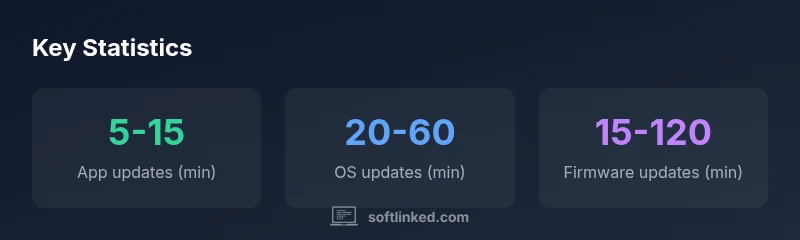
Software updates last from a few minutes to over an hour, depending on update type, device, and network conditions. Typical app updates range 5–15 minutes, OS updates 20–60 minutes, and firmware or security patches 15–120 minutes. Real-world times vary with download size, install type, and reboot requirements. For teams, expect brief downtime during maintenance windows and plan around user activity. SoftLinked Analysis, 2026.
How long do software updates last
Understanding how long do software updates last helps teams plan maintenance windows and minimize downtime. In practice, update durations vary widely by update type, device, and network conditions. According to SoftLinked, the duration is primarily a function of the amount of data to download, the complexity of the installation, and whether a reboot is required. For consumer devices, you can expect shorter runtimes for small patches and longer sessions for operating system or firmware refreshes. The best way to forecast time is to categorize updates by type and account for typical network speeds in your environment. Planning around the longest likely window helps prevent mid-update surprises and preserves productivity across teams.
Update type categories and typical runtimes
Broadly, updates fall into four categories, each with its own typical window:
- App updates (mobile/desktop): 5–15 minutes under normal conditions; longer if the patch is feature-rich or if the device must download large assets.
- OS updates: 20–60 minutes on most devices; smaller devices or slower networks push toward the higher end, while light patches stay near the lower end.
- Firmware updates: 15–120 minutes depending on hardware complexity, validation steps, and reboot cycles.
- Rapid security patches or hotfixes: 5–30 minutes, intended to close vulnerabilities quickly; these can require a quick reboot and minimal configuration.
Network conditions and device performance
Durations are strongly influenced by network speed, latency, and stability. A fast, reliable connection reduces download time, while busy networks or throttled connections increase it. Device performance also matters: older hardware may take longer to decompress and install updates; devices with ample storage and memory tend to handle updates more smoothly. In environments with managed devices, centralized distribution and caching can shave minutes off per-device times and improve consistency across the fleet.
Estimating duration for your setup
To estimate update duration for a specific device, start by identifying the update type and its size. Use vendor guidance to estimate download time (based on your network speed) and add an install overhead (pre-checks, unpacking, and reboot). A simple formula helps: total duration ≈ download time + install time + reboot time, with download time = file size / network speed. Always add a conservative buffer for unexpected delays, especially in large environments or when updates involve firmware.
Best practices to minimize downtime during updates
Proactive steps can reduce downtime and prevent user disruption. First, stage updates during off-peak hours and use maintenance windows. Second, leverage peer-to-peer or caching strategies to distribute the load and shorten individual device times. Third, ensure backups and rollback plans are in place in case an update fails. Finally, communicate expected downtime to users and stakeholders, and provide status updates during the process. These measures keep teams productive even when updates take longer than anticipated.
Scheduling and user experience considerations for teams
Teams should align update windows with project timelines and release cycles. For example, plan OS and firmware updates after a major sprint or feature release to avoid overlapping downtime. Use user-facing status indicators and post-update verification steps to confirm stability. If possible, offer opt-in maintenance windows for critical environments and provide a quick recovery plan if an update introduces issues. Clear communication and predictable timing improve user trust and minimize disruption.
Methodology and caveats in measurement
The durations described here reflect a synthesis of common industry patterns and SoftLinked Analysis, 2026. Real-world times vary due to vendor-specific download servers, incremental vs. full updates, and device health. This guide emphasizes ranges rather than exact figures to accommodate the diversity in devices, networks, and update strategies. When comparing update durations, consider device age, network type, and whether the update is cumulative or a fresh install.
Practical pre-update checklist you can follow
Before starting any update, run a quick readiness check: verify battery level or power connection, ensure sufficient storage, back up important data, and note current application states. Close unnecessary apps to speed up the install and disable non-essential background services if allowed by policy. After the update, perform a quick feature check, confirm reboot completes, and monitor system performance for 15–30 minutes to catch post-update issues early.
Comparison of update durations by type
| Update Type | Typical Duration (min) | Factors That Affect Duration |
|---|---|---|
| App updates (mobile/desktop) | 5-15 | Network speed, patch size, device performance |
| OS updates | 20-60 | Device health, reboot requirements, bandwidth |
| Firmware updates | 15-120 | Hardware compatibility, space, validation steps |
| Rapid security patches | 5-30 | Urgency, downtime policies, reboot needs |
Your Questions Answered
What factors most influence software update duration?
The size of the update, the type (app, OS, firmware), download bandwidth, and reboot requirements are the main drivers of duration. Device performance and storage availability also play a role. In managed environments, distribution strategies can shave minutes off total time.
Update duration is driven mainly by download size, type, bandwidth, and reboot needs. In managed setups, smart distribution helps reduce time.
Can updates be canceled mid-process?
Cancellation policies vary by platform. Some downloads can be paused, but most significant updates proceed to completion once installation begins. If a rollback is available, you may revert after a failed update, but mid-process cancellation is not always reliable.
Cancellation during an update isn't always possible; rollback options may exist depending on the device.
Why do OS updates take longer than app updates?
OS updates typically involve more comprehensive system changes, driver updates, and compatibility checks. They may require substantial validation and reboot steps, whereas app updates often focus on user-level changes with smaller payloads.
OS updates are usually longer because they affect core system components.
How can I reduce downtime when updating?
Plan updates during low-usage windows, enable caching or distribution networks to speed downloads, and ensure backups and rollback plans are ready. Communicate the schedule in advance to users and stakeholders.
Schedule updates during low-usage times and use caching to speed things up.
Are there differences between mobile and desktop update durations?
Yes. Mobile updates often finish faster due to smaller payloads, though firmware or OS updates on mobile devices can still exceed 30 minutes with firmware validation. Desktop updates vary more widely due to system configurations and enterprise policies.
Mobile updates tend to be quicker, but big OS or firmware updates can still take a while.
“Durations vary widely across devices and update types, but with proper planning you can minimize downtime without compromising security.”
Top Takeaways
- Start with the longest potential window for planning.
- Different update types have distinct typical durations.
- Network quality and device performance are major levers.
- Plan downtime and communicate clearly to users.