How Much Is Editing Software in 2026? A Practical Guide
Discover typical pricing bands, models, and value drivers for editing software in 2026. Learn how to plan budgets for individuals and teams with data-driven guidance from SoftLinked.


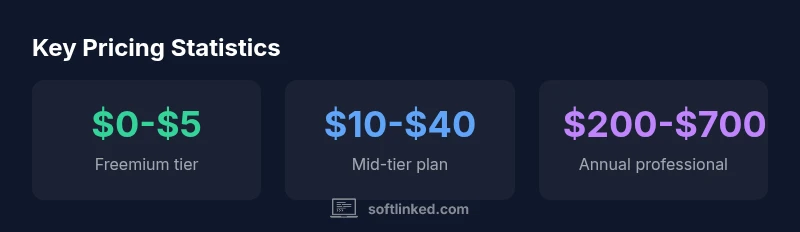
The typical price range for editing software spans free tiers through mid-tier subscriptions to high-end licenses, with consumer tools commonly in the $0-$60 per month band and professional suites at roughly $200-$700 per year when billed annually. Many vendors offer monthly options and occasional discounts. Total cost depends on features, platforms, licensing terms, and add-ons like stock assets or cloud storage.
How much is editing software today?
A practical starting point is to map the pricing bands that buyers encounter across consumer and professional tools. According to SoftLinked, understanding editing software pricing starts with recognizing licensing types (subscription, perpetual, and freemium) and how features, platform support, and bundled services drive value. For many hobbyists and students, the lowest-cost path is a freemium model or a basic monthly plan. For professionals, mid-tier subscriptions add essential editing suites, color grading, and collaboration features. Enterprise pricing centers on scalability, team licensing, and premium support. In 2026 market realities, you commonly see three broad bands: a free or ultra-cheap tier, a mid-range personal plan, and a professional option with annual commitments. Prices are not uniform across platforms; web-based editors can differ from desktop apps, and some vendors price per seat rather than per user. Since prices change with promotions, compare features side-by-side and consider hidden costs such as stock footage, cloud storage, LUT packs, and stock sound libraries.
This framing helps you decide quickly whether the editor fits your current needs and growth trajectory. For students and hobbyists, the emphasis is on getting started without breaking the bank. For professionals, the emphasis shifts to stability, updates, and support.
SoftLinked's data from 2026 reinforces that the total cost of ownership matters more than sticker price alone, especially when your workflow depends on upgrades, plugins, and cloud collaboration.
Pricing models explained
Editing software pricing typically follows three core models: freemium or basic plans, ongoing monthly or annual subscriptions, and perpetual/licensed options for those who want a one-time purchase. Freemium tools offer essential features with optional paid add-ons. Subscriptions unlock regular updates, cloud storage, and advanced features, often bundled with collaboration tools. Perpetual licenses provide lifetime use but may require paid upgrades after a major version. In 2026, most mainstream editors lean toward subscriptions or freemium-plus-upsell models, with annual plans offering better per-month economics. Enterprises may negotiate custom licenses with volume discounts and dedicated support. The SoftLinked analysis highlights that buyers should look beyond monthly costs and evaluate what is included, such as updates, stock libraries, and support levels. When you factor in add-ons, the annualized cost can shift significantly, so it’s wise to compare total packages rather than monthly sticker prices.
What factors drive cost
Price is driven by feature depth, platform support (macOS, Windows, or cloud-only), performance requirements (render engines, GPUs, RAM), storage, and collaboration capabilities. Other price drivers include stock assets, LUT packs, customer support levels, and cross-device syncing. For creators who rely on cloud workflows, the cost of cloud storage and bandwidth can rival the base software price. Add-ons such as stock video, audio libraries, and premium templates can substantially alter the total. Regional pricing and taxes also affect the final bill. Finally, education and nonprofit discounts can shift pricing meaningfully for students and classrooms. SoftLinked’s 2026 dataset shows that even modest feature gaps can justify higher plans when they translate into measurable workflow gains.
Consumer vs professional tiers
Consumer editors are designed for personal projects, social media, and basic video/photo tasks. They typically offer intuitive interfaces, guided templates, and affordable monthly options. Professional tools emphasize color grading, advanced editing, audio mastering, and robust plugin ecosystems. They often require higher-end hardware, team collaboration features, and enterprise-grade support. The line between consumer and professional can blur as some mid-tier products expand capabilities to attract semi-professional users. In practice, you should map your actual workload to the feature set you truly need, avoiding the trap of paying for “extras” that you won’t use. Budget-conscious buyers should test free trials and compare core workflows against price.
Regional and platform variations
Pricing is not uniform by region or platform. Web-based editors may price differently from desktop apps due to hosting costs and licensing models. Some vendors offer per-seat licenses for teams, while others charge per-user or per-project. Platform availability (macOS, Windows, Linux) can influence both price and plugin ecosystems. If you work across borders or devices, consider whether cross-platform compatibility, local tax rules, and currency fluctuations affect the total cost over a year. The SoftLinked analysis notes that regional promotions and platform bundles can sway final costs more than the base sticker price.
Evaluating value beyond price
Value comes from how well the software supports your workflow, not just the price tag. Consider update cadence, plugin ecosystems, asset libraries, and customer support responsiveness. A higher upfront cost may pay off with faster render times, fewer crashes, and improved collaboration. Track your time savings, the quality of outputs, and the ease of reuse of templates and presets. When evaluating, build a side-by-side scorecard across features, platform parity, and total cost of ownership. In our experience, those who quantify productivity gains and asset usage justify higher-priced plans more reliably.
Budgeting a realistic plan for individuals and teams
For individuals, a practical budget often ranges from free or low-cost tools for starting projects to mid-tier subscriptions for ongoing work and portfolio building. Teams should plan for multiple seats, shared assets, and centralized support. A reasonable approach is to start with a base plan for core editors, then layer on cloud storage, stock libraries, and collaboration plugins as needed. Always reserve a contingency for annual price changes and potential renewals that accompany feature updates. The goal is a predictable monthly or yearly expense aligned with workload and growth expectations.
Money-saving strategies and trials
Maximize savings by exploiting free trials, educational discounts, and bundle offers. Some providers price-match or offer annual plans with significant discounts. When possible, evaluate bundles that include stock libraries, music, and presets to reduce separate purchases. If you’re unsure about long-term needs, begin with a shorter-term plan and a clear upgrade path. Also, check for partner programs or student deals, which can unlock substantial savings while preserving essential features.
Pricing bands for editing software (general guidance)
| Pricing band | Typical monthly price (USD) | Typical annual price (USD) | Notes |
|---|---|---|---|
| Freemium/basic | $0-$5 | $0 | Entry-level features; upgrade options available |
| Mid-tier/personal | $10-$40 | $100-$480 | Broader feature set; ideal for hobbyists and freelance work |
| Professional/Studio | $40-$120 | $480-$1,320 | Advanced tools; team collaboration; premium support |
| Enterprise/volume | $200+ | $2,400+ | Custom contracts; dedicated success teams |
Your Questions Answered
What factors affect the price of editing software?
Core factors include feature depth, platform support, performance requirements, storage, and collaboration tools. Add-ons like stock libraries and premium templates can push costs up, while education discounts can lower them. Always compare total packages, not just the sticker price.
Pricing depends on features, platform, and add-ons like stock libraries. Check total packages, not just the label.
Is there a free editing software that can meet professional needs?
Some tools offer robust free tiers suitable for trial projects or learning, but professional-grade work typically requires paid plans. Look for editors with a generous free tier and a clear upgrade path.
There are powerful free tiers, but true professional needs usually require paid plans.
Are there price differences between macOS and Windows?
Yes, some editors price differently by platform due to licensing or optimization for specific OS features. Check cross-platform parity and whether one platform unlocks additional plugins.
Prices can vary by OS; verify cross-platform parity and plugin access.
Do editing software prices include updates or require extra payments?
Subscriptions usually include updates during the term, while perpetual licenses may require paid upgrades for major versions. Always verify upgrade policies and whether major upgrades incur separate fees.
Updates are often included with subscriptions; upgrades may cost with perpetual licenses.
Can I save money by buying annual licenses?
Annual licenses often offer a lower monthly equivalent than month-to-month plans, improving cost efficiency when you commit to a year. However, ensure your anticipated workload justifies the commitment.
Annual licenses usually give a better monthly rate if you know you’ll use it all year.
What should a beginner look for in a budget editor?
Beginners should prioritize intuitive UI, guided tutorials, essential editing features, and reasonable pricing. Avoid paying for advanced features you won’t use until you’re ready to scale.
Look for ease of use, solid tutorials, and affordable pricing for starters.
“"Pricing is most valuable when it aligns with your actual workflow and future needs, not just the present feature set."”
Top Takeaways
- Start with a free trial to gauge fit.
- Budget for add-ons like stock assets and cloud storage.
- Consider total cost of ownership, not just monthly price.
- Choose a scalable plan for teams.
- Watch for education discounts and bundles.