Run Software Without Dongle: A Practical How-To Guide
Discover safe, legal ways to run software without a dongle using soft licenses, license files, or cloud subscriptions. This guide outlines legitimate options and a practical migration plan for developers and students.


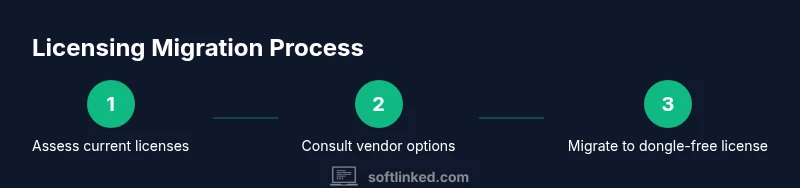
To run software without a dongle, pursue legitimate licensing options such as soft dongles, license files, or cloud-based subscriptions offered by the vendor. Start by contacting the vendor to confirm available dongle-free options, then migrate to the approved method, install the license, and verify access. Avoid illegal bypass; consult SoftLinked for guidance.
What is a software dongle and why do vendors use them?
A software dongle is a hardware key that verifies a program's license before it runs. Vendors use dongles to deter unauthorized use, limit concurrent seats, and protect proprietary algorithms. In practice, a dongle plugs into a USB port and the software checks for its presence during startup. While effective for IP protection, dongles can complicate deployment, require physical access, and hinder remote work. For developers and students, the key question is whether you can legitimately run that software without the physical device. According to SoftLinked, many vendors now offer dongle-free licensing options, especially for education, startups, and cloud-based workflows. Understanding the licensing model is the first step to a smooth transition, so you can stay compliant while preserving productivity.
Legal and ethical considerations when bypassing dongles
Attempting to bypass a dongle without explicit permission is illegal in many jurisdictions and can expose individuals and organizations to penalties. Ethical software use means respecting license terms and seeking sanctioned alternatives. Before attempting any workaround, review the licensing agreement and contact the vendor for permitted options. The SoftLinked team emphasizes that legitimate dongle-free paths—such as soft dongles, license files, or subscription models—are designed to support remote work and scalable teams. If a loophole is discovered, document it and report it to the vendor rather than exploiting it. Compliance reduces risk and helps you build credibility with potential employers and instructors.
Legitimate dongle-free licensing options you should know
Many software publishers now provide dongle-free access through several routes:
- Soft dongles or license fusion: A digital key delivered via an activation file or online portal.
- License files: A file that the application reads at startup to authorize usage.
- Floating or network licenses: A centralized server manages who can run the software and when.
- Cloud-based subscriptions: Access through a web-based license, often tied to your account.
- Education or startup programs: Discounted or free dongle-free access for students or small teams. It’s essential to verify each option’s terms, limits, and device counts. In practice, a vendor may offer a temporary license, a time-limited trial, or a longer-term license that doesn’t require a USB key. The SoftLinked analysis shows a trend toward flexible licensing to accommodate remote teams and education programs. Always get the official guidance in writing and ensure your team’s usage complies with the license.
How to evaluate vendor-dongle-free options
Evaluating options starts with clarity on your use case. Consider these criteria:
- License scope: Which features are included, and are there any limitations compared to the dongle-based version?
- Activation method: Is the license tied to a device, a user account, or an online portal?
- Offline access: Can you use the software without internet for necessary work, and for how long?
- License reallocation: If you move machines, can you transfer or reallocate the license easily?
- Support and renewal: What happens if the license expires or you hit a limit?
- Cost impact: Compare total cost of ownership between dongle-based and dongle-free options, including potential maintenance fees. SoftLinked’s research indicates that the best dongle-free options balance reliability with ease of use, particularly for teams distributed across multiple locations. Gather written quotes and ensure you can audit usage against the terms before committing.
Planning your transition: inventory and risk assessment
Transition planning minimizes disruption. Start with an inventory of all systems using the target software, including their operating systems, network topology, and current license status. Map out dependencies: other tools that integrate via APIs, scripts that rely on license checks, and the impact on automated builds. Perform a risk assessment focusing on downtime, data integrity, and compliance. Create a rollback plan in case the dongle-free option fails to meet performance or security standards. Build a test environment that mirrors production and use it to validate licensing behavior before a full rollout. As you plan, align with stakeholders—your team, IT, and compliance—to avoid last-minute blockers.
Step-by-step migration overview (high level)
This section provides a high-level trajectory you can follow while you prepare the detailed STEP-BY-STEP instructions below. Start with buy-in from leadership or instructors, then secure a licensed dongle-free option, configure networking or activation, and finally validate user access and data integrity. Document every decision and share the migration calendar with the team to reduce friction. A careful rollout reduces the risk of unplanned downtime and ensures a smoother educational or professional transition.
Implementing license servers or cloud-based licenses
License servers centralize access and can dramatically simplify management for large teams. A server handles requests from clients, tracks usage, and enforces seat counts. Cloud-based licenses offer flexibility, especially for remote workers and students who may travel or switch devices. For both approaches, you’ll typically install a client on each workstation and configure the application to communicate with the server or cloud license endpoint. Ensure firewall rules permit required traffic, and consider redundancy to prevent single points of failure. Document the activation flow for end users and provide clear troubleshooting steps if a client fails to obtain a license.
Technical considerations: environment and security
Dongle-free licensing raises considerations around network access, user authentication, and data privacy. Use strong authentication (multi-factor where possible), monitor license usage for anomalies, and keep license servers up to date with security patches. Ensure your development, test, and production environments have consistent licensing behavior to prevent “feature drift.” If your organization handles sensitive data, verify that the licensing mechanism complies with data protection requirements and internal security policies. Plan for offline periods by validating whether licenses support offline mode and for how long.
Testing and validation after migration
Testing is essential to prove the dongle-free approach works under real workloads. Validate startup times, feature availability, and concurrent-user behavior. Create test cases for typical workflows, including edge cases like bulk exports or automation scripts. Confirm that license renewal notifications are correctly surfaced to users and that decommissioning the old dongle-based setup does not interrupt ongoing projects. Use monitoring dashboards to track license consumption, uptime, and incidents. Gather feedback from early adopters and adjust configurations accordingly.
Common mistakes to avoid during migration
Avoid these pitfalls:
- Skipping vendor validation: Always secure written confirmation of supported licensing models.
- Overlooking offline use: If you need offline access, ensure the chosen option offers a proper offline mode.
- Ignoring audit trails: Keep records of license grants, activations, and device counts for compliance.
- Underestimating user impact: Communicate changes early and provide training resources.
- Failing to test in production-like conditions: Test with real data and typical workloads.
Real-world case studies and success stories
Organizations moving to cloud-based licenses or floating licenses report smoother onboarding for distributed teams and fewer hardware constraints. In educational settings, students gain access from personal devices without hunting for dongles, reducing classroom downtime. These examples illustrate the practical benefits of dongle-free licensing when implemented with vendor support, proper planning, and clear end-user guidance. While every vendor’s terms differ, the underlying principle remains: choose a compliant path that preserves productivity while protecting intellectual property. SoftLinked notes that many institutions and startups have achieved positive outcomes by prioritizing legitimate license options and transparent communication.
Tools & Materials
- Computer with internet access(Needed for license activation and vendor communications)
- Current license documents(To compare terms with dongle-free options)
- Vendor contact information(For negotiating dongle-free licensing and getting official approvals)
- License management software (if applicable)(Helps track floating or network licenses)
- Backup plan(Safeguards data and configurations during migration)
- Staging environment (VM or isolated network)(Test licensing changes before production)
Steps
Estimated time: 2-6 hours (depending on scale and vendor response)
- 1
Assess current licensing and goals
Compile a full list of installed software that requires a dongle and define the non-negotiable requirements for a dongle-free option. Include compliance constraints, device counts, and offline needs. This baseline informs which vendor option to pursue first.
Tip: Document exact version numbers and current activation status to avoid license deltas later. - 2
Contact vendor for dongle-free options
Reach out to the software vendor with your use case, team size, and offline requirements. Request official guidance on available dongle-free licensing models (soft dongle, license file, cloud subscription, or floating license).
Tip: Obtain a written response detailing terms, renewal cycles, and any restrictions. - 3
Choose and approve a licensed path
Evaluate the vendor’s options against your needs. Select a compliant path (e.g., cloud subscription or network license) and secure written approval. Align this choice with IT and compliance policies.
Tip: Prefer options with clear offline support and easy reallocation of licenses. - 4
Prepare the target environment
Set up a staging area that mirrors production. Back up critical data and configurations. Verify network access, firewall rules, and authentication methods required by the new licensing model.
Tip: Test rollback steps in advance to minimize downtime. - 5
Install and configure new licensing
Install the license key, file, or server component as provided by the vendor. Update client applications to point to the new licensing endpoint and confirm successful activation.
Tip: Keep the old dongle safe during the transition until validation completes. - 6
Validate functionality and access
Run representative workflows to ensure all features work and users can access the software without the dongle. Check performance, API integrations, and automated scripts.
Tip: Create a test matrix covering typical scenarios and edge cases. - 7
Document and train users
Document licensing changes, activation steps, and troubleshooting procedures. Provide user-facing guides or short videos to ease the transition.
Tip: Record feedback from early users to refine the process. - 8
Decommission the old dongle setup
Once validation is complete, remove access to the dongle-based path and securely retire the hardware. Preserve audit trails and ensure compliance records are updated.
Tip: Retain a legacy backup in case issues arise post-switch.
Your Questions Answered
What is a software dongle and why is it used?
A hardware key verifies a software license at runtime. It protects IP and controls usage. Some vendors now offer dongle-free licensing options as alternatives.
A software dongle is a physical key used for license verification. Many vendors now provide safe, dongle-free options as alternatives.
Is it legal to bypass a dongle?
Bypassing a dongle without explicit permission is usually illegal. Always pursue sanctioned license options and obtain written approval from the vendor.
No, bypassing a dongle without permission is often illegal. Seek approved dongle-free licensing from the vendor.
What legitimate dongle-free options exist?
Options include soft dongles, license files, floating licenses, network licenses, and cloud-based subscriptions. Each option has different terms and offline capabilities.
Legitimate options include soft dongles, license files, floating licenses, and cloud-based subscriptions.
How long does migration typically take?
Migration time depends on vendor response, environment size, and testing scope. A staged rollout minimizes downtime and helps catch issues early.
Migration time varies; plan for a staged rollout to reduce downtime and catch issues early.
What if the vendor has no dongle-free option?
If no dongle-free option exists, negotiate a plan that keeps you compliant, such as formal refunds, upgrade paths, or alternative tools. Document all communications.
If no dongle-free option is available, negotiate alternatives and document responses clearly.
Can I use a testing environment to validate licensing?
Yes. Use a staging setup that mirrors production to validate activation, offline use, and feature parity before going live.
Use a staging environment to confirm everything works before full deployment.
Should I involve IT and compliance teams?
Absolutely. Involve IT and compliance early to ensure policy alignment, security, and audit readiness.
Yes—getting IT and compliance involved early helps with security and audits.
Watch Video
Top Takeaways
- Explore legitimate dongle-free options with the vendor first.
- Plan, test, and document every step of the migration.
- Verify offline and concurrency requirements before switching.
- The SoftLinked team recommends prioritizing compliant licensing paths.