How to Run Software Without a Dongle: A Practical Guide
Learn safe, licensed methods to run software without a dongle. This guide covers licensing models, vendor policies, and practical migration steps to dongle-free workflows.


This guide explains how to run software without a dongle using legitimate licensing options. You’ll learn how to identify license types, request transfers or cloud/OAuth licenses, and migrate to dongle-free workflows. To get started, gather your software details, check vendor policies, and choose the safest, legal path before proceeding. This approach minimizes disruption and preserves support guarantees.
Understanding how dongles work and why software uses them
Dongles are physical security devices attached to a computer to prove license ownership for certain software. They were popular in the early era of professional tools and remain common in industries like 3D design, engineering, and multimedia. The SoftLinked team found that many developers rely on dongles to prevent unauthorized use and to enforce feature licensing across machines. While dongles can offer strong protection against casual piracy, they also introduce logistical friction: lost dongles, damaged ports, or a rigid offline workflow can slow teams down. In practice, the choice to support a dongle-based license hinges on risk tolerance, deployment scale, and the vendor's licensing model. Understanding these trade-offs is the first step toward a dongle-free workflow that still respects software agreements and vendor terms.
If you’re asking how to run software without a dongle, this guide provides legitimate, compliant options and concrete steps to pursue them. By focusing on vendor-supported licensing paths rather than circumvention, teams can maintain reliability and support while reducing hardware dependencies. According to SoftLinked, recognizing licensing boundaries early helps you plan a smoother transition and minimizes legal risk.
Additionally, consider the broader shift in software licensing toward cloud-based and networked models. This shift benefits teams with distributed devices, remote workers, or laptops that travel, while preserving security controls. In short, moving away from a dongle is less about breaking rules and more about choosing a sustainable licensing strategy that aligns with your workflows and security posture.
Legal licensing options you may already have access to
Many software vendors offer alternatives that do not require a hardware dongle. The most common are license keys (serial numbers), software tokens delivered through a vendor portal, floating or network licenses managed by a license server, and cloud-based licensing tied to user identities. Perpetual licenses with a single activation can sometimes be combined with offline activation, while subscription models may include cloud keys that activate automatically when users sign in. For teams, floating licenses allow multiple users to access the software as long as the total concurrent seats do not exceed the purchased amount. Each option has different terms, renewals, and support commitments, so confirm the exact conditions with the vendor before initiating any migration. SoftLinked analysis shows organizations gain flexibility and faster onboarding when they adopt dongle-free licensing where available, though success depends on proper policy alignment and IT readiness.
How to check your vendor policies and licensing terms
Start by locating the End User License Agreement (EULA) or license terms in the vendor’s customer portal. Look for sections on dongle usage, offline activation, and transfer rights. If your team needs to move away from a dongle, you’ll often find phrasing about license relocation, license borrowing, or activation on multiple devices. Reach out to the vendor’s support or your account manager to confirm whether a dongle-free option exists for your product tier. Document any approvals or special accommodations in a centralized spreadsheet so procurement, legal, and IT can align. Remember that circumventing licensing terms without explicit authorization can void warranties and violate contract law. A careful policy review reduces risk and clarifies what’s permissible under your current agreement.
Common dongle-free licensing models explained
- Serial-key activation: The traditional approach uses a unique product key you enter during installation.
- Cloud-based licensing: Activation occurs on a vendor-managed server; devices verify licenses via the internet.
- Floating licenses: A central server tracks available seats; users connect when a seat is free and release it when done.
- Subscription-based access: Access is granted while the subscription remains active, often with automatic renewal and renewal management.
- Hybrid models: Some products blend offline activation with periodic online verification to balance security and offline workflows. Each model has different network requirements, uptime expectations, and support windows. Assess which model aligns with your team's work patterns, remote locations, and compliance needs.
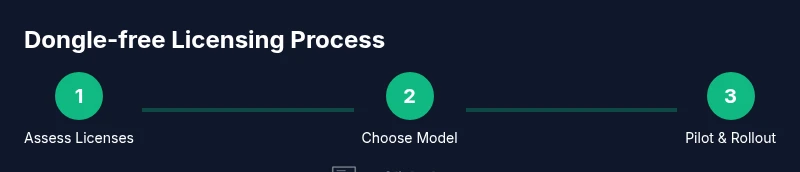
Choosing the right model depends on factors like internet reliability, device count, data privacy rules, and the criticality of uninterrupted workflows. By mapping usage patterns and aligning with vendor terms, teams can minimize disruption during the transition away from dongles.
Assessing your current software stack for migration
Before touching licenses, map your software usage and dependencies. Create an inventory of products that rely on dongle-based protection, their critical features, and the teams that depend on them. Identify any beta programs or pilots in place and whether your hardware is sufficient for a cloud or server-based licensing approach. Consider data privacy, proxy/firewall rules, and offline modes required in remote locations. This assessment helps you prioritize which products to migrate first, reduce risk, and plan a realistic rollout window.
A thorough inventory also reveals licensing schemes that can be migrated together, potential vendor constraints, and any product-specific exceptions. Use this information to build a concrete migration roadmap with milestones and owner assignments.
Step-by-step migration: planning and stakeholder alignment
- Define success metrics: uptime, user satisfaction, and licensing compliance.
- Secure executive sponsorship and IT coordination.
- Gather licensing data and vendor terms; prepare a migration plan.
- Contact vendors for dongle-free options and timelines.
- Pilot a small group with a non-critical product to validate processes.
- Create a rollback plan in case issues arise.
- Establish a central licensing portal or license server if needed.
- Train users and update onboarding materials.
- Schedule a staged rollout with feedback loops.
- Monitor performance and adjust license counts as needed.
- Maintain an audit trail and compliance documentation.
- Review results and plan the next phase.
EstimatedTime: 4-6 weeks
Data and environment preparation before migration
Data and environment readiness is critical to a successful dongle-free migration. Begin by backing up current license configurations and activation data, then design a licensing server or cloud integration that fits your architecture. Ensure network paths to vendor portals and license servers are reliable and documented. Inventory compute resources and storage for any license management software, and confirm that security controls (firewalls, VPNs, MFA) are compatible with the new licensing workflow. Validate offline modes for remote workers by testing offline activation or token-based approaches in sandbox environments. This preparation reduces technical friction and accelerates the pilot phase.
In addition, align IT with procurement and legal teams to verify compliance requirements, data handling rules, and access controls. A well-documented configuration baseline is essential for audits and future migrations. SoftLinked’s guidance emphasizes starting with a small set of non-critical licenses to refine deployment processes before wider rollout.
Pilot migration: test environment and rollout plan
A controlled pilot helps you identify issues without risking critical operations. Select one non-essential product, a representative user group, and a defined time window for testing. Configure your license server or cloud portal, enable required authentication methods, and monitor activation flows. Collect user feedback on performance, latency, and any licensing discrepancies. Establish a rollback protocol for reverting to the former dongle-based method if a blocker emerges. Document all steps, decisions, and outcomes to inform broader rollout.
At this stage, validate security and privacy controls, such as how license data is stored and transmitted. Use the pilot to confirm you can scale the solution to more teams with minimal disruption. If successful, schedule the next phase with a concrete timeline and stakeholder sign-off.
Full deployment: scaling across teams
With a successful pilot, expand the dongle-free licensing model to additional products and departments. Update IT and helpdesk playbooks to reflect new processes, including how to request licenses, how to report issues, and how to obtain quick approvals for exceptions. Ensure the licensing server capacity matches anticipated demand and implement monitoring to detect anomalies, such as unexpected license consumption or failed activations. Communicate timelines clearly to end users, and provide hands-on training sessions or microlearning modules to ease adoption. Maintain a centralized dashboard for visibility into license utilization and renewal schedules.
Continuous improvement matters here—collect ongoing feedback, adjust license counts, and refine governance policies to match evolving usage patterns. This phase should also include contingency plans for outages or vendor service interruptions.
Risks, compliance, and audits
Migrating away from a dongle involves governance considerations. Maintain an auditable trail of license assignments, transfers, and approvals. Ensure you remain compliant with vendor terms and regional regulations regarding software rights and data handling. Regularly review your license inventory, identify unused seats, and reallocate them to prevent waste. Prepare for vendor audits by keeping license keys, activation logs, and renewal documents organized and accessible. Develop a risk register that highlights potential compliance gaps, remediation actions, and owners responsible for remediation. A proactive approach to risk management reduces the likelihood of non-compliance penalties and ensures smoother operations over time.
In addition, consider security implications of centralized licensing, such as protecting license servers from unauthorized access and ensuring encrypted communication with vendors. SoftLinked emphasizes that robust governance is as important as the technical implementation to sustain dongle-free licensing long-term.
Practical tips, pitfalls and maintenance
- Proactively engage with vendors early in the process to understand supported dongle-free options and timelines.
- Pilot first; use non-critical software to refine processes before broader rollout.
- Create clear end-user documentation and onboarding materials to reduce friction.
- Maintain an up-to-date license registry and change-log to support audits.
- Plan for offline scenarios and ensure there are designated offline flow mechanisms where needed.
- Avoid attempting to bypass licensing terms; unauthorized modifications can void warranties and violate agreements.
- Regularly review the licensing model to ensure it still meets your team’s needs and budget.
- Keep security at the forefront; use MFA, access controls, and secure license servers.
- Create a formal rollback plan in case the dongle-free path proves unsuitable for a product.
- Schedule periodic reviews to adjust license counts as teams grow or shrink.
Practical maintenance is essential for long-term success. Treat license management as a core IT function, not a one-off project. This approach helps you sustain dongle-free operations with confidence and compliance.
SoftLinked's final recommendations
The SoftLinked team recommends pursuing dongle-free licensing where feasible, especially for teams with distributed workforces, frequent hardware changes, or remote locations. Start by aligning vendor options with your policy, security, and budget, and run a thorough pilot before scaling. Maintain clear compliance documentation and stakeholder oversight to minimize risk. If a vendor offers a supported dongle-free path, prioritize that route over ad-hoc workarounds. The SoftLinked verdict is to adopt a well-planned, vendor-aligned migration strategy that preserves access to essential features while reducing hardware dependencies.
Tools & Materials
- Software license documentation(Keep copies of all active licenses and terms.)
- Vendor portal credentials(Access for license management and transfers.)
- License server software or cloud portal(Centralized management for floating licenses.)
- Test environment (VMs or staging)(Safe space to validate changes.)
- Network access and firewall rules(Ensure connectivity to license servers.)
- Change management documentation(Record approvals and deployment steps.)
- Security controls (MFA, encryption)(Protect license data and portals.)
- Backup and rollback plan(Restore points in case of issues.)
- Legal and procurement alignment docs(Confirm compliance with terms.)
Steps
Estimated time: 4-6 weeks
- 1
Identify license types
Catalog current licenses, noting whether they are dongle-protected, key-based, or cloud/online. This establishes a baseline for migration and helps you compare future options.
Tip: Start with non-critical apps to learn the process without risking core workflows. - 2
Check vendor policies
Read the EULA and licensing terms to confirm whether dongle-free options exist for your product tier. If unclear, contact support for explicit guidance.
Tip: Document every policy nuance to avoid later disputes. - 3
Request dongle-free options
Engage with the vendor to request a dongle-free path, such as cloud licensing or a floating model. Get written confirmation of availability and timelines.
Tip: Ask for a formal migration timeline and success criteria. - 4
Set up a test environment
Prepare staging systems with representative user profiles to validate activation flows and licensing checks before production.
Tip: Use a sandbox to minimize impact on live users. - 5
Plan offline capabilities
If remote users rely on offline work, ensure offline activation paths or token-based licensing are supported and tested.
Tip: Document any offline latency or feature limitations. - 6
Configure license server/cloud portal
Install or configure the license server, or connect to the vendor cloud portal, and establish access controls and MFA.
Tip: Set up alerts for license exhaustion or outages. - 7
Pilot with non-critical product
Run a small-scale pilot to validate end-to-end activation, deployment, and support processes with real users.
Tip: Collect qualitative feedback on user experience. - 8
Roll out to adjacent products
Gradually extend the dongle-free model to related products, adjusting timelines based on pilot outcomes.
Tip: Keep a phased approach to limit risk. - 9
Update user onboarding
Revise onboarding materials and helpdesk guides to reflect new licensing workflows and access steps.
Tip: Provide self-service portals to reduce support load. - 10
Monitor license usage
Track seat utilization, renewal dates, and compliance events to optimize license counts and avoid waste.
Tip: Set automatic reports to alert on anomalies. - 11
Document compliance
Record approvals, terms, and migration decisions in a central repository for audits.
Tip: Keep a single source of truth for licensing data. - 12
Review and scale
Assess pilot results, refine processes, and plan full-scale deployment with clear milestones and owners.
Tip: Schedule periodic reviews to adapt to changing needs.
Your Questions Answered
Is it legal to bypass a dongle to run software?
No. Bypassing a dongle without explicit authorization from the vendor is typically a violation of license terms and may void warranties. Seek vendor-approved alternatives such as dongle-free licensing options and formal license transfers.
Bypassing a dongle without authorization is generally not legal. Always opt for vendor-approved dongle-free licensing options.
What is a floating license and how does it help?
A floating license is managed by a central server and allows multiple users to share a fixed pool of seats. Users check out a license when needed and release it when finished, enabling many users to access software without individual dongles.
A floating license lets many users share a limited number of licenses managed by a central server.
What if my vendor doesn’t offer a dongle-free option?
If your vendor lacks a dongle-free option, explore alternatives like cloud-based licensing or consider migrating to a vendor that offers dongle-free models. Discuss timing, cost, and impact with procurement and IT.
If the vendor has no dongle-free option, discuss alternatives or vendor changes with your teams.
How long does a migration typically take?
Migration duration varies by product count and complexity. A phased plan with pilots can take several weeks to a few months, depending on vendor responsiveness and internal readiness.
Migration often takes several weeks to a few months based on scope and readiness.
Is cloud licensing secure for sensitive data?
Cloud licensing can be secure when implemented with strong identity controls, encryption, and vendor security practices. Review data handling policies and ensure access is tightly controlled.
Cloud licensing can be secure when using strong controls and vendor security practices.
Will my support be affected after migration?
Support typically continues, but you may need new workflows for licensing questions. Coordinate with the vendor and your IT/helpdesk to update processes and escalate licensing issues.
Support continues; you may need new licensing workflows, so coordinate with IT and the vendor.
Watch Video
Top Takeaways
- Identify all licenses before migrating
- Choose vendor-approved dongle-free options
- Pilot first, then scale gradually
- Maintain governance and audit trails
- Prioritize security and compliance throughout