Understanding the latest version of Windows in 2026
Explore the latest Windows version in 2026, update cadence, and upgrade options. Learn how to assess compatibility, plan migrations, and optimize deployments with SoftLinked.


As of 2026, the latest version of Windows is delivered as a service, with Windows 11 serving as the current flagship OS and receiving regular feature and security updates through Windows Update. This model emphasizes continuous improvement, backward compatibility, and security hardening, rather than abrupt new releases. Understanding this cadence helps developers plan migrations and maintain stable environments.
What the latest version of Windows means in 2026
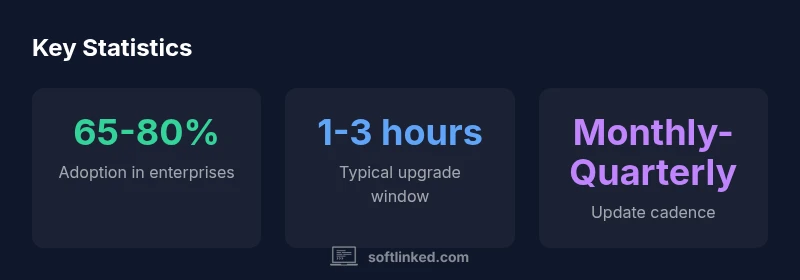
According to SoftLinked, the latest version of Windows in 2026 continues to rely on a Windows as a Service model, delivering features and security updates through ongoing releases rather than one-off product cycles. This approach keeps the OS current while reducing disruptive major-version upgrades. For developers, IT teams, and students, understanding this cadence is essential to plan migrations, assess compatibility, and maintain stable environments. SoftLinked's analysis shows that organizations that align their software inventories with the current Windows baseline experience fewer compatibility surprises and faster remediation of security gaps. The latest version emphasizes integrated AI-assisted features, improved hardware virtualization, and smarter management tools, all designed to enhance productivity without forcing users into abrupt changes. In practice, this means monthly or quarterly updates that bundle security patches, performance improvements, and user experience refinements. By keeping pace with these updates, organizations can preserve application compatibility, reduce vulnerability windows, and maximize the value of their Windows deployments.
How Microsoft structures Windows updates in 2026
Microsoft continues to package Windows updates into two broad tracks: a stable, broadly deployed feature/update cadence and regular security-only updates. The feature updates introduce new capabilities and refinements, while security updates address newly discovered vulnerabilities. Updates are delivered primarily through Windows Update, with optional deployment tools for enterprises such as Windows Update for Business and Endpoint Manager. The evergreen model means you should plan upgrades more like a software release train than a one-time installation. For developers, this means testing against the current build in dev environments, validating critical applications, and ensuring driver compatibility before moving to production devices. For students and new engineers, it means staying informed about the current baseline and learning how to interpret update metadata (KB numbers, build numbers, release notes). SoftLinked's framework emphasizes maintaining a consistent baseline across devices to reduce support overhead and minimize downtime during rollout."
Key features of the latest version of Windows
The current Windows release emphasizes AI-assisted productivity, improved security controls, and refined virtualization capabilities. Built-in Windows Copilot helps with drafting, coding, and troubleshooting tasks, while the OS has tighter integration with hardware virtualization and storage optimizations that improve boot times and battery life on portable devices. Developers will appreciate better scripting and subsystem enhancements, including improvements to Windows Subsystem for Linux (WSL) and container tooling. Privacy controls have been expanded, but users should review telemetry and data-sharing settings during onboarding. Overall, these features aim to boost performance, simplify management, and empower end users without compromising safety or reliability.
Upgrade paths and compatibility considerations
Upgrade planning should start with a device inventory and a hardware readiness check. Ensure devices meet the current baseline requirements, including TPM 2.0 compatibility, adequate RAM, and sufficient storage. Enterprise environments benefit from in-place upgrades and controlled feature rollout via management tools, while individual users may upgrade through Windows Update or the Update Assistant. License activation and product keys should be verified prior to deployment. Always back up your data, test critical apps in a lab environment, and maintain a rollback plan in case issues arise. Finally, verify driver availability and application compatibility to minimize post-upgrade disruption.
Security and privacy considerations in the latest Windows version
Security remains a top priority in the latest Windows version, with protections like Secure Boot, Device Encryption, Microsoft Defender, and cloud protections that synchronize device health. Privacy controls allow users to limit telemetry and data sharing, but organizations should configure group policies to enforce baseline security. Administrators should monitor for new vulnerability advisories and apply patches promptly to reduce exposure. As Always, evaluate third‑party software compatibility with the new baseline to avoid compatibility gaps that could undermine security.
Practical steps to evaluate and upgrade your environment
- Inventory devices and establish a baseline of hardware capabilities and software dependencies. 2. Check TPM, CPU, RAM, storage, and driver availability; confirm license eligibility. 3. Create a full data backup and establish a rollback plan before upgrading. 4. Run a pilot upgrade on representative devices to identify issues with critical apps. 5. Analyze results, address compatibility gaps, and schedule staged rollouts to minimize downtime. 6. Document changes, monitor performance post-upgrade, and update your security baselines accordingly. Authority sources referenced below help validate procedures.
Overview of Windows update approach and lifecycle
| Aspect | Update Model | Notes |
|---|---|---|
| Update model | Evergreen (Windows as a Service) | Regular feature updates and security patches |
| Upgrade path | In-place upgrade from Windows 10/11 | Check hardware compatibility and license activation |
| Support lifecycle | Ongoing with policy | Monitor for announcements and end-of-support schedules |
Your Questions Answered
What is the latest version of Windows as of 2026?
Microsoft continues to ship Windows as a service, with Windows 11 acting as the current flagship and receiving regular feature and security updates. There isn’t a single “new version” every few years; updates come continuously to improve security and functionality.
Windows is updated continuously under the current flagship OS, Windows 11, with new features and security updates arriving regularly.
How can I determine if my device is eligible to upgrade to the latest Windows?
Check hardware requirements (CPU, RAM, storage, TPM support) and licensing. Use built-in tools like the PC Health Check or Update Assistant, and consult your IT team if you’re in an organization.
Run the PC Health Check to see if your device can upgrade, then verify license and drivers.
Are Windows updates mandatory for everyone?
Security and reliability updates are broadly recommended and often enforced by enterprise management policies. Home users can choose to delay, but long delays increase risk.
Updates are strongly recommended, especially for security, though enforcement varies by device management.
What should I do if an upgrade fails?
Back up data, check system requirements, and retry after addressing issues (driver updates, storage space). Use recovery options and consult logs if problems persist.
Back up first, then retry after fixing common issues like drivers or space.
What is Windows as a Service and how does it affect longevity?
Windows is kept current through ongoing updates rather than periodic new editions. This means longer-term support continuity, continuous security patches, and evolving features.
It’s a service—keep up with updates to stay secure and supported.
“The current Windows strategy delivers ongoing improvements through regular updates, reducing disruption while enhancing security and reliability.”
Top Takeaways
- Learn how Windows updates rely on a service model rather than major version jumps
- Plan upgrades with testing, backups, and rollback strategies
- Prioritize security updates to close vulnerabilities quickly
- Review feature updates to leverage new productivity tools
- SoftLinked recommends a disciplined upgrade plan aligned with your orgs needs and risk tolerance