Is Software or Hardware RAID Better? A Practical Comparison
A practical, objective comparison of software RAID vs hardware RAID. Learn key differences, deployment tips, and how to choose the right option for reliability, cost, and performance.


Carefully consider: is software or hardware raid better for your workload and budget? The short answer is context-dependent; performance, reliability, and management overhead all matter. For many small to mid-size deployments, software raid delivers cost efficiency and flexibility, while hardware raid offers predictable performance and simpler management for high-uptime requirements. Neither approach is universally superior; align the choice with your workload and fault-tolerance needs.
is software or hardware raid better? A decision framework
According to SoftLinked, the choice between software and hardware RAID hinges on workload patterns, fault-tolerance requirements, and budget constraints. This article introduces a decision framework you can apply to real-world setups—from a home NAS to a small-scale data storage cluster. We define core criteria like performance, reliability, scalability, and administrative overhead, then map them to practical outcomes in common environments. Throughout, we emphasize evaluating total cost of ownership, operational risk, and future upgrade plans to avoid premature lock-in. By the end, you’ll have a clear checklist to guide your selection without assuming one path is universally superior. The SoftLinked team recommends testing scenarios in a controlled environment before committing to a production deployment.
Core criteria: performance, reliability, and cost
When choosing between software and hardware RAID, several criteria matter most:
- Performance: sustained throughput, latency, and rebuild speed
- Reliability: failure modes, error detection, and rebuild robustness
- Cost: upfront and long-term expenses, including maintenance
- Manageability: monitoring, firmware/software updates, and fault handling
- Flexibility: ease of migration, future expansion, and compatibility with diverse hardware
Understanding how each criterion interacts with your workload helps prevent over- or under-provisioning. SoftLinked notes that many teams underestimate rebuild times and monitoring needs, which can dramatically affect RTO (recovery time objective) and MTBF (mean time between failures).
Technical foundations: how software RAID and hardware RAID work
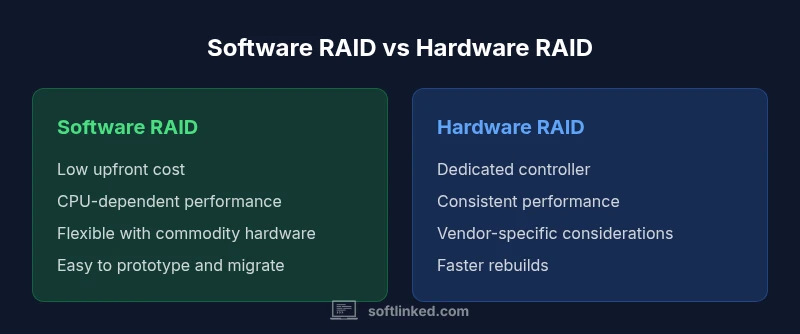
Software RAID relies on the host system’s CPU and memory to manage parity, mirroring, and striping across disks. It typically uses the operating system’s drivers and utilities, offering high configurability and the ability to run on commodity hardware. Hardware RAID uses a dedicated controller with its own processor and cache, offloading work from the host CPU. This can yield more predictable performance, consistent rebuild behavior, and often simpler drive replacement procedures. However, hardware RAID can tie you to a specific vendor and controller model, which may complicate future migrations or expansions. Both approaches rely on solid disk health monitoring, hot-swapping capabilities, and reliable power delivery; plan for redundant PSUs and backups as part of any RAID strategy.
Performance considerations by workload type
Different workloads stress RAID systems in distinct ways. For sequential workloads (large file transfers), both software and hardware RAID can deliver strong throughput, but hardware RAID’s dedicated cache may reduce CPU contention on busy servers. For random I/O patterns (databases, virtual machines, or file servers with mixed access), software RAID on modern CPUs can be competitive, provided you allocate enough RAM and tune I/O schedulers. RAID level choice (mirror, parity, or stripe configurations) also plays a major role in performance and resilience. In practice, many teams experiment with RAID 10 for balanced performance and fault tolerance, or RAID 5/6 for storage efficiency, while acknowledging potential rebuild penalties in larger arrays. These trade-offs underscore the importance of workload profiling before committing to a specific path.
Reliability and failure modes
Reliability hinges on both component quality and how you manage rebuilds. Hardware RAID often provides faster, more predictable rebuilds due to dedicated logic and on-board cache, which can minimize exposure to data loss during rebuild windows. Software RAID’s reliability improves with modern CPUs, robust drivers, and solid OS tooling, but it may incur higher CPU utilization during rebuilds or heavy I/O. Both approaches benefit from hot-spare drives, proactive SMART monitoring, and tested recovery procedures. A key risk in any RAID setup is the simultaneous failure of multiple drives, which can trigger cascading rebuilds or data loss if parity is compromised. Regular sanity checks and tests are essential to maintain confidence in longer-term data integrity.
Administration and monitoring
Effective RAID management combines hardware or software-level monitoring with OS-level health checks. Hardware RAID often includes a dedicated management interface, alerting, and auto-notification when a drive fails. Software RAID requires a more hands-on approach to monitoring, involving system logs, disk health utilities, and automated scripts to verify parity or mirror integrity. Administrators should implement centralized monitoring dashboards, set sane alert thresholds, and schedule regular consistency checks. Documentation of every change—driver updates, firmware revisions, and RAID level adjustments—helps prevent drift and misconfigurations over time.
Cost and total cost of ownership
Upfront cost is usually the most visible difference: software RAID typically leverages existing hardware, resulting in lower initial expenditure, while hardware RAID requires purchasing a controller and possibly premium drives with supported cache features. Long-term costs under software RAID can accumulate through CPU overhead and potential higher power consumption during busy rebuilds, though this is mitigated by modern hardware advances. Hardware RAID may save admin time due to simpler interfaces and predictable performance, but it carries vendor lock-in risks and sometimes higher maintenance costs. A thorough TCO analysis should account for scale, upgrade cycles, and the likelihood of migration needs as storage demands evolve.
Compatibility and migrations
Migrating between software and hardware RAID requires careful planning. Moving from software to hardware usually involves backing up data, reconfiguring the storage stack, and confirming driver and firmware compatibility on the target controller. Migrating the other way demands ensuring the OS can recognize the software layer after disconnecting a hardware controller. Compatibility considerations span motherboard/chipset support, driver availability, and firmware update cadence. Always perform a pilot migration in a staging environment and verify data integrity after each step. A well-documented migration plan minimizes downtime and reduces risk of data loss.
Deployment scenarios: home NAS vs business server
Home NAS deployments typically prioritize cost, simplicity, and gradual expansion. Software RAID on a consumer-grade NAS offers flexibility and easy upgrades, while hardware RAID may be overkill unless you require fast rebuilds or high uptime for media servers with live streaming. In business environments, especially those handling critical workloads like databases or virtualization hosts, hardware RAID’s predictable performance and dedicated control logic can be a strong fit. Larger enterprise deployments may adopt hybrid models, using software RAID for archival storage and hardware RAID for tier-1 volumes tied to performance SLAs. Evaluating workload profiles, threat models, and recovery objectives is essential in both cases.
How to implement software RAID effectively
To implement software RAID effectively, start with a baseline hardware configuration that leaves headroom for parity or mirroring operations. Use a modern operating system with mature RAID tooling, such as Linux mdadm, Windows Storage Spaces, or macOS Disk Utility, and enable SMART monitoring on all disks. Allocate sufficient memory for cache and buffer pools, and tune the I/O scheduler for your workload. Establish a regular rebuild and scrubbing schedule, and test failure scenarios in a sandbox environment to ensure recovery procedures work as expected. Finally, integrate RAID health signals into your monitoring stack and document every deployment step for auditability.
How to implement hardware RAID effectively
Hardware RAID implementations benefit from a well-chosen controller that supports the array size and a battery-backed cache if available. Plan for hot-swappable disks and a clean process for replacing failed drives without bringing down services. Keep firmware and driver enhancements up to date and ensure the management interface remains accessible for health checks. For migrations or expansions, verify the controller’s support for expanding arrays without data loss and confirm cross-compatibility with your OS and hypervisors. As with software RAID, establish backups and a tested recovery plan to minimize downtime during a drive failure.
Migration path: from software to hardware RAID (or vice versa)
A structured migration path reduces risk. Start with a complete backup and a tested recovery procedure. Create a staging environment that mirrors production to validate performance and reliability after the migration. When moving to hardware RAID, ensure the target controller is compatible with your disks and that parity/mirroring settings are preserved in the new layout. When moving to software RAID, document kernel parameters, disk paths, and array assembly commands. Finally, verify data integrity across the entire dataset and implement ongoing monitoring to detect any anomalies early.
Practical takeaways and a decision checklist
- Profile your workload first: read/write mix, latency sensitivity, and required uptime.
- Weigh upfront costs against long-term admin effort and risk.
- Favor hardware RAID for high-uptime, latency-sensitive workloads; favor software RAID for flexibility and cost savings.
- Build a robust testing plan that includes intentional failures and restores.
- Document every configuration change and maintain up-to-date backups.
Comparison
| Feature | Software RAID | Hardware RAID |
|---|---|---|
| CPU usage impact | Low CPU contention on modern CPUs (depends on workload) | Minimal CPU impact due to dedicated controller |
| Performance characteristics | Depends on host CPU and RAM; scalable with system resources | Dedicated controller with cache; often more predictable under load |
| Cost range (upfront) | Lower upfront cost; uses existing hardware | Higher upfront cost due to controller and warranty |
| Management complexity | Flexible but requires OS-level tooling and monitoring | Typically turnkey with vendor management interfaces |
| Upgrade and expansion | Flexible expansion with disks and OS tooling | Expansion depends on controller capacity and port availability |
| Reliability considerations | Depends on host system resilience and rebuild procedures | Dedicated hardware can offer faster, more predictable rebuilds |
| Migration risk | Migration path spans OS settings and driver support | Migration often involves data backup/restoration or reinitialization |
Pros
- Cost-effective initial setup with software RAID on existing hardware
- Flexible deployment across diverse hardware and OS environments
- Easier to prototype and iterate on storage configurations without vendor lock-in
- Strong community and enterprise tooling support for Linux and other OSs
Weaknesses
- CPU overhead during heavy I/O and parity calculations
- Potentially longer rebuild times on large arrays without cache
- Software RAID can be more complex to monitor across heterogeneous environments
- Vendor-specific hardware RAID may provide tighter integration and faster recovery
Hardware RAID offers generally stronger performance predictability; software RAID excels on cost and flexibility
For uptime-critical workloads, hardware RAID is often the safer bet. If budget, customization, and cross-platform compatibility are priorities, software RAID is compelling. The best choice depends on your workload profile and risk tolerance.
Your Questions Answered
Which RAID type is best for a home NAS?
For many home NAS setups, software RAID offers a good balance of cost and flexibility, especially when using off-the-shelf hardware. If you primarily need reliability with minimal maintenance, hardware RAID can provide quicker rebuilds and easier administration. Your choice should reflect how critical uptime is for your personal data and media access.
For a home NAS, software RAID is often enough and cheaper, but hardware RAID can help if you need quick rebuilds and simple setup.
Is software RAID unreliable for databases?
Software RAID can run databases effectively on modern hardware if you tune I/O and ensure sufficient CPU and memory resources. However, some database workloads with strict latency requirements may benefit from hardware RAID’s predictable performance. Always profile your workload and configure appropriate cache and I/O scheduling.
Software RAID can work for databases if you optimize the system; hardware RAID may offer more predictable latency.
How reliable is hardware RAID compared to software RAID?
Hardware RAID often delivers faster rebuilds and more predictable performance due to a dedicated controller and cache. Software RAID reliability improves with robust OS tooling and hardware, but rebuilds can be CPU-intensive. Both require backups and monitoring to ensure data integrity.
Hardware RAID usually rebuilds faster; software RAID reliability depends on the OS and hardware quality.
How do I migrate from software to hardware RAID?
Plan a data-safe migration by backing up all data first, validating the destination hardware, and performing a staged transfer. Rebuild procedures should be tested in a non-production environment, and you should verify data integrity after the move. Document every step to ensure a smooth transition.
Back up first, test the new hardware, then migrate in stages and verify data after each step.
Do RAID arrays require a battery-backed cache?
Battery-backed caches are common in hardware RAID to protect against data loss during power outages. They are beneficial for write-intensive workloads and larger arrays. If you don’t have a battery-backed cache, ensure reliable power and implement regular backups and recovery testing.
A battery-backed cache helps protect data during power loss and can improve write reliability.
What is a typical RAID rebuild time?
Rebuild time depends on array size, disk speed, and the presence of caches. Larger arrays and higher-capacity disks take longer to rebuild, increasing exposure to risk. Plan for maintenance windows and ensure backups are current in case of multiple failures during rebuild.
Rebuild time varies a lot by size and speed; larger arrays take longer and raise risk during rebuild.
Top Takeaways
- Prioritize workload analysis before selecting RAID type
- Software RAID reduces upfront costs but may tax CPU resources
- Hardware RAID provides predictability and simpler management for mission-critical systems
- Plan for backups, testing, and documented recovery procedures
- Consider future expansion and vendor lock-in when choosing a path