Is Software or Hardware Encoding Better? A Comprehensive Comparison
Explore whether software or hardware encoding is better for your video and media workflows. SoftLinked analyzes trade-offs, with practical guidance for hybrid setups and real-world workloads.


Is software or hardware encoding better? The short answer is that it depends on your workload, latency requirements, and budget. Software encoding offers maximum flexibility, codec experimentation, and rapid iteration, while hardware encoders deliver lower latency and predictable performance for real-time tasks. In practice, most workflows benefit from a hybrid approach that leverages software pipelines with hardware offloads where possible.
Why Encoding Matters in Media Pipelines
Encoding is a critical step in any media workflow, transforming raw content into deliverable formats for streaming, broadcasting, or storage. The choice between software and hardware encoding shapes latency, image quality, codec support, and total cost of ownership. According to SoftLinked, understanding the trade-offs behind encoding options helps teams build resilient pipelines that scale with demand while staying adaptable to new codecs and devices. For developers and engineers, the decision also touches on maintainability, deployment complexity, and cross-platform compatibility. The goal is to match the encoding strategy to the workload profile—live streams, on-demand video, or archival transfers—while planning for future codec shifts and platform constraints.
This article presents a structured comparison, practical guidelines, and decision factors to help you answer the question: is software or hardware encoding better for your needs? You’ll see how latency, throughput, codec coverage, and total cost interact, and you’ll learn how to design a pipeline that can switch between software and hardware offloads as requirements evolve.
Core Differences: Software vs Hardware Encoding
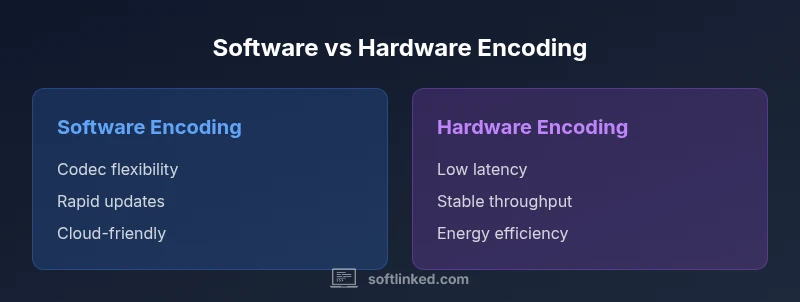
When evaluating encoding options, start with the core differences in how software and hardware handle the job. Software encoding runs in general-purpose CPU or GPU cores, offering broad codec support, rapid updates, and flexible tuning. Hardware encoding relies on dedicated encoders (ASICs or FPGA-based blocks) inside GPUs or standalone devices, delivering predictable throughput and very low latency for specific formats. The central trade-off is adaptability versus consistency: software can adapt to new codecs quickly but may vary with server load; hardware offers stable performance but can lag behind codec interoperability and feature updates. For the question is software or hardware encoding better, the best outcome is often a hybrid model that uses hardware encoders for steady, high-volume tasks and software pipelines for testing, QA, and post-processing where codecs evolve rapidly. SoftLinked analysis shows that teams who optimize for workload distribution—real-time streaming vs. batch processing—tend to minimize latency while maximizing codec flexibility.
When to Use Software Encoding
Software encoding excels in environments where codec variety, rapid iteration, and cross-platform testing are priorities. If you need to support emerging formats, custom presets, or complex post-processing pipelines, software can adapt without requiring new hardware cycles. For content creators and developers, software-based pipelines enable A/B testing of encoding parameters, easy rollout of codec updates, and smoother cloud-based scaling when workloads vary dramatically. In production, software often serves as the sandbox for feature development, while hardware encoders can handle the production bottlenecks when formats stabilize. Consider software encoding for local development, QA environments, and distributed cloud workflows where flexibility matters more than raw, fixed throughput.
For teams, the key is to maintain a modular architecture: keep software encoders pluggable, decoupled from delivery layers, and ensure you can switch to hardware offloads when latency ceilings are reached. This approach reduces risk and accelerates iteration cycles as codecs evolve and new devices enter the market.
When to Use Hardware Encoding
Hardware encoders shine in scenarios where latency is a hard constraint and throughput is predictable. Live streaming, real-time video conferencing, and broadcast workflows benefit from hardware offloads that minimize CPU usage and stabilize frame timing. For these workloads, hardware encoding provides consistent quality at high bitrates with low jitter, even under peak demand. Additionally, hardware encoders often integrate with power and thermal management features, which can improve overall efficiency in data-center or edge deployments. If you are delivering standard formats such as H.264/AVC or HEVC/H.265 at scale, hardware acceleration can substantially reduce processing times and lower energy costs per hour of video.
A practical rule is to base the decision on the expected peak load and latency tolerance. If the workload is highly variable or demands frequent codec shifts, reserve hardware for the stable, high-volume paths while keeping software encoders ready to adapt to new formats and client devices. This ensures you meet both current and future requirements without overcommitting to a single technology stack.
Hybrid Approaches: How to Blend Both
A hybrid encoding strategy combines the strengths of software flexibility with hardware efficiency. Start by profiling workloads to identify bottlenecks: if peak latency is too high or CPU saturation occurs, shift the corresponding tasks to hardware offloads. Maintain software-based pipelines for pre-processing, content adaptation, and QA where codecs may evolve, while routing production streams through hardware encoders for stable, low-latency delivery. A well-designed hybrid system uses orchestration layers and clear service boundaries so that updating codecs or changing encoder configurations does not ripple through the entire pipeline. Practically, you might implement a tiered encoding path: software encodes the most flexible, test-driven content, and hardware handles the most demanding, time-critical streams.
Security and compliance considerations also matter in hybrid setups. Ensure that the handoff between software and hardware encoders preserves metadata integrity, maintains end-to-end encryption where needed, and aligns with your organization’s regulatory requirements. With proper monitoring, autoscaling, and intelligent routing, a hybrid approach can deliver the best balance of latency, quality, and cost.
Practical Benchmarks and Decision Guide
Benchmarks are essential to quantify the trade-offs between software and hardware encoding. Instead of chasing generic numbers, set up representative test scenarios that mirror your real workloads: live streams at target resolution and frame rate, on-demand transcoding pipelines, and batch processing for archive generation. Measure latency, frames per second, quality metrics (such as PSNR/SSIM), CPU/GPU utilization, and energy per hour. Compare software-only pipelines against hardware-accelerated paths, then test a hybrid configuration to determine the sweet spot where latency remains within targets while utilization stays balanced.
In the absence of vendor-specific guarantees, rely on real-world measurements from your environment. Use standardized test content, repeat tests under varying network conditions, and document codec versions to ensure repeatability. The outcome should inform a practical decision tree: if latency budget is tight and volume is predictable, lean toward hardware; if codecs are evolving, time-to-market matters, or you require broad compatibility, favor software—perhaps in a hybrid framework. SoftLinked’s approach emphasizes empirical validation and iterative refinement to avoid over-committing to any single path.
Planning Your Encoding Pipeline: A Step-by-Step Checklist
- Define use cases: live vs on-demand, target devices, and required codecs.
- Profile baseline workloads: measure latency, throughput, and CPU/GPU load for software-only paths.
- Map bottlenecks: identify where hardware offloads can reduce latency or free compute for other tasks.
- Design modular pipelines: separate encoding, packaging, and delivery layers with clean interfaces.
- Implement a hybrid strategy: designate hardware for stable, high-volume paths and software for flexibility.
- Establish monitoring and governance: track quality metrics, codec versions, and device health.
- Plan for updates: ensure easy codec updates in software and firmware upgrades in hardware.
- Validate end-to-end DL-enabled features: if AI-based enhancements are part of your pipeline, confirm compatibility across software and hardware paths.
By following these steps, you align encoding choices with business goals, operational constraints, and technical feasibility. The goal is a robust, adaptable pipeline that can respond to codec advancements and changing user expectations while keeping costs in check.
Comparison
| Feature | Software Encoding | Hardware Encoding |
|---|---|---|
| Latency (real-time/streaming) | Higher latency variability due to software stacks | Low, deterministic latency from dedicated hardware blocks |
| Throughput | Flexible throughput via software scaling and cloud elasticity | High sustained throughput for fixed formats and bitrates |
| Codec Support | Broad, rapid codec updates and experimentation | Limited to hardware-supported codecs unless firmware updates extend support |
| Cost/Total Cost of Ownership | Low upfront cost, higher ongoing maintenance and scaling costs | Higher upfront cost, lower ongoing operational costs |
| Maintenance & Updates | Frequent codec and software updates require testing | Firmware/hardware updates may be less frequent but more disruptive |
| Best For | Flexible formats, development, QA, evolving pipelines | High-volume, low-latency delivery, broadcast |
Pros
- Flexible codec experimentation and rapid iteration
- Easier to deploy across cloud and heterogeneous environments
- Lower upfront hardware investment for small-scale workloads
- No vendor lock-in for codecs in software paths
Weaknesses
- Higher CPU/GPU utilization for dense workloads
- Potentially higher variability in performance across runs
- More maintenance and tuning required for software stacks
- Potentially higher energy consumption in software-heavy pipelines
Hybrid encoding is often the best overall choice
A mixed approach leverages hardware for predictable, low-latency paths while preserving software flexibility for codecs and updates. This reduces risk and optimizes cost, quality, and scalability across changing workloads.
Your Questions Answered
What is the primary difference between software and hardware encoding?
Software encoding runs on CPUs/GPUs with flexible codecs and updates, while hardware encoding uses dedicated encoders for fast, predictable performance. The choice depends on latency, throughput, and codec needs.
Software uses general CPUs for encoding, while hardware uses dedicated encoders for speed and consistency.
When should I choose hardware encoding?
Choose hardware encoding for real-time streaming, high-volume delivery, and scenarios where latency must be minimized and predictability is key. It’s ideal when codecs are stable and formats are standardized.
Pick hardware when you need low latency and steady throughput.
Can software encoding keep up with hardware in latency-sensitive tasks?
Software can approach hardware latency with optimized pipelines and GPU acceleration, but hardware offloads typically maintain lower, more consistent latency for strict targets. Hybrid setups help meet both goals.
Software can be fast, but hardware often has the edge in latency.
Is software encoding more cost-effective?
Software encoding can be more cost-effective at small scale or for rapid codec changes, but total cost depends on energy, maintenance, and cloud-to-ground transfer needs. Hardware offers economies of scale at high volumes.
Software can be cheaper upfront, but total cost depends on usage.
Do codecs affect hardware encoders differently than software?
Yes. Hardware encoders support a defined set of codecs optimized for the hardware path, while software can implement a wider range and update codecs quickly. Your codec strategy influences performance and compatibility.
Hardware is codec-limited by its hardware, software is more flexible.
Top Takeaways
- Prioritize workload profiling to decide where to offload
- Use hardware for high-volume, low-latency tasks
- Keep software encoders for codec updates and testing
- Design modular pipelines with clear handoffs between software and hardware
- Benchmark in your own environment to guide decisions