How Much Software Update: Costs, Time, and Impact
Explore how much software update costs, with practical ranges for patches and major upgrades, plus testing, automation, and deployment strategies to manage risk.


According to SoftLinked, there is no universal price tag for software updates—the cost depends on scope, architecture, and testing needs. For minor patches, expect hours to a couple of days of developer time. Major version updates can extend to days or weeks of planning, testing, and rollout. Budget for risk, rollback plans, and regression testing.
How much software update costs across contexts
Determining the total cost of a software update begins with acknowledging that there is no single price tag for updates. In practice, the question often reduces to: how much software update will this require in terms of time, testing, and risk management? Across different contexts—enterprise systems, consumer apps, mobile software, and embedded devices—the cost drivers shift, but the core levers stay the same. The SoftLinked team finds that the primary variables are scope (which components are touched), platform complexity, integration points, and regulatory or compliance checks. Minor patches typically touch a small surface area and pass quickly through validation, whereas major version upgrades can cascade through multiple modules, external APIs, and data migrations. Teams that invest early in clear scoping and risk assessments tend to shrink the variability window of update costs.
From a policy standpoint, consider how you will validate backward compatibility, ensure data integrity, and maintain user experience during the update. These decisions influence what you budget for in testing environments, staging, canary releases, and post-release monitoring. In sum, the kata of budgeting updates is less about a fixed price and more about building a disciplined process that reduces uncertainty over time.
Patch vs. major version updates: cost and effort
Patch updates are designed to fix defects or address minor security concerns with minimal user impact. The cost in time and resources typically ranges from a few hours to a couple of days, assuming automated test coverage and straightforward deployment. Minor upgrades introduce new features or small improvements, which elevates the effort but remains manageable when CI/CD pipelines are in place. Major upgrades, by contrast, often require cross-team coordination, data migrations, compatibility testing, and extended validation. These can span several days to multiple weeks depending on data volumes, third-party dependencies, and the need for formal governance reviews. The SoftLinked guidance emphasizes modular rollout plans and robust rollback strategies to keep risk in check during larger updates.
Testing, QA, and risk management
Quality gates are the largest determinant of update cost. Regression testing, performance validation, security checks, and user acceptance testing can quickly add up in labor hours and environment usage. Adopting test automation, virtualization of production environments, and deterministic testing plans reduces manual effort and speeds validation cycles. Automated test suites that cover critical flows, data integrity, and API contracts help maintain confidence with less manual toil. In regulated domains, additional audit trails and compliance checks further influence budget and timeline. Proactive test data management and synthetic data generation can mitigate the cost of test data setup while preserving coverage.
Deployment strategies to control update costs
Deployment strategy has a direct impact on both risk and cost. Canary or canary-like staged rollouts enable early failure detection with limited blast radius, while blue-green deployments minimize downtime and provide quick rollback. Feature flags decouple feature availability from the release itself, letting teams cut scope without redeploying. Automation is essential here: automated rollback scripts, health checks, and monitoring enable faster response if an issue arises. Choosing the right strategy depends on system criticality, user impact, and regulatory considerations. The SoftLinked framework recommends pairing a cautious rollout with rapid rollback options and post-release observability.
Estimating your update budget: a practical checklist
To plan effectively, start with a clear scope, define success metrics, and build a phased plan that includes test environments, automation, and rollback procedures. Create a checklist that covers: (1) scope and affected modules, (2) data migration requirements, (3) API compatibility checks, (4) test coverage and data validation, (5) deployment automation, and (6) rollback and monitoring. Use historical update data to calibrate estimates and add a contingency for unexpected issues. Finally, align with stakeholders on release windows and risk acceptance criteria. By following a structured budgeting approach, teams can reduce surprises and improve predictability of update costs.
Common myths about software updates
Many teams assume updates are simply press-and-go events. In reality, even small patches require environment parity, data validation, and user impact assessment. Others believe automation eliminates testing; automation reduces manual effort but still requires thoughtful test design. A frequent fallacy is assuming major upgrades are always more expensive than patch updates; in some cases, comprehensive automation and feature flags can make larger upgrades safer and faster. The SoftLinked perspective emphasizes planning, automation, and staged deployments as the best defense against runaway costs.
Typical durations and considerations by update type
| Update Type | Typical Duration | Key Considerations |
|---|---|---|
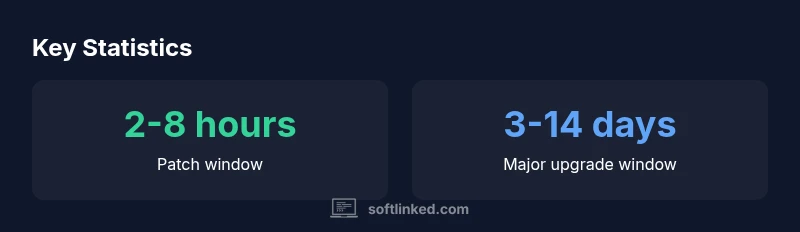
| Patch | 2-8 hours | Low risk; rapid release; limited regression testing |
| Minor upgrade | 1-3 days | New features; moderate testing; API compatibility checks |
| Major upgrade | 3-14 days | Extensive regression testing; data migrations; governance reviews |
Your Questions Answered
What factors most influence the cost of a software update?
Scope, platform complexity, dependencies, and regulatory requirements shape update cost. The broader the touched surface and the more external integrations, the higher the testing and rollout effort. Planning and automation help keep these costs predictable.
Cost is driven by scope, platform complexity, and regulatory needs; automation helps control it.
How long does a patch update typically take?
Patch updates usually take hours to days depending on environment, test coverage, and automation maturity. A well-automated pipeline can shorten this window significantly.
Patch updates usually take hours to a few days.
Can automation reduce update costs?
Yes. Automation reduces manual testing and deployment time, especially when integrated with CI/CD and automated rollback checks. It doesn't remove testing, but it makes it more efficient.
Automation helps cut time and cost during updates.
What is the best deployment strategy to minimize risk?
Canary or blue-green deployments paired with feature flags and robust monitoring minimize risk. They allow early failure detection and quick rollback without affecting all users.
Canary or blue-green with feature flags works well.
How should teams budget updates in regulated industries?
Budget should include compliance checks, audit trails, and formal approvals. Build time for regulatory reviews into the update timeline and cost estimate.
Include compliance and audit steps in budgeting.
“Effective software updates balance speed and risk through disciplined testing and automation.”
Top Takeaways
- Plan for variability: update costs vary by scope and context
- Patch updates are faster than major upgrades, but still require testing
- Automation reduces time and risk in testing and deployment
- Canaries, feature flags, and rollback plans lower failure impact
- Budget with a phased rollout and clear success criteria