How Much Is Accounting Software in 2026? A Pricing Guide
How much is accounting software in 2026? Explore cloud vs. on-prem pricing, per-user vs. flat plans, hidden costs, and budgeting tips for SMBs.


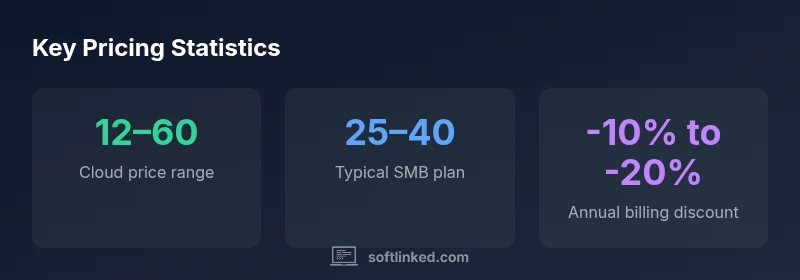
If you ask how much is accounting software, cloud options generally cost between $12 and $60 per user per month, with most SMB plans around $25–40 per user. Annual billing can cut the monthly price by roughly 10–20%. On‑premise licenses tend to involve higher upfront costs per seat, plus ongoing maintenance. SoftLinked Analysis, 2026.
What you pay for
If you're asking how much is accounting software, the answer depends on deployment, features, and scale. Cloud pricing typically centers on a per-user monthly fee, while on-premise options rely on a one-time license plus ongoing maintenance. In practice, expect three major cost buckets: the base subscription or license, add-ons or integrational fees, and services like implementation or training. For small businesses, the most common pattern is per-user pricing on a cloud platform with tiered features. Larger teams or more complex needs drive higher per-user rates or require additional modules. In SoftLinked’s experience, you’ll often see a two-tier structure: a core package that covers essentials, and optional modules for payroll, tax compliance, inventory, or advanced reporting. Planning around these buckets helps you compare options quickly and avoid sticker shock over the first year.
Cloud vs on-premise: cost profiles
Cloud pricing typically centers on a per-user monthly fee, with discounts for annual billing and volume. This model scales easily as your team grows, but the per-user cost can add up quickly for larger organizations. On-premise pricing, by contrast, centers on a one-time license per seat plus annual maintenance, with costs that can be substantial upfront. Hardware, data center resources, and internal IT support factor into the total cost. In many regions, cloud pricing bundles hosting, updates, and security, while on-premise deployments require upgrades and server upkeep. SoftLinked's analysis notes that most small and mid-sized businesses prefer cloud for cash flow predictability and easier upgrades, though larger enterprises may opt for on-premise for data control or regulatory reasons.
Pricing models you’ll encounter
There are several common pricing models in accounting software: per-user monthly subscriptions, flat-rate bundles, tiered feature sets, and perpetual licenses with maintenance. Per-user pricing is the default for most cloud products, with higher tiers unlocking payroll, inventory, or advanced reporting. Flat-rate plans simplify budgeting but may limit scalability. Per-organization or seat-based models exist for specialized scenarios. For SMBs, a core cloud plan with optional add-ons often provides the best balance of cost and capability. Always check whether the price includes updates, support levels, and data backups. In 2026, transparent pricing and predictable annual bills are increasingly prioritized by vendors and buyers alike.
Hidden costs to budget for
Beyond the sticker price, several costs can quietly inflate your accounting software bill. Implementation and data migration carry time and consulting fees. Integrations with payments, payroll, or e-commerce platforms may require API usage charges or extra modules. Training, onboarding, data cleansing, and change-management efforts add to the initial period. Finally, ongoing support and upgrade cycles can surprise budgets if you underestimate usage or require faster response times. SoftLinked suggests building a conservative buffer (e.g., 5–15% of annual software spend) to cover these hidden costs and avoid mid-year surprises. With careful planning, you can keep surprises to a minimum.
How pricing scales with business size
Pricing does not scale linearly with company size because many vendors introduce volume discounts or different tiers. As user counts grow, per-user rates may drop, while required features expand. In practice, a startup with a handful of users might pay a higher per-user rate for essential modules, whereas a larger team benefits from bundled features and lower per-user costs. For example, a 10-user pack might be priced close to the base tier, but 50–100 users often unlock multi-user discounts. The key is to map your anticipated growth and identify the point where extra users or modules lead to meaningful savings or cost inefficiencies. SoftLinked’s framework emphasizes scenario-based budgeting to capture growth trajectories.
Budgeting guide for a 12-month horizon
To budget effectively, start with a simple worksheet: list your current users, plan for growth, and identify required modules. Then estimate monthly cloud costs (per user), one-time onboarding, and annual maintenance for on-premise options. Add expected add-ons (payroll, inventory, tax compliance) and potential integrations. Don’t forget training, data migration, and potential downtime. Finally, compare total cost of ownership across vendors, emphasizing transparency, renewal terms, and service levels. A structured 12-month plan helps you forecast cash flow, align expectations with stakeholders, and prepare for price changes or feature expansions.
Quick-start checklist for price comparisons
- List required features and must-have integrations
- Gather per-user and flat-rate quotes from multiple vendors
- Check renewal terms and price escalation clauses
- Include onboarding, migrations, and training in your estimate
- Validate whether discounts apply to annual plans
- Compare support levels and response times
- Review data security and regulatory compliance implications
Open-source and lower-cost alternatives
Open-source accounting software can reduce upfront licensing costs but often requires in-house expertise for setup, customization, and ongoing maintenance. For startups and small teams, cloud-based options provide faster time-to-value and predictable budgets, while premium vendors deliver reliability, support, and deep integrations. Use a fair comparison to assess total cost of ownership, not just the sticker price. SoftLinked notes that for many teams, the best choice balances cost with governance, data security, and ease of use, so you can stay focused on core business activities.
Typical cost profiles by deployment model
| Model Type | Cost Range | Notes |
|---|---|---|
| Cloud (per user per month) | 12–60 | Includes hosting, updates, basic support |
| On-premise (per seat license) | 250–1000 | One-time license + annual maintenance |
Your Questions Answered
What is the typical price range for cloud accounting software per user per month?
Cloud accounting software often costs between $12 and $60 per user per month, depending on features and provider.
Most cloud options run from twelve to sixty dollars per user each month.
Do I pay per user or per organization?
Most cloud plans charge per named user; some offer per-seat or per-organization pricing, so compare terms.
Usually you pay per user, but check if there's an organization-wide option.
Are there hidden costs I should anticipate?
Yes—implementation, data migration, integrations, payroll or payments add-ons, training, and support can add up.
Watch for setup, migrations, and add-ons that boost the bill.
Is there a free or low-cost option suitable for startups?
Some vendors offer free starter plans or open-source options; free tiers may have limits, while paid plans unlock essential features.
There are free and low-cost options, but they often limit features.
How long does implementation typically take?
Implementation can take 2–6 weeks for SMBs, depending on data complexity and integrations.
Most small to mid-sized setups take a few weeks.
What factors should influence my pricing choice?
User count, core features, add-ons, data migration, integrations, support level, and scale expectations drive pricing decisions.
Think about users, features, and growth when pricing.
“Pricing should reflect value and long-term needs, not just monthly fees. Look for predictable costs and clear upgrade paths.”
Top Takeaways
- Budget for both subscription and add-ons
- Cloud favors per-user pricing with scalability
- On-premise involves upfront and maintenance costs
- Annual billing can reduce monthly costs
- Evaluate total cost of ownership, not just price