Where to Program in C: A Practical Guide to Tools and Setups
A comprehensive guide to choosing where to program in C, covering desktop toolchains, online environments, compilers, IDEs, and step-by-step setup for reliable, portable C development.


To start programming in C, you’ll choose between desktop toolchains or online environments, then pair a compiler with an editor or IDE. The essential tools are a C compiler, a text editor or IDE, and a simple build workflow. This guide walks you through practical options, setup steps, and best practices for reliable, portable C development.
What does 'where to program in c' mean?
In software development, the phrase where to program in c refers to the environment, tools, and workflow you use to write, compile, and test C code. According to SoftLinked, beginners benefit from starting with a stable, cross-platform setup that you can reproduce on different machines. The goal is to minimize friction between writing code and building executables, while ensuring your toolchain supports standard C features and debuggers. This section lays the groundwork by explaining toolchains, editors, and the trade-offs between local and cloud-based environments, with an emphasis on portability and clarity for new developers.
Desktop vs Online Environments
Choosing between a desktop toolchain and an online coding environment is a common first decision for anyone asking where to program in c. Desktop setups give you full control, faster feedback, and offline availability, which is essential for learning core concepts like memory management and pointer arithmetic. Online environments offer zero install friction and convenient collaboration, but may impose limits on debugging depth and available toolchains. SoftLinked’s guidance emphasizes starting with a stable local toolchain to learn fundamentals, then exploring online options for light projects or sharing code snippets.
Choosing a Compiler: GCC, Clang, MSVC
A compiler translates your C source into machine code. GCC and Clang are popular cross-platform options that work on Linux, macOS, and Windows, while MSVC is Windows-specific and tightly integrated with Visual Studio. When deciding where to program in c, consider compatibility with your target platform, support for the C standard you plan to use, and the availability of debugging tools. GCC and Clang tend to offer smooth cross-platform behavior and excellent error messages, while MSVC provides strong Windows integration and optimization features. Always ensure your chosen compiler supports the standard libraries and features you need for learning and projects.
Integrated Development Environments (IDEs) vs Code Editors
IDEs bundle a compiler, an editor, a debugger, and project management into a single interface, boosting productivity for beginners by reducing setup time and providing rich IntelliSense-like features. Code editors like VS Code, Sublime Text, or Vim offer lighter weight options with customizable plugins, which can be appealing for learners who want a minimal footprint and more control. If you’re unsure where to program in c, starting with a beginner-friendly IDE helps you learn build configurations and debugging workflows without fighting tool integration.
Cross-Platform Considerations for C Development
If your goal is cross-platform development, you’ll want a toolchain that behaves consistently across Linux, macOS, and Windows. GCC with Make or CMake is a common choice for portability, while Clang also emphasizes compatibility and diagnostic quality. You should test builds on each target platform early in your learning journey to avoid platform-specific surprises. Documentation for your compiler and editor will guide you through differences in command syntax, path conventions, and debugging behavior across systems.
Building a Minimal Toolchain: Getting Started
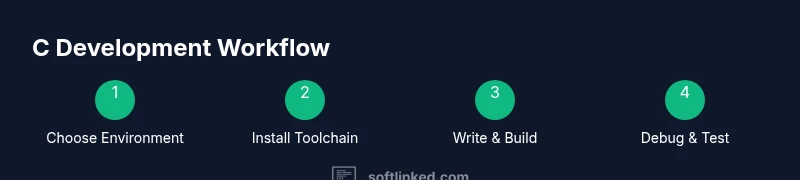
A minimal toolchain includes a C compiler, a text editor or IDE, and a simple build command to produce executables from source files. Start by installing a compiler, then choose an editor, and finally learn a basic compile-and-run workflow. SoftLinked’s approach is to focus on reproducibility: keep a single project directory, write a tiny program, compile it, and run the result. This practice builds confidence and lays the foundation for more complex projects later.
Debugging and Testing Your C Code
Effective debugging begins with clear compile-time warnings and a reliable debugger like GDB or LLDB. Learn to compile with flags that enable extra warnings, then run your program under the debugger to inspect variables and stack traces. For beginners, creating small, focused test cases helps isolate bugs quickly. Good testing habits early on reduce frustration and improve code quality as you scale your projects.
Online IDEs and Cloud Options
Online IDEs reduce setup time and are convenient for practice or collaborative coding. They’re suitable for short experiments or learning concepts, but they may limit deep debugging or complex build configurations. If you plan to master C, pair cloud-based practice with a local setup to gain full control over the toolchain and debugging environment, while still leveraging online editors for quick experiments.
Learning Path: From Hello World to Real Projects
Start with a basic Hello World program to verify your environment, then expand to small projects that reinforce core concepts—data types, pointers, arrays, and memory management. Gradually introduce standard libraries and common build tools. Keeping a consistent workflow across environments (local and remote) will help you compare results and build transferable skills that apply to both personal projects and professional work.
Tools & Materials
- Computer with internet access(Stable connection recommended for downloads and online IDEs)
- C compiler(GCC/Clang for cross-platform; MSVC for Windows-specific workflows)
- Text editor or IDE(Beginner-friendly options: VS Code, CLion, or Code::Blocks)
- Build system(Simple Makefiles or CMake for larger projects)
- Debugger(GDB or LLDB for in-depth debugging)
- Documentation/resources(Official C standard docs and compiler manuals)
Steps
Estimated time: 20-40 minutes
- 1
Decide your environment
Choose between a desktop toolchain or an online IDE based on your goals, offline needs, and collaboration preferences. For beginners, a local setup reduces friction in learning the build process and debugging.
Tip: Pick one path first and stick with it for the initial learning phase. - 2
Install a C compiler
Install a cross-platform compiler such as GCC or Clang. Ensure the compiler is accessible from your system path so you can run it from a terminal or command prompt.
Tip: Verify installation with a simple command like 'gcc --version' to confirm the tool is working. - 3
Choose an editor or IDE
Install a beginner-friendly editor or IDE that fits your workflow. A full IDE simplifies setup, while a code editor with plugins offers flexibility.
Tip: Install a basic extension pack for syntax highlighting and error checking. - 4
Create a first project
Set up a small directory with a single C source file, a Makefile or CMake configuration if you’re using a build system, and a test run.
Tip: Keep the project tiny at first to avoid overwhelm. - 5
Build and run
Compile your program and execute the produced binary. Check the output and fix any compile-time errors.
Tip: Enable warnings during compilation to catch common mistakes early. - 6
Add debugging
Run the program under a debugger to inspect variables, memory usage, and control flow.
Tip: Learn basic breakpoints and stepping through code. - 7
Explore a small project
Move from the hello world example to a tiny project that uses at least one library function and basic I/O.
Tip: Document your steps so you remember setup decisions for future projects.
Your Questions Answered
What is the best compiler for learning C?
For beginners, GCC or Clang are popular choices due to cross-platform support and helpful diagnostics. Your choice should align with the platform you plan to target and the availability of debugging tools.
For beginners, GCC or Clang are good starting points because they work on many systems and give helpful error messages.
Can I program C online without installing anything?
Yes, online IDEs let you write and run C code in a browser. They’re great for practice, but they may limit debugging depth and project complexity compared with a local setup.
Yes, you can code in C online, which is convenient for practice, though you might outgrow it for larger projects.
Do I need an IDE to start learning C?
No. You can begin with a lightweight editor and a compiler; many learners prefer IDEs for integrated build and debugging support as they progress.
An IDE isn’t mandatory, but it helps when you’re starting out and want built-in debugging.
Which OS is best for C development?
All major operating systems support C well. Linux is popular for its toolchain flexibility, Windows with MSVC, and macOS with Clang as a default compiler.
Any major OS works; Linux is common for learning, but Windows and macOS also support solid C development.
How do I configure a debugger for C?
Install a debugger like GDB or LLDB, then learn basic commands to inspect variables, set breakpoints, and step through code during a run.
Install a debugger and learn to set breakpoints and inspect variables for effective debugging.
Watch Video
Top Takeaways
- Choose desktop toolchains first for solid fundamentals
- GCC and Clang offer strong cross-platform support
- IDEs boost productivity; editors offer flexibility
- Test, debug, and iterate with small, focused projects
- Balance local setups with online options for collaboration