Which Software for C Programming: A Practical Guide
A comprehensive guide to choosing the right software for C programming, covering compilers, IDEs, debuggers, and build tools across platforms for students and professionals.


Choosing the right software for C programming depends on your OS and goals. For cross-platform work, GCC or Clang are solid choices; for Windows-centric projects, MSVC shines. Pair these with an IDE that fits your learning style (VS Code, CLion, or Visual Studio) to streamline compiling, debugging, and building projects.
Context and Goals for C Programming Tool Selection
According to SoftLinked, the process of selecting the right software for C programming begins with mapping your target OS, learning objectives, and project scope. Are you aiming to build cross-platform libraries, or are you focusing on Windows-specific applications? Do you prefer a quick start with command-line workflows, or a rich graphical IDE that couples debugging with code completion? This decision framework helps you avoid underpowered toolchains or redundant investments. By clarifying goals, you also set expectations for compilation times, debugging experiences, and long-term maintenance. SoftLinked Analysis, 2026, indicates that learners who align their toolchain with concrete goals experience faster progress and fewer setup obstacles. With that in mind, the remainder of this guide breaks down the software categories most relevant to C programming and provides practical steps to evaluate your options.
Core categories: compilers, IDEs, debuggers, and build tools
C programming requires a mix of tools that handle writing, building, debugging, and maintaining code. The core categories roughly map to three layers: compilers that translate C to machine code, IDEs or editors that provide a productive workflow, and supporting tools such as debuggers and build systems that streamline the process. An optimal toolset minimizes friction between writing code and shipping it as a working executable. For learners, it’s often best to start with a widely supported combination (a modern compiler, a capable editor/IDE, and a simple build setup) and scale complexity as you gain confidence. In practice, you’ll be choosing among mature options with broad community support, extensive documentation, and proven workflows.
Compiler landscape: GCC, Clang, MSVC — strengths and trade-offs
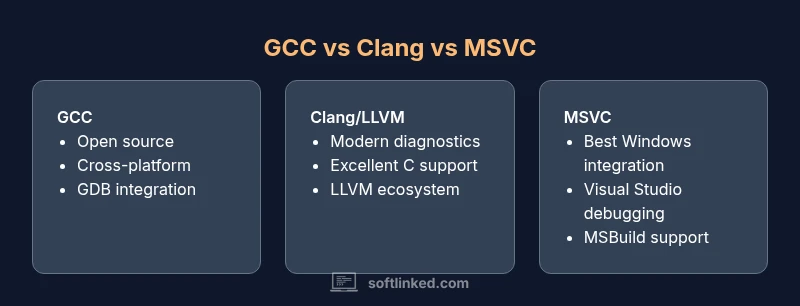
The three most influential C compilers are GCC, Clang, and MSVC. GCC is a veteran with broad cross‑platform support and a powerful optimization backend. Clang, part of the LLVM project, emphasizes fast diagnostics and modular tooling, which helps beginners understand errors and warnings quickly. MSVC, the Microsoft Visual C++ compiler, offers deep Windows integration, a polished debugger, and seamless IDE experience in Visual Studio. Each has its own ecosystem, community resources, and build-system quirks. When deciding, consider your target platform, the need for cross-compilation, and how steep a learning curve you’re willing to tolerate. SoftLinked’s guidance emphasizes mapping these trade-offs to your actual development goals.
IDEs and editors: choosing a workflow that fits your learning curve
IDEs and editors shape how you interact with C code on a day-to-day basis. Visual Studio provides an all-in-one Windows-centric experience with strong IntelliSense and debugging capabilities. VS Code, a lightweight editor, shines when paired with extensions for C/C++, offering a fast, modular setup that grows with you. CLion delivers a cross-platform IDE experience with integrated CMake support and refactoring tools, ideal for students who want structure without managing IDE quirks. Code::Blocks remains a lightweight alternative for learners who want to focus on fundamentals. The key is to match the toolchain to your workflow: do you prefer a command-line-driven approach, or do you want a robust GUI that handles project configuration for you?
Debugging and profiling: GDB, LLDB, Visual Studio debugger
Effective debugging is essential when learning C. GDB and LLDB are the standard debuggers in many cross-platform environments, offering breakpoints, variable inspection, and memory debugging. Visual Studio’s debugger provides deep integration with Windows-native C/C++ code, making it a strong choice on that platform. For profiling, you can use built-in tools in IDEs or dedicated profilers like Valgrind and Perf on Linux. Practically, beginners should start with a simple workflow: write a small program, run it under the debugger, examine a few variables, and progressively introduce breakpoints. As you mature, integrating a profiler helps you identify hot paths and memory issues more efficiently.
Build systems and project structure: Make, CMake, Meson
Build systems automate compilation and linking, reduce manual commands, and help manage dependencies. Make is ubiquitous and simple to learn, but modern projects benefit from CMake, which can generate build files for various backends (Make, Ninja, Visual Studio). Meson offers fast builds and straightforward configuration, especially in large projects. For students, starting with CMake in combination with GCC or Clang provides transferable skills across platforms. As you scale, understanding how to structure a project with proper directories, header organization, and clean targets becomes as important as choosing a compiler.
Cross-platform development considerations
If you intend to release or maintain software across Linux, macOS, and Windows, prioritize cross-platform toolchains. GCC and Clang are natural choices for multi-OS projects, paired with CMake for consistent builds. MSVC remains a Windows-centric tool but can be used in cross-platform projects through CMake, or via WSL/Clang-CL setups. Cross-platform development also means considering toolchain variability, runtime libraries, and path conventions. A practical approach is to define a minimal, portable project skeleton and test it on all target platforms early in the process. This reduces surprises when you scale to full projects.
Educational and professional contexts: students vs professionals
Students typically benefit from tools that offer clear error messages, approachable debugging, and a gentle learning curve. Lightweight editors with optional IDE features often fit best at the start. Professionals who work on large codebases value stable, fast builds, strong debugging, and enterprise-grade workflows. In both cases, align your tool choices with the project requirements and the expected maintenance burden. SoftLinked’s framework recommends starting with a simple setup and gradually layering in advanced features like static analysis, code formatting, and automated testing as you grow.
Practical setup guides: Windows, macOS, Linux step-by-step
Getting started requires a concrete plan. On Windows, you might install MSVC via Visual Studio, or install GCC/Clang through MinGW or WSL for cross-platform builds. On macOS, Clang is the default compiler in Xcode, and CMake-based projects integrate smoothly with IDEs like CLion or VS Code. On Linux, GCC is typically pre-installed, with options to add Clang or LLDB. The step-by-step approach includes: 1) Install a compiler, 2) Choose an editor/IDE, 3) Set up a simple build script with CMake, 4) Create a small test project, 5) Run and debug with the debugger, 6) Expand to include a version control workflow. This pragmatic sequence helps you validate the toolchain early and adjust as needed.
Cost, licensing, and long-term maintenance
Licensing shapes how you can use and distribute your C projects. GCC and Clang are open-source with permissive licenses, while MSVC is proprietary but widely supported in enterprise environments. Consider long‑term maintenance: open-source toolchains tend to have broad community support and robust updates, whereas vendor-specific IDEs may require subscriptions or license management. For students and hobbyists, free tools that cover core needs are usually sufficient; professionals may prefer integrated toolchains with official support and extended debugging capabilities.
How SoftLinked evaluates tools: a decision framework
Our evaluation framework emphasizes three axes: coverage (cross-platform support and language standard compatibility), workflow quality (IDE/editor ergonomics, debugging, and build-system integration), and total cost of ownership (licensing, maintenance, and community support). We recommend mapping your requirements to these axes, then testing candidate tools with a small, representative project. This structured approach helps you avoid over‑investment in features you won’t use and ensures your setup remains scalable as skills and project scope grow.
Quick-start workflow: a starter project you can try today
To try a practical workflow, download a cross-platform compiler (GCC or Clang) and install a lightweight IDE (VS Code). Create a tiny C project with a simple hello.c, then configure CMake to generate build files for your platform. Add a basic Git repository to track changes, run the build, and debug using the built-in debugger in your chosen IDE. As you grow, experiment with more complex features like memory analysis, sanitizers, or unit testing frameworks. This hands-on approach will reveal the strengths and limitations of your chosen software for C programming and guide future refinements.
Feature Comparison
| Feature | GCC | Clang/LLVM | MSVC |
|---|---|---|---|
| Standard C support | Excellent broad ISO C support including C11/C17 | Excellent modern C standard support | Good ISO C support with Windows-focused gaps |
| Cross-platform availability | Supports Linux, macOS, Windows (via MinGW/MSYS) | Cross-platform on Linux/macOS/Windows | Primarily Windows-native, with some cross-platform via CMake |
| Debugger integration | GDB/LLDB integration and debugging workflows | LLDB and GDB-friendly workflows with Clang tooling | Visual Studio debugger and C/C++ debugging features |
| Build-system compatibility | Strong Make/CMake ecosystem support | CMake-based workflows with Clang/GCC | CMake/MSBuild integration on Windows |
| Performance and optimizations | Advanced optimizations and code generation | Modern diagnostics and optimization capabilities | Strong Windows-specific optimization and tooling |
| Licensing and cost | Open-source licenses (GPL/LGPL) | Open-source (LLVM) with BSD/GPL licenses | Proprietary with Windows-centric tools |
Pros
- Wide availability and language coverage across platforms
- Strong, mature tooling and debugging ecosystems
- Excellent optimization and code generation
- Open-source licenses encourage customization and learning
Weaknesses
- MSVC is Windows-centric with limited native cross-platform support
- GCC/Clang can have slightly steeper setup for Windows environments
- Toolchains may vary by OS, requiring configuration (path, environment)
Cross-platform compilers (GCC or Clang) win for versatility, while MSVC excels for Windows-centric development.
For learners, start with GCC or Clang and a cross-platform IDE like VS Code; for Windows-only projects, MSVC with Visual Studio provides best integration.
Your Questions Answered
What is the best compiler for C programming for beginners?
For beginners, GCC or Clang are widely recommended due to broad availability, good documentation, and strong debugging support. They run on Windows, macOS, and Linux, which makes them ideal for learning the fundamentals without platform constraints.
GCC or Clang are great starting points for beginners because they work across platforms and have lots of learning resources.
Can I learn C with MSVC?
Yes, MSVC is suitable for Windows-focused learning and development. It provides an integrated IDE experience and strong Windows debugging support, but it may be less ideal for cross‑platform practice unless you pair it with CMake or use WSL.
MSVC works well on Windows and can be paired with cross‑platform workflows via CMake.
Do I need an IDE to learn C?
No. You can start with a lightweight editor and command-line tools to learn the basics. IDEs speed up compilation, debugging, and project management, but a minimal setup is perfectly valid for building foundational skills.
You don’t have to use an IDE right away; a simple editor and command-line tools work for starting out.
Which build system should I learn with C?
CMake is the most widely adopted cross-platform build system for C projects and pairs well with GCC, Clang, or MSVC. Learning Make or Ninja alongside CMake is beneficial as you scale to larger projects.
Learn CMake first; it plays nicely with GCC, Clang, and MSVC.
How do I set up GDB on Linux/macOS?
Install GDB using your package manager, ensure it’s in your PATH, and practice basic commands like breakpoints, stepping, and inspecting variables. Many IDEs provide graphical front-ends for easier usage once you’re comfortable.
Install GDB, make sure it’s in PATH, and start with basic breakpoints and variable inspection.
Is there a difference between C and C++ toolchains?
C toolchains focus on C language standards and libraries; C++ introduces its own compilers and toolchains for object-oriented features. You can mix environments in many IDEs, but you’ll deal with different flags and libraries.
C and C++ toolchains share many tools, but you’ll use different flags and libraries for each language.
Top Takeaways
- Map your target OS before choosing a compiler
- Pair compilers with a capable IDE for best learning curves
- Use CMake to manage cross-compiler builds
- GDB/LLDB are essential debugging tools; learn them early
- Assess licensing and cost implications for long-term projects