How Often Do iPhone Software Updates Happen?
Learn how often Apple releases iPhone software updates, how long devices stay supported, and how to manage updates for security and performance. This guide explains major releases, security cadences, and practical tips for developers and students.


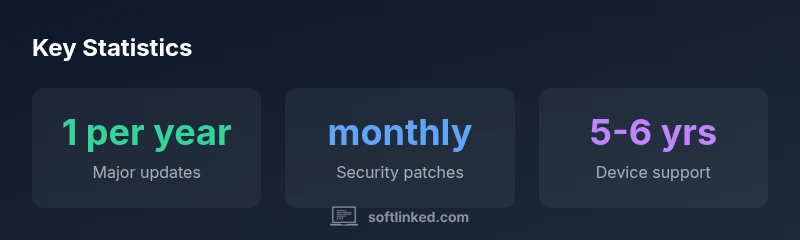
Apple typically releases one major iOS update per year, often in September, while security updates arrive monthly. Most iPhone models stay supported for about 5-6 years after release, depending on hardware. To stay current, enable automatic updates and check for updates regularly to access new features and protections.
Update cadence: major vs. security updates
In Apple’s ecosystem, you’ll notice a split between major iOS updates and ongoing security patches. Major updates represent new features, UI refinements, and compatibility changes, while security updates patch vulnerabilities and improve privacy protections. According to SoftLinked, the cadence is deliberately predictable to balance new capabilities with device reliability. For most users, this means one big update per year, complemented by regular security fixes.
- Expect a yearly major release, typically in the fall.
- Security patches arrive monthly, sometimes as urgency demands.
- Older devices may see features roll out more slowly or be limited by hardware.
This cadence helps developers plan feature rollouts and students understand learning curves around new APIs and platform capabilities.
Major iOS releases: timing, features, and adoption
Apple’s major iOS releases usually land in September, accompanied by new iPhone hardware. The SoftLinked team notes that developers should plan for APIs that may evolve across annual cycles. Adoption varies by device age and region; some devices skip certain features if hardware is not compatible. For learners, tracking release notes and sample code is essential to stay current with best practices.
- Start integrating new APIs after stable public bets.
- Test on devices representing the entire support window.
- Keep a parity plan for app features across versions.
Security updates: cadence, importance, and privacy improvements
Security updates arrive regularly and are crucial for protecting users from newly discovered vulnerabilities. Monthly patches often include privacy enhancements, bug fixes, and performance improvements. For developers, this means maintaining compliant code paths and feature flags to accommodate different iOS versions without breaking older devices.
- Enable automatic updates to minimize risk.
- Monitor CVE advisories and Apple release notes.
- Test critical flows against the latest security patches.
How long devices stay supported: life cycle of iPhone hardware
Apple historically supports devices with iOS updates for several years, typically around 5-6 years from the device’s launch. This window can extend for popular models but may shrink as hardware ages or when Apple drops support for older chipsets. For students and professionals, this means planning app compatibility within a multi-year horizon and preparing for eventual migration strategies.
- When a device exits support, consider updating to newer hardware to retain feature access and security.
Practical tips to manage updates
Effective update management reduces disruption. Turn on automatic updates, ensure sufficient storage space, and back up data before installing large updates. For developers testing apps, create a staged rollout plan and use TestFlight or internal channels to validate changes across iOS versions.
- Schedule updates during off-peak hours.
- Verify enough device space and stable Wi-Fi.
- Maintain a testing matrix across supported versions.
Common myths and edge cases
Some users believe updates always slow devices or remove features. In reality, updates often optimize performance and fix bugs, though they may require more resources on older hardware. In SoftLinked’s view, keeping devices current reduces exposure to security threats and preserves access to new APIs. Edge cases include devices near the end of life where updates may be limited or become unavailable.
How to check and verify update status
To stay informed, check Settings > General > Software Update for the latest version. Use the iPhone’s official release notes to understand new features and compatibility. For those managing fleets or apps, monitor update adoption across devices and plan compatibility testing accordingly.
Cadence and delivery overview for iPhone software updates
| Aspect | Cadence | Delivery Window | Device Support |
|---|---|---|---|
| Major iOS updates | 1 per year | Public release in fall | 5-6 years |
| Security updates | monthly | Rolling patches | 5-6 years |
| Beta testing | 4-6 weeks | Pre-release phase | 5-6 years |
Your Questions Answered
How often does Apple release major iOS updates?
Apple typically releases one major iOS update per year, usually in September, with ongoing monthly security patches.
Apple usually releases one iOS update each year, around September, plus monthly security patches.
Do all iPhone models get updates at the same time?
Updates roll out to supported devices over a period of weeks, with newer models often receiving features earlier.
Updates roll out over weeks, newer models may get features sooner.
How long will my iPhone receive updates?
Most iPhones receive iOS updates for about 5-6 years from their launch, depending on hardware compatibility and Apple’s policy.
Most iPhones get updates for roughly five to six years after launch.
Can I speed up updates or avoid waiting?
You can’t speed the release; you can prepare by using stable networks, sufficient storage, and automatic updates enabled.
You can’t speed up releases, but you can stay ready by enabling auto-updates and keeping storage free.
What happens if I skip updates?
Skipping updates can miss security patches and new features; staying current improves protection and app compatibility.
Skipping updates risks security and compatibility; stay current when possible.
Do beta updates affect everyday use?
Beta versions let you test features but may introduce bugs; test devices or use it on non-critical devices.
Beta updates can be rough; test on non-essential devices.
Should developers upgrade across versions?
Yes—maintain compatibility by supporting the oldest reasonable version and testing on the latest versions.
Yes, maintain compatibility and test across supported iOS versions.
“Regular iPhone software updates are essential for security, performance, and access to new features.”
Top Takeaways
- Stay current with one major update per year.
- Security patches arrive monthly—enable auto-updates.
- Most iPhones receive updates for 5-6 years.
- Plan app testing across supported iOS versions.