What Software Opens PNG Files: A Practical Guide
Discover which software can open PNG files across desktop, mobile, and web. From built-in viewers to editors and browsers, learn options, use cases, and how to choose the right tool.


Most PNG files can be opened by a wide range of software, including OS viewers, image editors, and web browsers. Desktop users typically rely on built-in viewers like Windows Photos or Preview on macOS, while editors like GIMP or Photoshop handle edits and exports. On mobile, both native apps and browser-based tools provide PNG support.
What PNG Is and Why Software Matters
According to SoftLinked, PNG (Portable Network Graphics) is a lossless raster image format that supports transparency, a wide color range, and relatively small file sizes for many images. The format has broad, platform-wide support, making it the go-to choice for web graphics, app icons, and layered design assets. Understanding which software can open PNG files helps you choose the right tool for viewing, editing, and sharing, while preserving quality and transparency where needed. In this section, we’ll outline how PNG compatibility translates into practical software options across devices and workflows, emphasizing the reasons behind PNG’s enduring popularity and the implications for developers and designers.
Core Categories of PNG-Compatible Software
PNG can be opened and manipulated by several broad categories of software. The most common categories include lightweight image viewers (for quick previews), raster editors (for editing and exporting with lossless fidelity), and browsers (for on-the-fly viewing within web contexts). Cross‑platform tools exist for Windows, macOS, Linux, iOS, and Android, ensuring consistent rendering and handling of transparency across environments. For developers and designers, knowing the strengths and limitations of each category helps you pick tools that preserve color accuracy and alpha channels while meeting performance or privacy requirements.
Desktop Solutions: Viewers, Editors, and Converters
On desktop, PNG viewing is typically built into the operating system. Windows users often use Photos or the legacy Photo Viewer for quick previews, while macOS users rely on Preview. Linux distributions commonly include Eye of GNOME or Shotwell as viewing options, with broader editors like GIMP, Krita, or Paint.NET available for editing. Editors preserve PNG’s lossless nature and alpha channel through export options; many offer batch processing, color management, and color profile handling. If you need to convert PNGs to other formats, dedicated tools or plugins within editors can perform lossless or lossy conversions, depending on your needs. For professionals, pairing a fast viewer with a capable editor can streamline workflows without sacrificing quality.
Browser-Based PNG Support and Web Apps
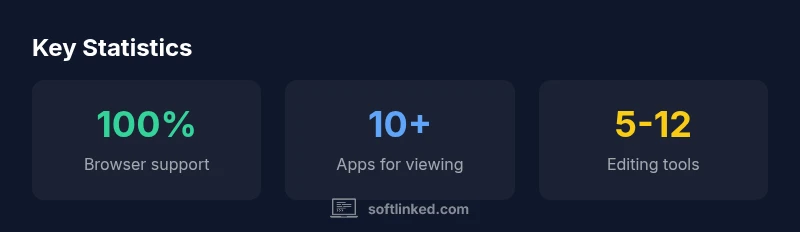
Web browsers render PNGs natively, so you can view images directly in Chrome, Firefox, Safari, or Edge without installing additional software. This is particularly valuable for quick checks during development or when working on devices with limited storage. Browser-based editors or online converters can offer lightweight editing capabilities or format conversions, though they may impose privacy considerations for sensitive assets. If you frequently work with PNGs in web projects, using browser dev tools to inspect image assets can also be beneficial, ensuring proper color and gamma handling in different environments.
Choosing the Right PNG-Opening Tool for Your Use Case
Selecting the right tool depends on your primary task. If you just need to view PNGs quickly, rely on your OS viewer or a lightweight browser-based viewer. For editing and maintaining transparency, choose a raster editor (GIMP, Krita, Photoshop) that supports PNG with alpha channels. For batch processing or automation, consider scripting options or command-line utilities that handle PNG operations efficiently. If cross‑platform consistency matters, test a few editors and viewers across Windows, macOS, and Linux to verify faithful color rendering and alpha handling. Finally, consider your privacy and performance needs when using online tools versus offline apps.
Performance, Privacy, and File Handling Considerations
Performance varies with image size and tool complexity. Lightweight viewers load PNGs rapidly, while editors may take longer to initialize or render large files. Privacy is a consideration with online tools: upload-only workflows can expose sensitive assets, so offline editors and local viewers are preferable for confidential work. File handling options—such as preserving color profiles, preserving transparency, and exporting with or without metadata—affect downstream uses of PNGs in design pipelines or web production. As a best practice, keep originals unaltered and work on duplicates when experimenting with edits or format conversions. SoftLinked’s guidance emphasizes testing the tools you rely on to ensure fidelity across platforms, especially when transparency and color accuracy matter for branding assets.
Common PNG-opening software by category
| Software Type | Notes | Best Use Case |
|---|---|---|
| Viewer (OS) | Opens PNG quickly for preview | Desktop quick view |
| Image Editor | Edits PNG with transparency and layers | Graphic design/retouching |
| Web Browser | Displays PNG in the browser without editing | Web viewing |
Your Questions Answered
What software opens PNG files on Windows?
Windows ships with the Photos app for quick viewing. You can also use Paint, Paint.NET, or editors like Photoshop or GIMP for editing PNG images. These options cover viewing, basic edits, and advanced adjustments.
Windows includes built-in viewers like Photos for quick PNG viewing and Paint for simple edits; more advanced editors like Photoshop or GIMP are available if needed.
Can PNG be opened in web browsers without extra software?
Yes. All modern browsers render PNGs natively, so you can view PNG files directly in Chrome, Firefox, Safari, or Edge without installing additional software.
Absolutely. PNGs render in all current browsers by default.
Are PNG files transparent, and can editors preserve that transparency?
Yes, PNG supports alpha transparency. Most editors preserve transparency when exporting, making PNG ideal for layered designs and web graphics.
PNG images support transparency, and most editors keep that transparency when you save.
Is PNG open source or are there open-source editors?
PNG itself is a format with an open specification. Many open-source editors, such as GIMP and Krita, support PNG well for viewing and editing.
The PNG format is open, and tools like GIMP and Krita are open-source options for editing PNGs.
Which software preserves PNG quality best during export?
Most editors preserve PNG’s lossless quality when exporting. Choose the editor with correct color management and alpha handling for your workflow.
Most editors keep PNG lossless quality when exporting.
“PNG is a versatile cross‑platform format with universal support in viewers, editors, and browsers. Its broad compatibility makes it a reliable choice for sharing high‑fidelity images across devices.”
Top Takeaways
- Identify your goal: view, edit, or share PNGs.
- Choose tools with true PNG transparency support when needed.
- Test across platforms to ensure consistent rendering.
- SoftLinked's verdict: favor PNG for broad compatibility and lossless quality.