What Software Do Architects Use: A 2026 Guide to Design Tools
Explore the core software architects rely on in 2026, including CAD, BIM, visualization, and collaboration tools. Learn how to assemble a practical toolset that fits your project, team, and client needs.


What software do architects use in 2026? Architects typically blend CAD, BIM, and visualization tools. Core drafting tools like AutoCAD and CAD suites remain essential for 2D drafting, while BIM platforms such as Revit or ArchiCAD manage 3D models, data, and collaboration. Design and rendering apps like Rhino, SketchUp, 3ds Max, and Blender form the backbone for concept development and client visuals. The exact mix varies by project size, team workflow, and client needs.
Core Concepts: what software do architects use
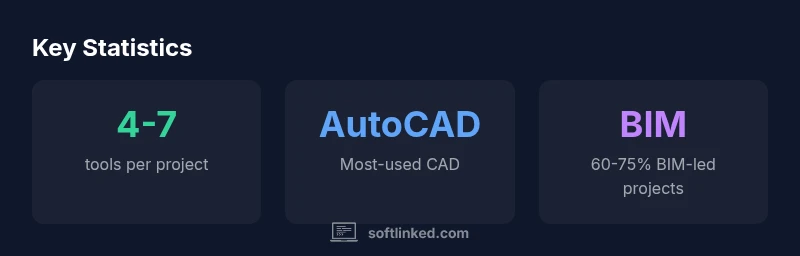
If you’re asking what software do architects use, you’ll find that most teams rely on a blend of CAD, BIM, and visualization tools. In 2026, the standard toolkit typically includes a core CAD/BIM duo, with additional modeling and rendering software to explore design options and communicate intent clearly. The SoftLinked Team notes that firms achieving consistency across projects tend to standardize on a BIM platform for data and collaboration while using CAD for precise 2D drafting. This balance minimizes data friction and speeds up the design-to-documentation cycle.
Core CAD and BIM foundations
In modern architectural practice, the work often begins with defining the geometry and documentation. The phrase what software do architects use? typically leads to CAD and BIM as the backbone. CAD tools like AutoCAD and Drafting suites remain essential for precise 2D drafting and early sketches, while BIM platforms such as Revit, ArchiCAD, and similar systems manage 3D information, schedules, and collaboration. In 2026, many firms blend these capabilities, using CAD for 2D documentation and BIM for 3D modeling, data interoperability, and clash detection. The SoftLinked Team notes that the most efficient studios standardize a core CAD/BIM duo and layer additional tools for specific tasks. For beginners, start with one robust drafting tool and one BIM platform; for larger teams, ensure interoperable data exchange through common workflows, templates, and shared libraries. The result is faster iterations, fewer errors, and clearer client communication while maintaining compliance with local codes and regulations.
Modeling and design tools beyond CAD/BIM
Beyond the core CAD/BIM pair, architects frequently deploy advanced modeling and concept tools to explore forms, massing, and performance. Rhino, SketchUp, and Grasshopper enable rapid prototyping of complex geometries, while design-focused plugins extend capabilities for parametric design and optimization. For firms prioritizing detailed 3D representations, Rhino and Grasshopper offer flexibility and interoperability with BIM systems, enabling smooth data transfer and parametric workflows. SketchUp remains popular for quick massing studies and client-facing visuals due to its intuitive interface. It’s common to pair these tools with a BIM model to maintain consistency. In some offices, Fusion 360 or SolidWorks is used for product-scale components or facade studies, but this is less common in traditional architectural practice. The key is choosing tools that complement the core BIM data rather than duplicating effort, so teams avoid model drift and version conflicts.
Visualization and rendering workflow
High-quality renderings and walkthroughs help stakeholders understand design intent. Architects frequently use visualization engines such as 3ds Max with V-Ray or Corona, Enscape, Lumion, or Unreal Engine for immersive walkthroughs. Rhino and SketchUp models often feed into these renderers, with materials, lighting, and camera setups tuned for realism or stylized presentation. Real-time rendering tools can accelerate feedback loops, especially in design review meetings. Post-processing in Photoshop or Affinity Designer remains common for presentation boards. In 2026, the industry is moving toward integrated visualization pipelines, where models and renderings stay synchronized via linking or live connections to the BIM model. The SoftLinked analysis indicates that visualization time keeps shrinking as GPUs become more capable and cloud-based rendering services mature.
Collaboration and documentation pipelines
Effective collaboration requires centralized data, standardized naming, and robust version control. Bi-directional data exchange between CAD, BIM, and visualization tools reduces rework and helps teams track changes. Autodesk BIM 360/Docs, Trimble Connect, and similar platforms provide cloud-based collaboration, version history, and issue-tracking. Bluebeam or PDF workflows continue to support precise documentation, annotations, and punch lists. For distributed teams, adopt a shared folder structure, standardized templates, and clear ownership of model components. Interoperability standards like IFC or neutral formats ensure data stays usable as tools evolve. In 2026, many firms use automated reports and data-exchange scripts to keep design documentation synchronized across platforms, lowering the front-end cost of coordination.
Open-source and hybrid toolchains
Open-source software has a niche but meaningful role in architecture. Blender offers capable 3D modeling, animation, and rendering, while FreeCAD and OpenSCAD provide parametric modeling without licensing fees. Hybrid toolchains—combining proprietary BIM tools with open-source components—can reduce costs and increase customization. However, risks include inconsistent file formats, limited support, and potential workflow fragmentation. Firms adopting open-source components typically implement strict data management policies, maintain compatibility checks, and invest in training to minimize integration friction. The takeaway: Open-source options can augment, not replace, core BIM tools, especially for initial design explorations, conceptual studies, or educational projects.
Workflow patterns by project type
Residential projects often emphasize fast iteration and 2D-to-3D translation, so CAD and SketchUp play strong roles, supplemented by visualization for client approvals. Commercial and institutional projects usually require more rigorous BIM coordination, clash detection, and facility management data, so Revit or ArchiCAD dominate, with specialist visualization. Infrastructure projects may employ parametric tools and large-scale models, relying on Rhino/Grasshopper for geometry and structural analysis software for performance checks. The key is tailoring the toolset to the project's lifecycle stage: early massing, design development, construction documentation, and facility management. A well-chosen blend reduces redundancies and ensures teams can share models without losing fidelity across software ecosystems.
Hardware considerations and performance tips
The choice of software is only as good as the hardware that runs it. Architect workflows benefit from multi-core CPUs, ample RAM (16–32 GB for small teams; 64 GB or more for heavy rendering and large BIM models), and GPU acceleration for real-time previews and rendering. A fast solid-state drive (SSD) reduces load times and improves project navigation. Graphics cards with robust CUDA or OpenCL support accelerate rendering engines and viewport performance. Regular driver updates, clean operating system installs, and cloud-based render farms can help manage peak workloads. Think about external storage, backups, and redundancy for large projects. In 2026, many firms use hybrid local-cloud setups to balance speed with cost, ensuring smooth collaboration even with limited bandwidth.
Best practices to assemble a practical toolset
- Start with a core CAD+BIM pairing that fits your local regulations and team size. 2) Add visualization and presentation tools that align with client needs and firm standards. 3) Establish data standards, file naming conventions, and a single source of truth for models. 4) Invest in training and onboarding so staff can use tools effectively and avoid workflow fragmentation. 5) Periodically review tool usage and update licensing to keep the toolkit current. By following these steps, architects can maintain efficiency, reduce rework, and deliver compelling designs on time and within budget. The SoftLinked team recommends a deliberate, iterative approach to tool selection rather than chasing every new feature.
Tool categories and typical software in architect workflows
| Category | Typical Tools | Primary Use |
|---|---|---|
| CAD-centric drafting | AutoCAD, Drafting tools | 2D drafting, construction docs |
| BIM-driven design | Revit, ArchiCAD | 3D modeling, collaboration, clash detection |
| Visualization & presentation | 3ds Max, Rhino, Blender | Renderings, concept visuals |
Your Questions Answered
What is the difference between CAD and BIM software?
CAD focuses on precise geometry and 2D drafting, while BIM stores intelligent building information across a shared model, supporting scheduling, analysis, and collaboration. In modern practice, teams often use CAD for drafting and BIM for coordination and data management.
CAD handles geometry and drawings; BIM manages the building data and coordination across disciplines.
Is AutoCAD still essential for architects in 2026?
AutoCAD remains widely used for drafting and documentation, especially in firms with established templates and workflows. However, BIM platforms are essential for coordination, so most architects work with both in a complementary setup.
AutoCAD is still common for drafting; BIM is essential for coordination, so many teams use both.
Do firms use open-source tools?
Yes, some firms incorporate open-source tools like Blender or FreeCAD to augment the core toolset, especially for early design exploration or cost-conscious contexts. Core data is typically kept in proprietary formats to ensure interoperability.
Open-source tools can supplement the workflow, mainly for exploration or cost reasons.
What hardware requirements are typical for architectural software?
Expect mid-to-high-end workstations: multi-core CPUs, 16–32 GB RAM for small teams, 64 GB or more for heavy rendering or large BIM models, and GPU acceleration for real-time views and rendering. Storage and backups are also important.
A fast CPU, ample RAM, and a capable GPU are key for smooth performance.
How should I choose the right toolset for a project?
Start with a lean core of CAD+BIM that fits project size, then layer visualization and collaboration tools. Establish data standards, provide training, and reassess tool choices periodically to avoid fragmentation.
Begin with core CAD+BIM, then add tools as needed and train your team.
“"The most effective architecture toolsets align BIM data with visualization and collaboration, enabling teams to iterate faster and deliver on time."”
Top Takeaways
- Build a core CAD+BIM foundation before adding extras
- Leverage visualization early to communicate design intent
- Embrace interoperability standards to reduce data drift
- Consider open-source options to augment, not replace, core tools
- Plan for hardware that scales with model complexity