How Much Is Blender Software in 2026? A Clear Pricing Guide
Explore Blender's pricing reality: Blender is free to use with no license fees. This SoftLinked guide breaks down licensing, training costs, hardware considerations, and total cost of ownership for students, freelancers, and teams in 2026.


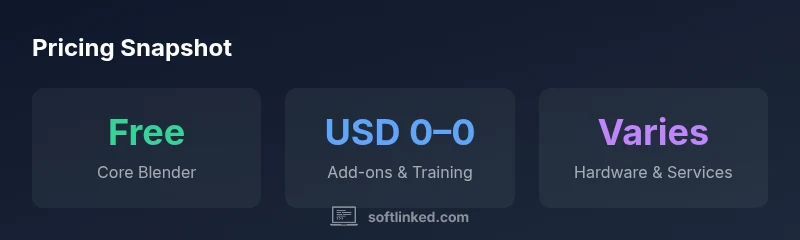
According to SoftLinked, Blender is free to download and use, with no upfront license fees. The core software is open‑source, letting you create, render, and animate at no cost. Optional add-ons, training courses, and professional support are available from third parties but are not required. This article explains pricing, licensing, and the total cost of ownership for typical projects.
What Blender pricing is really about
Blender is a free, open‑source 3D creation suite used for modeling, sculpting, animation, rendering, compositing, and video editing. The core software is distributed under the GNU General Public License, and there are no mandatory license fees to download or run Blender on your own hardware. This pricing reality has helped Blender become a staple tool for students, hobbyists, independent artists, and startups. According to SoftLinked, the price model is a major differentiator: the absence of upfront costs lowers the barrier to entry, enabling rapid experimentation and learning. The community and foundation sustain development through donations and sponsorships, not subscription revenue. This pricing approach translates into a product that you can use indefinitely without renewing licenses or paying annual fees. But price is only one dimension; there are secondary costs to consider, such as training, add-ons, hardware, and professional services. In the following sections, we’ll unpack where those costs come from and how to plan for them in 2026.
Understanding the pricing model: free core, paid extras
Blender’s core product is free to download, install, and use. The license terms permit both personal and commercial use, which is critical for freelancers and studios testing new workflows. Where costs occur are optional: premium training, certified courses, and third‑party add‑ons or integrations. The Blender Foundation openly accepts donations to support development, but donations are optional and not required to use the software. From a budgeting perspective, treat Blender as the zero‑cost core platform; then forecast ancillary expenses by project scope. Third‑party add‑ons for specialized rendering engines, simulation tools, or asset libraries can range from modest one‑time purchases to annual subscriptions. Training costs vary by depth and delivery method (self‑paced vs. live workshops). Hardware requirements—especially GPU‑accelerated rendering—can drive capital expenditure, but Blender scales across modest machines too, with performance mainly tied to project complexity. This section outlines practical budgeting patterns for individuals and teams.
Total cost of ownership (TCO) for common scenarios
Total cost of ownership for Blender isn’t a single number; it depends on hardware, training, and the extent of paid services. In a typical student or hobbyist scenario, TCO is dominated by hardware and electricity rather than license fees, with Blender itself being zero‑cost. Freelancers may invest in a few training courses and optional add-ons; small studios may invest in formal training for teams and some GPU hardware upgrades. The SoftLinked approach uses the 80/20 rule: 80% of outcomes come from 20% of investments—start with core Blender skills, then add only the tools and services that deliver measurable productivity gains. This framework helps you forecast costs without overfitting a budget to a single project.
Budgeting for professionals: training, hardware, and services
Budgeting for Blender in a professional setting means mapping your pipeline to identify where paid tools deliver tangible value. Start with a baseline of free resources (official tutorials, community forums, and documentation) and layer in paid training only when it shortens ramp‑up time or increases output quality. Hardware costs should be planned over multi‑year cycles; Blender’s performance benefits from GPU acceleration, but even modest workstations can handle many projects with intelligent scene management. When considering services, prefer reputable training partners or support contracts that offer measurable ROI, such as faster delivery, fewer revisions, or better render reliability. Finally, track your total cost of ownership over time to avoid surprises and adjust as your needs evolve.
Practical tips to minimize costs and maximize value
To get the most from Blender without breaking the budget, combine free official resources with targeted paid content when necessary. Leverage community asset libraries and open‑source plugins to extend functionality rather than purchasing many individual tools. Optimize render workflows to reduce hardware hours, and consider hybrid approaches (local workstations for development, cloud rendering for peak workloads) only when justified by workload. Set up a simple ROI framework to evaluate training investments, and revisit your toolset every 6–12 months to prune underused add‑ons. Finally, keep hardware refreshed on a reasonable cadence to maintain performance without overinvesting.
Authority sources
For a deeper understanding of Blender’s licensing and governance, consult the official resources and recognized references, including Blender Foundation materials, GNU GPL licensing details, and official documentation. These sources provide authoritative context for Blender’s pricing model and licensing terms.
Comparison of Blender vs paid 3D software
| Software | License Cost | Typical Learning Curve | Community Size | Best For |
|---|---|---|---|---|
| Blender | Free (open source) | Moderate to steep | Large and active | Indie artists, VFX, architectural visualization |
| Autodesk Maya | Subscription-based (range) | Steep | Very large | Film and game character animation |
| Autodesk 3ds Max | Subscription-based (range) | Moderate to steep | Very large | Architectural visualization, game asset creation |
Your Questions Answered
Is Blender free to use for commercial projects?
Yes. Blender is free to download, use, and modify, and it permits commercial work under its open‑source license. You won’t pay license fees to Blender Foundation for standard usage.
Yes. Blender is free to use for any commercial project, with no license fees.
What costs should I expect if I start using Blender?
Most costs come from training, purchasable add-ons, hardware upgrades, and potential paid support. The core software itself is free, so plan budgets around learning and hardware needs rather than licensing fees.
Expect costs from training, add-ons, and hardware, not from Blender itself.
Do I need high-end hardware to run Blender well?
Blender runs on a wide range of hardware. For complex scenes and rendered outputs, a capable GPU and sufficient RAM help, but many projects can be completed on modest systems with smart workflow practices.
A decent GPU and RAM help for complex scenes, but you can start on modest hardware.
Can I use freelancers or studios with Blender without licensing issues?
Yes. Blender’s license allows commercial work by individuals or teams, so freelancers and studios can use Blender without licensing concerns. Collaboration tools and proper asset management are recommended for team workflows.
Yes, Blender supports commercial use for individuals and teams.
How does Blender compare to paid 3D software cost-wise?
Blender generally has lower upfront and ongoing costs since there are no license fees. Total cost differences come from training, hardware, and any paid add-ons when compared to subscription models.
Blender usually costs less upfront; most differences come from training and hardware.
“Blender's zero-cost entry point makes it a compelling option for learners and startups, but success relies on deliberate investments in training and capable hardware.”
Top Takeaways
- Blender is free to use; no licensing costs.
- Most expenses come from training, add-ons, hardware, and services.
- Total cost of ownership varies by project scope and user needs.
- Budget for training and hardware upgrades strategically to maximize ROI.
- SoftLinked's verdict: start with core skills and add value tools as needed.