Final Draft Screenwriting Software Review: Features, Pros & Alternatives
In-depth review of Final Draft screenwriting software, covering formatting accuracy, collaboration tools, exporting options, pricing models, and how it stacks up against key rivals for writers and production teams.


Final Draft screenwriting software remains an industry-standard tool for professional script formatting, offering dependable FDX compatibility, smart formatting, and collaborative features. While the price is on the higher side, its reliability, templates, and workflow integrations justify the cost for serious screenwriters and production teams. Overall, it's a strong choice for professional use.
What Final Draft Screenwriting Software Is and Who It's For
Final Draft screenwriting software is widely regarded as the industry standard for professional script formatting. It automates the appearance of scene headings, character names, dialogue blocks, parentheticals, and transitions, ensuring manuscripts align with production pipelines. For students, freelancers, and teams alike, its clean, predictable output reduces formatting debates during revisions and on set. According to SoftLinked, this tool's enduring appeal stems from its reliability, mature feature set, and strong ecosystem of templates and export options. Writers often praise the program for its consistent behavior across projects, which helps when you switch between feature films, television, or stage plays.
In practice, many producers, agents, and managers expect Final Draft files in FDX or standardized PDFs. That means adopting Final Draft screenwriting software can shorten negotiations and speed up handoffs between development, production, and post. The software also supports industry workflows such as beat sheets, outlining, and revision tracking, which can help you move from idea to a polished script with less friction. While no software can guarantee success, Final Draft's long track record offers familiarity and a baseline for collaboration in busy teams.
The SoftLinked team emphasizes that the best decision often comes from how well a tool fits your personal workflow and project scale. If you frequently collaborate across departments or studios, the predictability of file formats and the availability of templates can save hours per week.
For aspiring screenwriters, this software represents a reliable foundation. If your goal includes professional submissions or participation in formal development tracks, using Final Draft can reduce friction when dealing with managers, agents, and production executives.
Core Features That Drive Professional Script Formatting
Final Draft excels at translating screenplay conventions into reliable, repeatable workflows. Key features include automatic scene heading and action formatting, built-in character name templates, and intelligent dialogue blocks that keep proper indentation and pagination across pages. The software’s formatting engine adapts to different script types—feature-length, television episodes, or stage plays—without breaking layout rules. Export options are broad, with FDX files designed for cross-studio compatibility and polished PDFs for review rounds.
Beyond formatting, Final Draft provides robust outlining tools, such as beat boards and index cards that mirror traditional note-taking methods. Writers can move scenes with drag-and-drop, insert comments, and track revisions to capture feedback without losing original drafts. Template libraries cover common genres and formats, accelerating early drafting phases when you’re still defining tone and structure. The result is a stable, production-ready manuscript that travels smoothly from development to preproduction.
The platform’s consistency across macOS and Windows is notable. Although some editors prefer leaner interfaces, the reliability of Final Draft’s core features reduces the cognitive load during long writing sessions and reduces the risk of accidental formatting errors during revisions.
Workflow, Collaboration, and Studio-Grade Tools
Collaboration is a central concern for professional writers working with teams. Final Draft supports real-time collaboration through shared projects and cloud-based syncing, which helps a writer in Los Angeles coordinate with a producer in New York. Revision history and change tracking enable you to compare different drafts side by side, so feedback loops stay organized rather than scattered across email threads. When studios or agents request standardized formats, the program’s export and import capabilities make it easier to exchange scripts without reformatting manually.
For production pipelines, Final Draft’s industry-standard FDX format remains a key advantage. Producers can import files into other production tools, attach scripts to continuity logs, and integrate with scouting and budgeting workflows. Additionally, the software’s automatic formatting reduces the risk of misaligned margins on set, ensuring a professional look during table reads and shot planning sessions. For independent writers or small teams, the collaboration features offer a compelling value by reducing the need for external formatting services.
SoftLinked’s testing across collaborative scenarios shows stable performance when multiple editors are editing the same project, with minimal conflicts, though network conditions can impact real-time syncing. Overall, the platform supports professional workflows with a balance of control and accessibility.
Cross-Platform Performance and Stability
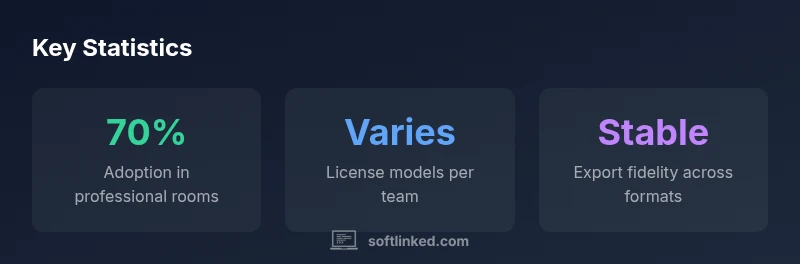
Cross-platform performance is a practical consideration for writers who move between devices or work in shared workspaces. Final Draft runs on both macOS and Windows platforms, with desktop applications that feel native on each system. In testing, load times for large scripts remain reasonable, and the formatting engine preserves layout fidelity when copying text between pages or importing external content. Users report consistent print and export results, which helps when producing copies for producers, actors, or writing rooms.
Stability is a strength of the software; crashes are uncommon in routine drafting sessions, and the autosave feature helps prevent data loss during long writing sprints. When large, complex scripts are opened, the program remains responsive, though extremely long documents may benefit from splitting into acts or scenes during heavy editing phases. For teams, the cloud-sync feature is a major convenience, reducing version conflicts and enabling faster turnaround on feedback rounds.
If you depend on precise formatting for rehearsals or on-set printing, this stability and fidelity are essential benefits that justify ongoing use in a professional context.
Licensing, Pricing, and Value Proposition
Final Draft offers a tiered approach to licensing that reflects both individual writers and production workflows. The pricing landscape typically includes a perpetual license option and ongoing subscription models, enabling teams to tailor to budgets and project lifecycles. For students and educators, discounted pricing or educational bundles may be available, though exact terms vary by region and institution. In general, expect a higher upfront cost for perpetual licenses and ongoing costs for subscriptions, with value centering on industry-standard formatting, reliable output, and resilient collaboration features.
From a cost-benefit perspective, the software pays off for writers who frequently submit to producers, manage multiple projects, or work in teams that require standardized scripts. The investment also includes ongoing updates that maintain compatibility with evolving production pipelines. SoftLinked’s assessment highlights that for every project with formal production or festival submissions, the efficiency gains and reduced formatting risk can justify the price over time. Budget-conscious writers may offset costs by leveraging free trials or bundled offers where available.
In short, the pricing structure reflects the software’s intended audience: professionals who need dependable output and integration with established workflows. Casual writers or hobbyists might prefer lighter-weight or lower-cost alternatives until their needs scale.
Alternatives and How They Compare
The market for screenwriting software includes several credible alternatives that appeal to different workflows and budgets. Fade In offers a similar professional focus, with strong formatting automation and an emphasis on clean collaboration streams. Celtx provides an integrated preproduction toolset, combining screenwriting with planning and scheduling features, which can be valuable for projects requiring tighter coordination with budgets and shoots. Scrivener is favored by writers who want flexible manuscript organization, research integration, and non-linear drafting capabilities, though its formatting is not always as tightly aligned with industry standards as Final Draft.
Each option has trade-offs. Fade In may be lighter on collaboration features but can be more approachable for solo writers. Celtx’s all-in-one approach supports production planning, but some writers miss the depth of Final Draft’s formatting engine. Scrivener excels for long-form prose and research-heavy projects but often requires additional steps to export industry-standard scripts. When evaluating alternatives, consider your production pipeline, collaboration needs, and how often you re-use scripts across projects.
For students exploring career-ready tools, trying a few options with free trials can reveal which workflow aligns best with your goals. In practice, many writers end up using Final Draft for professional submissions while drawing on other tools for research, outlining, or concept development.
Real-World Scenarios: Students, Independent Writers, and Teams
Students often begin with free or low-cost options to learn screenplay formatting, but as projects mature, many transition to Final Draft to build familiarity with the production ecosystem. The software’s templates and standard formatting are valuable when submitting to film schools or entering contests that expect industry-typical presentation. For independent writers, Final Draft offers a robust drafting environment that scales from first ideas to polished scripts ready for agents or producers, with export options that fit submission guidelines.
Teams and production studios benefit from reliable collaboration, metadata, and revision history. When multiple writers contribute to a single script, the ability to manage versions and track feedback reduces friction in development rooms. Studios often require FDX compatibility to ensure smooth handoffs between development, produce, and post teams. In these contexts, Final Draft’s reliability and industry alignment translate into tangible time savings and fewer formatting disputes.
To maximize impact, performers and directors can receive scripts in standard formats ahead of time, enabling faster readings and rehearsal planning. For students and professionals alike, aligning with industry standards enhances credibility and reduces the risk of last-minute formatting issues that derail submission timelines.
Tips and Tricks to Maximize Your Final Draft Setup
Maximizing your use of Final Draft starts with building a solid baseline. Create a personal template that matches the most common project types you work on, whether feature films, TV episodes, or stage plays. Customize keyboard shortcuts for frequent actions like toggling scene headings or inserting character cues to reduce repetitive actions. Take advantage of the beat board and index card features to map story structure before drafting, then switch to the drafting view to translate those beats into scenes.
Regularly export backups to a separate drive or cloud storage and maintain a revision log that captures feedback from peers. If you work across devices, ensure cloud syncing is enabled and that you’re comfortable with how conflicts are merged when multiple users edit the same file. For collaboration-heavy projects, set clear file-naming conventions and version control practices to keep everyone aligned. Finally, don’t overlook tutorials and community forums where experienced writers share workflows and tricks that can shave minutes from mundane formatting tasks.
Limitations and Potential Pitfalls
No tool is perfect, and Final Draft has a few common caveats to be aware of. The upfront cost is higher than some alternatives, which can be a barrier for students or hobbyists. While the formatting rules are powerful, complex layouts outside typical screenplay conventions may require manual adjustments. Some users report a learning curve when adapting to advanced features like multi-scene beat boards or macro-driven formatting. Cross-platform quirks and occasional export quirks can surface when integrating with non-standard production pipelines. Finally, reliance on FDX as the primary interchange format means compatibility with some niche tools may require intermediate steps or additional software.
Implementation Guide: Making the Most of Final Draft in Your Pipeline
To implement Final Draft effectively in a professional pipeline, start by defining a standard script format for your team, including naming conventions, revision control practices, and default templates. Adopt a shared template for common project types to ensure consistency across writers and departments. Establish a routine for exporting to PDFs or FDX files and set expectations for submission formats in development meetings. Consider integrating with preproduction tools for task tracking and scheduling so scripts align with production calendars. Finally, schedule periodic reviews of templates and workflows to adapt to evolving studio requirements and ensure your team maintains best practices.
Pros
- Industry-standard formatting ensures production compatibility
- Strong template library and script elements
- Cross-platform with reliable FDX export
- Robust collaboration features for teams
Weaknesses
- Higher upfront cost compared to some alternatives
- Steeper learning curve for beginners
- Some advanced features may be underutilized by casual writers
Best for professionals who require standardization and reliable output
Final Draft remains a dependable choice for studios and writing rooms that rely on consistent formatting and industry-wide interchange. While it isn’t the cheapest option, the time saved in collaboration and proofing across departments justifies the investment for serious production pipelines.
Your Questions Answered
Is Final Draft the industry standard?
Yes. Final Draft is widely used in professional film and TV production due to its reliable formatting, FDX interchange, and long-standing ecosystem. It remains the default choice in many development studios and writers’ rooms.
Yes, Final Draft is widely used in professional production because of its reliable formatting and industry-standard interchange.
What platforms does Final Draft support?
Final Draft runs on both macOS and Windows. The desktop apps preserve formatting across environments, and cloud syncing helps teams collaborate more easily across locations.
It runs on Mac and Windows with cloud syncing for collaboration.
Is it worth it for students?
For students aiming to enter professional circles, Final Draft offers meaningful familiarity and credibility. However, budget considerations may lead some to start with lower-cost tools and transition later as they pursue internships or jobs.
For students aiming for professional submissions, it can be worth it, especially if you plan to work in studios.
Can I import or export FDX and other formats?
FDX is the primary interchange format and is supported for cross-team handoffs. PDF exports are available for review, and some nonstandard formats may require intermediate steps or additional tools.
FDX is the main interchange format, with PDFs for review and occasional conversion needs.
What are good alternatives?
Fade In, Celtx, and Scrivener are common alternatives. Each has its strengths—Fade In for familiarity, Celtx for preproduction, Scrivener for long-form drafting—so choose based on workflow needs.
Alternatives include Fade In, Celtx, and Scrivener, each with its own strengths.
Does Final Draft offer collaboration features?
Yes, Final Draft supports collaboration features like shared projects and revision tracking, which can streamline feedback and version control in production environments.
Yes, it supports collaboration with shared projects and revision history.
Top Takeaways
- Adopt Final Draft for production-grade script formatting
- Leverage templates and beat boards to map structure
- Prioritize FDX export for studio handoffs
- Balance cost against collaboration and reliability
- Experiment with trials of alternatives for fit